Locating part number (P/N) and model number (M/N)
The following will show you how to find your product information:.
Product: Select your product from the drop-down list. The product name is usually located on the back or bottom of your product, such as 'Logitech Cordless Desktop EX-110' in the case of the Logitech EX-110 Keyboard.
M/N: The Model Number (M/N) is a code, usually located on the back or bottom of your product, such as M-RBH113 in the case of the Logitech G-7 Gaming Mouse
PID or S/N: The PID is used on all current Logitech products and replaces the older serial number (S/N) system. Depending on the product family the PID or S/N can be between 4 and 11 digits such as LZ547BJ in the case of the G-7 Gaming Mouse.
P/N: The Part Number (P/N) is a ten-digit number, divided into a six and a four-digit section beginning with the numeral '8'. This number is usually found on the bottom of your product, such as 831409-0000 in the case of the Logitech G-7 Gaming Mouse.

Figure 1
Operating System: Select your operating system from the drop-down menu. If there is no service pack option, please write it in the Question area of your email.
Software: Select the your Logitech software you have installed from the drop-down list. Include the version number in the Question area of your email
In order to find the information described above, please see the Details section of this article for each product line as follows:
__________________________________________________________________________________________________________________ ____
DETAILS:
Keyboards/Desktops: For Keyboards and DEsktops, the PID is usually to be found on the bottom of your keyboard, usually in the same area as the Model Name and Part Number. A sample keyboard PID would be something like SC54701. Directly above it will be located the Part Number for your keyboard. This is an 10-digit number, usually in the form of the following example 867670-0403. A current North American product always ends in 0403, while a European, Japanese or other regional product would end in a different four-digit code.
Mice/Trackballs: Mice and trackballs usually will have the PID and/or serial numbers located inside the battery compartment for cordless mice/trackballs and on the body of the device for older or non-cordless devices. Most trackballs pre-date the PID system and so will not have PIDs. Instead, they will usually have a serial number (S/N) located on the bottom of the device. Serial numbers are to be entered in the PID field if there is no PID. They usually will follow the format of the example here- LZS44500643. The Part Number will follow the format defined earlier save that trackballs' last four digits have no meaning as to region. The example we are using is from a Cordless Optical Trackman and is 804378-0000. Mice will often have the PID and Part Number inside the battery compartment and this information will be found on a black tag together with the Model Number..
Gaming Devices: Gaming devices vary depending on what type of gaming device is in question. However, the part and model number information will be on the body of the device in most cases.
Cameras: Current Logitech video devices have a black tag located at the end of the USB cable. This tab holds information that is specific to your camera model. To verify the part number of your camera please follow these steps
Harmony Remotes: On the remote controls the PID, M/N and P/N number is either located on the underside of the battery cover or within the battery compartment. A sample PID number is LZ544B700CG, a sample P/N is 866165-0000 and a sample M/N is R-RG7. Please note that some Harmony remote controls may not have a PID, M/N or P/N listed.
Speaker Systems: On speaker systems this informtion can be found on a label that is attached to a component of the speaker system. Please note than more than one PID, P/N, or M/N may appear on a speaker set (e.g. there may be a label on both the control pod and the subwoofer with unique information.) As a general rule the label can be found on one or more of the following locations:
Operating System: The operating system of your computer can easily be found. If you are running a Windows-based OS, you will need to right-click on the 'My Computer' icon in the upper left corner of your screen, (see Figure 2). If you are using XP's default view, then go to Start>My Computer and right-click as shown in Figure 3. You will then select 'Properties' and the resulting screen in Figure 4 will appear. The operating system version will be in the red-highlighted area.
Software Version: The easiest way to find the version of the Logitech software you are running is to go to the Windows Control Panel and find Add/Remove Programs. To do this, click Start>Settings>Control Panel>Add or Remove Programs. Once this window appears, then you will then scroll though all the installed porgrams until you have located the Logitech software for your device (Logitech QuickCam fo Cameras, SetPoint, MouseWare or iTouch for keyboards/mice and Logitech Gaming Software/Logitech G-Series Keyboard Software for controllers or the G-series gaming keyboards. You will then click on the 'Click Here for Support Information' link and the version of your Logitech software should immediately display.
Похоже я купил поддельную мышь Logitech
Это мой первый пост на этом сайте, и совсем не на ту тему, ради которой я зарегистрировался (поиск ребёнка, алименты, суды и т.п.), пусть простят меня все 16 подписчиков, которые ждут этих постов.
Но учитывая, что вроде бы крупные производители техники реагируют на статьи о проблемах публикуемых на Pikabu.ru , я решился.
Вобщем, сегодня я купил мышь Logitech B100 на подарок за 449 рублей. В ДНР, г.Донецк, на территории центра оптово-розничной торговли МОСТ (раньше МЕТРО), в магазине ФОКС. Почему в чеке другое название х.з.
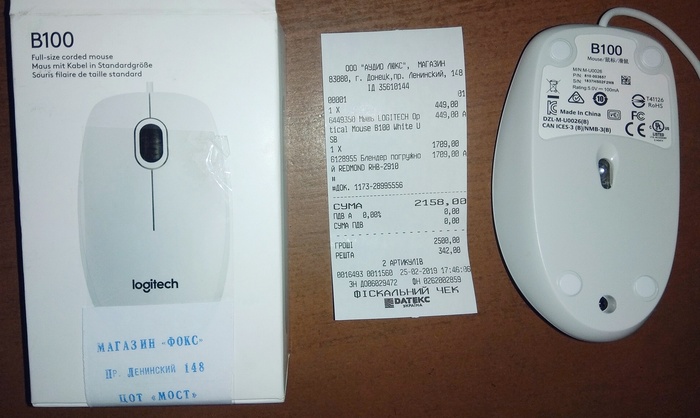
Дома, при осмотре мыши удивился, что на ней привычного логитипа, но быстро нагуглил, что в 2015м году Logitech сменила его на другой.

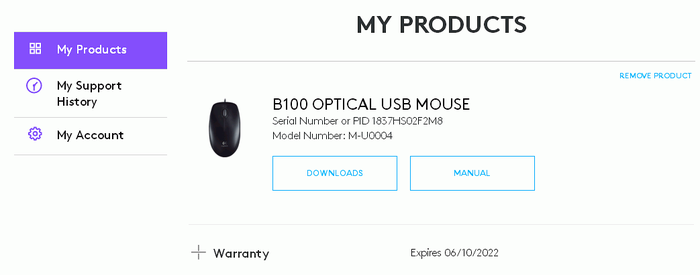
Зарегистрировал мышь на сайте Logitech по серийному номеру S/N: 1837HS02F2M8. И вот тут вылезло странное несоответствие. После регистрации сайт отобразил M/N: M-U0004 и картинку ЧЁРНОЙ мыши, а на моей БЕЛОЙ мыше написан другой M/N: M-U0026. Кроме того на сайте Logitech не получается найти белую мышь B100, а только чёрную.
Кроме того цифры на коробке и на мыше тоже не совпадают. Можно было бы предположить, что продавцы перепутали коробки, т.е. только S/N (серийный номер). Но отличаются не только S/N. На мыше напечатан P/N: 810-003857 — гугл такого не знает, а на упаковке относительно правильный P/N: 910-003360 — гугл по нему находит белую B100, и только в русскоязычном интернете.
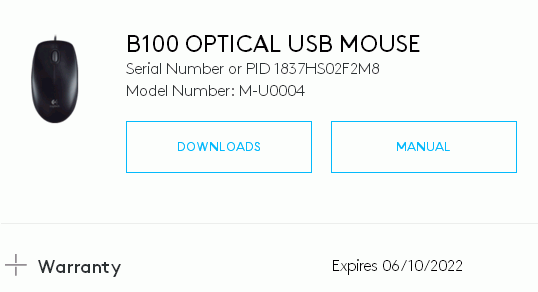
А это результат регистрации продукта на сайте Logitech серийного номер с коробки. Как видите M/N не изменился: M/N: M-U0004 для чёрной мыши.
Я искал в интернете эту модель мыши, и нашёл в нескольких магазинах РФ и Украины. Полное соответствие c моей мышью по фото есть даже в nix.ru , который вроде бы не склонен к торговле подделками. Поэтому непонятно как получилось, что M/N вычисленный из S/N и фактически напечатанный на мыше оказались разными.
У кого нибудь есть идеи о причинах несоответствия M/N и цвета после регистрации на сайте Logitech?
P.S. На всякий случай добавлю, что идентификатор этой мыши VID=046D, PID=C077 (по этим цифрам PNP подсистема Windows знает кто производитель устройства и название устройства, и в некоторых случаях может найти индивидуальный драйвер).
думаешь, что на поддельную мышь тебе бы клеили серийник, который проходит валидацию на официальном сайте?
Ну и на картинку не обращай внимания, может быть они планировали сначала выпускать только в чёрном цвете, а потом добавили ещё и белые, но не стали делать новую фотографию.
P.S. я геймпад покупал в eBay, который был после восстановления, так я указал на сайте logitech дату покупки и гарантия стала считаться с этой даты.
Хвост есть? Есть. Елозит? Елозит. Чего тебе еще надо, хороняка?
Замена мышки Logitech по гарантии
Вот уже полтора года являюсь обладателем мышки Logitech G400s. И все в ней хорошо, да зараза провод похоже надломился, что приводило к тормозам и зависаниям мышки. Обнаружив проблему пошел в магазин сети Эльдорадо, где ее покупал, благо сохранился полностью комплект документов и упаковка. Проблем быть не должно (успокаивал себя). По факту мне сказали, что купил я ее в другом магазине сети, поэтому иди туда. На вопрос «А если я ее в москве купил, мне обратно в москву ехать надо?» был встречен выражением лица «ну и нафига ты мне тут такой умный нашелся». Следующим шагом, мне сказали, что нужна печать в гарантийник, так что все равно езжайте туда. Только после этого, он подключил мышку, убедился в неисправности и предложил вернуть мне 2500р за мышку. Вот тут и возникла главная проблема — мышка куплена до скачка цена и аналогичная сейчас стоит 4900, а точно такой же нет. Запахло проблемами и очередным обращением в роспотребнадзор, поскольку я имею право выбрать либо возврат денег, либо замену на аналогичную модель или артикул. Ладно, думаю, утро вечера мудренее, завтра поеду поставлю печать, напишу заявление в роспотребнадзор и буду действовать. А дома пришла в голову мысль, дай-ка я наберу горячую линию Logitech. Сотрудник поддержки сказал, что он все понял, удивился, что в Эльдорадо нехорошие продавцы даже не предложили заменить на следующую модель G402, извинился и попросил фото мышки на белом листе бумаги с номером обращения. Через день мне прилетает письмо, что мое обращение одобрено и мне выслана экспресс-почтой из ЕС новая мышка, которую мне доставят через 10 дней. Ровно в указанный срок позвонили и вручили посылку. Так что я пополнил ряды тех, кому Logitech помогла с гарантией. Хочется выразить благодарность сотрудникам Logitech за понимание и качественную поддержку клиентов! Про сотрудников Эльдорадо хочется сказать одно — прочитайте, выучите и соблюдайте закон о защите прав потребителей! Спасибо что прочитали, может кому пригодится.
Проверка подлинности штрих кода 5099206007765
При помощи данного бесплатного сервиса, Вы легко сможете проверить на подлинность штрих-код нанесенный на любом товаре и узнать страну производитель.
Штрих-код 5099206007765 верный
Страна производитель Великобритания
Это: Logitech mouse mx518 optical gaming ii 910-000616
Категория: Техника / Электротехника / Цифровая техника / Компьютерная мышь
Связанные продукты: 5099206001862 (LOGITECH), 718037762289 (WESTERN DIGITAL )
Logitech wireless mice genuine or fake
I have just purchased a logitech m235 mice from a website. How can I check that the mice is genuine or fake? The seller of the mice has some negative feedbacks that’s why I want to check it. Is there a way of telling that without taking it to the service centre?
atljsf
Honorable
since it is a unifying mouse, i think there is a difference
the serial numbers well, i think it is a cheap refurbished or a mouse used for testing on it was on a store, so they packaged and sold it so the box and the mouse does not match
if them ouse and the nano receiver are both unifying capable i don’t see this as a problem
it is in the end your decision, i wouldn’t bother on those details if it was really cheap, if it wans’t that cheap, well, as i said, you decide
atljsf
Honorable
if you have doubts cancel your purchase
i have never seen a fake logitech device so no idea, quality of build, the color of the box perhaps?
trex042
Distinguished
USAFRet
Titan
atljsf
Honorable
when installed, windows does detect it with a specific name like the 235 it is or just a hid or a generic name of mouse?
did it came with a nano usb receiver with the logitech name written, being a black and silver adapter? in the silver metallic part is there any labeling or names?
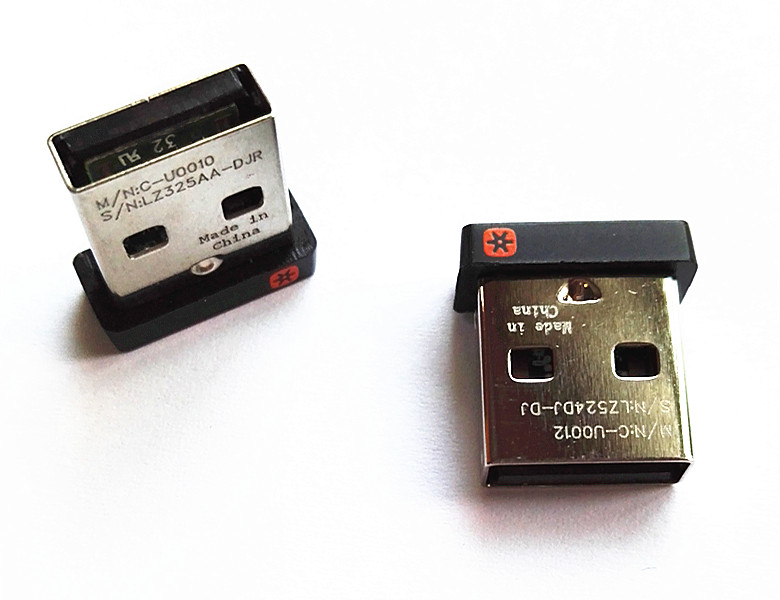
does it have that orange logo?
under the mouse, is there space for the nano receiver?
being a normal logitech model is very unlikely to be a cheap imitation
i can get it at 15 dollars on a store, so i doubt anyone would bother making one fake, not impossible, just unlikely
the noise form the buttons, all my logitech mouses do it, i have bought last week a mk235 combo, i already had one, also a mk230 combo and another combo but wired, all of the makes noises, the problem is when the wheel does noises, i don’t like that mouse
trex042
Distinguished
when installed, windows does detect it with a specific name like the 235 it is or just a hid or a generic name of mouse?
did it came with a nano usb receiver with the logitech name written, being a black and silver adapter? in the silver metallic part is there any labeling or names?
does it have that orange logo?
under the mouse, is there space for the nano receiver?
being a normal logitech model is very unlikely to be a cheap imitation
i can get it at 15 dollars on a store, so i doubt anyone would bother making one fake, not impossible, just unlikely
the noise form the buttons, all my logitech mouses do it, i have bought last week a mk235 combo, i already had one, also a mk230 combo and another combo but wired, all of the makes noises, the problem is when the wheel does noises, i don’t like that mouse
No the windows does not detect it with a specific name, just a HID.
Yes it has a nono receiver(silver), in the metalic part the following lines are written-
"S/N:LZ.
M/N:C-U.
Made in China
CNC ID:C-8. "
Yes it has the orange logo and it also have space for nano receiver at the bottom.
I also have a logitech mk320 combo, that mice makes much less noise than the m235.
Does the Windows(7 Ultimate) should have detected the mice with a specific name like logitech m235 or just HID?
The Serial Number(S/N) at the bottom of the Mice does not match the Serial Number at the package of the mice. Last few digits does not match.