KB5007189, KB5007206 Windows 10 1909, 1809 are out with multiple bug fixes
KB5007206 and KB5007189 for Windows 10 1809, 1909 changelog, direct download links, and ways to install.
Yet another patch Tuesday is here and with it come the security patches KB5007206 and KB5007189. These patches mainly work on a couple of relevant quality improvements and error or bug fixes. KB5007206 patch changes the version to Windows 10 17763.2300 whereas KB5007189 to Windows 10 18362.1916.
In this article, we will be discussing the main highlights and fixes introduced by these two patches- KB5007206 and KB5007189. You can also find out how to install these updates using different methods. A quick note to the users of these versions though. Both Windows 10 1909 and 1809 have reached their end of service. For keeping your system functioning at an optimal level, you might want to upgrade your OS to the latest version.
LCU KB5007189, KB5007206 for Windows 10 1909, 1809 Released
Following are the key changes included in KB5007189 for 1909:
- The LCU addresses 0 width Pen rendering one pixel problem that occurs irrespective of transformation.
- KB5007189 further makes the addition of a feature that enables certain cross-browser data transfers.
- This particular patch attempts to resolve a bug that used to prevent the full installation of printers using the Internet Printing Protocol.
- The team has also attempted to fix up an issue in JScript9.dll with PropertyGet.
- Addresses a problem in which assigned access kiosks configured with ME as a kiosk app would at times fail to restart the browser if users closed the browser window.
- The security patch also enhances the Defender for Endpoint’s ability to identify and intercept ransomware or such advanced attacks.
- Developers have also tried to a problem in which File Explorer stops responding and Event 1000 with the exception code 0xc0000005 is logged in the Application event log. The problem was found to be occurring after installing the patches released the previous month.
The following fixes and improvements are introduced in KB5007206 for Windows 10 1809 –
- KB5007206 for Windows 10 18362.1916 update primarily addresses certain apps or programs that might have unexpected results when accessing some UI elements or when drawing inside the app. This mess might be confronted with applications that use GDI+ and set a 0 width pen object on displays with resolution or DPI, or if the apps are using scaling.
- Further, the patch offers potential resolution to an issue that prevents Failover Clustering from updating DNS records.
- Lastly, the team has attempted to fix a previously known issue that usually prevents the successful installation of printers using the IPP.
Known issues
Issues 1:
This is a known issue with both of these patches. The problem involves the Windows print clients encountering some of the below errors after the installation of these patches. This occurs usually when you are attempting to connect to a remote printer that is shared on a Windows print server:
- 0x0000007c (ERROR_INVALID_LEVEL)
- 0x000006e4 (RPC_S_CANNOT_SUPPORT)
- 0x00000709 (ERROR_INVALID_PRINTER_NAME)
Kindly keep in mind that the printer connectivity-related problems described here are specific to print servers and aren’t usually found in other devices that are designed for normal home use. More commonly, the printing environment affected by this issue is observed to be in enterprises and organizations.
You may check out Windows Release health (official site) for potential workarounds while the team works on this issue.
Issue 2:
This problem is specific to KB5007206. What happens is, you may encounter the message 0x800f0982 – PSFX_E_MATCHING_COMPONENT_NOT_FOUND after getting this patch on devices with Asian language packs.
Workaround:
As a temporary workaround, you can attempt to uninstall and then re-install the language packs you added recently.
Another workaround suggested for this problem is checking for updates and installing the April 2019 Cumulative Update if it is not installed.
Finally, if nothing seems to be working, what you can do is Reset your PC while keeping files. This will remove third-party apps and programs and reset all the settings and controls and so on. To do this, go to Settings > Recovery > Get started > Reset this PC > Keep my file
Issue 3:
Yet another known problem related to KB5007206 is that subsequent to receiving KB5001342 or greater, the Cluster Service might be unable to begin and throw an error Cluster Network Driver is not found.
Workaround:
It was noticed that this problem occurs due to an update to the PnP class drivers used by this service. What you can do is, restart the device after about 20 minutes, and that should resolve the issue.
How to download KB5007206 and KB5007189 and install on Windows 10
KB5007206 and KB5007189 are supposed to be installed automatically as per the system configurations. However, in case you think you didn’t get this (or any other relevant) patch, here are a few other ways of installing them.
Before you go ahead with the installation, just note that you need to be installing the relevant Servicing Stack update before you get these regular updates on your system.
1] Check updates via Windows Update Settings
Here are the steps to check for updates and download them manually –
- Press the shortcut keys – Win + I.
- In Settings app click – Windows update.
- Choose – Check for updates.
- Let the system scan for the current Security patch. It should automatically start downloading and installing.
- Click – Restart now when you get an alert suggesting a restart.
2] Via Microsoft update catalog
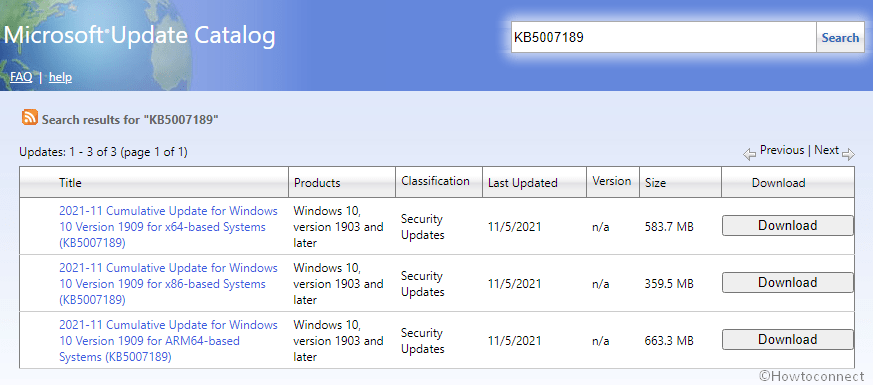
You can find the direct download Microsoft site link for KB5007206 and KB5007189 below. It brings you to the Microsoft update catalog website containing all the relevant files for this update. When you are there, browse through the site to find your patch depending on your computer’s architecture (like x86, x64, ARM64). Also, you can simply use the search feature and paste the name of the respective KB and easily look up this update. Here are the steps to follow once you find the right patch for your system
KB5007206: Windows 10 Version 1809 and Windows Server 2019 Security Update (November 2021) — Nessus
This page contains detailed information about the KB5007206: Windows 10 Version 1809 and Windows Server 2019 Security Update (November 2021) Nessus plugin including available exploits and PoCs found on GitHub, in Metasploit or Exploit-DB for verifying of this vulnerability.
Plugin Overview
ID: 154993
Name: KB5007206: Windows 10 Version 1809 and Windows Server 2019 Security Update (November 2021)
Filename: smb_nt_ms21_nov_5007206.nasl
Vulnerability Published: 2021-11-09
This Plugin Published: 2021-11-09
Last Modification Time: 2022-04-22
Plugin Version: 1.9
Plugin Type: local
Plugin Family: Windows : Microsoft Bulletins
Dependencies: ms_bulletin_checks_possible.nasl, smb_check_rollup.nasl, smb_hotfixes.nasl
Required KB Items [? ]: SMB/MS_Bulletin_Checks/Possible
Vulnerability Information
Synopsis
The remote Windows host is affected by multiple vulnerabilities.
Description
The remote Windows host is missing security update 5007206. It is, therefore, affected by multiple vulnerabilities:
— A remote code execution vulnerability. An attacker can exploit this to bypass authentication and execute unauthorized arbitrary commands. (CVE-2021-26443, CVE-2021-38666, CVE-2021-41378, CVE-2021-42275, CVE-2021-42276, CVE-2021-42279)
— An information disclosure vulnerability. An attacker can exploit this to disclose potentially sensitive information. (CVE-2021-38631, CVE-2021-38665, CVE-2021-41371)
— An elevation of privilege vulnerability. An attacker can exploit this to gain elevated privileges. (CVE-2021-36957, CVE-2021-41366, CVE-2021-41367, CVE-2021-41370, CVE-2021-41377, CVE-2021-41379, CVE-2021-42277, CVE-2021-42278, CVE-2021-42280, CVE-2021-42282, CVE-2021-42283, CVE-2021-42285, CVE-2021-42287, CVE-2021-42291)
— A security feature bypass vulnerability exists. An attacker can exploit this and bypass the security feature and perform unauthorized actions compromising the integrity of the system/application. (CVE-2021-42288)
— A denial of service (DoS) vulnerability. An attacker can exploit this issue to cause the affected component to deny system or application services. (CVE-2021-41356, CVE-2021-42274, CVE-2021-42284)
Solution
Apply Cumulative Update KB5007206.
Public Exploits
Target Network Port(s): 139, 445
Target Asset(s): Host/patch_management_checks
Exploit Available: True (GitHub)
Exploit Ease: Exploits are available
- GitHub:https://github.com/DarkSprings/CVE-2021-38666-poc
[CVE-2021-38666] - GitHub:https://github.com/JaneMandy/CVE-2021-38666
[CVE-2021-38666: RDP Client RCE] - GitHub:https://github.com/fardeen-ahmed/Bug-bounty-Writeups
[CVE-2021-38666] - GitHub:https://github.com/AlexandrVIvanov/InstallerFileTakeOver
[CVE-2021-41379] - GitHub:https://github.com/Octoberfest7/OSEP-Tools
[CVE-2021-41379] - GitHub:https://github.com/Octoberfest7/Tools
[CVE-2021-41379] - GitHub:https://github.com/devopscoder331/CVE_InstallerFileTakeOver
[CVE-2021-41379] - GitHub:https://github.com/dxnboy/redteam
[CVE-2021-41379] - GitHub:https://github.com/jbaines-r7/shakeitoff
[CVE-2021-41379] - GitHub:https://github.com/klinix5/InstallerFileTakeOver
[CVE-2021-41379] - GitHub:https://github.com/noname1007/InstallerFileTakeOver
[CVE-2021-41379] - GitHub:https://github.com/puckiestyle/InstallerFileTakeOver
[CVE-2021-41379] - GitHub:https://github.com/ycdxsb/WindowsPrivilegeEscalation
[CVE-2021-41379] - GitHub:https://github.com/0xsyr0/OSCP
[CVE-2021-42278] - GitHub:https://github.com/Ascotbe/Kernelhub
[CVE-2021-42278] - GitHub:https://github.com/H0j3n/EzpzCheatSheet
[CVE-2021-42278] - GitHub:https://github.com/Ignitetechnologies/Windows-Privilege-Escalation
[CVE-2021-42278] - GitHub:https://github.com/Jean-Francois-C/Windows-Penetration-Testing
[CVE-2021-42278] - GitHub:https://github.com/Mr-xn/Penetration_Testing_POC
[CVE-2021-42278] - GitHub:https://github.com/Qazeer/OffensivePythonPipeline
[CVE-2021-42278] - GitHub:https://github.com/Ridter/noPac
[CVE-2021-42278: Exploiting CVE-2021-42278 and CVE-2021-42287 to impersonate DA from standard domain . ] - GitHub:https://github.com/S1ckB0y1337/Active-Directory-Exploitation-Cheat-Sheet
[CVE-2021-42278] - GitHub:https://github.com/WazeHell/sam-the-admin
[CVE-2021-42278: Exploiting CVE-2021-42278 and CVE-2021-42287 to impersonate DA from standard domain . ] - GitHub:https://github.com/XiaoliChan/Invoke-sAMSpoofing
[CVE-2021-42278: CVE-2021-42287/CVE-2021-42278 exploits in powershell] - GitHub:https://github.com/YossiSassi/hAcKtive-Directory-Forensics
[CVE-2021-42278] - GitHub:https://github.com/cube0x0/noPac
[CVE-2021-42278: CVE-2021-42287/CVE-2021-42278 Scanner & Exploiter.] - GitHub:https://github.com/cybersecurityworks553/noPac-detection
[CVE-2021-42278: Detection script for CVE-2021-42278 and CVE-2021-42287] - GitHub:https://github.com/ihebski/A-Red-Teamer-diaries
[CVE-2021-42278] - GitHub:https://github.com/infosecn1nja/AD-Attack-Defense
[CVE-2021-42278] - GitHub:https://github.com/knightswd/NoPacScan
[CVE-2021-42278: NoPacScan is a CVE-2021-42287/CVE-2021-42278 Scanner,it scan for more domain . ] - GitHub:https://github.com/ly4k/Pachine
[CVE-2021-42278: Python implementation for CVE-2021-42278 (Active Directory Privilege Escalation)] - GitHub:https://github.com/mdecrevoisier/EVTX-to-MITRE-Attack
[CVE-2021-42278] - GitHub:https://github.com/mdecrevoisier/SIGMA-detection-rules
[CVE-2021-42278] - GitHub:https://github.com/mishmashclone/infosecn1nja-AD-Attack-Defense
[CVE-2021-42278] - GitHub:https://github.com/open-source-agenda/new-open-source-projects
[CVE-2021-42278] - GitHub:https://github.com/vanhohen/ADNinja
[CVE-2021-42278] - GitHub:https://github.com/waterrr/noPac
[CVE-2021-42278: Exploiting CVE-2021-42278 and CVE-2021-42287] - GitHub:https://github.com/ycdxsb/WindowsPrivilegeEscalation
[CVE-2021-42278] - GitHub:https://github.com/ycdxsb/WindowsPrivilegeEscalation
[CVE-2021-42282] - GitHub:https://github.com/cttynul/ana
[CVE-2021-42284] - GitHub:https://github.com/leonov-av/vulristics
[CVE-2021-42284] - GitHub:https://github.com/0xsyr0/OSCP
[CVE-2021-42287] - GitHub:https://github.com/Ascotbe/Kernelhub
[CVE-2021-42287] - GitHub:https://github.com/GhostPack/Rubeus
[CVE-2021-42287] - GitHub:https://github.com/H0j3n/EzpzCheatSheet
[CVE-2021-42287] - GitHub:https://github.com/Jean-Francois-C/Windows-Penetration-Testing
[CVE-2021-42287] - GitHub:https://github.com/Mr-xn/Penetration_Testing_POC
[CVE-2021-42287] - GitHub:https://github.com/Ridter/noPac
[CVE-2021-42287: Exploiting CVE-2021-42278 and CVE-2021-42287 to impersonate DA from standard domain . ] - GitHub:https://github.com/S1ckB0y1337/Active-Directory-Exploitation-Cheat-Sheet
[CVE-2021-42287] - GitHub:https://github.com/WazeHell/sam-the-admin
[CVE-2021-42287: Exploiting CVE-2021-42278 and CVE-2021-42287 to impersonate DA from standard domain . ] - GitHub:https://github.com/XiaoliChan/Invoke-sAMSpoofing
[CVE-2021-42287: CVE-2021-42287/CVE-2021-42278 exploits in powershell] - GitHub:https://github.com/YossiSassi/hAcKtive-Directory-Forensics
[CVE-2021-42287] - GitHub:https://github.com/cube0x0/noPac
[CVE-2021-42287: CVE-2021-42287/CVE-2021-42278 Scanner & Exploiter.] - GitHub:https://github.com/cybersecurityworks553/noPac-detection
[CVE-2021-42287: Detection script for CVE-2021-42278 and CVE-2021-42287] - GitHub:https://github.com/ihebski/A-Red-Teamer-diaries
[CVE-2021-42287] - GitHub:https://github.com/infosecn1nja/AD-Attack-Defense
[CVE-2021-42287] - GitHub:https://github.com/knightswd/NoPacScan
[CVE-2021-42287: NoPacScan is a CVE-2021-42287/CVE-2021-42278 Scanner,it scan for more domain . ] - GitHub:https://github.com/mishmashclone/infosecn1nja-AD-Attack-Defense
[CVE-2021-42287] - GitHub:https://github.com/open-source-agenda/new-open-source-projects
[CVE-2021-42287] - GitHub:https://github.com/vanhohen/ADNinja
[CVE-2021-42287] - GitHub:https://github.com/waterrr/noPac
[CVE-2021-42287: Exploiting CVE-2021-42278 and CVE-2021-42287] - GitHub:https://github.com/ycdxsb/WindowsPrivilegeEscalation
[CVE-2021-42287] - GitHub:https://github.com/ycdxsb/WindowsPrivilegeEscalation
[CVE-2021-42291] - GitHub:https://github.com/JaneMandy/CVE-2021-41351-POC
[CVE-2021-41351: CVE-2021-41351-poc]
Before running any exploit against any system, make sure you are authorized by the owner of the target system(s) to perform such activity. In any other case, this would be considered as an illegal activity.
WARNING: Beware of using unverified exploits from sources such as GitHub or Exploit-DB. These exploits and PoCs could contain malware. For more information, see how to use exploits safely.
Risk Information
Plugin Source
This is the smb_nt_ms21_nov_5007206.nasl nessus plugin source code. This script is Copyright (C) 2021-2022 and is owned by Tenable, Inc. or an Affiliate thereof.
- Linux / Unix:
/opt/nessus/lib/nessus/plugins/smb_nt_ms21_nov_5007206.nasl - Windows:
C:\ProgramData\Tenable\Nessus\nessus\plugins\smb_nt_ms21_nov_5007206.nasl - Mac OS X:
/Library/Nessus/run/lib/nessus/plugins/smb_nt_ms21_nov_5007206.nasl
How to Run
Here is how to run the KB5007206: Windows 10 Version 1809 and Windows Server 2019 Security Update (November 2021) as a standalone plugin via the Nessus web user interface (https://localhost:8834/):
- Click to start a New Scan.
- Select Advanced Scan.
- Navigate to the Plugins tab.
- On the top right corner click to Disable All plugins.
- On the left side table select Windows : Microsoft Bulletins plugin family.
- On the right side table select KB5007206: Windows 10 Version 1809 and Windows Server 2019 Security Update (November 2021) plugin ID 154993.
- Specify the target on the Settings tab and click to Save the scan.
- Run the scan.
Here are a few examples of how to run the plugin in the command line. Note that the examples below demonstrate the usage on the Linux / Unix platform.
Run the plugin with audit trail message on the console:
Run the plugin with trace script execution written to the console (useful for debugging):
Run the plugin with using a state file for the target and updating it (useful for running multiple plugins on the target):
References
- MS21-5007206
- 2021-A-0539-S, 2021-A-0544, 2021-A-0545-S
-
— KB5007186: Windows 10 Version 2004 / Windows 10 Version 20H2 / Windows 10 Version 21H1 (November 2021) — KB5007189: Windows 10 Version 1909 Security Update (November 2021) — KB5007192: Windows 10 Version 1607 and Windows Server 2016 Security Update (November 2021) — KB5007205: Windows 2022 Security Update (November 2021) — KB5007207: Windows 10 LTS 1507 Security Update (November 2021) — KB5007215: Windows 11 Security Updates (November 2021) — KB5007233: Windows Server 2008 R2 Security Update (November 2021) — KB5007245: Windows Server 2012 Security Update (November 2021) — KB5007246: Windows Server 2008 Security Update (November 2021) — KB5007255: Windows Server 2012 R2 Security Update (November 2021) — Security Updates for Microsoft Visual Studio Products (November 2021) — Security Updates for Microsoft Office (November 2021) (macOS) — Security Updates for Microsoft Excel Products (November 2021) — Security Updates for Exchange (November 2021) — Security Updates for Exchange (November 2021) (Remote) — Security Updates for Microsoft Office Products (November 2021)
Version
This page has been produced using Nessus Professional 10.1.2 (#68) LINUX, Plugin set 202205072148.
Plugin file smb_nt_ms21_nov_5007206.nasl version 1.9. For more plugins, visit the Nessus Plugin Library.
Kb5007206 что за обновление
Kaspersky Endpoint Security 12 для Windows
Проблемы в работе Kaspersky Endpoint Security для Windows после установки пакетов обновления Windows
Статья относится к:
- Kaspersky Endpoint Security 12.0.0 для Windows (версия 12.0.0.465);
- Kaspersky Endpoint Security 11.11.0 для Windows (версия 11.11.0.452);
- Kaspersky Endpoint Security 11.10.0 для Windows (версия 11.10.0.399);
- Kaspersky Endpoint Security 11.9.0 для Windows (версия 11.9.0.351);
- Kaspersky Endpoint Security 11.8.0 для Windows (версия 11.8.0.384);
- Kaspersky Endpoint Security 11.7.0 для Windows (версия 11.7.0.669);
- Kaspersky Endpoint Security 11.6.0 для Windows (версия 11.6.0.394).
Проблема
Пакеты обновления Windows из таблицы ниже могут привести к проблемам в работе Kaspersky Endpoint Security для Windows.
После установки обновления Windows программа продолжает работать в прежнем режиме, безопасность системы не нарушается, но становится недоступным мажорное обновление версии Kaspersky Endpoint Security для Windows, например с 11.6 до 11.7.
Мы рекомендуем при первой возможности установить ноябрьские или декабрьские обновления с исправлениями от Microsoft из таблицы ниже.
| Операционная система | Обновление | Обновление с исправлением (ноябрь 2021) |
Обновление с исправлением (декабрь 2021) |
|---|---|---|---|
| Windows 7 | KB5007233, KB5007236 | — | KB5008244 |
| Windows 8.1 | KB5007247, KB5007255 | — | KB5008263 |
| Windows 10 версии 2004 (20H1) и выше | KB5007186 | KB5007253 | KB5008212 |
| Windows 10 версии 1909 (19H2) | KB5007189 | — | KB5008206 |
| Windows 10 версии 1809 (RS5) | KB5007206 | KB5007266 | KB5008218 |
| Windows 10 версии 1607 (RS1) | KB5007192 | — | KB5008207 |
| Windows 10 версии 1507 (TH1) | KB5007207 | — | KB5008230 |
| Windows 11 | KB5007215 | KB5007262 | KB5008215 |
| Windows Server 2008 | KB5007246, KB5007263 | — | KB5008274 |
| Windows Server 2008 R2 | KB5007233, KB5007236 | — | KB5008244 |
| Windows Server 2012 | KB5007245, KB5007260 | — | KB5008277 |
| Windows Server 2012 R2 | KB5007247, KB5007255 | — | KB5008263 |
| Windows Server 2016 | KB5007192 | — | KB5008207 |
| Windows Server 2019 | KB5007206 | KB5007266 | KB5008218 |
| Windows Server 2022 | KB5007205 | KB5007254 | KB5008223 |
Решение
Если Kaspersky Endpoint Security для Windows не запускается после обновления версии операционной системы, например с 21H1 до 21H2:
- Скачайте утилиту kes_setup_util.
- Запустите cmd.exe с правами администратора и выполните команду kes_setup_util.exe /unblock
- Дождитесь завершения работы утилиты.
- Перезагрузите компьютер или принудительно запустите службу AVP командой sc start avp
- Если Kaspersky Endpoint Security для Windows не запускается, перейдите к следующему решению.
Если Kaspersky Endpoint Security для Windows не запускается после установки обновлений из таблицы выше:
- Установите доступное обновление с исправлением из таблицы выше или удалите проблемный пакет обновления, если обновления с исправлением еще нет.
- Перезагрузите компьютер.
- Удалите Kaspersky Endpoint Security для Windows. Если программу не удается удалить стандартными средствами:
- Скачайте утилиту kes_setup_util.
- Запустите cmd.exe правами администратора и выполните команду kes_setup_util.exe /unblock
- Попробуйте удалить Kaspersky Endpoint Security для Windows снова. Если программу не удается удалить, воспользуйтесь утилитой kavremover.
Если не удается установить мажорное обновление Kaspersky Endpoint Security для Windows, например версию 11.7:
- Установите доступное обновление с исправлением из таблицы выше или удалите проблемный пакет обновления, если обновления с исправлением еще нет.
- Перезагрузите компьютер.
- Обновите базы Kaspersky Endpoint Security для Windows.
- Повторите установку новой версии Kaspersky Endpoint Security для Windows.
Если не удается установить MSP-патч, изменить состав компонентов или удалить Kaspersky Endpoint Security для Windows:
- Обновите базы Kaspersky Endpoint Security для Windows.
- Повторите операцию, которую не удалось выполнить.
Что делать, если решение не помогло
Если проблему не удалось устранить, отправьте запрос с подробным описанием ситуации в техническую поддержку «Лаборатории Касперского» через Kaspersky CompanyAccount. Перед обращением ознакомьтесь с информацией, необходимой для создания запроса, в разделе базы знаний.
Kb5007206 что за обновление
По сообщениям сетевых источников, установка ноябрьских обновлений для Windows Server 2019 и Windows Server 2022 может приводить к нарушению работы фирменного антивируса Microsoft Defender for Endpoint. Согласно имеющимся данным, Microsoft подтвердила наличие проблемы и в настоящее время разработчики заняты подготовкой патча для её устранения.
Нарушение работоспособности антивируса Microsoft Defender for Endpoint может возникать на устройствах с Windows Server 2019 после установки пакета KB5007206 и Windows Server 2022, которые получили обновление KB5007205. Проблема сводится к тому, что антивирус Microsoft попросту перестаёт запускаться.

Источник изображения: Bleeping Computer
«После установки KB5007205 или более поздних пакетов обновлений антивирус Microsoft Defender for Endpoint может перестать запускаться или корректно функционировать на устройствах с Windows Server Core», — сказано в сообщении разработчиков, опубликованном на странице известных проблем программной платформы. Источник отмечает, что клиентские версии антивируса Microsoft данная проблема не затрагивает и «Защитник Windows» продолжает стабильно функционировать в Windows 10 и Windows 11 после установки ноябрьских обновлений.
Ранее также сообщалось, что ноябрьский пакет обновлений для ОС Windows нарушает работу установщика программ Windows Installer, из-за чего некоторые приложения перестали запускаться после обновления или восстановления. В некоторых случаях также наблюдается проблема с подключением к удалённым принтерам через сервер печати. К настоящему моменту эти проблемы уже решены, и Microsoft выпустила патч для их устранения. Найти его можно через «Центр обновлений Windows» или в каталоге обновлений Microsoft.