Pcsx2 читы как использовать
How To Use Codes on PCSX2 Emulator
Using codes on the PCSX2 Emulator is a royal pain in the butt and if you’re inexperienced with computers or a naturally impatient person it is likely that it’ll be too difficult to figure out. This guide breaks down how to setup codes in the simplest terms possible and it also points out the most common mistakes you may make while trying to get these codes to work.
Before I get started, here is a succinct list of all the steps for people who prefer information in this sort of format:
1. Find your games CRC #
2. Find your PCSX2 Cheat Directory
3. Make a .pnach file with your game’s CRC #
4. Download OmniConvert v1.0.3
5. Use Omniconvert to convert your codes to a format the emulator can recognize
6. Add the code to the .pnach file using the format I show
7. Test your code to see if it works in game
The first step is figuring out what the CRC code is for the game you’re playing. To do this boot up your game then on the PCSX2 Toolbar select "Misc" and "Show Console". This will bring up the box that you see in the screen shot below.
Scroll through all of the text until you find the Game CRC = part that I have highlighted in my screen shot above. The game I am playing/using for the purposes of this guide is Dragon Quest VIII: Journey of the Cursed King; the CRC number you see above is for that game.
You only need the last part of the CRC number, F4715852, the 0x should not be used when creating the .pnach file. Write this number down or just keep the console open while you locate the PCSX2 Directory on your computer. Mine is in Documents, which I think is where the program installs itself by default, but yours may be in Program Files.
Here’s the only two directories I have ever heard of it being:
C: Program Files (x86) > PCSX2 > Cheats
Documents > PCSX2 > Cheats
Location of the cheats folder in My Documents.
Open this folder and right click anywhere inside the folder to bring up a set of options, select "New" and make a Text Document. This will likely be the only file in the whole folder for you, but in the screen shot below you’ll see that I have a Text Document as well as many .pnach files in the folder.
This actually helps me demonstrate the difference between these two files to you easier; as you’ll notice the files in this folder have suffixes such as .pnach and .txt. If you can’t see this on your own computer and only see it in my screen shots then you’ll need to enable them. If you’re using Windows 10 you can enable these by going to the upper right corner of the folder and selecting "File Name Extensions" as you see in my second screen shot below.
Note: If you are on an older version of windows you can access this option by right clicking in the folder and selecting "Properties". Or you can go to Control Panel > Appearance and Personalization > Folder Options and uncheck "Hide extensions for known file types".
Right click the Text Document you made and rename it to whatever CRC # your game is and change the file’s extension to .pnach. For the purposes of this guide, my Dragon Quest VIII file was named F4715852.pnach. Double click on the file to open it.
Below you’ll see a screen shot of the inside of this file, with a few cheats that I have already added and can confirm they work; below this screen shot I have the raw text version of these same cheats which we’re going to be referencing for the other part of this guide.
gametitle=Dragon Quest VIII: Journey of the Cursed King
comment=Almar’s Guides: How to Setup Codes on PCSX2
Experience Times Two
patch=1,EE,203609D4,extended,8FA2319C
patch=1,EE,203609D8,extended,00021040
Enemies Always Drop Items
patch=1,EE,20296FB0,extended,9454004A
patch=1,EE,20296FB4,extended,10000027
patch=1,EE,20297058,extended,0280102D
As you can already most likely tell, these cheats look nothing like the codes you find on my Dragon Quest VIII: Journey of the Cursed King CodeBreaker Codes page. In order to use any of the codes you find on my website as well as pretty much any PS2 code you find online with the PCSX2 emulator you’ll first need to convert the code into a RAW format.
There are multiple ways to do this but the most common way is by using the OmniConvert 1.0.3 which you can download here. I’ve personally used this download link and can confirm there’s no malware or spyware but you should scan it anyway to make sure yourself. Get used to doing that — don’t just blindly trust me. In order to extract OmniConvert after you download it you’ll need Winrar, another free to use program that you can get from googling.
Note: If this download link doesn’t work anymore, google for information about OmniConvert 1.0.3. I am sure you’ll be able to find it somewhere; it’s not a very large program and it doesn’t require any sort of installation so it can be easily shared.
OmniConvert 1.0.3 & You
Once you’ve downloaded and extracted OmniConvert 1.0.3 using winrar your next step will be to run the Omniconvert.exe file which will bring up the window shown in my screen shot below. Depending on what type of cheat you’re putting into OmniConvert, you’ll want to go up to "Input" and select the cheat you’re putting in from the list of options.
For the purposes of this guide, we’re using the CodeBreaker codes on my Dragon Quest 8 CodeBreaker Codes page. I chose the code Max Gold (Max Gold: 2A8B1C65 05F5E0FF) from my list of codes and I placed it into the left side of Omniconvert, shown in the screen shot below.
With Input set to CodeBreaker V1+ and Output set to "Unencrypted > Standard" it’s time to hit Convert and change our Codebreaker code into a RAW/Unencrypted Code. As you can see in the above screen shot, after you hit Convert the code goes from being 2A8B1C65 05F5E0FF to 20409840 05F5E0FF.
Now the next step is we need to put this into a format that the PCSX2 can recognize. Take the RAW code and copy and paste it into the .pnach file then scroll up to my previously mentioned codes and copy and paste one of them into the .pnach as well; we’re going to be using the code for formatting purposes. After you format your code using this one just delete this code.
Take notice of the parts I bolded below; you’re going to have to format your new cheat the same way as this cheat.
Experience Times Two
patch=1,EE,203609D4,extended,8FA2319C
patch=1,EE,203609D8,extended,00021040
So, you’ll want to turn this: 20409840 05F5E0FF . into this:
Max Gold
patch=1,EE,20409840,extended,05F5E0FF
Once you’ve properly formatted your cheat you can delete the other one I told you to copy and paste into the file. All that is left is for us to test the cheat we just added to the .pnach file and make sure it works.
How To Use Cheat Codes On PCSX2 Emulator
Grab a cup of tea and get that brain in gear; it’s time to work out how to use cheat codes on PCSX2 emulator!
Remember the guide we did on how to use cheat codes on ePSXe emulator? Remember how straight forward it was and how user-friendly the whole process was?
Well, this is the exact opposite.
This process isn’t for the faint of heart, nor is it for those who aren’t confident with their computing skills.
You’ll need to be patient too; if you’re the kind of gamer that just wants everything to happen 10 seconds before you thought of it, then this isn’t gonna work out well for you.
Still, if you’re up for the challenge and really want to make those games easier to play, then here’s how to do it!
Table of Contents
Discover How To Use How To Use Cheat Codes On PCSX2 Emulator
Before we make games easier or heads bigger with cheat codes, we first need to get the CRC game code for the game you’re wanting to put cheats into.
By uploading a ROM file into PCSX2 and heading to Misc > Show Console in the toolbar, you’ll find a bunch of code that looks like the inner workings of Neo’s mind.
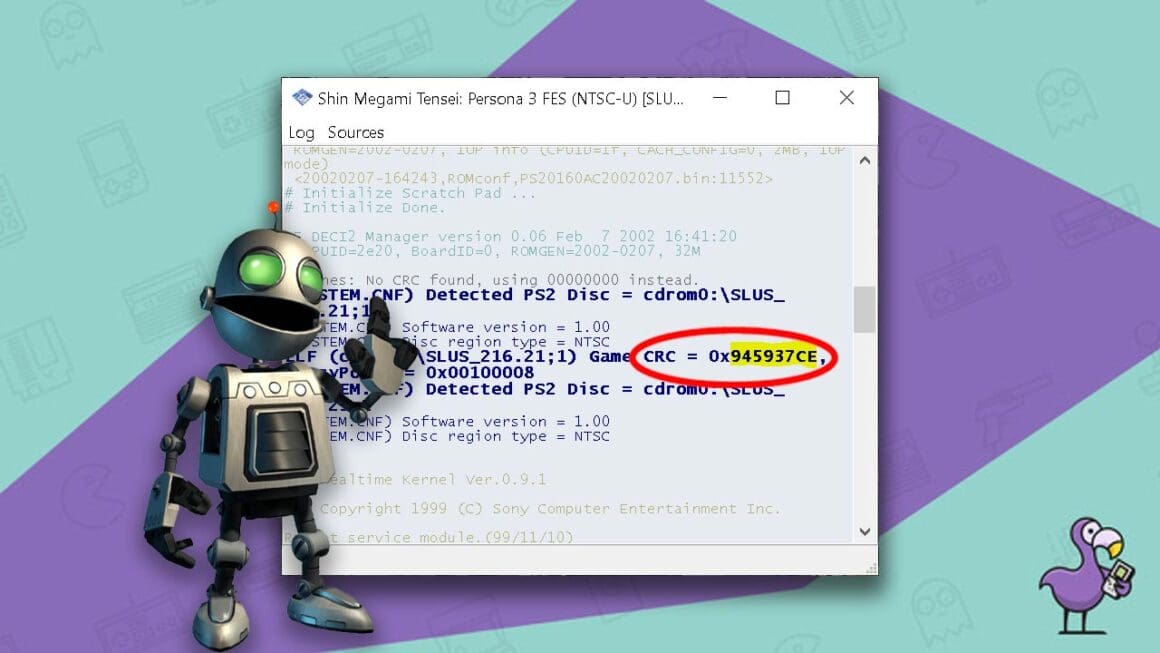
See that text in the red oval above? That’s the CRC code for Shin Megami Tensei: Persona 3. The part that’s highlighted in yellow is the bit you’ll need in order to make the .pnach file necessary for your cheat codes.
Make a note of this number; you’ll need it once you’ve located the cheat folder for your PCSX2 emulator.
Just like the ePSXe emulator, there’s a cheats file where cheat codes are kept safe. You’ll either find it in Program files or Documents within the PCSX2 folder itself.
Making A .pnach File For PCSX2 Emulator
Once inside the cheats folder, just hit the right-click button on your mouse or laptop and bring up the sub-menu. You’re going to want to hit ‘New’ in order to make a new document.
In reality, you probably won’t have done this before because it’s a massive farce so this should be the only file in there for you to worry about.
Tip – Make sure to tick ‘File Name Extensions’ or head to Properties by right clicking inside the window on an older version of Windows and untick ‘hide extensions for known file types. That’s tick in new, untick in old, otherwise you won’t be able to see the .pnach files.
Once you’ve made your document, rename it to the number of your games CRC minus the 0x at the beginning and save it as a .pnach file.
So, for Persona 3, that would be 945937CE.pnach
Adding Cheats To Your .pnach File
In order to get cheat codes into PCSX2 via a .pnach file, you’ve got to convert any cheat codes you find into RAW files.
To do this, you’ll need to download two extra programs.
Yeah, I told you it was a bit of a chew on!
First, you’ll need to download winrar and then use it to extract OmniConvert 1.0.3, the program you’ll use to convert CodeBreaker Codes for your chosen game and make ready for PCSX2.
Tip – You can find both winrar and OmniConvert 1.0.3 by Googling them. Make sure to scan the files before downloading to make sure that they’re from reputable sources.
Once you’ve obtained the CodeBreaker cheat code for your chosen game, you’ll need to set some parameters into the program itself.
See the Input and Output buttons above? Set your input to CodeBreaker V1+ and your output to Unencrypted > Standard.
Once those two bits are done, paste your CodeBreaker code into the left-hand column and then hit that convert button. It will be two sets of 8 characters, for example – 2AF793JK 34HS9XN4.
You’ll get a RAW code without any encryption with different numbers, and that’s the one that you’re going to need for the next step. This will look a little something like – 20784990 34HS9XN4
Remember – Take the code from the right-hand column once you’ve hit convert. The last part of the number should stay the same, but the first part will look different. That’s how you tell the two codes apart.
Making A Cheat Code That The PCSX2 Can Read
Now it’s time to add your code into your .pnach file that you made earlier. There’s a format that you need to follow though; it’s not just as simple as throwing a code in there and hoping for the best.
Why make things easy now, huh?
You’ll need to list the patch name and then the right code underneath it in your .pnach file.
Here’s an example code taken from Almar’s Guides:
Experience Times Two
patch=1,EE,203609D4,extended,8FA2319C
So, let’s say the made-up code that we generated above is for ‘Unlimited Ammo’. As a reminder, that made-up code was 20784990 34HS9XN4. Head to your .pnach file and enter:
Unlimited Ammo
patch=1EE,20784990,extended,34HS9XN4
Once you’ve added your code, all that’s left to do is to upload your .pnach file, and you’re good to go!
And that’s a wrap!
Thanks very much for checking out this article on how to use cheat codes on PCSX2 emulator. We’ve come through an emotional rollercoaster to get here, but hopefully now you’ve got a good idea of how to get cheats into this emulator and make the best PS2 games a whole lot easier.
Head to our Facebook, Twitter, and Instagram pages to make a support group with other gamers so you can moan about how annoyingly tedious this whole process was!
This article may contain affiliate links. If you use these links to purchase an item we may earn a commission. Thank you for your support.
Seb Santabarbara has bought every Nintendo console that has ever been released in his 31 years on Planet Earth. His favourite game franchise is Zelda, and he’s patiently waiting for Banjo-Kazooie to come back to the fold. When he’s not playing games, he’s travelling the world in his self-converted camper van.
Pcsx2 читы как использовать
Sometime between the last official beta and this one they changed the way that we do pnach files. We now have both a game patches directory AND a game cheats directory. Both of these directories take pnach files.
Additionally, at some point in the past they added a new feature to EE patching — extended mode. This mode will take any raw cheat code and use it directly — this includes jokers and mass search and replace codes!
So. what is the trick to mass importing all your favorite cheats for all your favorite games into pcsx2? It requires a few simple tools. Note: I will tell you what I use, but I will not provide direct links, you are responsible for doing your own google jobs. It’s just the way I roll.
One: a cheat code site. My personal recommendations are GSHI.org and BSFree.org — both have massive libraries of codes for multiple cheat devices, and both use very minimal advertising in comparison to other sites. and, best of all, both are «Just The Codes» without any of that bologna that other sites like to call «cheats» or «codes» that are really just hints that belong in a faq or walkthrough. This last point also means that the cheats are all formatted in essentially the same way. For BSFree, that’s a table with the leftmost cell being cheat name/description, middle cell being the codes, and the rightmost cell being reserved for giving credit to the hacker who first reported the code. All of the following will be for importing from BSFree. to import from another site, adjust the regex appropriately. I’d be happy to work out a set of regex for a given site if you post in a reply a decent sample of their standard code formatting. I will not, however, waltz around the internet trying to find every single possible code site in existence and post up regex for them. See above about «do your own google jobs» . regex is simple to learn, take some time out of your day and learn to do it yourself, OR make things easier on people who already know regex and feed us samples, NOT links to other sites.
Two: For real streamlining of the process, you should use a so-called «programmers» text editor. The necessary features are mass search and replace with full regex support. My personal recommendation here is Notepad++.
Three: You will need OmniConvert. This is not optional. There are no replacements or other choices here. You MUST use OmniConvert. I can attest that it works great in WINE for systems that aren’t running windows, so there’s no excuse.
Hint: Once you open up OmniConvert and set your Convert From and Convert To, if you close it, you’ll have to set them again, so just leave OmniConvert open until you are completely done with a given code import session.
Hint 2: I have dual 1920×1080 screens that I use while doing this, so while I don’t have to «switch windows» as much, most of you probably will.
Hint 3: MOST of the codes on BSFree.org that say they’re for CodeBreaker are for v7+ encrypted.
Start all your applications up. Firefox (or web browser of choice), Notepad++ (or programmers text editor of choice), and OmniConvert.
Browse using your browser to the codes you want to import. It’s often best to repeat this step along with the following ones in chunks, since both BSFree and GSHI split their codes up by categories. (for some games more intelligently than for others *stares meaningfully at .hack for one of the stupid ones*)
Select a large chunk of codes. Make sure you stay within the table and select all the way from the beginning of the first code description to the end of the last hacker name.
Copy these codes into Notepad++.
Bring up Search and Replace (for notepad++ this is done using CTRL+H).
Switch Search and Replace into full regex mode («Regular Expression» at the bottom left of the window in notepad++)
Type into the search box: «^([A-Z][a-z])» and into the replace box: «// \1» then hit replace all . What this essentially means is search for a Capital letter immediately followed by a lowercase letter at the beginning of every line and put two «/» and a space in front. This turns the cheat name into comment.
Type into the search box: «\s+Hacker Name(s)» and into the replace box: «\r\n» and then hit replace all . What this does is erase the credits and replace them with a windows style newline. If you’re not using notepad++ and you know that your programmers text editor does this by default, you might be able to just use \n . you can try it, and if step 10 looks funky in OmniConvert, you’ll know you need to use \r\n.
Type into the search box: «\s\s+» and leave the replace box alone, hit replace all. This does the same thing as above, but for separating codes from code descriptions.
CTRL+A, CTRL+X, switch to OmniConvert, CTRL+V, hit convert.
Click over into the converted code section and hit CTRL+A, CTRL+C, and switch over to notepad++ and paste it back in.
Type into the search box: «([A-F\d][A-F\d]+)\s([A-F\d][A-F\d]+)» (the mess is actually just a very simple hex code search where the hex is repeated at least twice, has a space, and then is repeated again at least twice. isn’t regex fun?!) and into the replace box: «//patch=1,EE,\1,extended,\2» (this comments out the cheats by default! remember to uncomment the codes you intend to use at a given time before starting up your game)
If you do things exactly like I suggest, then you’ll want to transfer all these codes to an appropriate .pnach file and rinse and repeat until you have all the codes for your game.
Start up pcsx2, and do most things normally, but in the «System» pulldown menu, make sure «Enable Cheats» is checked. Start up your game, then immediately close it. In the Program Log window, there should be a message about not finding a pnach, with a complete filename. Copy that filename and save your cheats to a pnach with that name. Make sure you include some decent comment lines in your pnach to remind yourself about some of the more unusual cheats you might be using! (At the minimum, you should put a comment at the beginning of the file with the name of the game and the word «Cheats» to remind yourself that you are using cheats. the format for a comment line is: comment=»text goes here»
Once you’ve got all your codes in your pnach and the pnach saved, remove the «//» from any patch lines for codes you want to use.
Pcsx2 читы как использовать
B64E9939 = Dragon Quest 5 [SLPM-65555] [NTSC-J]
E09E454C = Dragon Quest 5 [SLPM-65555] [NTSC-J/Translated]
67EA55CB = Enter the Matrix [SLUS-20454] [NTSC-U]
77E61C8A = Gran Turismo 4 [SCUS-97328] [NTSC-U]
FE44479E = Onimusha: Dawn of Dreams Disc 1v2 [SLUS-21180] [NTSC-U]
FFDE85E9 = Onimusha: Dawn of Dreams Disc 2v2 [SLUS-21362][NTSC-U]
812C5A96 = Onimusha: Dawn of Dreams [SLES-82038] [PAL-E]
FA835BA1 = Soul Calibur III [SLUS-21216] [NTSC-U]
BCD0B7CD = Suikoden 5 [SLUS-21291] [NTSC-U]
9CD9C449 = Suikoden 5 [SLES-54087] [PAL-E]
3E205556 = Suikoden Tactics [SLES-53769] [PAL-E]
7C359c94 = Tekken 4 [SLPS-25100] [NTSC-J]
833FE0A4 = Tekken 4 [SLUS-20328] [NTSC-U]
2251E14D = Tekken 4 [SCES-50878] [PAL]
D03D4C77 = The Legend of Spyro: A New Beginning [SLUS-21372] [NTSC-U]
0EE5646B = The Legend of Spyro: A New Beginning [SLES-54359] [PAL]
B80CE8EC = The Legend of Spyro: The Eternal Night [SLUS-21607] [NTSC-U]
8AE9536D = The Legend of Spyro: The Eternal Night [SLES-54815] [PAL]
You can open .pnach files with Notepad! There you find infos about the actually fuction of each patch.
How do I activate a patch?
1.) Load up your Game of choice into PCSX2.
2.) Take a look at the log and check the so called «Game CRC» (without the «0x»), your Game MUST! have the same Game CRC like the patch filename. Otherwise the patch will not work.
3.) If the Game CRC is the same, you just have to «Activate Cheats» (@ System) before you load up the Game.
or
You stop the Game with ESC, activate cheats and resume it. Always check the log if the patch is loaded.