ROUNDS
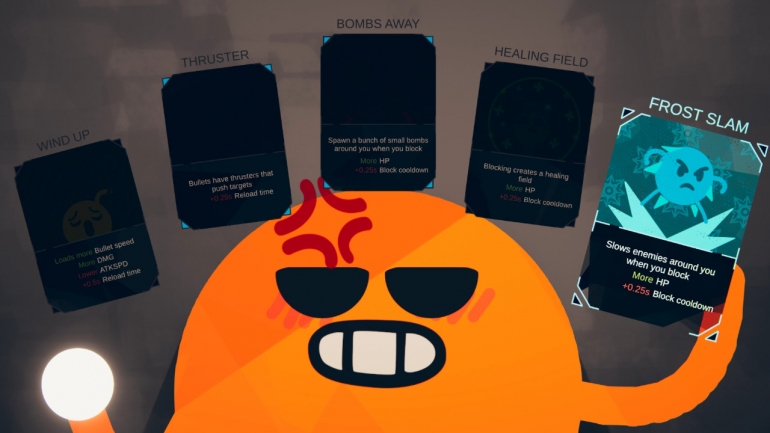
ROUNDS – это двухмерный упрощенный рогалик с примитивной графикой, в котором разноцветные смайлики-эмодзи прыгают по платформам и стреляют друг в друга из ракетниц. Прелесть геймплея заключается в постоянно увеличивающемся темпе перестрелок за счет миллионов комбинаций усилений на основе карточной колоды. Выбранная перед каждым раундом случайная карточка может как усилить оружие или персонажа, так и ослабить его.
В дуэльных и дуэтных поединках игроки могут не только стрелять ракетами, но и использовать их как средство быстрого передвижения. В колоде из 70 карт могут встретиться улучшения оружия, например, тепловое наведение ракет или дополнительный дробовик. Игроки могут настроить своего смайлика или позвать в сессию товарища по трансляциям в Twich. Инди-статус игры имеет неприятное последствие – онлайн модуль сильно лагает, а разработчики не спешат исправить проблемы сетевого кода.
Информация о сетевых режимах:
Интернет: ✔
Локальная сеть (LAN): ✘
На одном экране (HotSeat): ✔
RoundsWithFriends
BepInEx pack for ROUNDS. Preconfigured and ready to use.
willis81808-UnboundLib
This is a helpful utility for ROUNDS modders aimed at simplifying common tasks.
README
Rounds With Friends
A ROUNDS mod to extend the game’s multiplayer capabilities, built for BepInEx.
Current Features
The mod supports up to 16 players in local and private online lobbies.
Team Deathmatch
The game mode you are used to, except now it supports up to 16 players in various team compositions.
Deathmatch / Free for all
Deathmatch follows the heart of the original team deathmatch game mode, but now it’s just you against everyone else.
Continue or rematch
After the game ends, you can choose to play a little longer, or to start a new game.
Changelog
See CHANGELOG.md for version changes.
Dependencies
-
plugin framework version >=2.11.0
Manual Installation
0. Locate your ROUNDS install directory.
This directory is usually located at C:\Program Files (x86)\Steam\steamapps\common\ROUNDS or similar.
1. Install BepInEx.
You can download the latest release directly from BepInEx/releases. Choose the correct version for your platform and extract the downloaded zip file to your ROUNDS installation directory in its entirety.
Run the game once to generate BepInEx folder structure and configuration files.
2. Download UnboundLib.
Download the latest release of UnboundLib and extract the downloaded dll files to ROUNDS/BepInEx/plugins .
3. Download RoundsWithFriends.
Download the latest release of Rounds With Friends and extract the downloaded zip file to the install directory of ROUNDS.
Available versions
Please note that the install buttons only work if you have compatible client software installed, such as the Thunderstore Mod Manager. Otherwise use the zip download links instead.