Структура протокола TCP
Transmission Control Protocol или TCP описан в RFC 793, обеспечивает приложениям надежную службу, ориентированную на подключение.
Протокол TCP похож на телефонный звонок, в котором сначала устанавливается соединение, затем передаются данные, и в конце осуществляется отключение когда передача данных завершена.
TCP использует три основных механизма, описанных ниже:
- Пакеты маркируются порядковыми номерами ( sequence number ). Это позволяет службе TCP с приёмной стороны восстановить корректную последовательность пакетов, прежде чем отправлять их конечному приложению.
- Для обеспечения надежности TCP использует механизмы подтверждения, чексуммы и таймеров ( acknowledment , checksum , timers ). Получатель может уведомить отправителя о том, что какой-то пакет из последовательности не пришел или содержит ошибки, или отправитель может предположить, что пакет не дошел до получателя, если получатель не прислал подтверждение получателю через определенное время.
- TCP использует механизм “плавающего окна” ( windowing ) для регулирования потока пакетов. Windowing уменьшает шанс того, что пакет будет отброшен приемной стороной из-за переполнения буфера.
Заголовок TCP следует сразу за данными прикладного уровня, он содержит поля необходимые для работы механизмов, которые описаны выше, а также определяет порты, которые в свою очередь определяют приложения источника и назначения. Данные с заголовком TCP затем инкапсулируются в заголовок IP.
Структура протокола TCP выглядит следующим образом
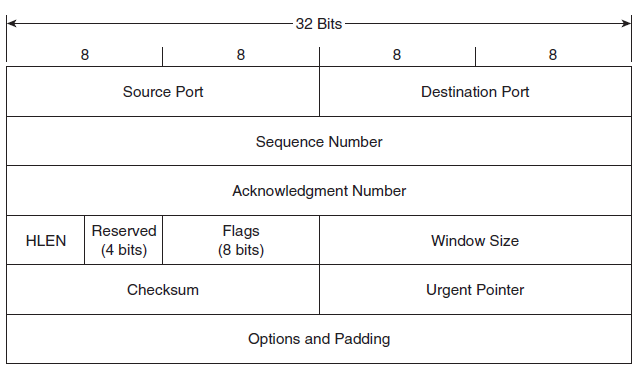 TCP Header Structure
Source и Destination порты — 16-битные поля, определяющие приложения источника и назначения для инкапсулированных данных. RFC 1700 определяет все номера для портов (общего и не общего назначения).
Сокет — сочетание порта (источника/назначения) и соответствующего IP-адреса. Сокет уникально определяет каждое приложение в сети.
 Source and Destination Ports
Sequence Number — 32-битное поле, определяет где инкапсулированные данные находятся внутри общего потока отправителя. Например, если порядковый номер сегмента 1234 и сегмент содержит 512 байт данных, то следующий сегмент должен иметь порядковый номер 1234 + 512 = 1746
Ниже представлена вырезка из трафика, в котором sequence number равен 337 , ожидаемый следующий порядковый номер должен быть 390 , который состоить из seq number + TCP Payload (337 + 53 = 390)
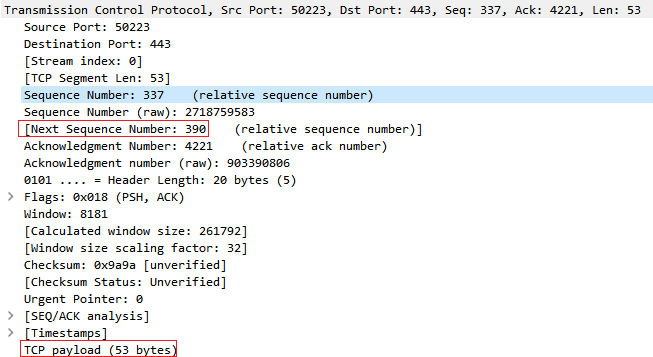 Sequence Number 1
А вот вторая вырезка, которая подтверждает ожидаемый в предыдущем пакете порядковый номер.
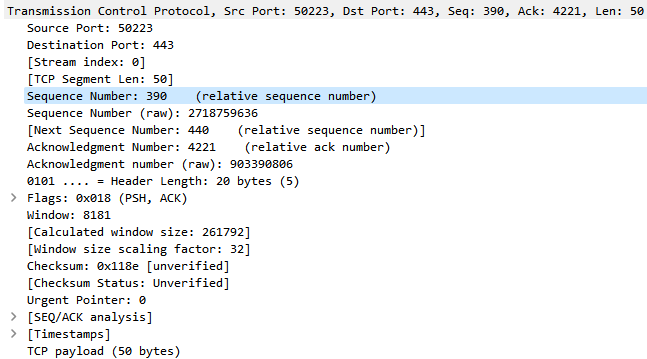 Sequence Number 2
Acknowledgment Number — 32-битное поле, определяет порядковый номер, который источник ожидает получить от получателя в следующий раз. Если устройство получает номер подтверждения, который не соответствует следующему порядковому номеру, который он собирается отправить (или отправил), то это будет означать, что пакеты были утеряны.
Header Length или еще данное поле называют Data Offset — 4-битное поле, определяющее длину заголовка в 32-битных словах. Данное поле очень важно, т.к. оно позволяет определить начало данных, потому что поле Options имеет переменную длину.
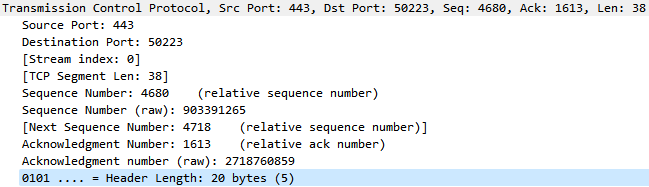 Header Length
Reserved — 4-битное поле, которое всегда заполнено нулями.
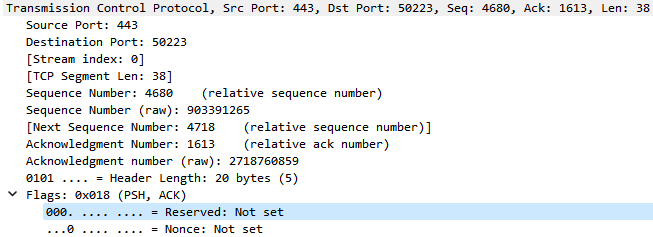 Reserved
Flags — 8 однобитовых флагов, которые используются для управления потоком данных и контроля подключения. Флаги слева направо:
- CWR — Congestion Window Reduced
- ECE — ECN-Echo
- URG — Urgent
- ACK — Acknowledment
- PSH — Push
- RST — Reset
- SYN — Synchronize
- FIN — Final
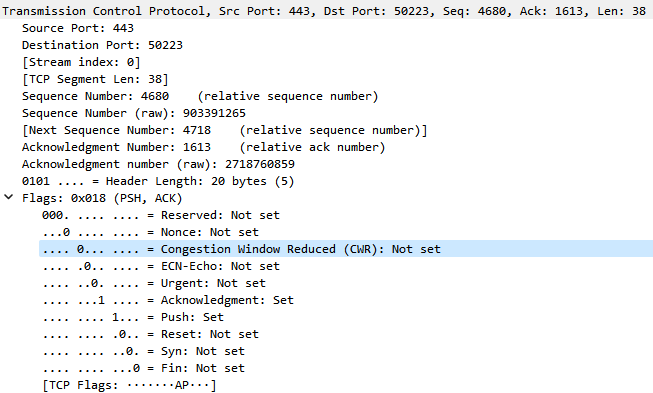 Flags
Flags
Window Size — 16-битное поле, которое используется для контроля потока. Данное поле определяет количество байт, которое отправитель сегмента примет от узла на другом конце соединения, прежде чем этот узел прекратит передачу, ожидая подтверждения.
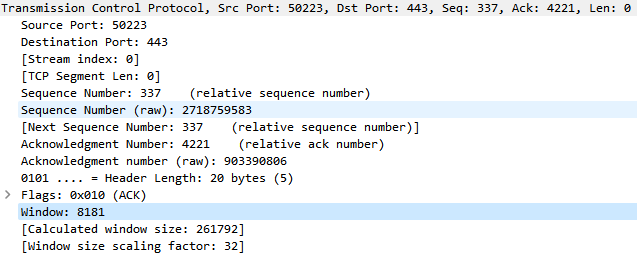 Window Size
Window вычисляется путём умножения значения window на window size scaling factor , в случае выше получаем 8181 * 32 = 261792
Checksum — — 16-битное поле, позволяющее обнаружить ошибку в заголовке и инкапсулированных данных.
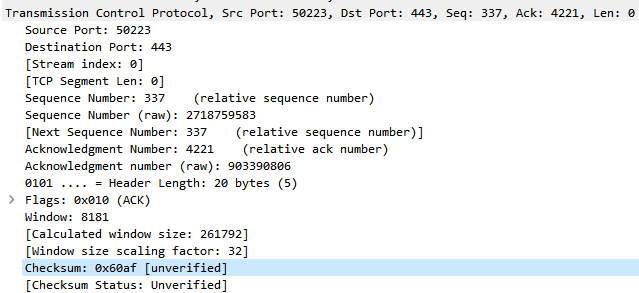 Checksum
Urgent Pointer — 16-битное поле, используется только в случае использования флага URG . Значение данного поля добавляется к Sequence Number тем самым указывая на окончание срочных данных.
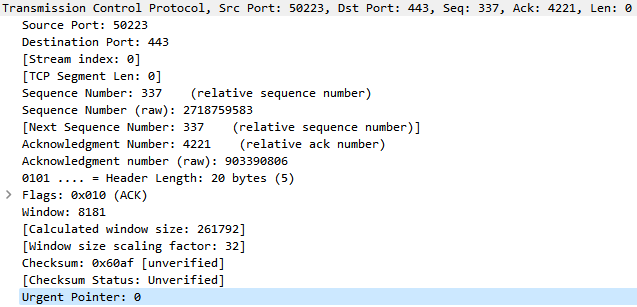 Urgent Pointer
Options — как следует из названия, данное поле определяет опции в процессе TCP. Наиболее часто используемая опция — Maximum Segment Size (MSS), которая информирует получателя о наибольшем размере сегмента, который отправитель готов принять. Оставшаяся часть поля заполняется нулями до выравнивания до значения 4 байт.
TCP Sequence and Acknowledgement Numbers Explained
TCP Sequence (seq) and Acknowledgement (ack) numbers help enable ordered reliable data transfer for TCP streams. The seq number is sent by the TCP client, indicating how much data has been sent for the session (also known as the byte-order number). The ack number is sent by the TCP server, indicating that is has received cumulated data and is ready for the next segment.
The TCP seq and ack numbers are coordinated with one another and are key values during the TCP handshake, TCP close, and, of course, while data is transferred between the client and server.
[By default, Wireshark converts all sequence and acknowledgement numbers into relative numbers. This means that all SEQ and ACK numbers always start at 0 for the first packet seen in each conversation.]
The picture below shows a real example of TCP sequence and acknowledgment numbers in a TCP flow diagram. The key variable is the TCP segment length for each TCP segment sent in the session.

The client sends the first segment with seq=1 and the length of the segment is 669 bytes. The server responds with an ack=670 which tells the client that the next expected segment will have a sequence number is 670.
The next segment the client sends has seq=670 and the len is now 1460 bytes. In turn, the server responds with ack=2130 (670 + 1460). This cycle continues until the end of the TCP session.
Again, note that the length value is from the TCP segment length, not the Layer 2 frame length nor the IP packet length.
Seq and Ack in Wireshark
Client sends seq=1 and tcp segment length=669

Server responds with ack=670

Client sends segment with seq=670 and length=1460

Server responds with ack=2130

This is just a simple example to get the basics of TCP sequence and acknowledgement numbers.
Understanding TCP Seq & Ack Numbers [Packet-by-Packet]
Getting started with TCP Sequence and Acknowledgement Numbers
TCP (Transmission Control Protocol) is a connection oriented and highly reliable protocol. Before data exchange between two parties, it requires to establish a connection, using TCP 3-way handshaking. The connection remains active until it gets terminated. During 3-way handshaking both sides synchronize (SYN) and acknowledge (ACK) each other. In another saying, they inform each other about what kind of settings they would like to use during the connection establishment. The settings include Sequence Number, Maximum Segment Size, if SACK is permitted or not, Window Scale, Window Size etc. See below for a SYN packet which contains an initiator (a client) settings.
![Understanding TCP Seq & Ack Numbers [Packet-by-Packet]](https://www.golinuxcloud.com/wp-content/uploads/wireshark-53.png)
Reliability is one of TCPs strong feature. TCP ensures that all packets one end sends will be delivered to the other end, keeping track of which packets have been received successfully, resending any packets that have been lost, and specifying the order for reassembling the data on the other end. In short, TCP provides this reliability mostly by Sequence Number and Acknowledgement Number. TCP sequence and acknowledgement numbers are counters used to keep track of every bytes sent and received during the connection.
In this article, we will closely examine Sequence Number and Acknowledgement Number with Wireshark. For better understanding, we will capture a TCP flow and analyse it. I will visit the first web page published on the internet, which is pretty simple. If you wonder to see what it is like, link is here: http://info.cern.ch/hypertext/WWW/TheProject.html
Capturing a TCP Flow
1) Open Wireshark and create a capture filter like below.
![Understanding TCP Seq & Ack Numbers [Packet-by-Packet]](https://www.golinuxcloud.com/wp-content/uploads/wireshark-54.png)
3) Stop capturing, now we should have the packets. See my captures below.
![Understanding TCP Seq & Ack Numbers [Packet-by-Packet]](https://www.golinuxcloud.com/wp-content/uploads/wireshark-55.png)
4) Go to Statistics → Flow Graph to see more details.
![Understanding TCP Seq & Ack Numbers [Packet-by-Packet]](https://www.golinuxcloud.com/wp-content/uploads/wireshark-56.png)
The figure above explains everything about the flow. First 3 packets —SYN, SYN/ACK and ACK— are used to establish a connection before any data is exchanged. This step is called TCP 3-way handshaking. Next, the client sends a http GET request on the top of TCP and the server responds it back with a http 200 OK, which indicates that the request has succeeded. The last 4 packets are exchanged to tear down the connection.
Breaking down to Packet by Packet Analysis
Packet Number 1
We will analyse the flow packet by packet, starting from the first packet. For visualization, see screen shot below.
![Understanding TCP Seq & Ack Numbers [Packet-by-Packet]](https://www.golinuxcloud.com/wp-content/uploads/wireshark-57.png)
This is the first packet (it is also called SYN packet) from the client to the server with source and destination port of 62834, 80 respectively.
All data in a TCP connection are numbered, starting at a randomly chosen ISN (Initial Sequence Number). Although the first packet (SYN) does not contain any data, it consumes one sequence number and as a result the actual data begins at ISN+1. For easy understanding, Wireshark starts ISN from zero which is called «relative sequence number» while in the screen shot above, we can clearly see the client has set its real sequence number to 332215980. Relative sequence number is just for easy analyzing. Since this is the first packet in the flow, acknowledgement number is set to zero. With these settings, the client informs the server that it will use some options and asks the server to send its options as well in the next packet (SYN/ACK).
Packet Number 2
![Understanding TCP Seq & Ack Numbers [Packet-by-Packet]](https://www.golinuxcloud.com/wp-content/uploads/wireshark-58.png)
The second packet (it is also called SYN/ACK packet) from the server to the client is pretty similar to the first packet, except ACK flag being set to 1 this time. Even though, this packet is not carrying any data but connection settings, the acknowledgement number is increased by 1 which tells the client it has received the SYN packet while it sets its sequence number to zero.
Packet Number 3
![Understanding TCP Seq & Ack Numbers [Packet-by-Packet]](https://www.golinuxcloud.com/wp-content/uploads/wireshark-59.png)
This is the last packet (it is also called ACK packet) for TCP 3-way handshaking. The client increases its sequence and acknowledgement number by 1, letting the server know it has received its SYN/ACK packet. From this point, the sequence and the ack numbers will increase only after one end has sent or received some data.
Packet Number 4
![Understanding TCP Seq & Ack Numbers [Packet-by-Packet]](https://www.golinuxcloud.com/wp-content/uploads/wireshark-60.png)
This is the first packet that contains some actual data (373 bytes of HTTP Get request), which is also called TCP payload. The sequence numbers are accumulated during the conversation. In another saying, the client let the server know how much data it has sent in total by sequence number. it also specifies amount of data in total it has received from the server by acknowledgement number. Since, it has not sent or received any data before, the sequence and the acknowledgement numbers remain 1.
Packet Number 5
![Understanding TCP Seq & Ack Numbers [Packet-by-Packet]](https://www.golinuxcloud.com/wp-content/uploads/wireshark-61.png)
This packet does not carry any data as you see from len: 0. Once the server receives 373 bytes of data, it needs to let the client know that it has received the data with ACK flag set. Since the server has not sent any data before, it sets its sequence number to 1 while the acknowledgement number increases by 373 to 374. In short, the server tells the client it got 373 bytes of data and it expects new data starting from number of 374.
Packet Number 6
![Understanding TCP Seq & Ack Numbers [Packet-by-Packet]](https://www.golinuxcloud.com/wp-content/uploads/wireshark-62.png)
After receiving the http GET request, the server creates a http response and breaks it into 2 pieces, since total response size exceeds TCP maximum segment size (1452 bytes, it is present in the second packet) which both side agreed on during TCP 3-way handshaking. The length of the data is 1452 bytes. The server sends the packet with the same sequence and acknowledgement number.
Packet Number 7
![Understanding TCP Seq & Ack Numbers [Packet-by-Packet]](https://www.golinuxcloud.com/wp-content/uploads/wireshark-63.png)
This is the second piece of the http response from the server with size of 998 bytes. you can see the sequence number has increased by 1452, because it sent that amount of data to the client in the previous packet while the acknowledgement number still remains the same.
Packet Number 8
![Understanding TCP Seq & Ack Numbers [Packet-by-Packet]](https://www.golinuxcloud.com/wp-content/uploads/wireshark-64.png)
The server has no data to send and it wants to acknowledge the client that it would like to terminate the TCP connection with the fin flag set. The packet carries no data. The sequence number increases by 998 to 2451, which indicate that it has sent 2450 bytes until now. Since there has not been any change in amount of data receiving from the client, the acknowledgement number remains the same.
Packet Number 9
![Understanding TCP Seq & Ack Numbers [Packet-by-Packet]](https://www.golinuxcloud.com/wp-content/uploads/wireshark-65.png)
The client acknowledges the server that it has received its data by setting the acknowledgment number to 2452, which indicates that the server should send the data starting from 2452 next time (if it has any).
Packet Number 10
![Understanding TCP Seq & Ack Numbers [Packet-by-Packet]](https://www.golinuxcloud.com/wp-content/uploads/wireshark-68.png)
With this packet, the client informs the server that it also would like to terminate the connection with the fin flag set.
Packet Number 11
![Understanding TCP Seq & Ack Numbers [Packet-by-Packet]](https://www.golinuxcloud.com/wp-content/uploads/wireshark-67.png)
This is the last packet in the flow. The server receives the client’s connection termination request and it informs the client that it has got its packet with fin flag.
Final Thoughts
TCP is working in the transport layer, providing connection oriented and reliable data transmission. First, it creates a connection then it transfers the data. With help of sequence and acknowledgment numbers, it keeps track of how much data it has sent and received. When there is packet loss, it uses acknowledgment number to recover it.
Didn’t find what you were looking for? Perform a quick search across GoLinuxCloud
If my articles on GoLinuxCloud has helped you, kindly consider buying me a coffee as a token of appreciation.

For any other feedbacks or questions you can either use the comments section or contact me form.
Understanding TCP Sequence Number with Examples
TCP Sequence Number is a 4-byte field in the TCP header that indicates the first byte of the outgoing segment. It helps to keep track of how much data has been transferred and received. The TCP Sequence Number field is always set, even when there is no data in the segment.
For example, the sequence number for this packet is X. The length for this packet is Y. If this packet is transferred to another side successfully, then the sequence number for the next packet is X+Y. The sequence number is the first byte of the outgoing segment.
Purpose of TCP Sequence Number
TCP is a byte-oriented sequencing protocol. Thus, a Sequence Number field is necessary to ensure that missing or misordered packets can be detected and fixed. If data is lost or arrives at the destination out of order, the TCP module is capable of retransmitting or resequencing the data to restore the original order based on the sequence number.
Tip of TCP Sequence Number
TCP supports full-duplex operation, so both client and server will decide on their initial sequence numbers for the connection, even though data may only flow in one direction for that specific connection. We will demonstrate more this with an example.
Check TCP Sequence Number with Tcpdump
At default, tcpdump shows the packets with a relative sequence number. We can use -S option to get the real sequence number.
Command:tcpdump -i any -S port 22
16:05:41.536831 IP 10.79.97.15.61401 > 10.252.8.111.ssh: Flags [S], seq 3739218596, win 65535, options [mss 1350,nop,wscale 6,nop,nop,TS val 968973822 ecr 0,sackOK,eol], length 0
16:05:41.711584 IP 10.252.8.111.ssh > 10.79.97.15.61401: Flags [S.], seq 1322804771, ack 3739218597, win 28960, options [mss 1260,sackOK,TS val 803272772 ecr 968973822,nop,wscale 7], length 0
16:05:41.711656 IP 10.79.97.15.61401 > 10.252.8.111.ssh: Flags [.], ack 1322804772, win 2067, options [nop,nop,TS val 968973997 ecr 803272772], length 0
16:05:41.715127 IP 10.79.97.15.61401 > 10.252.8.111.ssh: Flags [P.], seq 3739218597:3739218618, ack 1322804772, win 2067, options [nop,nop,TS val 968974000 ecr 803272772], length 21
16:05:41.890437 IP 10.252.8.111.ssh > 10.79.97.15.61401: Flags [.], ack 3739218618, win 227, options [nop,nop,TS val 803272951 ecr 968974000], length 0
16:05:41.894555 IP 10.252.8.111.ssh > 10.79.97.15.61401: Flags [P.], seq 1322804772:1322804793, ack 3739218618, win 227, options [nop,nop,TS val 803272956 ecr 968974000], length 21
16:05:41.894610 IP 10.79.97.15.61401 > 10.252.8.111.ssh: Flags [.], ack 1322804793, win 2066, options [nop,nop,TS val 968974178 ecr 803272956], length 0
16:05:41.905007 IP 10.79.97.15.61401 > 10.252.8.111.ssh: Flags [.], seq 3739218618:3739219866, ack 1322804793, win 2066, options [nop,nop,TS val 968974188 ecr 803272956], length 1248
16:05:41.905015 IP 10.79.97.15.61401 > 10.252.8.111.ssh: Flags [P.], seq 3739219866:3739220010, ack 1322804793, win 2066, options [nop,nop,TS val 968974188 ecr 803272956], length 144
16:05:42.071542 IP 10.252.8.111.ssh > 10.79.97.15.61401: Flags [P.], seq 1322804793:1322805553, ack 3739218618, win 227, options [nop,nop,TS val 803273130 ecr 968974178], length 760
16:05:42.071612 IP 10.79.97.15.61401 > 10.252.8.111.ssh: Flags [.], ack 1322805553, win 2054, options [nop,nop,TS val 968974354 ecr 803273130], length 0
Example of TCP Sequence Number
From the above packets, we can see that the sequence number for source: 3739218596 3739218597 3739218618 3739219866
sequence number for destination: 1322804771 1322804772 1322804793
There are 3739219866-3739218596=1270 bytes of data transferred from source to destination and 1322804793-1322804771=22 bytes of data transferred from destination to source.
For the following packet, it has 21 bytes of data (3739218597->739218618). The sequence number is the number of the first byte which should be 3739218597.
16:05:41.715127 IP 10.79.97.15.61401 > 10.252.8.111.ssh: Flags [P.], seq 3739218597:3739218618, ack 1322804772, win 2067, options [nop,nop,TS val 968974000 ecr 803272772], length 21

TCP Sequence Number for Ack segment
As we said at the beginning, every segment has a sequence number. But in the above examples, we can see that some packets don’t have sequence numbers. That is because they are ack segments.
Note that the ACK segment does not consume any sequence numbers if it does not carry data. An ACK segment, if carrying no data, consumes no sequence number.