Команда sed Linux
Команда sed — это потоковый редактор текста, работающий по принципу замены. Его можно использовать для поиска, вставки, замены и удаления фрагментов в файле. С помощью этой утилиты вы можете редактировать файлы не открывая их. Будет намного быстрее если вы напишите что и на что надо заменить, чем вы будете открывать редактор vi, искать нужную строку и вручную всё заменять.
В этой статье мы рассмотрим основы использования команды sed linux, её синтаксис, а также синтаксис регулярных выражений, который используется непосредственно для поиска и замены в файлах.
Команда sed в Linux
Сначала рассмотрим синтаксис команды:
$ sed опции -e команды файл
А вот её основные опции:
- -n, —quiet — не выводить содержимое буфера шаблона в конце каждой итерации;
- -e — команды, которые надо выполнить для редактирования;
- -f — прочитать команды редактирования из файла;
- -i — сделать резервную копию файла перед редактированием;
- -l — указать свою длину строки;
- -r — включить поддержку расширенного синтаксиса регулярных выражений;
- -s — если передано несколько файлов, рассматривать их как отдельные потоки, а не как один длинный.
Я понимаю, что сейчас всё очень сложно, но к концу статьи всё прояснится.
1. Как работает sed
Теперь нужно понять как работает команда sed. У утилиты есть два буфера, это активный буфер шаблона и дополнительный буфер. Оба изначально пусты. Программа выполняет заданные условия для каждой строки в переданном ей файле.
sed читает одну строку, удаляет из неё все завершающие символы и символы новой строки и помещает её в буфер шаблона. Затем выполняются переданные в параметрах команды, с каждой командой может быть связан адрес, это своего рода условие и команда выполняется только если подходит условие.
Когда всё команды будут выполнены и не указана опция -n, содержимое буфера шаблона выводится в стандартный поток вывода перед этим добавляется обратно символ перевода строки. если он был удален. Затем запускается новая итерация цикла для следующей строки.
Если не используются специальные команды, например, D, то после завершения одной итерации цикла содержимое буфера шаблона удаляется. Однако содержимое предыдущей строки хранится в дополнительном буфере и его можно использовать.
2. Адреса sed
Каждой команде можно передать адрес, который будет указывать на строки, для которых она будет выполнена:
- номер — позволяет указать номер строки, в которой надо выполнять команду;
- первая
Если для команды не был задан адрес, то она будет выполнена для всех строк. Если передан один адрес, команда будет выполнена только для строки по этому адресу. Также можно передать диапазон адресов. Тогда адреса разделяются запятой и команда будет выполнена для всех адресов диапазона.
3. Синтаксис регулярных выражений
Вы можете использовать такие же регулярные выражения, как и для Bash и популярных языков программирования. Вот основные операторы, которые поддерживают регулярные выражения sed Linux:
- * — любой символ, любое количество;
- \+ — как звездочка, только один символ или больше;
- \? — нет или один символ;
- \ — любой символ в количестве i;
- \ — любой символ в количестве от i до j;
- \ — любой символ в количестве от i и больше.
4. Команды sed
Если вы хотите пользоваться sed, вам нужно знать команды редактирования. Рассмотрим самые часто применяемые из них:
- # — комментарий, не выполняется;
- q — завершает работу сценария;
- d — удаляет буфер шаблона и запускает следующую итерацию цикла;
- p — вывести содержимое буфера шаблона;
- n — вывести содержимое буфера шаблона и прочитать в него следующую строку;
- s/что_заменять/на_что_заменять/опции — замена символов, поддерживаются регулярные выражения;
- y/символы/символы — позволяет заменить символы из первой части на соответствующие символы из второй части;
- w — записать содержимое буфера шаблона в файл;
- N — добавить перевод строки к буферу шаблона;
- D — если буфер шаблона не содержит новую строку, удалить его содержимое и начать новую итерацию цикла, иначе удалить содержимое буфера до символа перевода строки и начать новую итерацию цикла с тем, что останется;
- g — заменить содержимое буфера шаблона, содержимым дополнительного буфера;
- G — добавить новую строку к содержимому буфера шаблона, затем добавить туда же содержимое дополнительного буфера.
Утилите можно передать несколько команд, для этого их надо разделить точкой с запятой или использовать две опции -e. Теперь вы знаете всё необходимое и можно переходить к примерам.
Примеры использования sed
Теперь рассмотрим примеры sed Linux, чтобы у вас сложилась целостная картина об этой утилите. Давайте сначала выведем из файла строки с пятой по десятую. Для этого воспользуемся командой -p. Мы используем опцию -n чтобы не выводить содержимое буфера шаблона на каждой итерации, а выводим только то, что нам надо. Если команда одна, то опцию -e можно опустить и писать без неё:
sed -n ‘5,10p’ /etc/group
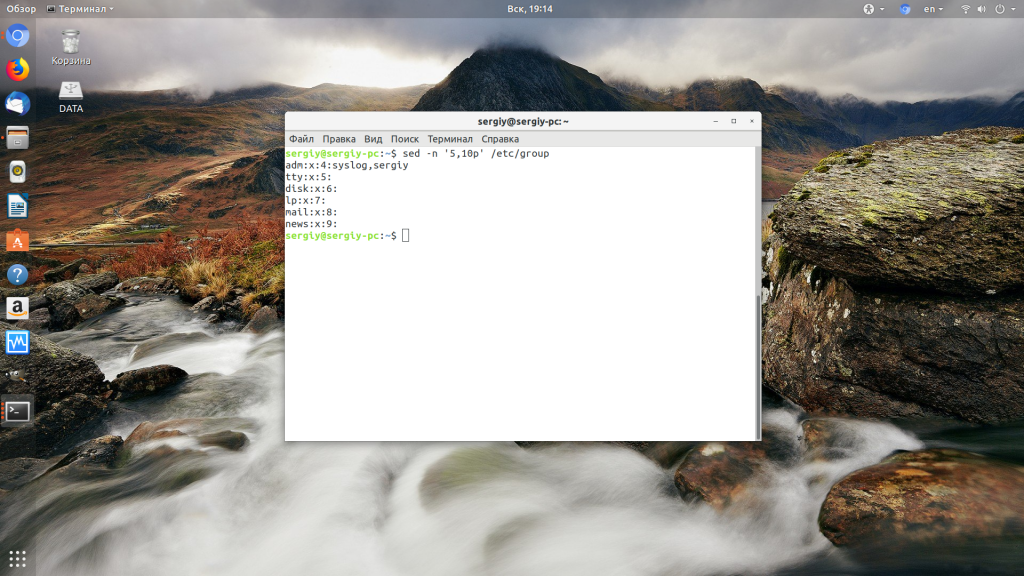
Или можно вывести весь файл, кроме строк с первой по двадцатую:
sed ‘1,20d’ /etc/group
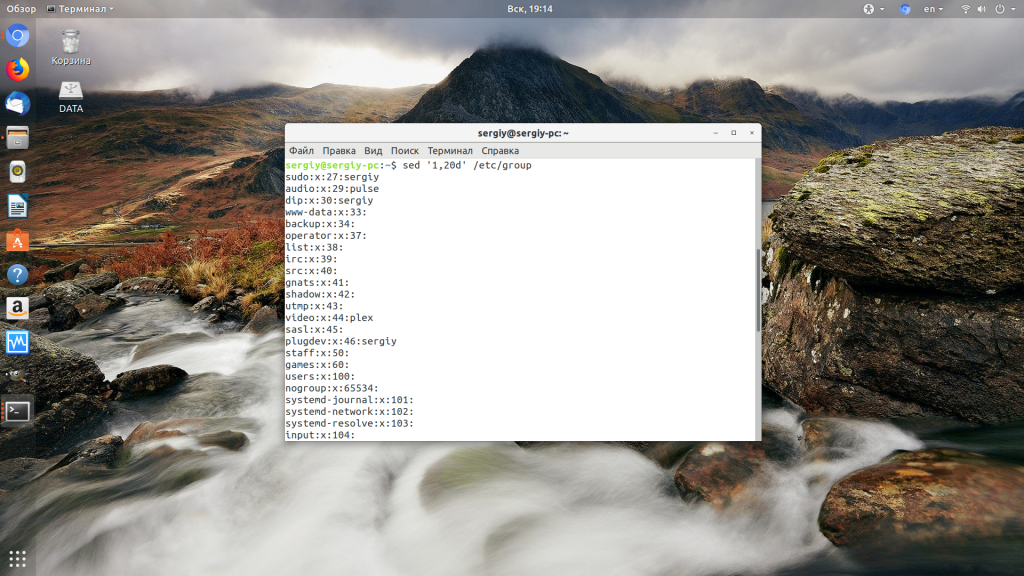
Здесь наоборот, опцию -n не указываем, чтобы выводилось всё, а с помощью команды d очищаем ненужное. Дальше рассмотрим замену в sed. Это самая частая функция, которая применяется вместе с этой утилитой. Заменим вхождения слова root на losst в том же файле и выведем всё в стандартный вывод:
sed ‘s/root/losst/g’ /etc/group
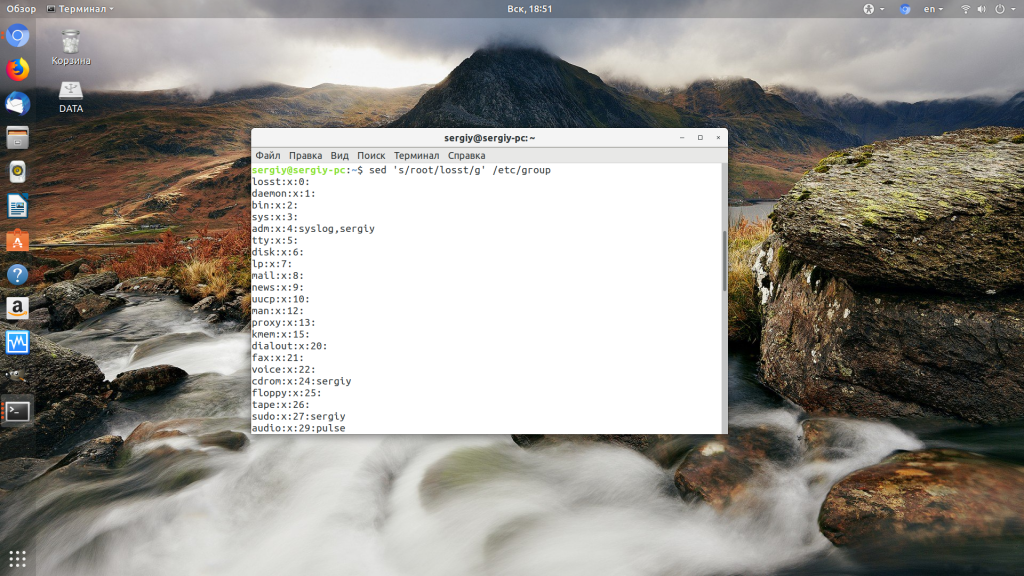
Флаг g заменяет все вхождения, также можно использовать флаг i, чтобы сделать регулярное выражение sed не зависимым от регистра. Для команд можно задавать адреса. Например, давайте выполним замену 0 на 1000, но только в строках с первой по десятую:
sed ‘1,10 s/0/1000/g’ /etc/group
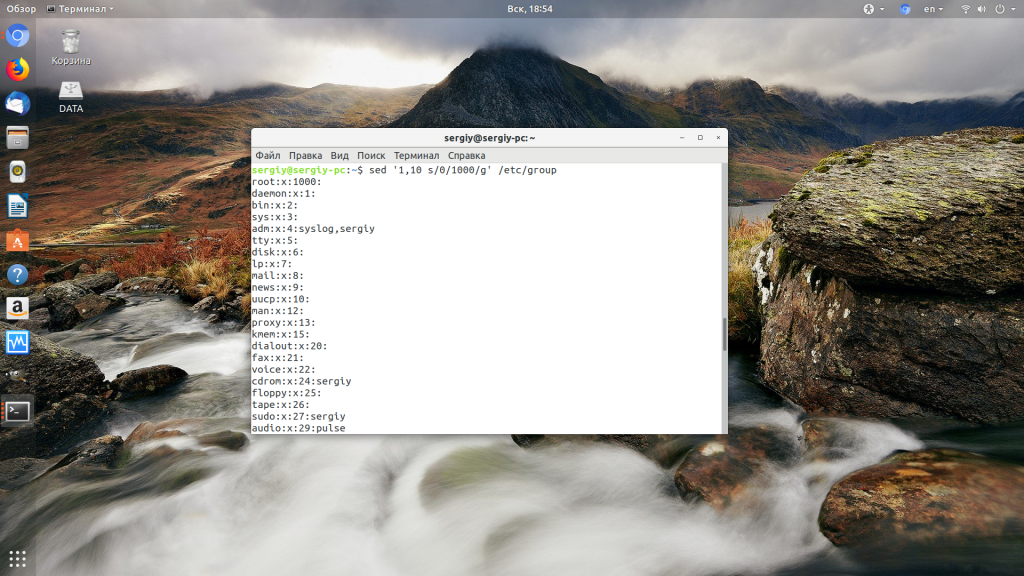
Переходим ещё ближе к регулярным выражениям, удалим все пустые строки или строки с комментариями из конфига Apache:
sed ‘/^#\|^$\| *#/d’ /etc/apache2/apache2.conf
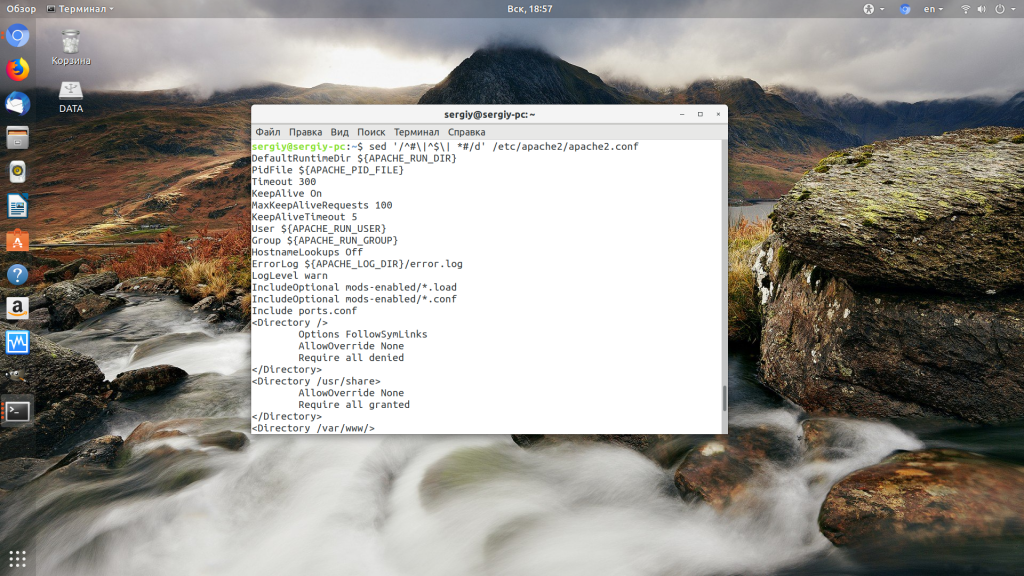
Под это регулярное выражение (адрес) подпадают все строки, которые начинаются с #, пустые, или начинаются с пробела, а за ним идет решетка. Регулярные выражения можно использовать и при замене. Например, заменим все вхождения p в начале строки на losst_p:
sed ‘s/[$p*]/losst_p/g’ /etc/group
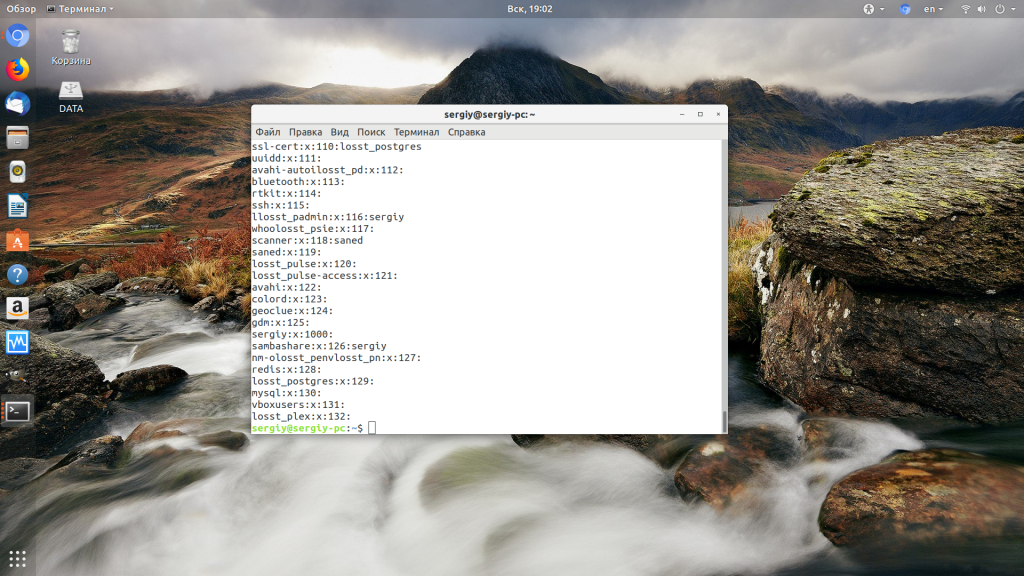
Если вам надо записать результат замены в обратно в файл можно использовать стандартный оператор перенаправления вывода > или утилиту tee. Например:
sed ‘/^#\|^$\| *#/d’ /etc/apache2/apache2.conf | sudo tee /etc/apache2/apache2.conf
Также можно использовать опцию -i, тогда утилита не будет выполнять изменения в переданном ей файле:
sudo sed -i ‘/^#\|^$\| *#/d’ /etc/apache2/apache2.conf
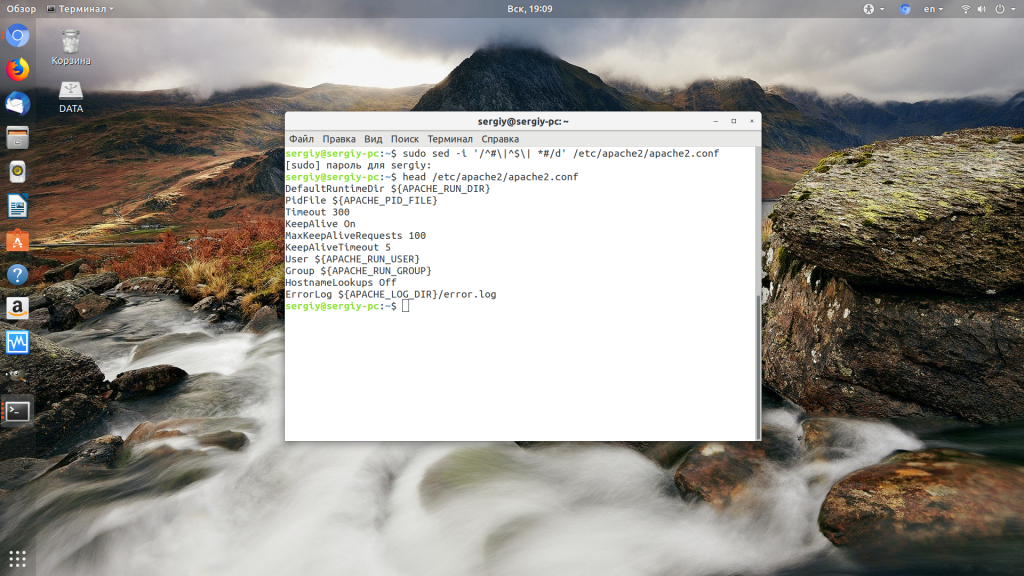
Если надо сохранить оригинальный файл, достаточно передать опции -i в параметре расширение для файла резервной копии.
Выводы
Из этой статьи вы узнали что представляет из себя команда sed Linux. Как видите, это очень гибкий инструмент, который позволяет делать с текстом очень многое. Он сложный в освоении, но с помощью него очень удобно решать многие задачи редактирования конфигурационных файлов или фильтрации вывода.
Похожие записи
Оцените статью
alt=»Creative Commons License» width=»» />
Статья распространяется под лицензией Creative Commons ShareAlike 4.0 при копировании материала ссылка на источник обязательна .
Об авторе
Основатель и администратор сайта losst.ru, увлекаюсь открытым программным обеспечением и операционной системой Linux. В качестве основной ОС сейчас использую Ubuntu. Кроме Linux, интересуюсь всем, что связано с информационными технологиями и современной наукой.
13 комментариев к “Команда sed Linux”
Да. Было время, когда и я тоже пользовался sed-ом. Причём несколько раз.
Но потом понял — мне проще и быстрее выполнять редактирование текста в обычном редакторе.
Если работа происходит в графической консоли (у меня Debian, MATE), то проще запустить текстовый редактор pluma. Если же нужно выполнить редактирование удалённого файла (в смысле на другом компе), то это проще сделать с помощью nano или mcedit (из пакета mc). На крайняк скопировать удалённый файл к себе на комп, изменить и вернуть обратно. Но использовать sed-ом — �� . смысл этого я что-то не очень понимаю. На минутчку! За последние лет 10 я его так ни разу по делу и не использовал, не было нужды прибегать именно к нему на фоне других редакторов текста.
А никто случаем не заметил диссонанса на скриншотах в статье? С одной стороны — мощный компьютер с мощным процессором и гигабайтами памяти, современной видеокартой с высоким разрешением и графический рабочий стол. А с другой — какой-то маленький потоковый редактор, которому для его работы нужно совсем ничтожное количество ресурсов компа. Которому совсем не нужна графика рабочего стола. Который, чтобы правильно запустить в работу и получить результат, которому можно верить, — нужно ещё вспомнить как это всё делается. Что мы делаем? Какой в этом смысл?
Да, sed — очень симпатичный и быстрый редактор. Я искренне извиняюсь, но я просто не вижу ему реальных применение. Разве что понастальгировать. Но это из области эмоций, а не технологий. Мир Линукса изменился сильно со времен, когда sed был актуален. Изменились инструменты. Изменился подход к решению задач.
sed — инструмент программиста, наиболее частая область применения — скрипты, используется обычно для автоматизации сложных деплойментов, предполагающих много рутины, чтобы ручками нужные файлы не редактировать, вся рутина выстраивается в сценарий, а потом скрипт просто исполняется на сервере. Желающие использовать его в командной строке, ну чо, пусть поупражняются, всё одно — польза и интеллектуальное развитие организма.
Спасибо!
Несколько далёк от этой области. Тоже программер, но пишу под микроконтроллеры и немного для компов (десктоп-программулины). Админка и вэб — не моё. Не знал, что там есть применение sed-у.
Занят в embedded разработке под arm, phytec и т.п. Частенько приходилось в загрузочных скриптах или сервисных скриптах задействовать sed для автоматического парсинга логов, конфигурационных параметров системы и т.п. Утилиту sed очень удобно применять, когда входные данные на лету требуется преобразовать к требуемому для последующей переработки виду. Где кроется гемор с регулярными выражениями, так это в случаях, когда требуется автоматическое сервисное обслуживание устройств в сети по ssh. При необходимости передачи вложенных скриптовых выражений, которые частично должны интерпретироваться как чистый текст с необходимостью использования символов экранирования, а частично как команды подстановки. У меня бывали случаи, когда использование одного экранирующего символа «\» в исходном выражении могло приводить к преобразованию его к «\\\» для передачи выражения по ssh, в отдельных случаях неявное поведение баша вообще не позволяло сделать корректное эквивалентное преобразование команд для передачи по ssh. Честно говоря, регулярные выражения мне нравятся ровно до тех пор, пока из них не требуется сформировать более менее сложную команду. Это чуть ли не единственная для шелла вещь из области «Использовал при написании в скрипте, а потом через пол-года не можешь вспомнить, что эта мешанина из спец. и экранирующих символов может значить» XD
Ага. И Вам тоже спасибо!
Я задам, возможно, глупый вопрос — а файлы, о которых Вы говорите — загрузочные скрипты, логи и так далее — они какие по размеру? Сколько строк или килобайт в среднем? Я просто не очень себе представляю.
Ну и мой глупый вопрос — а почему с этими файлами лучше работать с помощью sed, а не обрабатывать их в Perl или Python?
Я совершенно не представляю специфики, поэтому могу спросить что-то не то. Извиняйте, если что.
Ещё один пример, есть резервная копия базы данных размером в 1 Гб, надо заменить все запросы INSERT на INSERT IGNORE.
Сегодня пришлось заняться: пользователь удалил несколько писем из архива за 2019 год почты Mozilla Thunderbird. Их надо восстановить. В «Удаленные» это письма, почему-то, не попали. Фактически письма всё ещё находятся в файле 2019 размером 9 Гб.
Задача: заменить все строки X-Mozilla-Status: 0009 на X-Mozilla-Status: 0001. mcedit даже на открытии такого файла уже «присел».
И вот решение: sed -i ‘s/X-Mozilla-Status:\ 0009/X-Mozilla-Status:\ 00091/g’ 2019. Пара минут и все удалённые письма восстановлены.
Извините, ошибся: sed -i ‘s/X-Mozilla-Status:\ 0009/X-Mozilla-Status:\ 0001/g’ 2019
Вы писали:»Также можно использовать опцию -i, тогда утилита не будет выполнять изменения в переданном ей файле:
sudo sed -i ‘/^#\|^$\| *#/d’ /etc/apache2/apache2.conf»
Как раз в этом случае файл будет очищен от пустых строк. ��
Вы написали: «Также можно использовать опцию -i, тогда утилита не будет выполнять изменения в переданном ей файле:
sudo sed -i ‘/^#\|^$\| *#/d’ /etc/apache2/apache2.conf».
Эта команда, как раз, изменит содержание файла.
В статье достаточно много неточностей это и
-i[SUFFIX]
—in-place[=SUFFIX]
и
-l N
—line-length=N
(длинна первой команды) и тд
(не люблю писать ртфм но https://www.gnu.org/software/sed/manual/ )
sed — полноценный язык , наверное , я мощнее ( для текста ) не встречал ( ну перл, конечно )
> sed ‘/^#\|^$\| *#/d’ /etc/apache2/apache2.conf | sudo tee /etc/apache2/apache2.conf
Такой командой вы можете получить неиллюзорные проблемы вплоть до потери содержимого файла. Нельзя читать и писать в один и тот же файл в пределах одного пайпа. Есть несколько обходных путей: с помощью опции самого sed, временного файла или sponge.
Что такое sed linux
Уж я и не знаю, зачем вы это всё читаете, зато прекрасно знаю, для кого это написано: для тех, кому понадобилось научится применять одну из многих UNIX-Way утилит — GNUsed.
Вообще говоря, sed появилась более 30 лет назад, потому споры о том, что это чисто «линуксоидная» фишка, бессмысленны: существуют версии sed для MS-DOS, Windows, MacOS, да и наверное для всех систем где понятие текст имеет хоть какой-то смысл.
Что такое sed? Это (как вам уже наверняка известно) потоковый текстовый редактор . Текст поступает на обработку не в виде файла как обычно, а в виде потока . По этой причине, sed даже более универсальна, чем все остальные редакторы. Утилита sed может работать без участия оператора, без возможности вывода текста, на системах где вывод файлов вообще не возможен, и даже там, где не существует самих файлов! Достаточно всего-лишь потоков, а уж они есть практически везде.
Основные понятия.
Программы должны уметь обмениваться информацией. Это аксиома. Если программы этого не умеют, это не программы, а набор разбухших монстров, которые еле ворочаются на самых современных компьютерах. Примеры всем известны. Проблема только в том, что для обмена нужно выработать правила взаимодействия, в основном, в каком виде обмениваться? Много лет назад, ещё во времена UNIX, было решено обмениваться исключительно текстовой информацией, и появилось соглашение, что считать текстом, а что — нет. Конечно, многие программы используют какие-то особые, специальные форматы, однако, обмениваться ими в общем случае невозможно (если конечно нет подходящего конвертера спец-формат<->текст). Соглашения следующие:
- Текст — это упорядоченный набор строк . Строк может быть любое количество, в том числе их может не быть вовсе.
- Строка — это упорядоченный набор символов . Каждая строка заканчивается особым символом ‘\n’.
- Символ — это минимальный неделимый элемент текста.
- Алфавитом называется список всех допустимых символов в тексте.
Особый случай — это «чистый текст(plain-text)», алфавит в нём состоит из байтов 32. 127, 10, и 9.
Если пользователь, а тем более программист не согласен с этими соглашениями, то у него возникают проблемы.
Замечание
Примеров — масса: я сам, помнится, расстраивался, что у меня «не работает» планировщик — я дописал к его таблице свою строчку, однако планировщик меня тупо игнорировал. Всё просто, не было никакой строчки, была фигня непонятная! Я нарушил пункт 2 — не добавил в конец строки ‘\n’. Хотя это скорее беда моего редактора, просил-ведь: «сохрани как текст «, а он.
Замечание
Особо отмечу проблемы с текстами в UTF-8. В них символы могут быть в несколько байтов, но это ещё не самое страшное (нас это обычно не сильно волнует, это проблема разработчиков sed, мы можем заметить разве-что сильное уменьшение быстродействия). Самое противное — в «тексте» могут появляться несимволы , что приводит к совершенно неожиданным результатам.
История(программа ed).
Первую свою программу я написал лет 20 назад. Однако историю я знаю ещё глубже — дело в том, что в то время (впрочем как и сейчас) новейший супер-компьютер мне никто не дал, пришлось мучиться на довольно старой технике. Именно по этому я и знаю, какими были тогда текстовые редакторы.
Замечание
Основная (для меня) прелесть Linux заключается в том, что мы можем всё сразу попробовать. Достаточно открыть второе окно (вторую консоль для некромантов), и там набирать команды. ИМХО, если у вас хорошо развита моторная память, вам лучше команды именно набирать , тем-же, у кого более развита зрительная — можно копировать мышкой (кстати, я именно так и делаю).
Внимание
Раз уж зашла речь о программах, давайте напишем программу на C.
Пример 1.1. Программа test.c.
Что делает эта программа не столь важно (если вам интересно — то всё что она сделает будучи скомпилированной — выведет на экран фразу «тестовый файл» и завершит работу), нам интересна эта программа всего-лишь как образец текста. Попробуем отредактировать эту программу так, как это делал я более 20 лет назад:
программа ed написала 90 и что-то ждёт. Ну 90 — это размер файла для редактирования, а ждёт наш редактор команды. Первое что хочется сделать — просмотреть файл. Для этого существует команда p , которая выведет нужные нам строки. Какие именно? Это нужно указать явно, по умолчанию будет выведена только последняя строка, записав 1,$p мы выведем все строки нашего файла. Тут 1,$ означает диапазон строк, от первой строки, и до последней (последняя строка обозначается $ ). Это выражение называется адресным , либо просто — адресом, так-как оно определяет, к каким именно строкам будет применена данная команда.
Замечание
Теперь отредактируем наш файл, к примеру заменим «return 0;», на «return 77;». Как всегда, для этого существует множество путей, наверное самый простой, это заново набрать всю строчку. Команда замены строчек у нас есть, называется она c ; однако, нужно ещё и указать, к чему-же её применить (к какой именно строке). Проще всего указать номер этой строки, но его тоже надо узнать (хотя можно и посчитать, но это не наш метод), наберём 1,$n :
Эта команда сработала так-же как p , только перед каждой строкой вывелся её номер, и теперь ясно, что нам нужно изменить восьмую строчку. Для этого наберём 8c , и теперь наберём строчку по новой, нажмём ENTER и CTRL+C. Просмотрев файл, мы убедимся, что замена выполнена.
Согласитесь, неудобно. Однако, в те далёкие семидесятые годы прошлого века ничего другого придумать было нельзя, текст на экране терминала безвозвратно уползал вверх, и мы видели только последние 24 строки (в 25й вводилась команда). Навигация по тексту как в современных редакторах была невозможна, потому пришлось придумать другие методы. Впрочем тут и придумывать ничего не надо: просто нужно заменить в строке 8 число 0 на число 77 . Для этого (кто-бы мог подумать) имеется команда замены. Я долго не понимал, почему эта команда называется s , а не более логично, например replace . Точно это мне неизвестно до сих пор, но думается, что главное в этой команде вовсе не замена, а поиск ( s earch), нам сначала надо найти число 0, и уж затем, если найдём конечно, его заменить. Записывается это просто: 8s/0/77/ , т.е. «в восьмой строке нужно заменить 0 на 77».
Замечание
Но на практике и это неудобно — проще было-бы не нам смотреть номер строки с «return», а заставить это сделать компьютер. И конечно это ещё тогда было реализовано: в качестве адреса можно задать не только номер, но и саму строку, или даже часть строки, наберём к примеру /ret/n :
Как видите, ed самостоятельно находит строку с /ret/ , и выполняет для неё заданную команду.
Замечание
Где применяется sed.
Редактор ed конечно не самая удобная штука, но на оборудовании 70х ничего лучше придумать было нельзя. К счастью, прогресс не стоит на месте, и с развитием железа развивались и программы для него, в частности текстовые редакторы. Все вы прекрасно знаете, во что превратились сегодня текстовые редакторы — достаточно сказать, что даже самые опытные пользователи попросту не знают 80% возможностей своего любимого редактора! Однако, была и другая ветка развития текстовых редакторов: во многих случаях нет нужды каждый раз писать новые файлы с нуля, часто нужно просто исправлять какой-либо файл по известному алгоритму, это действие конечно можно произвести обычным редактором, но на самом деле, присутствие юзера тут не только не необходимо, но даже вредно! Юзерам свойственно постоянно ошибаться, всё путать да и вообще — юзер, ленивое и капризное существо: если ему было сказано: «сотри в файле %WINDOWS%\sysok.ini все слова hide», а юзер стёр не все, не hide, да и вообще не то(хорошо, если слова в файлах стирал, а не сами файлы), то этот самый юзер будет обвинять меня, вас, глючный компьютер, кривую программу, карму, да что угодно, но только не свою криворукость.
Имеется ещё 1000 и 7 разных применений, где участие юзера нужно если не исключить, то хотя-бы сильно ограничить: например огромный класс задач про безопасность, ну сколько раз можно повторять: «Читай логи. «, дык пробовал, «ниасилил — многабукв». Правильно, что-бы юзер увидел опасность необходимо отфильтровать весь «мусор», компьютеру всё равно, он железный: было 10482 атаки на закрытую уязвимость, и одна успешная на открытую — в логе будет 10483 строки (в лучшем случае), и даже если юзер — терпеливая и прилежная блондинка, то даже тогда, она скорее сломает PageDown (сотрёт колесо мыши), прежде чем найдёт нужную строчку.
Ну по поводу фильтров можно возразить: дескать в том-же ed можно набрать g/re/p , что приведёт к фильтрации только нужных строк. Та-же функциональность присутствует во всех остальных текстовых редакторах (включая notepad), мало того, для этого и редактор не нужен, можно прямо в консоли набрать grep (ну вы поняли, почему эта команда так названа). Всё это так, но для фильтрации этого зачастую мало, лично мне по любому не осилить ни 10483 не фильтрованные, ни 2174 фильтрованные строки: до того, как я научился использовать sed, мне приходилось составлять зубодробительные конвейеры, а потом всё равно юзать less|PageDown|search, в разных комбинациях. Это не очень сложно, но отнимает массу времени.
В фильтрации, да и не только в ней, часто нужно реализовать очень простой алгоритм, который почему-то не реализован в различных имеющихся утилитах. Писать для этого программу на C лениво да и не быстро. Для таких случаев придуманы скриптовые языки программирования(ЯП), например bash, perl, awk, php, и многие другие. Все они имеют два недостатка:
- Они универсальные, а значит тянут за собой множество ненужного функционала. Конечно, это удобно для кодера, но вот пользователю это совсем не нужно. Ему надо просто решение, а не «самый крутой ЯП».
- Все эти ЯП жутко медленные, что связано и с п1, и с тем, что каждую команду нужно множество раз «парсить». Вот например bash’евское Ага. На 10000 строк! Это-ж каждый раз надо прочитать из файла слово «echo», разобраться что оно значит, а потом найти нужную $VARIABLE. Такой скрипт будет выполнятся в сотни раз дольше чем сам вывод!
Таким образом, нам необходим особый ЯП, который лишён этих недостатков. Таким языком как раз и является sed.
С такими задачами справятся доступные утилиты, если нам нужно просто скопировать информацию, или скопировать несколько файлов в один, нам нужна cat , для резки файлов подойдёт split и cut , для поиска подстрок сгодится grep , и так далее.
Задачи, для которых не хватает инструментов из п1
А вот тут-то и пригодится sed.
Ещё более сложные задачи.
Если мощности sed не хватает, придётся писать собственный анализатор текста. При этом не стоит забывать про sed — можно сэкономить огромное количество времени (как своего, так и процессорного), если прогнать входные и/или выходные данные через sed-фильтр(ы).
Подсказка
- Использовать sed как входной фильтр. К примеру можно не просто посмотреть текст командой less , а посмотреть уже фильтрованный текст.
- Вы можете вызвать другую утилиту внутри sed. Это очень мощный, и потому опасный приём. Далее приведены множество примеров с использованием этой возможности.
- Вы можете выполнить sed внутри своего приложения. Впрочем, мне не кажется, что это — хорошая идея.
- И наконец, вы можете вообще отказаться от sed. Однако, я думаю, очень многие материалы этой книги будут вам полезны, во первых вы сможете быстро и просто протестировать регулярное выражение с помощью sed, а во вторых, речь у меня идёт именно о встроенных в GNU Linux выражениях, а не о каких-то других, которых у вас может и не оказаться под рукой. Вот пример использования регулярных выражений в языке Си (Правда там обсуждается проблема с UTF, но пример как раз и приведён здесь потому, что это проблема касается не только sed, но и всех остальных ЯП).
Недоступные для решения на компьютере задачи.
Да, есть и такие. Что-ж, вот тут-то и пригодятся обычные редакторы, например этот текст я набирал в kate . Однако, многие части у меня уже были готовые, потому я их прямо суда вставил, прогнав через sed конечно.
Вы можете обсудить этот документ на форуме. Текст предоставляется по лицензии GNU Free Documentation License (Перевод лицензии GFDL).
Вы можете пожертвовать небольшую сумму яндекс-денег на счёт 41001666004238 для оплаты хостинга, интернета, и прочего. Это конечно добровольно, однако это намного улучшит данный документ (у меня будет больше времени для его улучшения). На самом деле, проект часто находится на грани закрытия, ибо никаких денег никогда не приносил, и приносить не будет. Вы можете мне помочь. Спасибо.
Linux sed command
On Unix-like operating systems, sed is a stream editor: it filters and transforms text.
This page covers the GNU/Linux version of sed.
Description
The sed stream editor performs basic text transformations on an input stream (a file, or input from a pipeline). While in some ways similar to an editor which permits scripted edits (such as ed), sed works by making only one pass over the input(s), and is consequently more efficient. But it is sed's ability to filter text in a pipeline which particularly distinguishes it from other types of editors.
Syntax
If you do not specify INPUTFILE, or if INPUTFILE is "—", sed filters the contents of the standard input. The script is actually the first non-option parameter, which sed specially considers a script and not an input file if and only if none of the other options specifies a script to be executed (that is, if neither of the -e and -f options is specified).
Options
| -n, —quiet, —silent | Suppress automatic printing of pattern space. |
| -e script, —expression=script |
Add the script script to the commands to be executed. |
| -f script-file, —file=script-file |
Add the contents of script-file to the commands to be executed. |
| —follow-symlinks | Follow symlinks when processing in place. |
| -i[SUFFIX], —in-place[=SUFFIX] |
Edit files in place (this makes a backup with file extension SUFFIX, if SUFFIX is supplied). |
| -l N, —line-length=N | Specify the desired line-wrap length, N, for the "l" command. |
| —POSIX | Disable all GNU extensions. |
| -r, —regexp-extended | Use extended regular expressions in the script. |
| -s, —separate | Consider files as separate rather than as a single continuous long stream. |
| -u, —unbuffered | Load minimal amounts of data from the input files and flush the output buffers more often. |
| —help | Display a help message, and exit. |
| —version | Output version information, and exit. |
Sed programs
A sed program consists of one or more sed commands, passed in by one or more of the -e, -f, —expression, and —file options, or the first non-option argument if none of these options are used. This documentation frequently refers to "the" sed script; this should be understood to mean the in-order catenation of all of the scripts and script-files passed in.
Commands within a script or script-file can be separated by semicolons (";") or newlines (ASCII code 10). Some commands, due to their syntax, cannot be followed by semicolons working as command separators and thus should be terminated with newlines or be placed at the end of a script or script-file. Commands can also be preceded with optional non-significant whitespace characters.
Each sed command consists of an optional address or address range (for instance, line numbers specifying what part of the file to operate on; see selecting lines for details), followed by a one-character command name and any additional command-specific code.
How sed works
sed maintains two data buffers: the active pattern space, and the auxiliary hold space. Both are initially empty.
sed operates by performing the following cycle on each line of input: first, sed reads one line from the input stream, removes any trailing newline, and places it in the pattern space. Then commands are executed; each command can have an address associated to it: addresses are a kind of condition code, and a command is only executed if the condition is verified before the command is to be executed.
When the end of the script is reached, unless the -n option is in use, the contents of pattern space are printed out to the output stream, adding back the trailing newline if it was removed. Then the next cycle starts for the next input line.
Unless special commands (like ‘D’) are used, the pattern space is deleted between two cycles. The hold space, on the other hand, keeps its data between cycles (see commands ‘h’, ‘H’, ‘x’, ‘g’, ‘G’ to move data between both buffers).
Selecting lines with sed
Addresses in a sed script can be in any of the following forms:
2; to pick every third line starting with the second, ‘2
3’ would be used; to pick every fifth line starting with the tenth, use ‘10
If no addresses are given, then all lines are matched; if one address is given, then only lines matching that address are matched.
An address range can be specified by specifying two addresses separated by a comma (","). An address range matches lines starting from where the first address matches, and continues until the second address matches (inclusively).
If the second address is a regexp, then checking for the ending match starts with the line following the line which matched the first address: a range always spans at least two lines (except of course if the input stream ends).
If the second address is a number less than (or equal to) the line matching the first address, then only the one line is matched.
GNU sed also supports some special two-address forms; all these are GNU extensions:
Appending the ! character to the end of an address specification negates the sense of the match. That is, if the ! character follows an address range, then only lines which do not match the address range will be selected. This also works for singleton addresses, and, perhaps perversely, for the null address.
Overview of regular expression syntax
To know how to use sed, understand regular expressions ("regexp" for short). A regular expression is a pattern that is matched against a subject string from left to right. Most characters are ordinary: they stand for themselves in a pattern, and match the corresponding characters in the subject. As a simple example, the pattern
. matches a portion of a subject string that is identical to itself. The power of regular expressions comes from the ability to include alternatives and repetitions in the pattern. These are encoded in the pattern by the use of special characters, which do not stand for themselves but instead are interpreted in some special way. Here is a brief description of regular expression syntax as used in sed:
- Apply postfix operators, like \(abcd\)*: this searches for zero or more whole sequences of ‘abcd’, while abcd* would search for ‘abc’ followed by zero or more occurrences of ‘d’. Note that support for \(abcd\)* is required by POSIX 1003.1-2001, but many non-GNU implementations do not support it and hence it is not universally portable.
- Use back references (see below).
In most scripts, pattern space is initialized to the content of each line. So, it is a useful simplification to think of ^#include as matching only lines where ‘#include’ is the first thing on line—if there are spaces before, for example, the match fails. This simplification is valid as long as the original content of pattern space is not modified, for example with an s command.
A leading ^ reverses the meaning of list, so that it matches any single character not in list. To include ] in the list, make it the first character (after the ^ if needed); to include — in the list, make it the first or last; to include ^ put it after the first character.
Note that the regular expression matcher is greedy, i.e., matches are attempted from left to right and, if two or more matches are possible starting at the same character, it selects the longest.
| abcdef | Matches "abcdef". |
| a*b | Matches zero or more "a" characters, followed by a single "b". For example, "b" or "aaaaaaab". |
| a\?b | Matches "b" or "ab". |
| a\+b\+ | Matches one or more "a" characters followed by one or more "b"s. "ab" is the shortest possible match, but other examples are "aaaaab", "abbbbbb", or "aaaaaabbbbbbb". |
| .* or .\+ | Either of these expressions will match all of the characters in a non-empty string, but only .* will match the empty string. |
| ^main.*(.*) | This matches a string starting with "main", followed by an opening and closing parenthesis. The "n", "(" and ")" need not be adjacent. |
| ^# | This matches a string beginning with "#". |
| \\$ | This matches a string ending with a single backslash. The regexp contains two backslashes for escaping. |
| \$ | This matches a string consisting of a single dollar sign. |
| [a-zA-Z0-9] | In the C locale, this matches any ASCII letters or digits. |
| [^ tab]\+ | (Here tab stands for a single tab character.) This matches a string of one or more characters that does not contain a space or a tab. Usually this means a word. |
| ^\(.*\)\n\1$ | This matches a string consisting of two equal substrings separated by a newline. |
| .\<9\>A$ | This matches nine characters followed by an ‘A’. |
| ^.\<15\>A | This matches the start of a string that contains 16 characters with the last character of being ‘A’. |
Often-used commands
If you use sed at all, you will probably want to know these commands.
If you are concerned about portability, be aware that some implementations of sed (which are not POSIX conformant) may only support a single one-line comment, and then only when the very first character of the script is a #.
The s command
The syntax of the s command (which stands for "substitute") is: ‘s/regexp/replacement/flags’. The / characters may be uniformly replaced by any other single character within any given s command. The / character (or whatever other character is used in its stead) can appear in the regexp or replacement only if it's preceded by a \ character.
The s command is probably the most important in sed and has a lot of different options. Its basic concept is simple: the s command attempts to match the pattern space against the supplied regexp; if the match is successful, then that portion of the pattern space which was matched is replaced with replacement.
The replacement can contain \n (n being a number from 1 to 9, inclusive) references, which refer to the portion of the match that is contained between the nth \( and its matching \). Also, the replacement can contain unescaped & characters which reference the whole matched portion of the pattern space. Finally, as a GNU sed extension, you can include a special sequence made of a backslash and one of the letters L, l, U, u, or E. The meaning is as follows:
| \L | Turn the replacement to lowercase until a \U or \E is found |
| \l | Turn the next character to lowercase |
| \U | Turn the replacement to uppercase until a \L or \E is found |
| \u | Turn the next character to uppercase |
| \E | Stop case conversion started by \L or \U |
To include a literal \, &, or newline in the final replacement, precede the desired \, &, or newline in the replacement with a \.
The s command can be followed by zero or more of the following flags:
Less frequently-used commands
Though perhaps less frequently used than those in the previous section, some very small yet useful sed scripts can be built with these commands.
Transliterate any characters in the pattern space which match any of the source-chars with the corresponding character in dest-chars.
Queue the lines of text which follow this command (each but the last ending with a \, which are removed from the output) to be output at the end of the current cycle, or when the next input line is read.
Escape sequences in text are processed, so use \\ in text to print a single backslash.
Queue the contents of file name to be read and inserted into the output stream at the end of the current cycle, or when the next input line is read. Note that if file name cannot be read, it is treated as if it were an empty file, without any error indication.
Commands for sed gurus
In most cases, use of these commands indicates that you are probably better off programming in something like awk or Perl. But occasionally one is committed to sticking with sed, and these commands can enable one to write quite convoluted scripts.
| : label | [No addresses allowed with this command.] Specify the location of label for branch commands. In all other respects, a no-op (no operation performed). |
| b label | Unconditionally branch to label. The label may be omitted, in which case the next cycle is started. |
| t label | Branch to label only if there was a successful substitution since the last input line was read or conditional branch was taken. The label may be omitted, in which case the next cycle is started. |
Commands specific to GNU sed
These commands are specific to GNU sed, so you must use them with care and only when you are sure that the script doesn't need to be ported. They allow you to check for GNU sed extensions or do tasks that are required quite often, yet are unsupported by standard seds.
If a parameter is specified, instead, the e command interprets it as a command and sends its output to the output stream (like r does). The command can run across multiple lines, all but the last ending with a back-slash.
This command is the same as q, but will not print the contents of pattern space. Like q, it provides the ability to return an exit code to the caller.
This command can be useful because the only alternative ways to accomplish this apparently trivial function are to use the -n option (which can unnecessarily complicate your script) or resorting to the following snippet, which wastes time by reading the whole file without any visible effect:
:eat #Quit silently on the last line: $d #Read another line, silently: N #Overwrite pattern space each time to save memory: g b eat.
GNU extensions for escapes in regular expressions
Until now (on this page, anyway), we have only encountered escapes of the form ‘\^’, for example, which tell sed not to interpret the circumflex (caret) as a special character, but rather to take it literally. For another example, ‘\*’ matches a single asterisk rather than zero or more backslashes.
This section introduces another kind of escape—that is, escapes that are applied to a character or sequence of characters that ordinarily are taken literally, and that sed replaces with a special character. This provides a way of encoding non-printable characters in patterns in a visible manner. There is no restriction on the appearance of non-printing characters in a sed script, but when a script is being prepared in the shell or by text editing, it is usually easier to use one of the following escape sequences than the binary character it represents:
| \a | Produces or matches a bel character, that is an "alert" (ASCII 7). |
| \f | Produces or matches a form feed (ASCII 12). |
| \n | Produces or matches a newline (ASCII 10). |
| \r | Produces or matches a carriage return (ASCII 13). |
| \t | Produces or matches a horizontal tab (ASCII 9). |
| \v | Produces or matches a so called "vertical tab" (ASCII 11). |
| \cx | Produces or matches Control-x, where x is any character. The precise effect of ‘\cx’ is as follows: if x is a lowercase letter, it is converted to uppercase. Then bit 6 of the character (hex 40) is inverted. Thus ‘\cz’ becomes hex 1A, but ‘\c<’ becomes hex 3B, while ‘\c;’ becomes hex 7B. |
| \dxxx | Produces or matches a character whose decimal ASCII value is xxx. |
| \oxxx | Produces or matches a character whose octal ASCII value is xxx. |
| \xxx | Produces or matches a character whose hexadecimal ASCII value is xx. |
‘\b’ (backspace) was omitted because of the conflict with the existing "word boundary" meaning.
Other escapes match a particular character class and are valid only in regular expressions:
| \w | Matches any "word" character. A "word" character is any letter or digit or the underscore character. |
| \W | Matches any "non-word" character. |
| \b | Matches a word boundary; that is, it matches if the character to the left is a "word" character and the character to the right is a "non-word" character, or vice versa. |
| \B | Matches everywhere but on a word boundary; that is it matches if the character to the left and the character to the right are either both "word" characters or both "non-word" characters. |
| \` | Matches only at the start of pattern space. This option is different from ^ in multi-line mode. |
| \' | Matches only at the end of pattern space. This option is different from $ in multi-line mode. |
Sample scripts
Here are some sed scripts to guide you in the art of mastering sed.
Sample script: centering lines
This script centers all lines of a file on 80 columns width. To change that width, the number in \<. \> must be replaced, and the number of added spaces also must be changed.
Note how the buffer commands are used to separate parts in the regular expressions to be matched, which is a common technique.
Sample script: increment a number
This script is one of a few that demonstrate how to do arithmetic in sed. This script is indeed possible, but must be done manually.
To increment one number you add 1 to last digit, replacing it by the following digit. There is one exception: when the digit is a nine the previous digits must be also incremented until you don't have a nine.
This solution is very clever and smart because it uses a single buffer; if you don't have this limitation, the algorithm used in Numbering Lines is faster. It works by replacing trailing nines with an underscore, then using multiple s commands to increment the last digit, and then again substituting underscores with zeros.
Sample script: rename files to lowercase
This script is a pretty strange use of sed. We transform text, and transform it to be shell commands, then feed them to shell. Don't worry, even worse hacks are done when using sed. Scripts have even been written converting the output of date into a bc program. So, stranger things have happened.
The main body of this is the sed script, which remaps the name from lower to upper (or vice versa) and even checks out if the remapped name is the same as the original name. Note how the script is parameterized using shell variables and proper quoting.
Sample script: print bash environment
This script strips the definition of the shell functions from the output of the set command in the Bourne-Again shell (bash).
Sample script: reverse characters of lines
This script can reverse the position of characters in lines. The technique moves two characters at a time, hence it is faster than more intuitive implementations.
Note the tx command before the definition of the label. This command is often needed to reset the flag that is tested by the t command.
Sample script: reverse lines of files
This one begins a series of totally useless (yet interesting) scripts emulating various Unix commands. This, in particular, is a tac workalike.
Note that on implementations other than GNU sed this script might easily overflow internal buffers.
Sample script: numbering lines
This script replaces ‘cat -n’; in fact it formats its output exactly like GNU cat does.
Of course this is completely useless for two reasons: first, because somebody else did it in C (the cat command), and second, because the following Bourne-shell script could be used for the same purpose and would be much faster:
It uses sed to print the line number, then groups lines two by two using N. Of course, this script does not teach as much as the one presented below.
The algorithm used for incrementing uses both buffers, so the line is printed as soon as possible and then discarded. The number is split so that changing digits go in a buffer and unchanged ones go in the other; the changed digits are modified in a single step (using a y command). The line number for the next line is then composed and stored in the hold space, to be used in the next iteration.
Sample script: numbering non-blank lines
Emulating ‘cat -b’ is almost the same as ‘cat -n’: we only have to select which lines are to be numbered and which are not.
The part that is common to this script and the previous one is not commented to show how important it is to comment sed scripts properly.
Sample script: counting characters
This script shows another way to do arithmetic with sed. In this case, we have to add possibly large numbers, so implementing this by successive increments would not be feasible (and possibly even more complicated to contrive than this script).
The approach is to map numbers to letters, kind of an abacus implemented with sed. ‘a's are units, ‘b's are tens and so on: we add the number of characters on the current line as units, and then propagate the carry to tens, hundreds, and so on.
As usual, running totals are kept in hold space.
On the last line, we convert the abacus form back to decimal. For the sake of variety, this is done with a loop rather than with some 80 s commands: first we convert units, removing ‘a's from the number; then we rotate letters so that tens become ‘a's, and so on until no more letters remain.
Sample script: counting words
This script is almost the same as the previous one, once each of the words on the line is converted to a single ‘a’ (in the previous script each letter was changed to an ‘a’).
It is interesting that real wc programs have optimized loops for ‘wc -c’, so they are much slower at counting words rather than characters. This script's bottleneck, instead, is arithmetic, and hence the word-counting one is faster (it has to manage smaller numbers).
Again, the common parts are not commented to show the importance of commenting sed scripts.
Sample script: counting lines
Sed gives us ‘wc -l’ functionality for free. Here is the code:
Sample script: printing the first lines
This script is probably the simplest useful sed script. It displays the first 10 lines of input; the number of displayed lines is right before the q command.
Sample script: printing the last lines
Printing the last n lines rather than the first is more complex but indeed possible. The n is encoded in the second line, before the bang ("!") character.
This script is similar to the tac script (above) in that it keeps the final output in the hold space and prints it at the end:
Mainly, the scripts keeps a window of 10 lines and slides it by adding a line and deleting the oldest (the substitution command on the second line works like a D command but does not restart the loop).
The "sliding window" technique is a very powerful way to write efficient and complex sed scripts, because commands like P would require a lot of work if implemented manually.
To introduce the technique, which is fully demonstrated in the rest of this chapter and is based on the N, P and D commands, here is an implementation of tail using a simple "sliding window."
This looks complicated but in fact the working concept is the same as the last script: after we have kicked in the appropriate number of lines, however, we stop using the hold space to keep inter-line state, and instead use N and D to slide pattern space by one line:
Note how the first, second and fourth line are inactive after the first ten lines of input. After that, all the script does is: exiting on the last line of input, appending the next input line to pattern space, and removing the first line.
Sample script: make duplicate lines unique
This script is an example of the art of using the N, P and D commands, probably the most difficult to master.
As you can see, we maintain a 2-line window using P and D. This technique is often used in advanced sed scripts.
Sample script: print duplicated lines of input
This script prints only duplicated lines, like ‘uniq -d’.
Sample script: remove all duplicated lines
This script prints only unique lines, like ‘uniq -u’.
Sample script: squeezing blank lines
As a final example, here are three scripts, of increasing complexity and speed, that implement the same function as ‘cat -s’, that is squeezing blank lines.
The first leaves a blank line at the beginning and end if there are some already.
This one is a bit more complex and removes all empty lines at the beginning. It does leave a single blank line at end if one was there.
This removes leading and trailing blank lines. It is also the fastest. Note that loops are completely done with n and b, without relying on sed to restart the script automatically at the end of a line.
GNU sed's limitations (and non-limitations)
For those who want to write portable sed scripts, be aware that some implementations are known to limit line lengths (for the pattern and hold spaces) to be no more than 4000 bytes. The POSIX standard specifies that conforming sed implementations shall support at least 8192 byte line lengths. GNU sed has no built-in limit on line length; as long as it can allocate more (virtual) memory, you can feed or construct lines as long as you like.
However, recursion is used to handle subpatterns and indefinite repetition. This indicates the available stack space may limit the size of the buffer that can be processed by certain patterns.
Extended regular expressions
The only difference between basic and extended regular expressions is in the behavior of a few characters: ‘?’, ‘+’, parentheses, and braces (‘<>’). While basic regular expressions require these to be escaped if you want them to behave as special characters, when using extended regular expressions you must escape them if you want them to match a literal character.
| abc? | Becomes ‘abc\?’ when using extended regular expressions. It matches the literal string ‘abc?’. |
| c\+ | Becomes ‘c+’ when using extended regular expressions. It matches one or more ‘c's. |
| a\ | Becomes ‘a ’ when using extended regular expressions. It matches three or more ‘a's. |
| \(abc\)\ | Becomes ‘(abc) ’ when using extended regular expressions. It matches either ‘abcabc’ or ‘abcabcabc’. |
| \(abc*\)\1 | Becomes ‘(abc*)\1’ when using extended regular expressions. Backreferences must still be escaped when using extended regular expressions. |
Examples
Double-spaces the contents of file myfile.txt, and writes the output to the file newfile.txt.
Prefixes each line of myfile.txt with a line number, a period, and a space, and displays the output.
Searches for the word "test" in myfile.txt and replaces every occurrence with the word "example".
Counts the number of lines in myfile.txt and displays the results.
Related commands
awk — Interpreter for the AWK text processing programming language.
ed — A simple text editor.
grep — Filter text which matches a regular expression.
replace — A string-replacement utility.
What is SED?
Sed is stream editor and ultimate editor (non-interactive text editor)for modifying files automatically. Commonly used in the Linux/Unix based system. Sed inputs in the form of a stream and update the stream or input depends on the instructions.
Many System developers or admins use this commands on daily basis to update or replace text or filter from the strings or files.
How to use?
I will use the given file reference to explain the commands:
the above command will create file “exp.txt” which has content CAT_1 . to CAT_5 separated by lines.
Delimiter IN SED:
Most of the people know that only ‘/’ slash is a delimiter this is a myth you can use like “|”, “,”, “_”, “:” etc.
so all above command yields the same result.
How to print line no using sed:
Using “=” we can print line and line no:
Print file using SED:
Example: Print from line no1 to 5.
By default, each line of input is printed to the standard output, after all of the commands have been applied to it to suppress this behavior we have -n
Print Non-consecutive lines:
How to print non-consecutive lines like print from line 1to3 and 5.
Here we have used -e flag basically means append the editing commands specified by the command argument to the list of commands.
it’s similar to execute multiple sed commands same as below.
Delete Lines and Print:
How to delete or remove some of the lines and print rest all the lines.
so above command delete 3rd line and print all the lines.
Inserting spaces in files:
Using “G” we can insert an empty line with every non-empty line present in the file.
you can also do sed ‘G; G’ exp.txt to insert 2 blank lines, similarly, no of G’s separated by semicolon insert blank line same as no of “G”
In Place Editing in Sed:
Using the “-i” flag we can edit the file in place and changes are updated in the same file without printing output of file in the console.
Occurrences of pattern in SED:
Without giving any occurrence first matched character is replaced on giving “g” flag all occurrences are replaced. In case if you want to modify a particular pattern in sed then you can do like below.
as you can see in the above example the second occurrence is replaced.
if you want to replace from second onwards you can do like this
Command S for substitution:
it will replace the occurrence of pattern to a newly given pattern
Replace String using String:
Example: Let's replace CAT_2 to DOG_2
It will replace CAT_2to DOG_2
Note: Most of the Linux utilities works on reading the file line by line similarily sed works, in the same way, it will replace the first occurrence of pattern and go to next line if you want to replace all the occurrences then use “g” means global.
We can also uses a number instead of “g” which will tell every number th position character is replaced
second position name is replaced with saurav
Replace String using REGEX:
Example Replace CAT from DOG
Sometimes we used -E flag while regex matching in sed for example
This is an extended regular expression flag, this means the behavior of a few characters: ‘?’, ‘+’, ‘()’,’<>’ etc does not require to escape while in regular (or not using -E flag) we need to escape. Extended regular expressions have more power than normal
, but sed scripts that treated “+”
so in above example as you can “+ ” is special character when use “-E” sed take as regular expression where as without “-E” sed take as normal string.
That's it after going through this article you can get an idea of how sed works and different flags present in flags. Some of the flags are not covered like”r” (for reading from the file), “w” for writing in file etc. these are basic and easy sed flags.