How to Delete a Postgres User (Drop User)
Administering a database requires removing user accounts, especially if a user account is no longer needed. Deleting an unnecessary Postgres users is an essential database security practice. This action also removes a potentially unnoticeable access point for hackers.
This tutorial explains how to drop a Postgres user in multiple ways.
- Access to the command line or terminal with sudo privileges. , preferably the latest version.
- Postgres users to drop. Follow our tutorial to create Postgres users for testing purposes.
Delete a Postgres User
A user in PostgreSQL has login privileges by default. There are two methods to remove a user, and both require access to the CREATEROLE rights. To drop a superuser, the SUPERUSER privilege is mandatory.
The postgres user created during installation has all the necessary privileges by default. The examples below use the postgres user to connect to PostgreSQL.
Method 1: Delete a Postgres User With dropuser Utility
Postgres offers a client utility for removing a user without connecting to the PSQL command-line interface.
To delete a user in Postgres with dropuser , run the following command in the terminal:

Note: The -e tag echoes the server’s response, showing whether the command completes successfully. Without the tag, if the command is successful, the terminal does not output a message.
Alternatively, split the command into two steps:
1. Switch to the postgres user (or another user with the correct privileges):
2. Run the dropuser command:

In both cases, Postgres removes the user.
Method 2: Delete a Postgres User With DROP USER Statement
Another way to delete a user from a Postgres database is using a PSQL statement.
To delete a user, follow the steps below:

The terminal changes to the PSQL console ( postgres=# ).
2. List all users and roles with:
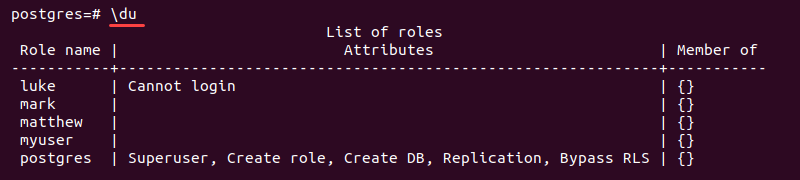
Locate the user for removal and use the name in the following step.
3. Run the following query to delete a user:

Alternatively, to check if a user exists before dropping, enter:

The client notifies if the role is nonexistent.
4. Display the user list again to confirm the user is gone:
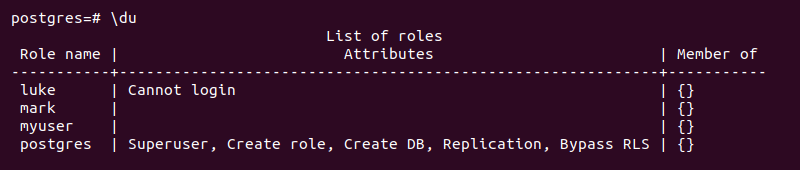
The user is no longer on the list of roles. This output indicates a successful deletion.
Delete Multiple Postgres Users
The PSQL client allows deleting more than one Postgres user at once. The instructions below explain how to connect to the PostgreSQL client and delete multiple users.
1. Connect to the PSQL client with:
2. List all users with:
Locate the users for deletion and use the names in the following step.
3. Delete multiple Postgres users by separating individual users with a comma:
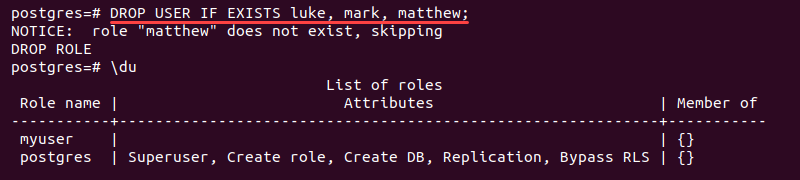
The command removes multiple roles at once. Add IF EXISTS to skip users that are not available.
4. Recheck the user list to confirm all the roles are deleted:
The removed users are no longer on the list.
Delete a Postgres User with Dependencies
Attempting to remove a Postgres user with dependencies fails and shows an error.

To safely remove the user, do the following:
1. Assign the object ownership from the error detail to another user. For example, to transfer the objects owned by myuser to postgres, run:

The query changes the object ownership to the postgres user.
2. Remove the database object connections to the user with:

This step also removes any privileges the user has over the object.
3. At the moment, the user no longer has any dependencies. To drop the user, run:

Since no dependencies exist, the removal is successful.
Delete a Postgres Role
To delete a Postgres role, run the following command in the PSQL client:
The DROP USER statement is an alias for DROP ROLE . The Postgres users are roles with LOGIN permissions. Therefore, both DROP USER and DROP ROLE are interchangeable and work for both users and roles.
After following the steps from this guide, you know how to delete a Postgres user and multiple users securely.
How to create and delete users in PostgreSQL
More often than not, when working with a database you will need to be able to create and delete users. Whether working in a team that has multiple members needing access to the database or creating and deleting test users to simulate database privileges, knowing how to add and remove database users is important.
In this short guide, we will cover the basics of creating and deleting database users in PostgreSQL. These commands will have you ready to get started on granting database access and establish a foundation for future role management.
How do you create PostgreSQL users?
PostgreSQL has the CREATE USER psql command and createuser for the command line. Both options define a new database user account. In order to create users, you need to be a superuser role for the database cluster. Alternatively, any user with the CREATE ROLE privilege is also able to create new users.
The basic syntax for createuser looks like this:
. and for CREATE USER :
The options component of either method is where you can define parameters such as whether this user can create databases, is a superuser, and the need for a password when connecting to the server.
The command line syntax can look something like for creating user1 :
In addition to creating users, it is important to know the different privileges that can be granted so users are only able to work with the database in specified ways. For the purpose of this guide we are just covering the basics to get started, but you can read more about granting privileges in PostgreSQL for more advanced settings.
How do you delete PostgreSQL users?
With the ability now to create users, it is important to also know how to delete a user when their access is no longer needed. Similar to creating a user, there are two ways to delete one. You can use both the command line utility dropuser or the psql command DROP USER .
The basic syntax for dropuser is:
There are additional options that you can include for parameters such as the username to login as to conduct the user drop or including a clause for if the user exists.
The basic psql command option syntax looks like:
A common syntax using the command line would look something like:
In this quick guide, we covered the basics of creating and deleting users for PostgreSQL databases as well as some additional options.
Once your users are created, we have additional informative articles diving deeper in user role management in PostgreSQL as well as user authentication.
7) Создать, изменить, добавить, удалить пользователя
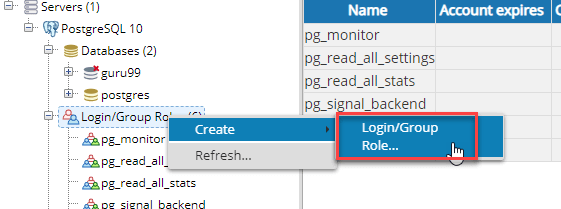
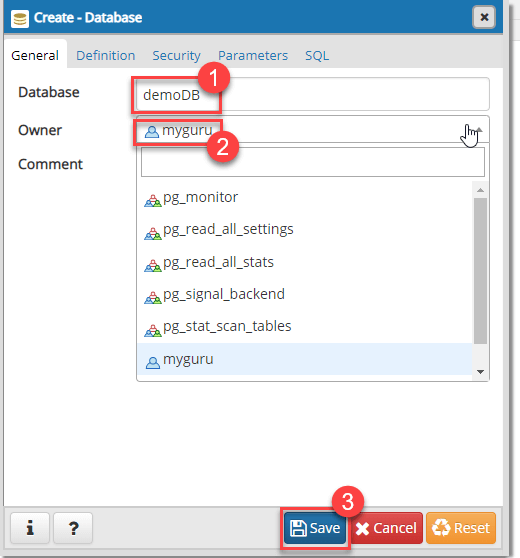
Шаг 7) Создайте базу данных и назначьте на нее владельца myguru.
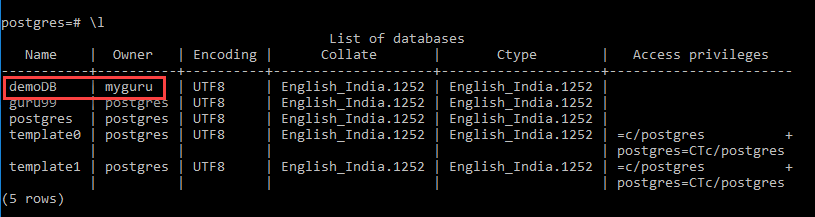
Шаг 8) В командной строке вы можете увидеть владельца “myguru”
PostgreSQL Создать пользовательский SQLShell (командная строка)
Вы можете создать пользователя с помощью командной строки
В PostgreSQL этот метод более удобен для программистов и администраторов, поскольку они имеют доступ к консоли сервера PostgreSQL. Более того, их необходимо выполнить с помощью одной команды вместо входа в систему и использования интерфейса клиента PostgreSQL.
создаст пользователя Том
Создаст пользовательский том с привилегиями суперпользователя. Давайте посмотрим на следующий пример.
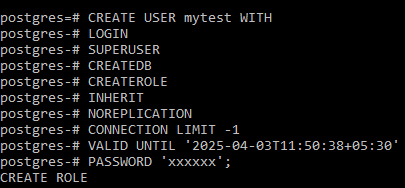
Шаг 1) Мы создаем суперпользователя сроком действия до 3 – го Apri 2025 11:50:38 IST. Введите следующую команду
Шаг 2) Введите команду \ du в контрольный список пользователей
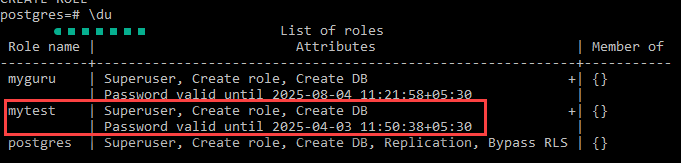
ПРИМЕЧАНИЕ. CREATE USER аналогична команде CREATE ROLE. Разница между этими двумя командами заключается в том, что при написании команды CREATE USER она по умолчанию находится в состоянии LOGIN, тогда как NOLOGIN предполагается, когда используется опция CRETE ROLE.
Добавить существующего пользователя в базу данных
Вы можете предоставить пользователю права доступа к базе данных.
Например, мы предоставляем пользователю mytest все привилегии для пользователя guru99.

После выполнения этой команды пользователь сможет получить доступ к базе данных с данными разрешениями.
Команда GRANT очень мощная. Вы можете дать пользователю детальные права, такие как «Выбрать», «Вставить», «Обновить».
Обновление PostgreSQL ПОЛЬЗОВАТЕЛЬ
Изменение существующих прав пользователя
Теперь, когда наш новый пользователь «mytest» существует, вы можете использовать ALTER USER для изменения разрешений, предоставленных библиотекарю.
Формат ALTER USER включает имя пользователя, за которым следуют некоторые параметры, чтобы сообщить PostgreSQL, какие допустимые изменения необходимо сделать:
Отзыв разрешений
Вам нужно использовать эту команду, когда вы делаете ошибку и неправильно назначаете разрешение, которое вы можете отозвать. Вы можете использовать команду ALTER USER без префикса перед разрешающими опциями.
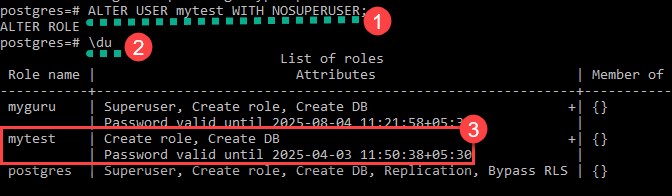
Например, мы можем удалить статус SUPERUSER из mytest, например:
Используя \ du, вы увидите, что привилегия суперпользователя удалена.
Назначение разрешения
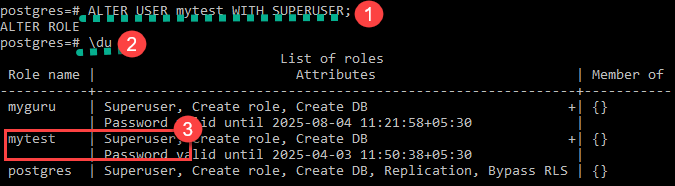
Вы можете использовать права пользователя SUPERUSER обратно “mytest”, используя следующую команду
Используя \ du, вы увидите, что привилегия суперпользователя добавлена.
PostgreSQL, удаляющий пользователя
Вы можете использовать удалить любого пользователя, если вы уверены, что конкретный пользователь больше не подходит для вашей базы данных. Обратите внимание, что удаление пользователей никогда не повлияет на реальную базу данных.
Чтобы удалить любого пользователя, вы должны убедиться, что он является владельцем базы данных. В противном случае вы можете получить сообщение об ошибке.
- Аккаунт “myguru” является владельцем базы данных “demoDB”.
- Введите команду DROP USER myguru
- Ошибка отображается
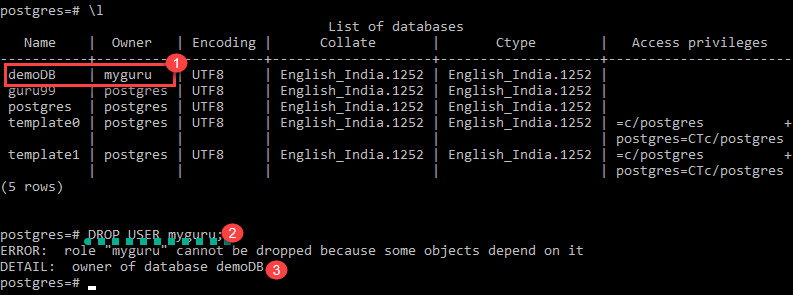
Как только мы изменим владельца базы данных, пользователь может быть удален
Как удалить пользователя postgresql
dropuser — remove a PostgreSQL user account
Synopsis
dropuser [ connection-option . ] [ option . ] [ username ]
Description
dropuser removes an existing PostgreSQL user. Only superusers and users with the CREATEROLE privilege can remove PostgreSQL users. (To remove a superuser, you must yourself be a superuser.)
dropuser is a wrapper around the SQL command DROP ROLE . There is no effective difference between dropping users via this utility and via other methods for accessing the server.
Options
dropuser accepts the following command-line arguments:
Specifies the name of the PostgreSQL user to be removed. You will be prompted for a name if none is specified on the command line and the -i / —interactive option is used.
Echo the commands that dropuser generates and sends to the server.
Prompt for confirmation before actually removing the user, and prompt for the user name if none is specified on the command line.
Print the dropuser version and exit.
Do not throw an error if the user does not exist. A notice is issued in this case.
Show help about dropuser command line arguments, and exit.
dropuser also accepts the following command-line arguments for connection parameters:
Specifies the host name of the machine on which the server is running. If the value begins with a slash, it is used as the directory for the Unix domain socket.
Specifies the TCP port or local Unix domain socket file extension on which the server is listening for connections.
User name to connect as (not the user name to drop).
Never issue a password prompt. If the server requires password authentication and a password is not available by other means such as a .pgpass file, the connection attempt will fail. This option can be useful in batch jobs and scripts where no user is present to enter a password.
Force dropuser to prompt for a password before connecting to a database.
This option is never essential, since dropuser will automatically prompt for a password if the server demands password authentication. However, dropuser will waste a connection attempt finding out that the server wants a password. In some cases it is worth typing -W to avoid the extra connection attempt.
Environment
Default connection parameters
Specifies whether to use color in diagnostic messages. Possible values are always , auto and never .
This utility, like most other PostgreSQL utilities, also uses the environment variables supported by libpq (see Section 34.15).
Diagnostics
In case of difficulty, see DROP ROLE and psql for discussions of potential problems and error messages. The database server must be running at the targeted host. Also, any default connection settings and environment variables used by the libpq front-end library will apply.
Examples
To remove user joe from the default database server:
To remove user joe using the server on host eden , port 5000, with verification and a peek at the underlying command:
See Also
| Prev | Up | Next |
| dropdb | Home | ecpg |
Submit correction
If you see anything in the documentation that is not correct, does not match your experience with the particular feature or requires further clarification, please use this form to report a documentation issue.