Ошибки SQL-сервера
SQL-сервер не найден или недоступен, ошибки соединения с SQL-сервером
- Если SQL-сервер не найден, убедитесь, что ваш экземпляр SQL-сервера действительно установлен и запущен. Для этого зайдите на компьютер, где он установлен, запустите диспетчер конфигурации SQL и проверьте, есть ли там тот экземпляр, к которому вы пытаетесь подключиться и запущен ли он. Нелишним будет также получить отчет об обнаружении компонентов SQL-серверов.
- Если вы проделали п1. и не обнаружили источник проблемы, возможно, неверно указан IP-адрес компьютера или номер порта TCP. Перепроверьте их настройки.
- Причиной того, что невозможно подключиться к SQL-серверу, также может быть сеть, убедитесь, что компьютер с SQL-сервером доступен по сети.
- Проверьте, может ли клиентское приложение, установленное на том же компьютере, что и сервер, подключиться к SQL-серверу. Запустите SQL Server Management Studio(SSMS), в диалоговом окне “Подключиться к серверу” выберите тип сервера Database Engine, укажите способ аутентификации “Аутентификация Windows”, введите имя компьютера и экземпляра SQL-сервера. Проверьте подключение.
Обратите внимание, что многие сообщения об ошибках могут быть не показаны или не содержат достаточной информации для устранения проблемы. Это сделано из соображений безопасности, чтобы при попытке взлома злоумышленники не могли получить информацию об SQL-сервере. Полные сведения содержатся в логе ошибок, который обычно хранится по адресу C:\Program Files\Microsoft SQL Server\MSSQL13.MSSQLSERVER\MSSQL\Log\ERRORLOG, или там, куда его поместил администратор системы.
Ошибка SQL-сервера 26
Одна из наиболее часто встречающихся ошибок подключения к SQL-серверу, обычно связана с тем, что в настройках SQL-сервера не разрешены или ограничены удаленные соединения. Чтобы это исправить, попробуйте:
- в SSMS в настройках SQL-сервера включите аутентификацию Windows
- для брандмауэра Windows создайте новое правило, которое разрешает подключение для всех программ и протоколов с указанного IP-адреса
- убедитесь, что запущена служба SQL Server Browser
Ошибка SQL-сервера 18456
Эта ошибка означает, что попытка подключиться к серверу не успешна из-за проблем с именем пользователя или паролем. По коду ошибки в журнале ошибок можно узнать более точную причину, чтобы устранить ее.
Не удалось запустить SQL-server — код ошибки 3417
Возникает в случае, если были изменены настройки Windows или перемещена папка с файлами MSSQL.
- зайдите в C:\Program Files\Microsoft SQLServer\MSSQL.1\MSSqL\Data — Безопасность\Настройки доступа — Учетная запись сетевой службы — добавьте учетную запись сетевой службы
- проверьте, что MDF-файл не сжимается. Если это не так, отключите “Сжимать содержимое для экономии места на диске” в свойствах файла
Иногда ни один из этих способов не помогает, это значит, что файлы БД повреждены и ее придется восстанавливать из резервной копии.
Повреждена база данных
Код ошибки SQL-сервера 945
Ошибка 945 возникает, когда БД SQL-сервера помечена как IsShutdown. Проверьте, достаточно ли места на диске, достаточно ли прав у учетной записи для операций с БД, файлы MDF и LDF не должны быть помечены “Только для чтения”.
Код ошибки SQL-сервера 5172
SQL-сервер хранит свою физическую БД в первичном файле, в котором информация разбита постранично. Первая страница содержит информацию о заголовке mdf-файла и называется страницей заголовка. Она состоит из разнообразной информации о БД, такой как размер файла, подпись и т.д. В процессе прикрепления MDF на SQL-сервере часто возникает ошибка 5172. Это в основном происходит, если MDF-файл поврежден, информация в его заголовке тоже и соответственно сложно добраться до данных. Причиной может быть вирус, аварийное выключение системы, ошибка оборудования.
Ошибка SQL-сервера 823
SQL использует API Windows для операций ввода-вывода, но кроме завершения этих операций SQL проверяет все ошибки обращений к API. Если эти обращения несовместимы с ОС, появляется ошибка 823. Сообщение об ошибке 823 означает, что существует проблема с базовым оборудованием для хранения данных или с драйвером, который находится на пути запроса ввода-вывода. Пользователи могут столкнуться с этой ошибкой, если в файловой системе есть противоречия или поврежден файл базы данных.
Ошибка SQL-сервера 8946
Основной причиной ошибки 8946 так же, как и для 5172, является повреждение заголовков страниц БД SQL вследствие сбоя питания, вирусной атаки, отказа оборудования — SQL-сервер больше не может прочесть эти страницы.
- если у вас есть свежая резервная копия базы — восстановить базу из этой копии
- можно попробовать использовать специализированное ПО, такое как SQL Recovery Tool, чтобы восстановить поврежденные файлы
Желательно определить, что именно привело к возникновению ошибок и принять меры, чтобы это не повторялось — заменить плохо работающее оборудование, повысить информационную безопасность.
Другие ошибки SQL
Код ошибки SQL-сервера 1814
SQL-сервер не может создать базу данных tempdb. Убедитесь, что на выделенном под нее диске достаточно места и что у учетной записи хватает прав для записи в указанную директорию.
Код ошибки SQL-сервера 1067
Эта ошибка может возникать по разным причинам. Наиболее часто оказывается, что повреждены или отсутствуют конфигурационные файлы, SQL-сервер обращается к поврежденным системным файлам, ошибочные данные пользователя, нет информации про лицензию. В самых тяжелых случаях придется переустанавливать SQL-сервер. Но иногда помогает восстановление поврежденных файлов или изменение настроек SQL-сервера — вы можете создать новую учетную запись в домене и использовать ее для службы MSSQL.
SQL-сервер запускается, но работает слишком медленно
Проанализируйте журнал сервера, индексы (фрагментацию), запросы, задания, возможность взаимных блокировок. Причин может быть масса.
Мы работаем с разными версиями SQL-сервера уже много лет, знакомы со всевозможными инструкциями SQL-сервера, видели самые разные варианты его настройки и использования на проектах у своих клиентов. В целом мы можем выделить четыре основных источника неполадок:
- Индексы — причина проблем номер один. Неправильные индексы, отсутствующие индексы, слишком много индексов и подобное. Чаще всего при проблеме с индексами пользователи или администраторы базы данных не получают сообщения об ошибке, они просто видят, что база работает очень медленно и докопаться до причин бывает очень нелегко
- изначально плохая архитектура сервера баз данных — ошибка, которую очень сложно и дорого исправлять на этапе, когда база уже используется
- плохой код, в котором возможны блокировки и тупиковые места
- использование конфигурации по умолчанию,
Если у вас не получается устранить ошибки сервера SQL-server самостоятельно, если они появляются снова и снова, то скорее всего в основе лежит одна из этих причин. В таком случае — если у вас произошла ошибка с SQL сервером, ваше ПО не видит SQL-сервер, либо нужно развернуть кластер SQL-серверов — вы всегда можете обратиться за консультацией и технической поддержкой к специалистам Интегруса, отправив заявку с сайта, написав на e-mail, либо позвонив в колл-центр нашей компании.
Ошибки и сбои в работе MS SQL Server
В этой статье описаны ошибки и сбои при работы с СУБД MS SQL Server и пути их решения.
1. Не запускается служба SQL Server (EXPRESS) — код ошибки 3414.

В журнале событий выдается ошибка о испорченных системных файлах model.mdf и лог model_l.ldf:

Решение.
Помогли следующие действия:
* Перед удалением СУБД SQL Server сохраните все рабочие БД на отдельный жесткий диск (лучше на внешний) во избежании потери данных.
- 1. Зайти в Панель Управления -> Удаление программ;
- 2. Нажать правой кнопкой мыши на MS SQL Server и выбрать пункт Удалить (Remove/Repair)
- 3. Следовать пунктам инструкции.
- 4. Далее нужно заново установить MS SQL Server
- 5. Сделать attache (присоединить) БД, которую скопировали ранее (файл .mdf)
2. Довольно часто возникают случаи, когда из-за повреждения файлов база данных (БД) переводится в статус suspect:
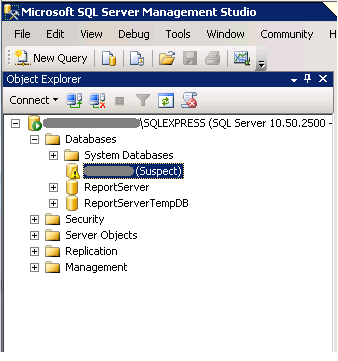
Первым делом стоит проверить последний сохраненных back up (резервную копию БД), если ее актуальность Вас устраивает, то смело восстанавливайте ее и не трате времени и сил. В связи с этим еще раз напомню про актуальность создания резервных копий БД (по рекомендации Microsoft их нужно делать не реже раз в сутки).
Если все таки резервной копии БД нет или ее актуальность Вас не устраивает, то возможно попробовать произвести восстановление БД на свой страх и риск :
—переводим нашу БД testBD в аварийный режим
—переводим БД testBD в однопользовательский (SINGLE_USER) режим
— Проверяем и заодно ремонтируем базу
— Переводим базу в обычный режим MULTI_USER
3. При входе в MS SQL Server под учетной записью SQL Server появляется ошибка 18456:
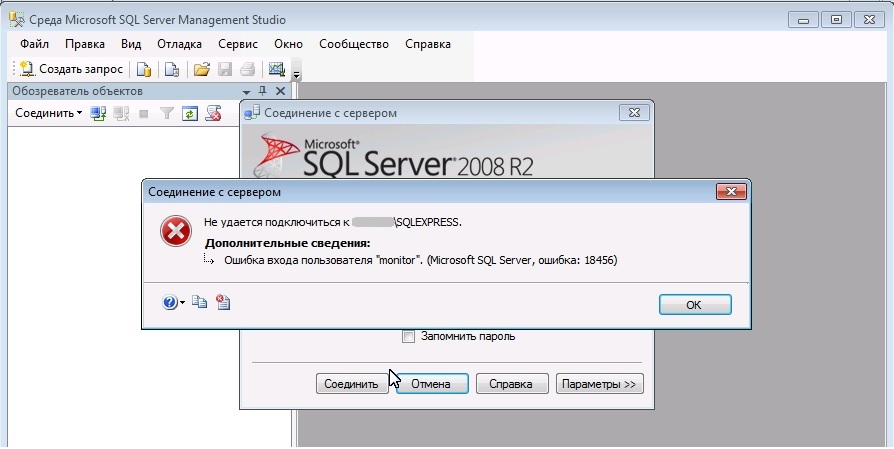
Рис.3 — Microsoft SQL Server , Ошибка 18456
3.1. Зайти в свойства сервера MS SQL Server
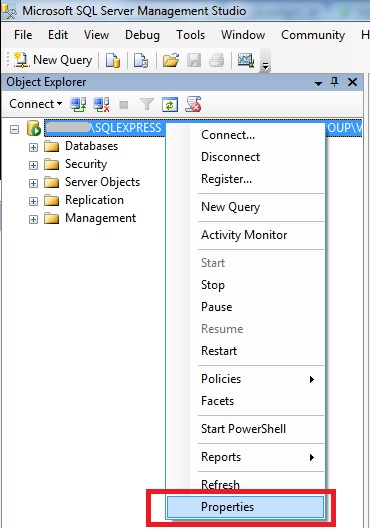
Рис.3.1. — MS SQL server — Properties (свойства)
выбрать Properties
3.2. В свойствах сервера (Server Properties) перейти в раздел Безопасность (Security) и выставить значение Проверка подлинности SQL Server и Windows (SQL Server and Windows Authentication mode)
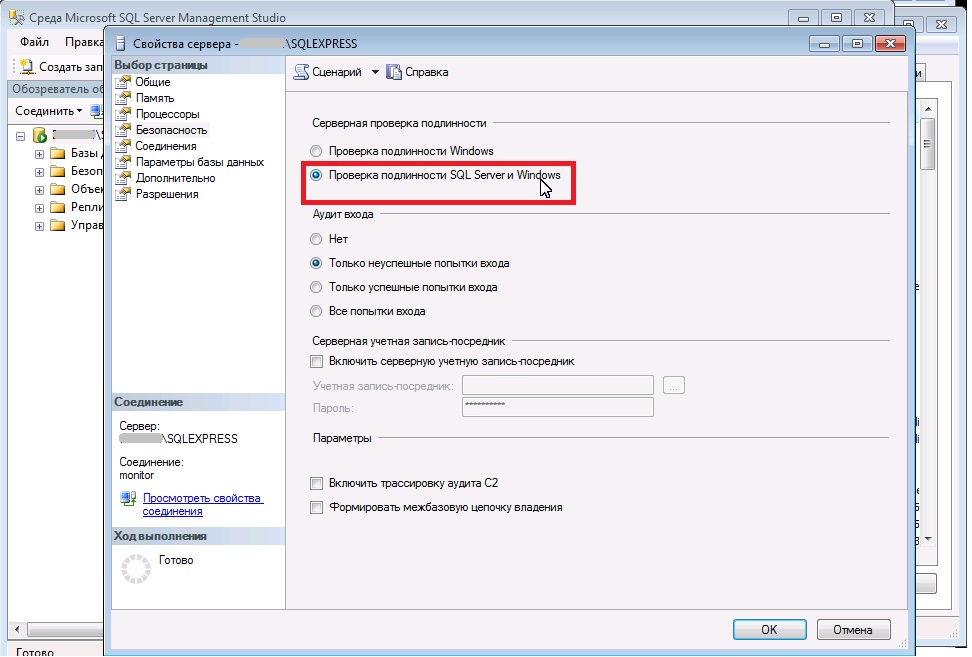
Рис.3.2. — Свойства сервера — Безопасность
4. При восстановлении БД (Back up) или ее прикреплении (Attache) система не может получить доступ к файлу БД.
РЕШЕНИЕ : Наиболее распространенная причина — это SQL Managment Studio запущенная не от администратора. Т.е. первым делом необходимо открыть MS SQL Managment Studio от имени администратора:
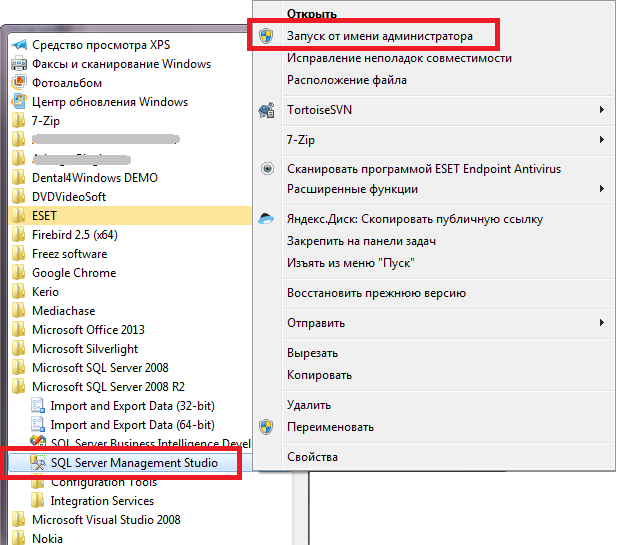
Рис.4.1. MS SQL Server Managment Studio — запуск от имени администратора
И восстановить БД заново.
5. При восстановлении БД возникает ошибка:
System.Data.Sqlclient.SqlError: The tail of the log for the database «InspDB» has not backed up. Use BACKUP LOG WITH NORECOVERY to backup the log if it contains work you do not want to lose. Use the WITH REPLACE or WITH STOPAT clause of the RESTORE statement to just overwrite the contents of the log
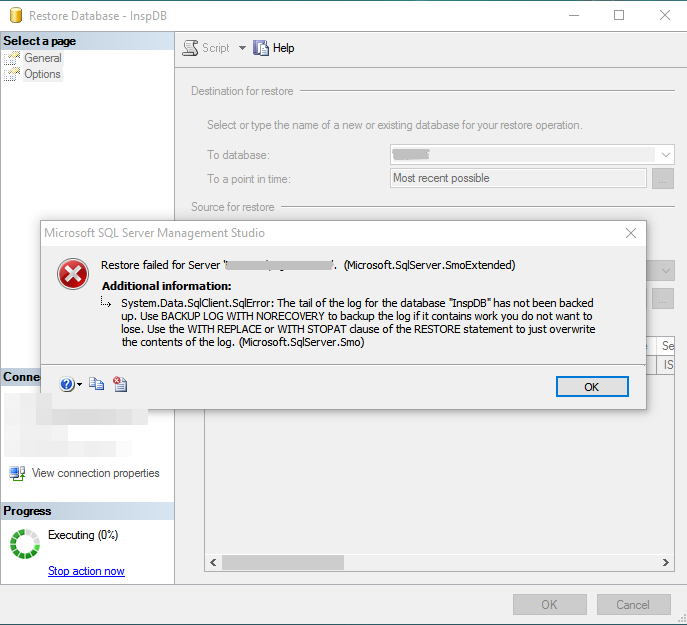
РЕШЕНИЕ: Причина этой ошибки кроется в том, что в каталоге, куда восстанавливается БД уже есть файлы с такими именами .mdf и .ldf (по умолчанию директория c:\Program Files\Microsoft SQL Server\MSSQL10_50.SQLEXPRESS\MSSQL\DATA\). Необходимо в опциях при восстановлении выбрать параметр Overwrite the existing database (WITH REPLACE). Таким образом БД будет перезаписана с таким именем.

6. При восстановлении БД из резервной копии (back up) появляется ошибка:

Specified cast is not valid (SqlManagerUI)
Решение: Необходимо установить версию MS SQL Server равную или выше версии, на которой была сделана резервная копия БД, т.е. нельзя восстановить БД на MS SQL Server младшей версии, чем сам бэкап.
7. При выполнении:
Check terminated. A failure was detected while collecting facts. Possibly tempdb out of space or a system table is inconsistent. Check previous errors.
Почему не запускается sql server
Ситуация такая: SQL Server работал исправно на протяжении 2 лет, пока после одного ребута сервера служба MS SQL Server не перестала запускаться.
На попытку запуска выдает "Error 1067:the process terminated unexpectadly. Windows could not start the SQL Server (MSSQLSERVER) service on Local Computer".
В логах самой ОС (2008 R2 Server) ничего, проливающего свет на такой краш нет. Вот логи из ос:
Log Name: System
Source: Service Control Manager
Date: 1/19/2015 1:59:38 PM
Event ID: 7034
Task Category: None
Level: Error
Keywords: Classic
User: N/A
Computer:
Description:
The SQL Server (MSSQLSERVER) service terminated unexpectedly. It has done this 38 time(s).
Event Xml:
<Event xmlns="http://schemas.microsoft.com/win/2004/08/events/event">
<System>
<Provider Name="Service Control Manager" Guid="<555908d1-a6d7-4695-8e1e-26931d2012f4>" EventSourceName="Service Control Manager" />
<EventID Qualifiers="49152">7034</EventID>
<Version>0</Version>
<Level>2</Level>
<Task>0</Task>
<Opcode>0</Opcode>
<Keywords>0x8080000000000000</Keywords>
<TimeCreated SystemTime="2015-01-19T10:59:38.590861000Z" />
<EventRecordID>239570</EventRecordID>
<Correlation />
<Execution ProcessID="612" ThreadID="8628" />
<Channel>System</Channel>
<Computer> ______</Computer>
<Security />
</System>
<EventData>
<Data Name="param1">SQL Server (MSSQLSERVER)</Data>
<Data Name="param2">38</Data>
</EventData>
</Event>
В error log бд указана следующая информация:
2014-11-20 12:11:00.46 Server Microsoft SQL Server 2008 (SP3) — 10.0.5512.0 (X64)
Aug 22 2012 19:25:47
Copyright (c) 1988-2008 Microsoft Corporation
Enterprise Edition (64-bit) on Windows NT 6.1 <X64> (Build 7601: Service Pack 1)
2014-11-20 12:11:00.56 Server (c) 2005 Microsoft Corporation.
2014-11-20 12:11:00.56 Server All rights reserved.
2014-11-20 12:11:00.56 Server Server process ID is 2812.
2014-11-20 12:11:00.56 Server System Manufacturer: ‘HP’, System Model: ‘ProLiant DL360 G6’.
2014-11-20 12:11:00.58 Server Authentication mode is MIXED.
2014-11-20 12:11:00.58 Server Logging SQL Server messages in file ‘D:\MAXPATROL\MSSQL10.MSSQLSERVER\MSSQL\Log\ERRORLOG’.
2014-11-20 12:11:00.60 Server This instance of SQL Server last reported using a process ID of 2844 at 11/20/2014 12:04:28 PM (local) 11/20/2014 9:04:28 AM (UTC). This is an informational message only; no user action is required.
2014-11-20 12:11:00.60 Server Registry startup parameters:
-d D:\MAXPATROL\MSSQL10.MSSQLSERVER\MSSQL\DATA\master.mdf
-e D:\MAXPATROL\MSSQL10.MSSQLSERVER\MSSQL\Log\ERRORLOG
-l D:\MAXPATROL\MSSQL10.MSSQLSERVER\MSSQL\DATA\mastlog.ldf
2014-11-20 12:11:00.81 Server SQL Server is starting at normal priority base (=7). This is an informational message only. No user action is required.
2014-11-20 12:11:00.83 Server Detected 16 CPUs. This is an informational message; no user action is required.
2014-11-20 12:11:01.00 Server Large Page Extensions enabled.
2014-11-20 12:11:01.00 Server Large Page Granularity: 2097152
2014-11-20 12:11:01.09 Server Large Page Allocated: 32MB
2014-11-20 12:11:01.11 Server Large Page Allocated: 32MB
2014-11-20 12:11:01.64 Server Using locked pages for buffer pool.
2014-11-20 12:11:02.54 Server Using dynamic lock allocation. Initial allocation of 2500 Lock blocks and 5000 Lock Owner blocks per node. This is an informational message only. No user action is required.
2014-11-20 12:11:02.55 Server Lock partitioning is enabled. This is an informational message only. No user action is required.
2014-11-20 12:11:04.60 Server Node configuration: node 0: CPU mask: 0x000000000000ff00 Active CPU mask: 0x000000000000ff00. This message provides a description of the NUMA configuration for this computer. This is an informational message only. No user action is required.
2014-11-20 12:11:04.60 Server Node configuration: node 1: CPU mask: 0x00000000000000ff Active CPU mask: 0x00000000000000ff. This message provides a description of the NUMA configuration for this computer. This is an informational message only. No user action is required.
2014-11-20 12:11:05.64 spid8s Starting up database ‘master’.
2014-11-20 12:11:07.88 spid8s Recovery is writing a checkpoint in database ‘master’ (1). This is an informational message only. No user action is required.
2014-11-20 12:11:07.90 spid8s Recovery completed for database master (database ID 1) in 1 second(s) (analysis 402 ms, redo 311 ms, undo 218 ms.) This is an informational message only. No user action is required.
2014-11-20 12:11:10.24 spid8s Resource governor reconfiguration succeeded.
2014-11-20 12:11:10.26 spid8s SQL Server Audit is starting the audits. This is an informational message. No user action is required.
2014-11-20 12:11:10.83 spid8s SQL Server Audit has started the audits. This is an informational message. No user action is required.
2014-11-20 12:11:10.93 spid8s FILESTREAM: effective level = 0, configured level = 0, file system access share name = ‘MSSQLSERVER’.
2014-11-20 12:11:12.47 spid8s SQL Trace ID 1 was started by login "sa".
2014-11-20 12:11:12.77 spid8s Starting up database ‘mssqlsystemresource’.
2014-11-20 12:11:13.16 spid8s The resource database build version is 10.00.5500. This is an informational message only. No user action is required.
2014-11-20 12:11:14.06 spid13s Starting up database ‘model’.
2014-11-20 12:11:14.10 spid8s Server name is ‘VLG-MPSRV’. This is an informational message only. No user action is required.
2014-11-20 12:11:14.58 spid13s Clearing tempdb database.
2014-11-20 12:11:15.40 spid13s Starting up database ‘tempdb’.
2014-11-20 12:11:15.72 Server A self-generated certificate was successfully loaded for encryption.
2014-11-20 12:11:15.74 Server Server is listening on [ ‘any’ <ipv6> 1433].
2014-11-20 12:11:15.75 Server Server is listening on [ ‘any’ <ipv4> 1433].
2014-11-20 12:11:15.75 Server Server local connection provider is ready to accept connection on [ \\.\pipe\SQLLocal\MSSQLSERVER ].
2014-11-20 12:11:15.75 Server Server local connection provider is ready to accept connection on [ \\.\pipe\sql\query ].
2014-11-20 12:11:15.77 Server Server is listening on [ ::1 <ipv6> 1434].
2014-11-20 12:11:15.77 Server Server is listening on [ 127.0.0.1 <ipv4> 1434].
2014-11-20 12:11:15.77 Server Dedicated admin connection support was established for listening locally on port 1434.
2014-11-20 12:11:15.79 Server The SQL Server Network Interface library successfully registered the Service Principal Name (SPN) [ MSSQLSvc/VLG-MPSRV.___.ru ] for the SQL Server service.
2014-11-20 12:11:15.80 Server The SQL Server Network Interface library successfully registered the Service Principal Name (SPN) [ MSSQLSvc/VLG-MPSRV.___.ru:1433 ] for the SQL Server service.
2014-11-20 12:11:15.80 Server SQL Server is now ready for client connections. This is an informational message; no user action is required.
2014-11-20 12:11:16.23 spid12s The Service Broker protocol transport is disabled or not configured.
2014-11-20 12:11:16.23 spid12s The Database Mirroring protocol transport is disabled or not configured.
2014-11-20 12:11:16.77 spid12s Service Broker manager has started.
2014-11-20 12:11:32.35 spid29s A new instance of the full-text filter daemon host process has been successfully started.
2014-11-20 12:11:33.14 spid18s Starting up database ‘msdb’.
2014-11-20 12:11:33.14 spid24s Starting up database ‘CONSBD’.
2014-11-20 12:11:33.14 spid19s Starting up database ‘ReportServer’.
2014-11-20 12:11:33.14 spid20s Starting up database ‘ReportServerTempDB’.
2014-11-20 12:11:33.14 spid21s Starting up database ‘srv’.
2014-11-20 12:11:33.15 spid22s Starting up database ‘CONSDB’.
2014-11-20 12:11:37.69 spid51 Attempting to load library ‘xpsqlbot.dll’ into memory. This is an informational message only. No user action is required.
2014-11-20 12:11:37.87 spid51 Using ‘xpsqlbot.dll’ version ‘2007.100.1600’ to execute extended stored procedure ‘xp_qv’. This is an informational message only; no user action is required.
2014-11-20 12:11:39.09 spid51 Attempting to load library ‘xpstar.dll’ into memory. This is an informational message only. No user action is required.
2014-11-20 12:11:39.45 spid51 Using ‘xpstar.dll’ version ‘2007.100.5500’ to execute extended stored procedure ‘xp_instance_regread’. This is an informational message only; no user action is required.
2014-11-20 12:11:39.69 spid51 Attempting to load library ‘xplog70.dll’ into memory. This is an informational message only. No user action is required.
2014-11-20 12:11:39.93 spid51 Using ‘xplog70.dll’ version ‘2007.100.1600’ to execute extended stored procedure ‘xp_msver’. This is an informational message only; no user action is required.
2014-11-20 12:11:43.40 spid8s Recovery is complete. This is an informational message only. No user action is required.
2014-11-21 00:00:12.10 spid26s This instance of SQL Server has been using a process ID of 2812 since 11/20/2014 12:11:43 PM (local) 11/20/2014 9:11:43 AM (UTC). This is an informational message only; no user action is required.
2014-11-22 00:00:18.30 spid20s This instance of SQL Server has been using a process ID of 2812 since 11/20/2014 12:11:43 PM (local) 11/20/2014 9:11:43 AM (UTC). This is an informational message only; no user action is required.
2014-11-23 00:00:30.06 spid22s This instance of SQL Server has been using a process ID of 2812 since 11/20/2014 12:11:43 PM (local) 11/20/2014 9:11:43 AM (UTC). This is an informational message only; no user action is required.
2014-11-24 00:00:40.88 spid22s This instance of SQL Server has been using a process ID of 2812 since 11/20/2014 12:11:43 PM (local) 11/20/2014 9:11:43 AM (UTC). This is an informational message only; no user action is required.
2014-11-25 00:00:46.75 spid26s This instance of SQL Server has been using a process ID of 2812 since 11/20/2014 12:11:43 PM (local) 11/20/2014 9:11:43 AM (UTC). This is an informational message only; no user action is required.
2014-11-26 00:00:53.67 spid21s This instance of SQL Server has been using a process ID of 2812 since 11/20/2014 12:11:43 PM (local) 11/20/2014 9:11:43 AM (UTC). This is an informational message only; no user action is required.
2014-11-27 00:00:59.80 spid25s This instance of SQL Server has been using a process ID of 2812 since 11/20/2014 12:11:43 PM (local) 11/20/2014 9:11:43 AM (UTC). This is an informational message only; no user action is required.
2014-11-28 00:00:09.02 spid25s This instance of SQL Server has been using a process ID of 2812 since 11/20/2014 12:11:43 PM (local) 11/20/2014 9:11:43 AM (UTC). This is an informational message only; no user action is required.
2014-11-29 00:00:16.15 spid27s This instance of SQL Server has been using a process ID of 2812 since 11/20/2014 12:11:43 PM (local) 11/20/2014 9:11:43 AM (UTC). This is an informational message only; no user action is required.
2014-11-30 00:00:23.06 spid20s This instance of SQL Server has been using a process ID of 2812 since 11/20/2014 12:11:43 PM (local) 11/20/2014 9:11:43 AM (UTC). This is an informational message only; no user action is required.
2014-12-01 00:00:30.25 spid26s This instance of SQL Server has been using a process ID of 2812 since 11/20/2014 12:11:43 PM (local) 11/20/2014 9:11:43 AM (UTC). This is an informational message only; no user action is required.
2014-12-02 00:00:36.00 spid25s This instance of SQL Server has been using a process ID of 2812 since 11/20/2014 12:11:43 PM (local) 11/20/2014 9:11:43 AM (UTC). This is an informational message only; no user action is required.
2014-12-03 00:00:41.72 spid20s This instance of SQL Server has been using a process ID of 2812 since 11/20/2014 12:11:43 PM (local) 11/20/2014 9:11:43 AM (UTC). This is an informational message only; no user action is required.
2014-12-04 00:00:48.47 spid27s This instance of SQL Server has been using a process ID of 2812 since 11/20/2014 12:11:43 PM (local) 11/20/2014 9:11:43 AM (UTC). This is an informational message only; no user action is required.
2014-12-05 00:00:54.17 spid22s This instance of SQL Server has been using a process ID of 2812 since 11/20/2014 12:11:43 PM (local) 11/20/2014 9:11:43 AM (UTC). This is an informational message only; no user action is required.
2014-12-06 00:00:59.81 spid24s This instance of SQL Server has been using a process ID of 2812 since 11/20/2014 12:11:43 PM (local) 11/20/2014 9:11:43 AM (UTC). This is an informational message only; no user action is required.
2014-12-07 00:00:04.49 spid19s This instance of SQL Server has been using a process ID of 2812 since 11/20/2014 12:11:43 PM (local) 11/20/2014 9:11:43 AM (UTC). This is an informational message only; no user action is required.
2014-12-08 00:00:11.35 spid19s This instance of SQL Server has been using a process ID of 2812 since 11/20/2014 12:11:43 PM (local) 11/20/2014 9:11:43 AM (UTC). This is an informational message only; no user action is required.
2014-12-09 00:00:18.81 spid24s This instance of SQL Server has been using a process ID of 2812 since 11/20/2014 12:11:43 PM (local) 11/20/2014 9:11:43 AM (UTC). This is an informational message only; no user action is required.
2014-12-10 00:00:24.52 spid23s This instance of SQL Server has been using a process ID of 2812 since 11/20/2014 12:11:43 PM (local) 11/20/2014 9:11:43 AM (UTC). This is an informational message only; no user action is required.
2014-12-10 09:51:28.14 spid6s Warning: The available page file space has dropped below 4Mb.
2014-12-10 09:51:31.74 spid63 Error: 17053, Severity: 16, State: 1.
2014-12-10 09:51:31.74 spid63 D:\MAXPATROL\MSSQL10.MSSQLSERVER\MSSQL\DATA\tempdb.mdf: Operating system error 112(There is not enough space on the disk.) encountered.
2014-12-10 09:51:31.82 spid63 Error: 1105, Severity: 17, State: 2.
2014-12-10 09:51:31.82 spid63 Could not allocate space for object ‘<temporary system object: 422223137865728>’ in database ‘tempdb’ because the ‘PRIMARY’ filegroup is full. Create disk space by deleting unneeded files, dropping objects in the filegroup, adding additional files to the filegroup, or setting autogrowth on for existing files in the filegroup.
2014-12-11 00:00:30.18 spid23s This instance of SQL Server has been using a process ID of 2812 since 11/20/2014 12:11:43 PM (local) 11/20/2014 9:11:43 AM (UTC). This is an informational message only; no user action is required.
2014-12-12 00:00:41.93 spid21s This instance of SQL Server has been using a process ID of 2812 since 11/20/2014 12:11:43 PM (local) 11/20/2014 9:11:43 AM (UTC). This is an informational message only; no user action is required.
2014-12-13 00:00:52.56 spid21s This instance of SQL Server has been using a process ID of 2812 since 11/20/2014 12:11:43 PM (local) 11/20/2014 9:11:43 AM (UTC). This is an informational message only; no user action is required.
2014-12-14 00:00:02.99 spid27s This instance of SQL Server has been using a process ID of 2812 since 11/20/2014 12:11:43 PM (local) 11/20/2014 9:11:43 AM (UTC). This is an informational message only; no user action is required.
2014-12-15 00:00:09.95 spid26s This instance of SQL Server has been using a process ID of 2812 since 11/20/2014 12:11:43 PM (local) 11/20/2014 9:11:43 AM (UTC). This is an informational message only; no user action is required.
2014-12-16 00:00:20.77 spid28s This instance of SQL Server has been using a process ID of 2812 since 11/20/2014 12:11:43 PM (local) 11/20/2014 9:11:43 AM (UTC). This is an informational message only; no user action is required.
2014-12-17 00:00:37.19 spid24s This instance of SQL Server has been using a process ID of 2812 since 11/20/2014 12:11:43 PM (local) 11/20/2014 9:11:43 AM (UTC). This is an informational message only; no user action is required.
2014-12-18 00:00:49.03 spid24s This instance of SQL Server has been using a process ID of 2812 since 11/20/2014 12:11:43 PM (local) 11/20/2014 9:11:43 AM (UTC). This is an informational message only; no user action is required.
2014-12-19 00:00:59.90 spid25s This instance of SQL Server has been using a process ID of 2812 since 11/20/2014 12:11:43 PM (local) 11/20/2014 9:11:43 AM (UTC). This is an informational message only; no user action is required.
2014-12-20 00:00:03.68 spid24s This instance of SQL Server has been using a process ID of 2812 since 11/20/2014 12:11:43 PM (local) 11/20/2014 9:11:43 AM (UTC). This is an informational message only; no user action is required.
2014-12-21 00:00:15.82 spid21s This instance of SQL Server has been using a process ID of 2812 since 11/20/2014 12:11:43 PM (local) 11/20/2014 9:11:43 AM (UTC). This is an informational message only; no user action is required.
2014-12-22 00:00:27.86 spid22s This instance of SQL Server has been using a process ID of 2812 since 11/20/2014 12:11:43 PM (local) 11/20/2014 9:11:43 AM (UTC). This is an informational message only; no user action is required.
2014-12-23 00:00:40.19 spid24s This instance of SQL Server has been using a process ID of 2812 since 11/20/2014 12:11:43 PM (local) 11/20/2014 9:11:43 AM (UTC). This is an informational message only; no user action is required.
2014-12-24 00:00:46.15 spid25s This instance of SQL Server has been using a process ID of 2812 since 11/20/2014 12:11:43 PM (local) 11/20/2014 9:11:43 AM (UTC). This is an informational message only; no user action is required.
2014-12-25 00:00:57.06 spid22s This instance of SQL Server has been using a process ID of 2812 since 11/20/2014 12:11:43 PM (local) 11/20/2014 9:11:43 AM (UTC). This is an informational message only; no user action is required.
2014-12-26 00:00:09.24 spid18s This instance of SQL Server has been using a process ID of 2812 since 11/20/2014 12:11:43 PM (local) 11/20/2014 9:11:43 AM (UTC). This is an informational message only; no user action is required.
2014-12-27 00:00:25.21 spid21s This instance of SQL Server has been using a process ID of 2812 since 11/20/2014 12:11:43 PM (local) 11/20/2014 9:11:43 AM (UTC). This is an informational message only; no user action is required.
2014-12-28 00:00:41.16 spid23s This instance of SQL Server has been using a process ID of 2812 since 11/20/2014 12:11:43 PM (local) 11/20/2014 9:11:43 AM (UTC). This is an informational message only; no user action is required.
2014-12-29 00:00:51.00 spid18s This instance of SQL Server has been using a process ID of 2812 since 11/20/2014 12:11:43 PM (local) 11/20/2014 9:11:43 AM (UTC). This is an informational message only; no user action is required.
2014-12-30 00:00:03.05 spid24s This instance of SQL Server has been using a process ID of 2812 since 11/20/2014 12:11:43 PM (local) 11/20/2014 9:11:43 AM (UTC). This is an informational message only; no user action is required.
2014-12-31 00:00:10.58 spid22s This instance of SQL Server has been using a process ID of 2812 since 11/20/2014 12:11:43 PM (local) 11/20/2014 9:11:43 AM (UTC). This is an informational message only; no user action is required.
2015-01-01 00:00:16.24 spid21s This instance of SQL Server has been using a process ID of 2812 since 11/20/2014 12:11:43 PM (local) 11/20/2014 9:11:43 AM (UTC). This is an informational message only; no user action is required.
2015-01-02 00:00:21.97 spid23s This instance of SQL Server has been using a process ID of 2812 since 11/20/2014 12:11:43 PM (local) 11/20/2014 9:11:43 AM (UTC). This is an informational message only; no user action is required.
2015-01-03 00:00:28.62 spid18s This instance of SQL Server has been using a process ID of 2812 since 11/20/2014 12:11:43 PM (local) 11/20/2014 9:11:43 AM (UTC). This is an informational message only; no user action is required.
2015-01-04 00:00:39.31 spid22s This instance of SQL Server has been using a process ID of 2812 since 11/20/2014 12:11:43 PM (local) 11/20/2014 9:11:43 AM (UTC). This is an informational message only; no user action is required.
2015-01-05 00:00:44.97 spid20s This instance of SQL Server has been using a process ID of 2812 since 11/20/2014 12:11:43 PM (local) 11/20/2014 9:11:43 AM (UTC). This is an informational message only; no user action is required.
2015-01-06 00:00:49.29 spid19s This instance of SQL Server has been using a process ID of 2812 since 11/20/2014 12:11:43 PM (local) 11/20/2014 9:11:43 AM (UTC). This is an informational message only; no user action is required.
2015-01-07 00:00:56.17 spid25s This instance of SQL Server has been using a process ID of 2812 since 11/20/2014 12:11:43 PM (local) 11/20/2014 9:11:43 AM (UTC). This is an informational message only; no user action is required.
2015-01-08 00:00:03.05 spid22s This instance of SQL Server has been using a process ID of 2812 since 11/20/2014 12:11:43 PM (local) 11/20/2014 9:11:43 AM (UTC). This is an informational message only; no user action is required.
2015-01-09 00:00:09.67 spid23s This instance of SQL Server has been using a process ID of 2812 since 11/20/2014 12:11:43 PM (local) 11/20/2014 9:11:43 AM (UTC). This is an informational message only; no user action is required.
2015-01-10 00:00:15.36 spid18s This instance of SQL Server has been using a process ID of 2812 since 11/20/2014 12:11:43 PM (local) 11/20/2014 9:11:43 AM (UTC). This is an informational message only; no user action is required.
2015-01-11 00:00:19.07 spid24s This instance of SQL Server has been using a process ID of 2812 since 11/20/2014 12:11:43 PM (local) 11/20/2014 9:11:43 AM (UTC). This is an informational message only; no user action is required.
2015-01-12 00:00:25.93 spid25s This instance of SQL Server has been using a process ID of 2812 since 11/20/2014 12:11:43 PM (local) 11/20/2014 9:11:43 AM (UTC). This is an informational message only; no user action is required.
2015-01-13 00:00:32.81 spid22s This instance of SQL Server has been using a process ID of 2812 since 11/20/2014 12:11:43 PM (local) 11/20/2014 9:11:43 AM (UTC). This is an informational message only; no user action is required.
2015-01-14 00:00:40.02 spid18s This instance of SQL Server has been using a process ID of 2812 since 11/20/2014 12:11:43 PM (local) 11/20/2014 9:11:43 AM (UTC). This is an informational message only; no user action is required.
2015-01-15 00:00:45.79 spid23s This instance of SQL Server has been using a process ID of 2812 since 11/20/2014 12:11:43 PM (local) 11/20/2014 9:11:43 AM (UTC). This is an informational message only; no user action is required.
2015-01-15 11:17:59.70 Server SQL Server is terminating because of a system shutdown. This is an informational message only. No user action is required.
2015-01-15 11:18:03.71 spid12s Service Broker manager has shut down.
2015-01-15 11:18:03.72 spid12s Error: 17054, Severity: 16, State: 1.
2015-01-15 11:18:03.72 spid12s The current event was not reported to the Windows Events log. Operating system error = (null). You may need to clear the Windows Events log if it is full.
2015-01-15 11:18:05.93 spid8s SQL Trace was stopped due to server shutdown. Trace . This is an informational message only; no user action is required.
2015-01-15 11:18:06.10 Server The SQL Server Network Interface library could not deregister the Service Principal Name (SPN) for the SQL Server service. Error: 0x6d3, state: 4. Administrator should deregister this SPN manually to avoid client authentication errors.
кроме того, при попытке смены учетной записи, запускающей службу SQL Server через SQl Configuration Manager вылезает ошибка "WMI Provider Error. The process terminated unexpectadly. [0x8007042b]"
но, после ребута сервера указана именно учетная запись на запуск, при изменении на которую он так ругался.
в логах винды никак не отображается данное событие.
места на жестком диске хватает, логи были тоже почищены.
в errorlog ошибка с невозможностью unregister spn, но не уверена что ошибка именно в этом.
Грешила на права доступа на службу, недостаток прав, но возможно просто из-за ребута , после которого база не поднялась, как-то повредились системные файлы бд?
Ошибка запуска службы SQL
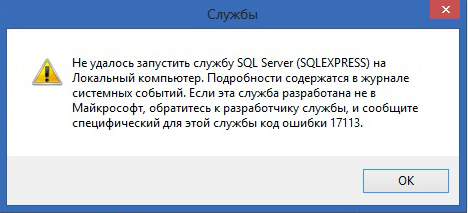
Не удалось запустить службу SQL Server на Локальный компьютер. Подробности содержатся в журнале системных событий. Если эта служба разработана не в Майкрософт, обратитесь к разработчику службы, и сообщите специфический для этой службы код ошибки.
Код ошибки 13
Решение:
При появлении данной ошибки необходимо зайти в Пуск → Microsoft SQL Server → Средства настройки → Диспетчер конфигурации SQL Server / SQL ServerConfiguration Manager → Конфигурация сети SQL Server → Протоколы для SQLEXPRESS и проверить, включены ли протоколы (все протоколы должны быть включены).
Код ошибки 1814
Вариант ошибки на английском:
Windows could not start the SQL Server on Local Computer. For more information, review the System Event Log. If this is a non-Microsoft service, contact the service vendor, and refer to service-specific error code — 1814.
Причина: Ошибка возникает, когда по какой-то причине путь к файлам базы по умолчанию не соответствует действительному.
Решение:
Возможно в папке C:\Program Files\Microsoft SQL Server\MSSQL10_50.SQLEXPRESS\MSSQL\DATA нет необходимых файлов. Необходимо добавить с заменой файлы из папки C:\Program Files\Microsoft SQL Server\MSSQL10_50.SQLEXPRESS\MSSQL\TemplateData.
Код ошибки 3417
Решение:
Перед заменой файлов рекомендуется сохранить копию папки Data в отдельной директории.
Cкопировать данные из C:\Program Files\Microsoft SQL Server\MSSQLXXX\MSSQL\Template Data в C:\Program Files\Microsoft SQL Server\MSSQLXXX\MSSQL\DATA
Для 64-разрядных систем — C:\Program Files (x86)\Microsoft SQL Server\MSSQLXXX\MSSQL\Template Data в C:\Program Files (x86)\Microsoft SQL Server\MSSQLXXX\MSSQL\DATA
Если замена файлов не помогла, необходимо дать права на папку Microsoft SQL Server.
Код ошибки 17058
Решение:
Необходимо дать полные права на папки C:\Program Files\Microsoft SQL Server\ и C:\Program Files (x86)\Microsoft SQL Server. Если данное решение не поможет — в свойствах службы на вкладке Вход в систему поставьте флаг С системной учетной записью.
Код ошибки 17113
Решение:
Перед заменой файлов рекомендуется сохранить копию папки Data в отдельной директории.
Cкопировать данные из C:\Program Files\Microsoft SQL Server\MSSQLXXX\MSSQL\Template Data в C:\Program Files\Microsoft SQL Server\MSSQLXXX\MSSQL\DATA