What is ICMP? The Protocol, Port Number and PING!
ICMP (Internet Control Message Protocol) is located at the Network layer of the OSI model (or just above it in the Internet layer, as some argue), and is an integral part of the Internet Protocol suite ( commonly referred to as TCP/IP).
ICMP is assigned Protocol Number 1 in the IP suite according to IANA.org.
Designed to act as an error reporting and query service, it plays a crucial role in the host-to-host datagram service in network communication.
It is the part of the IP service that acts as the feedback system in network IP communication, making sure that undeliverables packets are reported to the sending host, such as the router or the gateway.
Any IP network device can send ICMP datagrams, including network interface cards and other devices that are commonly used in your environment.
What is ICMP?
ICMP’s role in network communication can be likened to a team that is assembling an automobile using parts being sent from the manufacturer.
The manufacturer is sending the parts one by one, assuming that they are being received by the assembly crew.
Occasionally, though, a part does not arrive as scheduled, or parts are being slowed down via their usual delivery method and a faster way of getting parts to assembly exists.
The assembly crew needs a way to notify the manufacturer to resend the missing part or to send the parts via a different, faster shipper or route.
ICMP plays this role of the messenger that relays information from the receiver to the sender.
This protocol is a fairly complex. Not only does it report undeliverable packets and unreachable hosts, it also sends redirect messages, echo and echo reply messages and others discussed below.
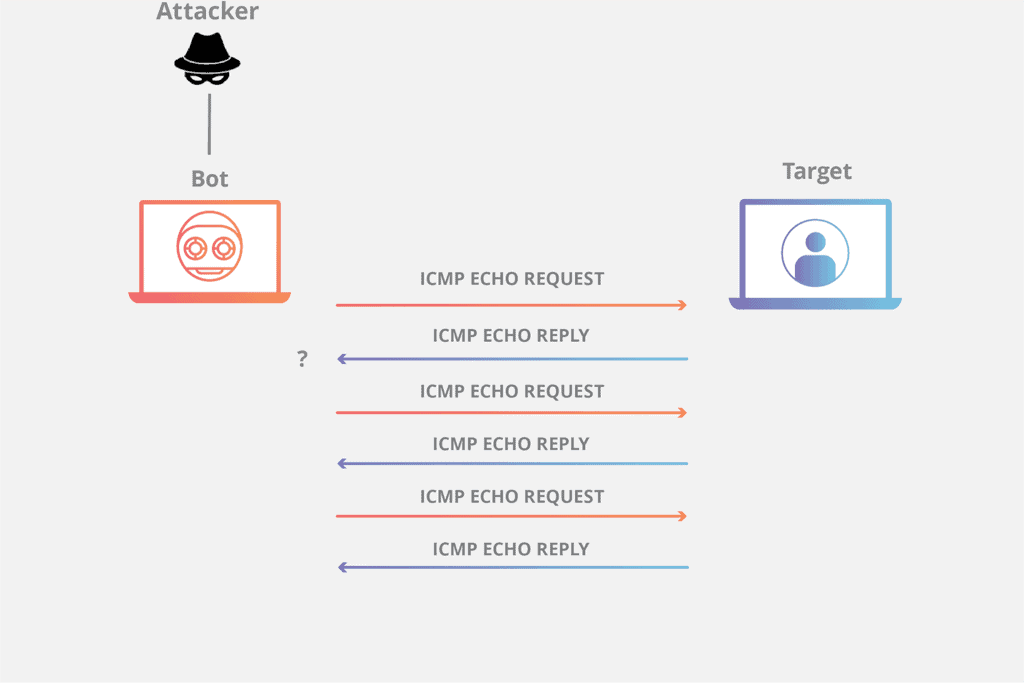
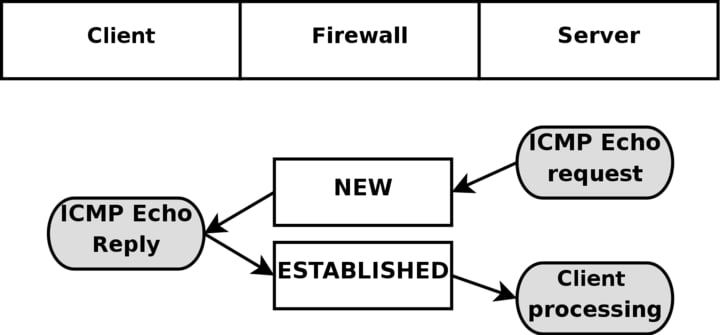
(Echo/echo reply messages are used by the well-known PING command, which allows a user to send an echo to a receiving host, which sends an echo reply if echo is received).
ICMP messages provide the system with a way to notify the source host if the remote host is not receiving the transmitted packets.
ICMP does not help IP be more dependable and it does not receive or send any actual data. It simply exists as a feedback system, a resource to identify problems with lost packets and broken data routing.
One of the most well-known and useful messages in an ICMP datagram is the Destination Unreachable message.
Destination Unreachable messages are generated for several reasons, including unable to reach a network, a host, a port, or a protocol.
A router sends these Destination Unreachable messages back to the host, which then usually sends it to the application that generated the original packet.
The error messages let the application know to try again and, if needed, the host application can generate an error message to the user of the application, notifying them of network connectivity problems.
It is important to know that even though Destination Unreachable messages are the ones that people know best through the PING utility, they are not all that there is to ICMP.
Other important messages include the Redirect message, which a gateway uses to let the host know to send traffic to a different router.
Time Exceeded is used by a router to tell the host that a packet has exceeded its Time to Live (TTL) and has been discarded; when a host starts receiving Time Exceeded packets, it may be an indication that a feedback loop exists somewhere downstream.
Source Quench messages are sent from a router to a host, letting it know that its buffering capacity is full and to briefly pause transmissions to allow it to catch up.
Other types of messages include Parameter Problem, Address Mask Request & Reply and Timestamp, among others.
ICMP will not send messages about ICMP messages; if this were to happen, it would create a feedback loop – a returned ICMP message would generate an ICMP message back to the other side, which would generate another message, and so on, creating a storm of ICMP packets that would quickly flood a network.
For this same reason, ICMP will not reply to broadcast or multicast addresses. Unlike other IP protocols such as TCP and UDP, ICMP does not exchange data between hosts.
As a general rule, end users do not interact with this protocol except for a limited number of diagnostic tools, such as ping and traceroute, used to troubleshoot network and Internet connections.
ICMP can be exploited to attack computers with what is known as the “Ping of Death”, which is a common Cyber attack that can cause Denial of Service issues in your networks.
An IP packet designed to overflow a target computer’s buffer is sent in an attempt to crash its system.
Another attack consists of floods of ping requests that prevent normal traffic from getting to the targeted computer.
These attacks are relatively simple to prevent by implementing checks of IP fragments in the reassembly process.
ICMP messages are datagrams encapsulated within IP packets, and is used by both IPv4 (ICMPv4) and IPv6 (ICMPv6) protocols.
These packets start with an IP header, followed by the ICMP header, type and code, checksum, and data.
The data depends on the type and code fields, which identify the ICMP message being sent.
One of the most important parts of the Internet Protocol suite, ICMP serves a crucial role in IP network communication.
It ensures that a transmitting host knows if its packets are not being received by the remote host, providing crucial information regarding network problems as well as helping hosts transmit data more efficiently.
Network technicians and administrators also use it as a diagnostic tool to help identify points of failure in the network.
An ultimately indispensable tool in our constant, endless flow of billions and billions of IP packets sent around the world every second of every day.
ICMP FAQs
Why is it that an ICMP packet does not have source and destination port numbers?
ICMP, the Internet Control Message Protocol is part of the TCP/IP protocol suite. ICMP relates to the Internet Layer, whereas port numbers are only found in the Transport Layer, which is the layer above.
What is ICMP protocol?
ICMP stands for the Internet Control Message Protocol. It was designed to provide administrative functions to Internet transmissions. Examples of its role include status checks and error messages passed between two devices across a connection.
What layer is ICMP?
ICMP is part of the TCP/IP protocol stack and it is found at the Internet Layer. This is actually the second layer up in the stack. ICMP is referred to as a Layer 3 protocol. This number comes from the Network Layer in the Open Systems Interconnection (OSI) protocol stack. The Network Layer in the OSI model is the thirds up and it equates to the Internet Layer in the TCP/IP stack.
Does ICMP run over IP?
Yes, ICMP sends messages to a source IP address. All IP-based network devices have the ability to send and receive ICMP messages. However, ICMP can be turned off, eliciting an error or failed response. This common tactic is used to limit an environment’s exposure to ICMP related attacks.
Can hackers use ICMP?
Yes, hackers can use ICMP for a variety of attacks. Many of these attacks can be prevented by limiting ICMP traffic volumes and destinations in your firewall. In some cases, it may be appropriate to disable ICMP. Many content delivery networks can automatically block these attacks.
Ping sweeps
Hackers can use the ping command to scan a range of IP addresses and determine which ones are active. This can help them identify potential targets on a network.
ICMP redirect attacks
This type of attack is used to manipulate routing tables on a network, allowing the attacker to redirect network traffic through a device under their control.
ICMP tunneling
Hackers can use ICMP to create a tunnel through which they can transmit data, bypassing firewalls and other security measures.
Smurf attack
A Smurf attack is a type of denial of service attack in which the attacker sends a large number of ICMP echo request packets (ping packets) to the broadcast address of a network, with the source address spoofed to be the address of the intended victim.
ICMP flood attacks
This type of attack is similar to a Smurf attack, but instead of sending a large number of ping packets, the attacker floods the target with a high volume of ICMP packets, overwhelming the target and causing a denial of service.
What port does 'ping' work on?
Is there any particular port number that the ping command works on by default?
Also on a Linux system, is there a way to figure out by yourself which port numbers it runs on and configure a different port number for it?
4 Answers 4
Ping uses the ICMP protocol which doesn’t have ports like the TCP and UDP protocols.
If you need to see if Ping is disabled on a Linux system, you can check:
- 0 means Ping is enabled. (The system will respond to pings)
- 1 means Ping is disabled (The system will not respond to pings)
TCP/IP uses a four-layer network stack. The Link layer deals with the physical media and how to get bytes across, the Internet layer deals with IP addresses and how to route data from one node to another, the Transport layer deals with TCP and UDP sessions, and the Application layer is what user programs use to interact with the network normally.
Pings are implemented as part of ICMP, the Internet Control Message Protocol, which deals with things like errors, congestion, and the like. ICMP is implemented in the Internet layer, and is therefore blissfully ignorant of things like encryption, ports, sessions, and other things provided by the upstream layers, and is also unaware of how the bytes are physically getting from point A to point B (which is the main point of the Link layer).
All of this means that pings are inherently without a port. They don’t operate on any port number, as those are implemented in a different level. When you request a ping, this operation effectively bypasses the Application and Transport Layers, and directly asks the Internet layer to diagnose a connection (namely, to see how long it takes to get a response). This is often directly implemented in a network driver, and doesn’t require any special user application to request or respond to a ping.
You can turn pings responses on and off, but you can’t configure something that literally has no concept in the layer you’re asking about. For any given Operating System, you simply need to check your online manual for how to enable or disable ping responses. The other answer goes into detail about enabling/disabling it on Linux, while this answer was meant to address why there are no ports that can be configured for pings.
PING port number?
Yesterday interviewer ask me what is port number for ping and which protocol ping use TCP/UDP.
After interview I search on internet and found different results someone says ICMP uses Port 7, someone says it does not use port number, on one site I found it usese IP protocol 1, etc.
Can anyone help me with the correct explanation?


5 Answers 5
The standard ping command does not use TCP or UDP. It uses ICMP. To be more precise ICMP type 8 (echo message) and type 0 (echo reply message) are used. ICMP has no ports!
See RFC792 for further details.
I’d like to give you an additional answer especially to this part of the question:
. someone says ICMP uses Port 7
Port 7 (both TCP and UDP) is used for the «echo» service.
If this service is available on a computer, UDP port 7 could be used instead of ICMP to perform a «ping».
However, most modern computers don’t have the «echo» service running, so performing «ping» using UDP port 7 instead of ICMP would not work.
And: As the words «instead of ICMP» already indicate, «ping» over UDP port 7 does NOT use ICMP but UDP, which is a completely different protocol!
As others have already stated, in general pings are ICMP-based and have no ports. There is, however, such a thing as TCP Ping where, instead of the typical 3-way TCP handshake, only the first 2 steps are performed and the delay between is measured. Once the measurement has completed, a RST ACK is sent to close the half-open connection. Then the process repeats until the counter/duration is reached or you terminate the process. Using TCP Ping (which I use FREQUENTLY to test for open ports on servers my systems admins work on) you are able to specify destination ports to test (to verify a server is listening on a certain port). The source port is just an ephemeral random port.
If you’d like to see an example of a TCP Ping utility (the one I use on Windows systems), here you go: TCPing. Also, NMAP comes with a utility called NPING which has a flag to allow it to perform TCP based pings too (I use that on macOS and Linux systems).
As a note, some network equipment also has this capability, such as Cisco ASAs using some of the newer operating system versions. The command is: ping tcp <destination IP> <destination port>
Ping use not port but protocol. Ping operates by sending Internet Control Message Protocol (ICMP) echo request packets to the target host and waiting for an ICMP echo reply. However, as a security consideration, this is often disabled.
What Is Ping Port Number?
The ping is a term and command-line tool used to check remote system network connectivity. It is one of the most popular tools for network diagnostics. By default, the usage of the ping command does not require any port number and will work with just a target IP address or domain name. But you may ask what port number is used by the ping command.
The TCP and UDP protocols are very popular where they can provide multiple port numbers to provide different services over the network. The ping command can be related to these TCP and UDP protocols but it does not use TCP or UDP. This may be even asked you in an interview or certificate exam or class exam. The ping command uses the ICMP protocol. The ping is an old method and tool described in the RFC792 and this standard does not provide any port number for the ping.
Ping and ICMP Protocol
The ping tool uses the ICMP protocol which is different from the TCP and UDP protocol where it is tightly integrated with the IP protocol. The ICMP is a layer 3 protocol that is transmitted with the IP packets even the IP is also a layer 3 protocol too. The ICMP is created to support the IP protocol.
Ping Uses ICMP Type 8 and Type 0
Normally the ICMP protocol does not have any attribute or function like a port number. The ICMP protocol provides the Type, Code, Checksum, and Content parts. So there is no specific port number for the ping command. But the ICMP types Type 8 (Echo Message) and Type 0 (Echo Reply Message) are used for ping operation. The sender or pinger creates an ICMP packet with type 8 which requests the remote system to return an ICMP reply. The target if configured properly and accessible responds with the ICMP Type 0 response to this ping request.
Ping Packet Content
In order to investigate the ping ICMP packets, we will make a ping test to the popular Google DNS server IP address 8.8.8.8 and look to the ICMP packet details for the request and response. First start ping for the 8.8.8.8 with the following command.
We can see below that the ICMP ping request from the IP addresses 192.168.142.133 to 8.8.8.8. If we look at the packet details of the ICMP protocol there is no port and port number information. The most distinctive information is the Type information which is “Type: 8 (Echo (ping) request)“
 Ping ICMP Request Packet Details
The response from the Google DNS server 8.8.8.8 is like below which is labeled as Echo ping reply. If we take a look at the response ICMP packet detailed there is no port or port number related information. But the “Type: 0 (Echo (ping) reply)” is the type of the ICMP reply packet.
 Ping ICMP Reply Packet Details
Is Port 7 Used For Ping ICMP?
The short answer is no. In the old days of the computer, there were a lot of simple protocols to help users in different cases. The TCP and UDP protocol number 7 is assigned for a simple ping service port where both TCP and UDP protocol can be used to make ping tests. This service is called an echo test where after connecting to the TCP and UDP port 7 the transmitted data is returned as a response which creates an echo effect. But currently, most of the computers do not provide and serve this TCP and UDP port number 7 for this type of ping and connectivity check. As a general answer, the ICMP protocol does not use port number 7 which is a TCP and UDP service called echo that is absolute.
Alternative Way Ping TCP Ports
As stated previously the ping is a generic term that is used for different cases other than the ping command. There are different tools that can be used to ping TCP and UDP ports. These tools simply try to connect remote TCP ports and if the connection is established successfully this is called the ping is successful. You can take a look at the following post about pinging TCP ports with different tools like telnet, Nmap, Test-NetConenction, nc.