Issues
The GitLab Issue Tracker is an advanced and complete tool for tracking the evolution of a new idea or the process of solving a problem.
It allows you, your team, and your collaborators to share and discuss proposals before and while implementing them.
GitLab Issues and the GitLab Issue Tracker are available in all GitLab Products as part of the GitLab Workflow.
Use cases
Issues can have endless applications. Just to exemplify, these are some cases for which creating issues are most used:
- Discussing the implementation of a new idea
- Submitting feature proposals
- Asking questions
- Reporting bugs and malfunction
- Obtaining support
- Elaborating new code implementations
Keep private things private
For instance, let’s assume you have a public project but want to start a discussion on something you don’t want to be public. With Confidential Issues, you can discuss private matters among the project members, and still keep your project public, open to collaboration.
Streamline collaboration
With Multiple Assignees for Issues, available in GitLab Starter you can streamline collaboration and allow shared responsibilities to be clearly displayed. All assignees are shown across your workflows and receive notifications (as they would as single assignees), simplifying communication and ownership.
Consistent collaboration
Create issue templates to make collaboration consistent and containing all information you need. For example, you can create a template for feature proposals and another one for bug reports.
Issue Tracker
The Issue Tracker is the collection of opened and closed issues created in a project. It is available for all projects, from the moment the project is created.
Find the issue tracker by navigating to your Project’s homepage > Issues.
Issues per project
When you access your project’s issues, GitLab will present them in a list, and you can use the tabs available to quickly filter by open and closed issues.

You can also search and filter the results more deeply with GitLab’s search capacities.
Issues per group
View issues in all projects in the group, including all projects of all descendant subgroups of the group. Navigate to Group > Issues to view these issues. This view also has the open and closed issues tabs.
Введение в непрерывную поставку (CD) при помощи GitLab

Данный туториал позволит вам быстро прочувствовать как происходит командная работа с использованием GitLab. В целом, начать практиковать DevOps/CD с GitLab проще чем с использованием других продуктов потому что GitLab — это решение «всё в одном».
В процессе этого туториала мы
- настроим базовое управления проектом на GitLab.com;
- создадим конвейер непрерывной поставки
- проведём несколько циклов работы с GitLab Flow
- изучим метрики CI/CD в GitLab
Желательны но необязательны базовые знания
- Git;
- Node.js;
- React;
- Docker;
Время от времени я буду просить вас что-то сделать. Такие моменты помечены значком «!«. Пожалуйста выполняйте действия по мере чтения текста чтобы получить от данного туториала наибольшую пользу.
В оригинале места где требовалось что-то сделать были помечены эмодзи «молоток и гаечный ключ». Так как редактор habr’а вырезает эмодзи, я заменил эти эмодзи на «!«.
Трудно переводить на русский вещи, которые даже русскоязычные программисты между собой называют по-английски. Я постарался литературно переводить термины для которых есть общепринятые переводы и не переводить остальные. Например, мы будем использовать словечки вроде «чекбокс» и «коммитить», а названия разных штук в GitLab останутся на английском, как есть.
Введение и знакомство с проектом
В качестве «подопытного кролика» мы будем использовать чуть модифицированный шаблонный проект, созданный утилитой create-react-app.
! Теперь давайте клонируем репозиторий с кодом с которым мы будем работать.
! Перейдите в каталог локального репозитория
Должна отобразиться стандартная стартовая страница create-react-app.
! Установите npm пакеты локально, выполнив
! Попробуйте «собрать» проект
Обратите внимание, что в папке ./build появились соответствующие файлы, включая минифицированный JavaScript и CSS.
! Затем запустите тесты
! Осталось осуществить «развёртывание», но чтобы не засорять туториал инструкциями по установке веб-сервера, давайте просто запустим отладочный веб-сервер чтобы увидеть как выглядит наше веб приложение выглядит в браузере.
Если подумать, то осталось заменить последнюю инструкцию на копирование статических файлов из папки ./build на веб-сервер — и развёртывание можно считать завершённым. В принципе, это вполне хватит для самостоятельной работы, однако для работы в команде в режиме непрерывной поставки может также захотеться иметь как минимум следующее:
- централизованный репозиторий с
- управлением полномочиями членов команды;
- code review;
- планировать работу и
- отслеживать прогресс;
- автоматическим запуском конвейера непрерывной поставки в нужные моменты;
- визуализацией статуса сборки;
- хранением артефактов;
- автоматическим оповещением о ключевых событиях;
- автоматическим развёртыванием в разные среды;
Всё это, а также многое другое, поддерживается GitLab. Платная версия предлагает больше возможностей, но для наших целей нам хватит и бесплатной версии доступной на GitLab.com.
️ Базовая настройка управления проектом на GitLab.com
В этой части мы создадим сам проект в GitLab и задачи над которыми будем работать в дальнейшем, а также настроим Kanban-доску для визуализации состояния проекта.
Создание проекта в GitLab
Мы будем использовать GitLab.com в качестве инсталляции GitLab чтобы избежать хлопот по установке и настройке локальной версии.
! Если у вас ещё нет учётной записи на GitLab.com, зайдите на https://gitlab.com и заведите её.
GitLab позволяет нам создать проект просто выполнив push в удалённый репозиторий.
! Воспользуемся для этого следующей командой:
<user name> тут — ваше имя пользователя на GitLab.com.
Эта команда создаст приватный проект с именем gitlab-cd-react внутри вашей учётной записи на GitLab.com.
! Пожалуйста перейдите по адресу https://gitlab.com/<user name>/gitlab-cd-react .
Далее мы настроим канбан-доску, а заодно создадим несколько задач чтобы было вокруг чего строить дальнейшую работу и о чём собирать статистику.
️ Создание задач и настройка доски
Давайте начнём с создания задачи.
! Кликните Issues в левом меню, затем нажмите одну из кнопок New Issue в основной области. Откроется форма создания задачи. Укажите в качестве заголовка «Создать задания для туториала».
В описании укажите следующий текстДа, именно эти вещи мы и будем делать в дальнейшем. Оставьте остальные значения по умолчанию. Нажмите кнопку Submit issue.
Обратите внимание, что список с пробелами в квадратных скобках вначале элементов был распознан как чеклист, а отдельные его элементы как задачи. GitLab, как и многие другие платформы, использует Markdown в качестве языка разметки.
! Назначьте задачу Создать задания для туториала на себя. Для этого нажмите ссылку Edit в панели с надписью 0 Assignees справа на странице редактирования задачи.
Поздравляю, теперь вы — исполнитель. На самом деле на этом этапе задача может быть назначена любому члену команды но т.к. по сути ничего не изменится, мы не будем плодить пользователей.
! Давайте теперь на самом деле создадим все задачи, перечисленные в описании нашей первой задачи. Укажите только заголовки, остальные поля оставьте по умолчанию. Вы можете «ставить галочки» в описании задачи Создать задания для туториала как по мере создания задач, так и все сразу когда закончите.
Существуют разные способы создавать задачи, при создании задач по списку найдите и используйте хотя бы 3 разных способа. В итоге у вас должно получиться 6 задач.
! Закройте задачу Создать задания для туториала . Для этого можете в Issues -> List или Issues -> Board кликнуть на заголовок задачи и внутри формы редактирования задачи нажать на кнопку Close issue.
Наш процесс работы
Под процессом работы(workflow) обычно подразумевается порядок этапов, которые задача проходит для того чтобы считаться выполненной. В Continuuos Delivery, Kanban и DevOps задача движется через некую последовательности состояний либо вперёд, либо может быть возвращена на один из предыдущих этапов.
Мы будем использовать простую последовательность состояний
- Open
- Dev
- Dev: done
- QA
- Closed
Вначале задача оказывается в состоянии Open. Затем она затягивается(pull) в работу разработчикам в стадию Dev. После того, как работа завершена, происходит передача задачи в стадию Dev: done.
Итак, затем задача затягивается в этап QA где работают специалисты по качеству и автотесты, а «выпускники» QA считаются настолько хорошими что развёртываются непосредственно на продуктив.
️ Настройка меток
Для организации задач GitLab использует метки(labels). Они как теги и позволяют искать, фильтровать и отображать задачи в разных местах в зависимости от наличия той или иной метки. Давайте заведём сами метки
! Откройте задачу Создать метки и назначьте его на себя. Выберите Issues -> Labels в левом меню, затем нажмите New label в правой части основной области. Заведите таким образом следующие 3 метки, выберите разные цвета на свой вкус.
- Dev
- Dev: done
- QA
Названия меток тут полностью произвольные и никакого особого смысла с точки зрения GitLab в них нет.
! Когда закончите, назначьте задачу Создать метки статус Closed.
Теперь всё готово для настройки Kanban-доски.
Настройка доски
В GitLab есть Kanban-доски. Они позволяют отображать разные задачи в соответствии с их метками. Несмотря на название они могут быть использованы не только для реализации Kanban, но и Scrum а также других методологий. У нас же уже создана задача для этого.
! Назначьте эту задачу на себя.
! Выберите Issues -> Boards в левом меню. Вы увидите доску по умолчанию. В ней уже будут колонки-списки Open и Closed. Нажмите Add list в правой верхней части основной области. Создайте по одному списку для каждой из созданных ранее меток
- Dev
- Dev: done
- QA
Если вы создали их в другом порядке, вы можете изменить порядок, перетаскивая списки «за заголовки».
! На странице Issues -> Boards перетащите задачу Настроить доску мышкой из столбца Open в столбец Dev. Выделите задачу кликнув на часть карточки, не занятую текстом.
Таким образом мы указываем что начали работать над этой задаче. Обратите внимание что у задачи появилась новая метка Dev.
! Так как всю работу мы уже сделали, переведите задачу в столбец Dev: done.
Мы приближаемся к стадии QA. Постарайтесь внутренне ощутить себя тестировщиком, подумайте какие разработчики неблагонадёжные люди, и, опционально, разберите при помощи отвёртки небольшой бытовой прибор.
! Затем переведите задачу в стадию QA. Тут можете несколько раз поперетаскивать задачу из столбца в столбец туда-сюда. Кстати, такие приключения порой и происходят с задачами на данном этапе. В процессе у задачи будет появляться метка нового столбца и исчезать метка предыдущего столбца. В конце концов оставьте задачу в столбце Closed и обратите внимание что в результате этого действия она была закрыта.
Есть ещё один полезный интерфейс — To-Do List(в меню рядом с меню логина есть подменю). Это список действий, которые по тем или иным причинам ожидается от вас. Мы не будем останавливаться на нём подробно, но я рекомендую заглядывать в него в процессе туториала время от времени чтобы составить представление о том как эта штука работает.
Конвейер непрерывной поставки
В этой секции мы реализуем непрерывную поставку(Continuous Delivery) средствами GitLab.
️ Построение конвейера непрерывной поставки в GitLab
Для того чтобы на самом деле выполнять код задач конвейеров, GitLab.com использует общие агенты (shared runners) которые реализуют docker executors. Если вы зарегистрируете свои собственные агенты, вам будет доступна куда большая гибкость в выборе сред сборки.
Давайте теперь сконструируем наш конвейер.
! Назначьте issue Создать конвейер непрерывной поставки и переведите его в статус Dev.
! Создадим конвейер непрерывной поставки(CI/CD pipeline). Для этого требуется создать файл .gitlab-ci.yaml .
На момент написания этой статьи это можно было сделать так.- Перейдите в проект gitlab-cd-react
- Либо на странице Project overview / Details либо на странице Repository вы увидите файлы в вашем репозитории.
- Выберите опцию New file как показано на скриншоте. Вас перенаправят на страницу создания файла.

- В окне File name введите имя файла .gitlab-ci.yml , поле Template правее заполнится автоматически, появится ещё одно поле Apply a template. Ознакомьтесь с доступными опциями, попробуйте повыбирать разные варианты. В конце концов выберите Bash — это просто шаблон с командами bash, мы будем использовать его в качестве отправной точки.
Давайте разберём полученный файл. Официальная документ по формату файла .gitlab-ci.yml находится тут.
Чтобы получить нужный нам конвейер чуть модифицируем этот файл.
image задаёт какой образ docker будет использован для выполнения jobs сборки. По умолчанию GitLab использует Docker Hub, но это можно настроить. Нам понадобится образ с предустановленным Node.js.
! Укажите
before_script и after_script выполняются перед и после каждой задачи соответственно. В процессе выполнения задач, мы будем использовать модули Node.js.
! Организуем кэширование модулей для того чтобы не скачивать модули каждый раз из интернета.
- Мы вначале указываем где задачи будут искать кэш, а именно — внутри текущей папки в подпапке .npm .
В качестве ключа кэша используем $, это означает что мы держим отдельный кэш для каждой ветви в Git. - В before_script мы устанавливаем пакеты в соответствии с package-lock.json , указывая в качестве пути для кэша подпапку .npm .
Таким образом, в дальше в коде .gitlab-ci.yml мы можем исходить что пакеты уже установлены.
after_script нам в этом туториале не понадобится.
Перейдём к секции build1 , изначально там должно быть что-то вроде этого:
Обратим внимание на кусок stage: build . stage определяет этап конвейера, этапы выполняются один за другим. Один этап может содержать одну или более задач, которые могут выполняться параллельно.
! Изменим команды чтобы действительно осуществлять сборку:
- npm ci устанавливает необходимые модули в соответствии с файлом package-lock.json без проверки существуют ли они уже в папке node_modules .
- npm run build запускает саму сборку минифицированного React-приложения.
- artifacts указывает какие файлы должны быть сохранены для использования в будущем. Webpack с настройками create-react-app по умолчанию копирует файлы в папку build . expires_in мы используем для того чтобы не тратить место на уже не нужные сборки.
Обратим теперь внимание на кусок кода для этапа stage: test
! Нам не нужна задача test2 , а задачу test1 изменим следующим образом:
- npm test тут запускает модульные тесты, определённые в нашем проекте.
- dependencies указывает что данная задача test1 зависит от результатов задачи build1 чтобы артефакты этой задачи были доступны в текущей.
Перейдём к части связанной напрямую с развёртыванием.
Эта часть обычно завязана на специфику среды в которую осуществляется развёртывание и потому технически сложна. GitLab поддерживает развёртывание в Kubernetes с минимальными усилиями по настройке. Альтернативой является реализация логики развёртывания в другую среду своими силами. Оставим технические детали этого процесса для будущих статей. Фокус данной статьи на объяснении основ работы с GitLab, поэтому мы прибегнем к хитрости, а точнее используем то обстоятельство что наше приложение на React технически является статическим вебсайтом и развернём его на GitLab Pages, которые доступны любому у кого есть учётная запись на GitLab.com.
! Заменим job deploy1 на этот код.
Мы переименовали deploy1 в pages потому что GitLab именно по названию задачи понимает что требуется развернуть файлы доступные этой задаче в GitLab Pages.
Далее делаем 2 вещи.- mv public _public сохраняет папку public которая есть в приложении, сгенерированном из шаблона create-react-app. Мы делаем это потому что GitLab будет возвращать в ответ на запросы к Pages именно содержимое папки public .
- mv build public — тут мы как раз помещаем результат сборки туда где веб-сервер GitLab Pages будет искать его.
Завершим на этом работу над нашим конвейером.
! Закоммитьте отредактированный файл .gitlab-ci.yml , укажите «Add CI/CD pipeline» в качестве Commit message, оставьте в качестве ветви master .
! Переведите задачу Создать конвейер непрерывной поставки в стадию Dev: done.
Проведём несколько циклов работы с GitLab Flow
Git — очень гибкая система контроля версий кода и использовать его можно очень по-разному. Если каждый член команды использует Git по-своему, возникает путаница когда трудно понять логику действий других людей из истории изменений, и никто не понимает что ожидать от других. Об измерении производительности в такой ситуации и говорить не приходится. Для того чтобы такая путаница не возникала участники команды обычно договариваются о единых правила работы с Git, такая договорённость и называется Git workflow.
Чтобы изучить реализацию GitLab Flow в GitLab мы сделаем эти вещи:
- обсудим что такое процесс работы с Git(Git workflow) вообще;
- посмотрим, как в GitLab устроены права доступа и защищённые ветви;
- разберёмся как работают merge request`ы;
- проведём несколько итераций GitLab Flow.
Процесс работы с Git
Если коротко, то GitLab Flow состоит в том что
- при каждой необходимости что-то изменить в коде создаётся ветвь от главной (в Git по умолчанию master );
- затем открывается merge request (в других системах называется pull request) где происходит обсуждение вносимых изменений;
- для каждой из сред (тестовой, продуктивной и т.д.) при этом существует отдельная ветвь;
- одна из «ветвей сред», откуда происходит безусловное развёртывание может совпадать с главной;
- развёртывание происходит путём слияния в ветвь соответствующей среды;
- cлияния происходят из feature branch в главную ветвь или из «менее продуктивной» ветви среды в «более продуктивную».
Уровни доступа в GitLab
Существует разные уровни доступа, в порядке понижения полномочий.
- Instance administrator — доступен только для отдельных инсталляций, может всё.
- Owner — владелец группы проектов, может всё кроме чисто технических штук типа включения-отключения фич и интеграции с другими сервисами.
- Maintainer — может всё кроме некоторых действий в отношении всего проекта типа изменения его названия или степени видимости, а также деструктивных действий типа удаления задач.
- Developer — может то же что и Maintainer кроме некоторых администраторских и деструктивных функций внутри проекта типа настройки защищенности ветвей и редактирования комментариев.
- Reporter — может редактировать задачи, но не может вносить изменения в репозиторий.
- Guest — доступ только на чтение issue кроме конфиденциальных, может создавать новые задачи.
Данные о полномочиях здесь приведены для полноты, активно использовать в рамках туториала мы их не будем.
Merge requests
Merge requests — основной способ внесения изменений в код при использовании GitLab. Изменения вносятся в код, затем автором изменений создаётся merge request, который затем обсуждается, в котором происходит code review. Merge request в результате принимается, отправляется на доработку или отклоняется.
! Зайдите в задачу Провести несколько итераций GitLab Flow , назначьте его на себя и переведите в колонку Dev.
! Переведите задачу Создать конвейер непрерывной поставки в стадию QA.
Наше приложение бесполезно. В этом нет ничего необычного, ведь в интернете много бесполезных приложений. Чтобы выйти на новый уровень, давайте сделаем наше приложение токсичным. Существуют 2 фичи, которые являются проверенным способом достичь этого.
! Откройте файл src/App.js на редактирование (Repository -> Files, Edit) и добавьте эту строчку прямо вверху файла.
В качестве Commit message укажите, например, «Add React imports». В качестве Target branch оставьте master и нажмите Commit changes.
Упс, мы только что закоммитили изменения сразу в master . Некоторые workflow позволяют такое, но мы будем работать в рамках GitLab Flow. Избежать подобных казусов в дальнейшем нам поможет фича GitLab под названием защищённые ветви(protected branches). Её смысл не в разграничении доступа, а в том, чтобы помочь членам команды работать в рамках договорённостей и избежать случайного изменения и удаления данных в репозитории.
! Нажмите в левом меню Settings -> Repository. В открывшейся странице найдите раздел Protected Branches.
Вы увидите что по умолчанию защищена только ветка master , но вы можете добавить и другие. И по умолчанию
- force push запрещён всем
- push разрешён Maintainers
- merge разрешён Maintainers
! Измените Allowed to push на No one.
! Отлично, давайте вернёмся к редактированию файла src/App.js . После строчки
Соответствующий участок кода должен теперь выглядеть примерно так
Укажите «Add the annoying popup» в качестве commit message.
Вы увидите что вам предлагается добавить коммит в некую ветвь и в уже автоматически сгенерировано некоторое имя ветви. Мы в будущем заменим это имя на более осмысленное и соответствующее нашему процессу работы с Git, но пока давайте проведём небольшой эксперимент.
! Замените предлагаемое имя на master и нажмите Commit changes.
Вы увидите сообщение об ошибке You are not allowed to push into this branch . Хорошо! Защита ветвей работает. Давайте теперь инициируем процедуру внесения изменений в код так как это предполагается делать.
! Замените теперь имя ветви с master на feature-cookies-consent . Оставьте чекбокс Start a new merge request with these changes установленным. Будет создана ветвь с указанным названием и изменения будут закоммичены в эту ветвь. Вы окажетесь на странице создания merge request’а. Оставьте
- заголовок merge request’а по умолчанию.
- Assignee и Reviewer Unassigned .
- всё остальное также по умолчанию.
Нажмите Submit merge request
- Assignee — ответственный за работу над merge request’ом и его слияние в целевую ветвь,
- Reviewer же изучает предложенные изменения и может согласовать их если они кажутся правильными.
После создания merge request’а, ы окажетесь его на странице. Давайте изучим эту страницу. В основной области мы видим следующее.
- Какую ветвь мы сливаем с какой ( feature-cookies-consent в master ).
- Статус pipeline для ветви feature-cookies-consent .
- Возможность согласовать merge request от имени текущего пользователя.
- Кнопка Merge осуществляет принятие merge request’а и непосредственно слияние ветвей, которое приводит к внесению изменений в master .
- Область где можно посмотреть коммиты, которые будут слиты, там же можно изменить сообщение merge commit’а.
- Возможности принять участие в обсуждении:
- выразить своё отношение и оставить смайлик;
- область добавления комментария.
Если вы переключитесь на вкладку Changes, вы можете посмотреть, какие изменения в код планируется внести. Здесь же вы можете создать комментарий, который будет ссылаться на строку кода.
Кстати, merge requests также поддерживают метки, которые вы можете использовать чтобы было проще находить нужные.
К этому моменту работа конвейера уже должна завершиться и… тесты завершены неуспешно. В нашем конкретном случае это потому что мы использовали window.alert который является чисто браузерным объектом и наши выполняемые в среде Node.js юнит-тесты не имеют к нему доступа.
В случае непрерывной поставки требуется очень хороший набор автоматических тестов потому что именно на них переложена почти вся, а в случае непрерывного развёртывания(Continuous Deployment) — вся, ответственность за контроль качества. Поддержание такого набора тестов в актуальном состоянии — главная технический вызов в реализации таких методологий.
! Исправим src/App.js , добавив проверку на то что код работает в браузере. Давайте поместим код, использующий window.alert внутрь блока кода, проверяющего что мы в браузере. Убедитесь что вы редактируете файл в ветке feature-cookies-consent .
Должно получиться примерно такДобавьте «Ensure running in a browser» в качестве commit message. В качестве Target Branch должна быть установлена feature-cookies-consent .
! Давайте вернёмся в merge request Add the annoying popup и нажмём кнопку Merge и примем изменения в код. Оставьте чекбокс Delete source branch установленным.
При использовании GitLab Flow feature branches традиционно удаляют. Это позволяет избежать замусоривания системы уже неактуальными ветвями и создавать ветвь с тем же именем в случае отправки задачи на доработку.
! Откройте Repository -> Graph и обратите внимание на то что feature-cookies-consent теперь слита с master .
Затем откройте файл src/App.js в ветке master и заметьте что код уже содержит правки.! Зайдите в задачу Провести несколько итераций GitLab Flow и в основной области нажмите стрелочку вниз рядом с кнопкой Create merge request. Укажите имя ветки, которую вы хотите создать чтобы базировать на ней новый merge request. feature-notifications-consent вполне подойдёт. Оставьте в качестве source branch master .
При создании merge request’а таким образом задача будет закрыта автоматически как только мы сольём код в основную ветвь.
Обратите внимание что автоматически сгенерированное название нашего merge request’а начинается с Draft: . Это означает что merge request помечен как черновик. Это полезно для авторов чтобы явно обозначить что работа пока не завершена и избежать слияния изменений as is в результате недопонимания. Этого же можно добиться и при помощи кнопки Mark as draft в верхней правой части основной области.
Добавим функцию оповещений в наш вебсайт чтобы он выглядел современно.
! Давайте для разнообразия внесём изменения в код чуть иначе. На странице merge request’а нажмите кнопку Open in Web IDE. Откроется чуть более удобный для работы с кодом интерфейс. Уже из него откройте файл src/App.js . Добавьте код
после ранее добавленной строчки
! Нажмите кнопку Commit в левой нижней части. Вы увидите интерфейс коммита, укажите в качестве commit message «Add the notifications users want». Оставьте всё остальное по умолчанию и нажмите кнопку Commit.
! Перейдите в merge request, например, используя подменю в верхней правой части экрана рядом с меню логина.Нажмите кнопку Mark as ready в верхней правой части формы merge request’а. Нажмите кнопку Merge или Merge when pipeline succeeds в зависимости от того завершился ли уже конвейер.
! Откройте наш тестовый вебсайт и убедитесь что новые «фичи» работают, и наша страница ощущается как большинство современных сайтов в интернете.
! Если с сайтом всё хорошо, перетащите задачу Создать конвейер непрерывной поставки в стадию Closed на доске.
Итак, мы провели несколько полных циклов работы и теперь можем изучить метрики, которые GitLab собрал в процессе работы.
Метрики CI/CD в GitLab
В процессе командной работы полезно собирать статистику чтобы понимать повышается ли продуктивность или падает. Способы оценки производительности могут быть совсем разными в зависимости от характера работы и типа проекта или продукта.
Хорошей новостью является то что GitLab имеет функционал сбора этой статистики. Давайте с этим функционалом познакомимся.
! Кликните на Analytics. По умолчанию откроется раздел Value stream. В Lean вообще и в DevOps в частности считается что задачи несут в конечном итоге некоторую пользу для конечного заказчика. И движение таких полезных задач, от стадии формулирования через все этапы работы до того момента когда результаты становятся доступны заказчику называется value stream.
Основные средние величины по этапам:
- Issue — время которое уходит на то чтобы задачу «взять в работу» т.е. присвоить метку или добавить в Milestone.
- Plan — время от последнего действия в предыдущем этапе до появления первого коммита в ветке, хоты бы один из коммитов которой связан с той же задачей. То есть «время, которое уходит чтобы начать коммитить».
- Code — время существования ветки, связанной с той или иной задачей, которое уходит до появления merge request’a.
- Test — время от начала до конца всех конвейеров данного проекта.
- Review — время от создания merge request’а до его слияния или закрытия.
- Staging — время от принятия merge request до развёртывания в продуктивную среду.
Если вы сложите длительность Issue, Plan, Code, Review и Staging, вы и получите примерно то самое заветное время для вывода на рынок (TTM).
Наверху страницы в также увидите некие агрегатные показатели по проекту за выбранный период времени.
Analytics -> Repository показывает разные графики связанные с языками коммитов, показателями code coverage (если настроено), распределением коммитов во времени (месяц, дни недели, часы).
Analytics -> CI/CD показывает сводные данные по выполенным pipelines, в том числе график показывающий динамику изменения «успешности» выполнения pipelines.
Поздравляю!
Вы осуществили имплементацию непрерывной поставки(CD) при помощи GitLab начиная с задач с канбан-доской и завершая метриками.
Name already in use
gitlabhq / doc / api / issues.md
- Go to file T
- Go to line L
- Copy path
- Copy permalink
- Open with Desktop
- View raw
- Copy raw contents Copy raw contents
Copy raw contents
Copy raw contents
Issues API (FREE)
Interact with GitLab Issues using the REST API.
If a user is not a member of a private project, a GET request on that project results in a 404 status code.
By default, GET requests return 20 results at a time because the API results are paginated.
WARNING: The reference attribute in responses is deprecated in favor of references . Introduced in GitLab 12.6.
NOTE: The references.relative attribute is relative to the group or project of the issue being requested. When an issue is fetched from its project, the relative format is the same as the short format. When requested across groups or projects, it’s expected to be the same as the full format.
- The due_date property was introduced in GitLab 13.3.
- The weight property moved to GitLab Premium in 13.9.
- The due_date filters any , today , and tomorrow were introduced in GitLab 14.8.
Get all issues the authenticated user has access to. By default it returns only issues created by the current user. To get all issues, use parameter scope=all .
Attribute Type Required Description assignee_id integer no Return issues assigned to the given user id . Mutually exclusive with assignee_username . None returns unassigned issues. Any returns issues with an assignee. assignee_username string array no Return issues assigned to the given username . Similar to assignee_id and mutually exclusive with assignee_id . In GitLab CE, the assignee_username array should only contain a single value. Otherwise, an invalid parameter error is returned. author_id integer no Return issues created by the given user id . Mutually exclusive with author_username . Combine with scope=all or scope=assigned_to_me . author_username string no Return issues created by the given username . Similar to author_id and mutually exclusive with author_id . confidential boolean no Filter confidential or public issues. created_after datetime no Return issues created on or after the given time. Expected in ISO 8601 format ( 2019-03-15T08:00:00Z ) created_before datetime no Return issues created on or before the given time. Expected in ISO 8601 format ( 2019-03-15T08:00:00Z ) due_date string no Return issues that have no due date, are overdue, or whose due date is this week, this month, or between two weeks ago and next month. Accepts: 0 (no due date), any , today , tomorrow , overdue , week , month , next_month_and_previous_two_weeks . epic_id (PREMIUM) integer no Return issues associated with the given epic ID. None returns issues that are not associated with an epic. Any returns issues that are associated with an epic. (Introduced in GitLab 13.6) health_status (ULTIMATE) string no Return issues with the specified health_status . (Introduced in GitLab 15.4). In GitLab 15.5 and later, None returns issues with no health status assigned, and Any returns issues with a health status assigned. iids[] integer array no Return only the issues having the given iid in string no Modify the scope of the search attribute. title , description , or a string joining them with comma. Default is title,description issue_type string no Filter to a given type of issue. One of issue , incident , or test_case . (Introduced in GitLab 13.12) iteration_id (PREMIUM) integer no Return issues assigned to the given iteration ID. None returns issues that do not belong to an iteration. Any returns issues that belong to an iteration. Mutually exclusive with iteration_title . (Introduced in GitLab 13.6) iteration_title (PREMIUM) string no Return issues assigned to the iteration with the given title. Similar to iteration_id and mutually exclusive with iteration_id . (Introduced in GitLab 13.6) labels string no Comma-separated list of label names, issues must have all labels to be returned. None lists all issues with no labels. Any lists all issues with at least one label. No+Label (Deprecated) lists all issues with no labels. Predefined names are case-insensitive. milestone string no The milestone title. None lists all issues with no milestone. Any lists all issues that have an assigned milestone. Using None or Any will be deprecated in the future. Please use milestone_id attribute instead. milestone and milestone_id are mutually exclusive. milestone_id string no Returns issues assigned to milestones with a given timebox value ( None , Any , Upcoming , and Started ). None lists all issues with no milestone. Any lists all issues that have an assigned milestone. Upcoming lists all issues assigned to milestones due in the future. Started lists all issues assigned to open, started milestones. milestone and milestone_id are mutually exclusive. (Introduced in GitLab 14.3) my_reaction_emoji string no Return issues reacted by the authenticated user by the given emoji . None returns issues not given a reaction. Any returns issues given at least one reaction. non_archived boolean no Return issues only from non-archived projects. If false , the response returns issues from both archived and non-archived projects. Default is true . (Introduced in GitLab 13.0) not Hash no Return issues that do not match the parameters supplied. Accepts: assignee_id , assignee_username , author_id , author_username , iids , iteration_id , iteration_title , labels , milestone , milestone_id and weight . order_by string no Return issues ordered by created_at , due_date , label_priority , milestone_due , popularity , priority , relative_position , title , updated_at , or weight fields. Default is created_at . scope string no Return issues for the given scope: created_by_me , assigned_to_me or all . Defaults to created_by_me . search string no Search issues against their title and description sort string no Return issues sorted in asc or desc order. Default is desc state string no Return all issues or just those that are opened or closed updated_after datetime no Return issues updated on or after the given time. Expected in ISO 8601 format ( 2019-03-15T08:00:00Z ) updated_before datetime no Return issues updated on or before the given time. Expected in ISO 8601 format ( 2019-03-15T08:00:00Z ) weight (PREMIUM) integer no Return issues with the specified weight . None returns issues with no weight assigned. Any returns issues with a weight assigned. with_labels_details boolean no If true , the response returns more details for each label in labels field: :name , :color , :description , :description_html , :text_color . Default is false . The description_html attribute was introduced in GitLab 12.7 Issues created by users on GitLab Premium or higher include the weight property:
Issues created by users on GitLab Premium or higher include the epic property:
Issues created by users on GitLab Premium or higher include the iteration property:
Issues created by users on GitLab Ultimate include the health_status property:
WARNING: The assignee column is deprecated. We now show it as a single-sized array assignees to conform to the GitLab EE API.
WARNING: The epic_iid attribute is deprecated and scheduled for removal in API version 5. Please use iid of the epic attribute instead.
List group issues
- The due_date property was introduced in GitLab 13.3.
- The weight property moved to GitLab Premium in 13.9.
- The due_date filters any , today , and tomorrow were introduced in GitLab 14.8.
Get a list of a group’s issues.
If the group is private, credentials need to be provided for authorization. The preferred way to do this, is by using personal access tokens.
Attribute Type Required Description assignee_id integer no Return issues assigned to the given user id . Mutually exclusive with assignee_username . None returns unassigned issues. Any returns issues with an assignee. assignee_username string array no Return issues assigned to the given username . Similar to assignee_id and mutually exclusive with assignee_id . In GitLab CE, the assignee_username array should only contain a single value. Otherwise, an invalid parameter error is returned. author_id integer no Return issues created by the given user id . Mutually exclusive with author_username . Combine with scope=all or scope=assigned_to_me . author_username string no Return issues created by the given username . Similar to author_id and mutually exclusive with author_id . confidential boolean no Filter confidential or public issues. created_after datetime no Return issues created on or after the given time. Expected in ISO 8601 format ( 2019-03-15T08:00:00Z ) created_before datetime no Return issues created on or before the given time. Expected in ISO 8601 format ( 2019-03-15T08:00:00Z ) due_date string no Return issues that have no due date, are overdue, or whose due date is this week, this month, or between two weeks ago and next month. Accepts: 0 (no due date), any , today , tomorrow , overdue , week , month , next_month_and_previous_two_weeks . epic_id (PREMIUM) integer no Return issues associated with the given epic ID. None returns issues that are not associated with an epic. Any returns issues that are associated with an epic. (Introduced in GitLab 13.6) id integer/string yes The global ID or URL-encoded path of the group owned by the authenticated user iids[] integer array no Return only the issues having the given iid issue_type string no Filter to a given type of issue. One of issue , incident , or test_case . (Introduced in GitLab 13.12) iteration_id (PREMIUM) integer no Return issues assigned to the given iteration ID. None returns issues that do not belong to an iteration. Any returns issues that belong to an iteration. Mutually exclusive with iteration_title . (Introduced in GitLab 13.6) iteration_title (PREMIUM) string no Return issues assigned to the iteration with the given title. Similar to iteration_id and mutually exclusive with iteration_id . (Introduced in GitLab 13.6) labels string no Comma-separated list of label names, issues must have all labels to be returned. None lists all issues with no labels. Any lists all issues with at least one label. No+Label (Deprecated) lists all issues with no labels. Predefined names are case-insensitive. milestone string no The milestone title. None lists all issues with no milestone. Any lists all issues that have an assigned milestone. my_reaction_emoji string no Return issues reacted by the authenticated user by the given emoji . None returns issues not given a reaction. Any returns issues given at least one reaction. non_archived boolean no Return issues from non archived projects. Default is true. (Introduced in GitLab 12.8) not Hash no Return issues that do not match the parameters supplied. Accepts: labels , milestone , author_id , author_username , assignee_id , assignee_username , my_reaction_emoji , search , in order_by string no Return issues ordered by created_at , updated_at , priority , due_date , relative_position , label_priority , milestone_due , popularity , weight fields. Default is created_at scope string no Return issues for the given scope: created_by_me , assigned_to_me or all . Defaults to all . search string no Search group issues against their title and description sort string no Return issues sorted in asc or desc order. Default is desc state string no Return all issues or just those that are opened or closed updated_after datetime no Return issues updated on or after the given time. Expected in ISO 8601 format ( 2019-03-15T08:00:00Z ) updated_before datetime no Return issues updated on or before the given time. Expected in ISO 8601 format ( 2019-03-15T08:00:00Z ) weight (PREMIUM) integer no Return issues with the specified weight . None returns issues with no weight assigned. Any returns issues with a weight assigned. with_labels_details boolean no If true , the response returns more details for each label in labels field: :name , :color , :description , :description_html , :text_color . Default is false . The description_html attribute was introduced in GitLab 12.7 Issues created by users on GitLab Premium or higher include the weight property:
Issues created by users on GitLab Premium or higher include the epic property:
Issues created by users on GitLab Ultimate include the health_status property:
WARNING: The assignee column is deprecated. We now show it as a single-sized array assignees to conform to the GitLab EE API.
WARNING: The epic_iid attribute is deprecated and scheduled for removal in API version 5. Please use iid of the epic attribute instead.
List project issues
- The due_date property was introduced in GitLab 13.3.
- The weight property moved to GitLab Premium in 13.9.
- The due_date filters any , today , and tomorrow were introduced in GitLab 14.8.
Get a list of a project’s issues.
If the project is private, you need to provide credentials to authorize. The preferred way to do this, is by using personal access tokens.
Attribute Type Required Description assignee_id integer no Return issues assigned to the given user id . Mutually exclusive with assignee_username . None returns unassigned issues. Any returns issues with an assignee. assignee_username string array no Return issues assigned to the given username . Similar to assignee_id and mutually exclusive with assignee_id . In GitLab CE, the assignee_username array should only contain a single value. Otherwise, an invalid parameter error is returned. author_id integer no Return issues created by the given user id . Mutually exclusive with author_username . Combine with scope=all or scope=assigned_to_me . author_username string no Return issues created by the given username . Similar to author_id and mutually exclusive with author_id . confidential boolean no Filter confidential or public issues. created_after datetime no Return issues created on or after the given time. Expected in ISO 8601 format ( 2019-03-15T08:00:00Z ) created_before datetime no Return issues created on or before the given time. Expected in ISO 8601 format ( 2019-03-15T08:00:00Z ) due_date string no Return issues that have no due date, are overdue, or whose due date is this week, this month, or between two weeks ago and next month. Accepts: 0 (no due date), any , today , tomorrow , overdue , week , month , next_month_and_previous_two_weeks . epic_id (PREMIUM) integer no Return issues associated with the given epic ID. None returns issues that are not associated with an epic. Any returns issues that are associated with an epic. (Introduced in GitLab 13.6) id integer/string yes The global ID or URL-encoded path of the project owned by the authenticated user iids[] integer array no Return only the issues having the given iid issue_type string no Filter to a given type of issue. One of issue , incident , or test_case . (Introduced in GitLab 13.12) iteration_id (PREMIUM) integer no Return issues assigned to the given iteration ID. None returns issues that do not belong to an iteration. Any returns issues that belong to an iteration. Mutually exclusive with iteration_title . (Introduced in GitLab 13.6) iteration_title (PREMIUM) string no Return issues assigned to the iteration with the given title. Similar to iteration_id and mutually exclusive with iteration_id . (Introduced in GitLab 13.6) labels string no Comma-separated list of label names, issues must have all labels to be returned. None lists all issues with no labels. Any lists all issues with at least one label. No+Label (Deprecated) lists all issues with no labels. Predefined names are case-insensitive. milestone string no The milestone title. None lists all issues with no milestone. Any lists all issues that have an assigned milestone. my_reaction_emoji string no Return issues reacted by the authenticated user by the given emoji . None returns issues not given a reaction. Any returns issues given at least one reaction. not Hash no Return issues that do not match the parameters supplied. Accepts: labels , milestone , author_id , author_username , assignee_id , assignee_username , my_reaction_emoji , search , in order_by string no Return issues ordered by created_at , updated_at , priority , due_date , relative_position , label_priority , milestone_due , popularity , weight fields. Default is created_at scope string no Return issues for the given scope: created_by_me , assigned_to_me or all . Defaults to all . search string no Search project issues against their title and description sort string no Return issues sorted in asc or desc order. Default is desc state string no Return all issues or just those that are opened or closed updated_after datetime no Return issues updated on or after the given time. Expected in ISO 8601 format ( 2019-03-15T08:00:00Z ) updated_before datetime no Return issues updated on or before the given time. Expected in ISO 8601 format ( 2019-03-15T08:00:00Z ) weight (PREMIUM) integer no Return issues with the specified weight . None returns issues with no weight assigned. Any returns issues with a weight assigned. with_labels_details boolean no If true , the response returns more details for each label in labels field: :name , :color , :description , :description_html , :text_color . Default is false . description_html was introduced in GitLab 12.7 Issues created by users on GitLab Premium or higher include the weight property:
Issues created by users on GitLab Premium or higher include the epic property:
Issues created by users on GitLab Ultimate include the health_status property:
WARNING: The assignee column is deprecated. We now show it as a single-sized array assignees to conform to the GitLab EE API.
WARNING: The epic_iid attribute is deprecated and scheduled for removal in API version 5. Please use iid of the epic attribute instead.
Only for administrators. Get a single issue.
The preferred way to do this is by using personal access tokens.
Attribute Type Required Description id integer yes The ID of the issue Issues created by users on GitLab Premium or higher include the weight property:
Issues created by users on GitLab Premium or higher include the epic property:
Users of GitLab Ultimate can also see the health_status property:
WARNING: The assignee column is deprecated. We now show it as a single-sized array assignees to conform to the GitLab EE API.
WARNING: The epic_iid attribute is deprecated, and scheduled for removal in API version 5. Please use iid of the epic attribute instead.
Single project issue
Get a single project issue.
If the project is private or the issue is confidential, you need to provide credentials to authorize. The preferred way to do this, is by using personal access tokens.
Attribute Type Required Description id integer/string yes The global ID or URL-encoded path of the project owned by the authenticated user issue_iid integer yes The internal ID of a project’s issue Issues created by users on GitLab Premium or higher include the weight property:
Issues created by users on GitLab Premium or higher include the epic property:
Users of GitLab Ultimate can also see the health_status property:
WARNING: The assignee column is deprecated. We now show it as a single-sized array assignees to conform to the GitLab EE API.
WARNING: The epic_iid attribute is deprecated and scheduled for removal in API version 5. Please use iid of the epic attribute instead.
The weight property moved to GitLab Premium in 13.9.
Creates a new project issue.
Attribute Type Required Description assignee_id integer no The ID of the user to assign the issue to. Only appears on GitLab Free. assignee_ids (PREMIUM) integer array no The IDs of the users to assign the issue to. confidential boolean no Set an issue to be confidential. Default is false . created_at string no When the issue was created. Date time string, ISO 8601 formatted, for example 2016-03-11T03:45:40Z . Requires administrator or project/group owner rights. description string no The description of an issue. Limited to 1,048,576 characters. discussion_to_resolve string no The ID of a discussion to resolve. This fills out the issue with a default description and mark the discussion as resolved. Use in combination with merge_request_to_resolve_discussions_of . due_date string no The due date. Date time string in the format YYYY-MM-DD , for example 2016-03-11 epic_id (PREMIUM) integer no ID of the epic to add the issue to. Valid values are greater than or equal to 0. epic_iid (PREMIUM) integer no IID of the epic to add the issue to. Valid values are greater than or equal to 0. (deprecated, scheduled for removal in API version 5) id integer/string yes The global ID or URL-encoded path of the project owned by the authenticated user iid integer/string no The internal ID of the project’s issue (requires administrator or project owner rights) issue_type string no The type of issue. One of issue , incident , or test_case . Default is issue . labels string no Comma-separated label names for an issue merge_request_to_resolve_discussions_of integer no The IID of a merge request in which to resolve all issues. This fills out the issue with a default description and mark all discussions as resolved. When passing a description or title, these values take precedence over the default values. milestone_id integer no The global ID of a milestone to assign issue. To find the milestone_id associated with a milestone, view an issue with the milestone assigned and use the API to retrieve the issue’s details. title string yes The title of an issue weight (PREMIUM) integer no The weight of the issue. Valid values are greater than or equal to 0. Issues created by users on GitLab Premium or higher include the weight property:
Issues created by users on GitLab Premium or higher include the epic property:
Issues created by users on GitLab Ultimate include the health_status property:
WARNING: The assignee column is deprecated. We now show it as a single-sized array assignees to conform to the GitLab EE API.
WARNING: The epic_iid attribute is deprecated and scheduled for removal in API version 5. Please use iid of the epic attribute instead.
To help avoid abuse, users can be limited to a specific number of Create requests per minute. See Issues rate limits.
The weight property moved to GitLab Premium in 13.9.
Updates an existing project issue. This call is also used to mark an issue as closed.
At least one of the following parameters is required for the request to be successful:
- :assignee_id
- :assignee_ids
- :confidential
- :created_at
- :description
- :discussion_locked
- :due_date
- :issue_type
- :labels
- :milestone_id
- :state_event
- :title
Attribute Type Required Description add_labels string no Comma-separated label names to add to an issue. assignee_ids integer array no The ID of the users to assign the issue to. Set to 0 or provide an empty value to unassign all assignees. confidential boolean no Updates an issue to be confidential description string no The description of an issue. Limited to 1,048,576 characters. discussion_locked boolean no Flag indicating if the issue’s discussion is locked. If the discussion is locked only project members can add or edit comments. due_date string no The due date. Date time string in the format YYYY-MM-DD , for example 2016-03-11 epic_id (PREMIUM) integer no ID of the epic to add the issue to. Valid values are greater than or equal to 0. epic_iid (PREMIUM) integer no IID of the epic to add the issue to. Valid values are greater than or equal to 0. (deprecated, scheduled for removal in API version 5) id integer/string yes The global ID or URL-encoded path of the project owned by the authenticated user issue_iid integer yes The internal ID of a project’s issue issue_type string no Updates the type of issue. One of issue , incident , or test_case . labels string no Comma-separated label names for an issue. Set to an empty string to unassign all labels. milestone_id integer no The global ID of a milestone to assign the issue to. Set to 0 or provide an empty value to unassign a milestone. remove_labels string no Comma-separated label names to remove from an issue. state_event string no The state event of an issue. Set close to close the issue and reopen to reopen it title string no The title of an issue updated_at string no When the issue was updated. Date time string, ISO 8601 formatted, for example 2016-03-11T03:45:40Z (requires administrator or project owner rights). Empty string or null values are not accepted. weight (PREMIUM) integer no The weight of the issue. Valid values are greater than or equal to 0. 0 Issues created by users on GitLab Premium or higher include the weight property:
Issues created by users on GitLab Premium or higher include the epic property:
Issues created by users on GitLab Ultimate include the health_status property:
WARNING: The epic_iid attribute is deprecated and scheduled for removal in API version 5. Please use iid of the epic attribute instead.
WARNING: assignee column is deprecated. We now show it as a single-sized array assignees to conform to the GitLab EE API.
Delete an issue
Only for administrators and project owners. Deletes an issue.
Attribute Type Required Description id integer/string yes The global ID or URL-encoded path of the project owned by the authenticated user issue_iid integer yes The internal ID of a project’s issue Reorder an issue
Reorders an issue, you can see the results when sorting issues manually
Attribute Type Required Description id integer/string yes The global ID or URL-encoded path of the project owned by the authenticated user issue_iid integer yes The internal ID of the project’s issue move_after_id integer no The global ID of a project’s issue that should be placed after this issue move_before_id integer no The global ID of a project’s issue that should be placed before this issue Moves an issue to a different project. If the target project is the source project or the user has insufficient permissions, an error message with status code 400 is returned.
If a given label or milestone with the same name also exists in the target project, it’s then assigned to the issue being moved.
Attribute Type Required Description id integer/string yes The global ID or URL-encoded path of the project owned by the authenticated user issue_iid integer yes The internal ID of a project’s issue to_project_id integer yes The ID of the new project Issues created by users on GitLab Premium or higher include the weight property:
Issues created by users on GitLab Premium or higher include the epic property:
Issues created by users on GitLab Ultimate include the health_status property:
WARNING: The assignee column is deprecated. We now show it as a single-sized array assignees to conform to the GitLab EE API.
WARNING: The epic_iid attribute is deprecated and scheduled for removal in API version 5. Please use iid of the epic attribute instead.
Clone the issue to given project. If the user has insufficient permissions, an error message with status code 400 is returned.
Copies as much data as possible as long as the target project contains equivalent criteria such as labels or milestones.
Attribute Type Required Description id integer/string Yes ID or URL-encoded path of the project owned by the authenticated user. issue_iid integer Yes Internal ID of a project’s issue. to_project_id integer Yes ID of the new project. with_notes boolean No Clone the issue with notes. Default is false . Subscribe to an issue
Subscribes the authenticated user to an issue to receive notifications. If the user is already subscribed to the issue, the status code 304 is returned.
Attribute Type Required Description id integer/string yes The global ID or URL-encoded path of the project owned by the authenticated user issue_iid integer yes The internal ID of a project’s issue Issues created by users on GitLab Premium or higher include the weight property:
Issues created by users on GitLab Premium or higher include the epic property:
Issues created by users on GitLab Ultimate include the health_status property:
WARNING: The assignee column is deprecated. We now show it as a single-sized array assignees to conform to the GitLab EE API.
WARNING: The epic_iid attribute is deprecated and scheduled for removal in API version 5. Please use iid of the epic attribute instead.
Unsubscribe from an issue
Unsubscribes the authenticated user from the issue to not receive notifications from it. If the user is not subscribed to the issue, the status code 304 is returned.
Attribute Type Required Description id integer/string yes The global ID or URL-encoded path of the project owned by the authenticated user issue_iid integer yes The internal ID of a project’s issue Create a to-do item
Manually creates a to-do item for the current user on an issue. If there already exists a to-do item for the user on that issue, status code 304 is returned.
Attribute Type Required Description id integer/string yes The global ID or URL-encoded path of the project owned by the authenticated user issue_iid integer yes The internal ID of a project’s issue WARNING: The assignee column is deprecated. We now show it as a single-sized array assignees to conform to the GitLab EE API.
Promote an issue to an epic (PREMIUM)
Promotes an issue to an epic by adding a comment with the /promote quick action.
For more information about promoting issues to epics, see Manage epics.
Attribute Type Required Description id integer/string yes The global ID or URL-encoded path of the project owned by the authenticated user issue_iid integer yes The internal ID of a project’s issue body String yes The content of a note. Must contain /promote at the start of a new line. Set a time estimate for an issue
Sets an estimated time of work for this issue.
Attribute Type Required Description duration string yes The duration in human format. e.g: 3h30m id integer/string yes The global ID or URL-encoded path of the project owned by the authenticated user issue_iid integer yes The internal ID of a project’s issue Reset the time estimate for an issue
Resets the estimated time for this issue to 0 seconds.
Attribute Type Required Description id integer/string yes The global ID or URL-encoded path of the project owned by the authenticated user issue_iid integer yes The internal ID of a project’s issue Add spent time for an issue
Adds spent time for this issue
Attribute Type Required Description duration string yes The duration in human format. e.g: 3h30m id integer/string yes The global ID or URL-encoded path of the project owned by the authenticated user issue_iid integer yes The internal ID of a project’s issue summary string no A summary of how the time was spent Reset spent time for an issue
Resets the total spent time for this issue to 0 seconds.
Attribute Type Required Description id integer/string yes The global ID or URL-encoded path of the project owned by the authenticated user issue_iid integer yes The internal ID of a project’s issue Get time tracking stats
If the project is private or the issue is confidential, you need to provide credentials to authorize. The preferred way to do this, is by using personal access tokens.
Attribute Type Required Description id integer/string yes The global ID or URL-encoded path of the project owned by the authenticated user issue_iid integer yes The internal ID of a project’s issue List merge requests related to issue
Get all the merge requests that are related to the issue.
If the project is private or the issue is confidential, you need to provide credentials to authorize. The preferred way to do this, is by using personal access tokens.
Attribute Type Required Description id integer/string yes The global ID or URL-encoded path of the project owned by the authenticated user issue_iid integer yes The internal ID of a project’s issue List merge requests that close a particular issue on merge
Get all merge requests that close a particular issue when merged.
If the project is private or the issue is confidential, you need to provide credentials to authorize. The preferred way to do this, is by using personal access tokens.
Attribute Type Required Description id integer/string yes The global ID or URL-encoded path of the project owned by the authenticated user issue_iid integer yes The internal ID of a project issue Participants on issues
If the project is private or the issue is confidential, you need to provide credentials to authorize. The preferred way to do this, is by using personal access tokens.
Attribute Type Required Description id integer/string yes The global ID or URL-encoded path of the project owned by the authenticated user issue_iid integer yes The internal ID of a project’s issue Comments on issues
Comments are done via the notes resource.
Get user agent details
Available only for administrators.
Attribute Type Required Description id integer/string yes The global ID or URL-encoded path of the project owned by the authenticated user issue_iid integer yes The internal ID of a project’s issue List issue state events
To track which state was set, who did it, and when it happened, check out Resource state events API.
Upload metric image
Available only for Incident issues.
Attribute Type Required Description id integer/string yes The global ID or URL-encoded path of the project owned by the authenticated user issue_iid integer yes The internal ID of a project’s issue file file yes The image file to be uploaded url string no The URL to view more metric information url_text string no A description of the image or URL List metric images
Available only for Incident issues.
Attribute Type Required Description id integer/string yes The global ID or URL-encoded path of the project owned by the authenticated user issue_iid integer yes The internal ID of a project’s issue Update metric image
Available only for Incident issues.
Attribute Type Required Description id integer/string yes The global ID or URL-encoded path of the project owned by the authenticated user issue_iid integer yes The internal ID of a project’s issue image_id integer yes The ID of the image url string no The URL to view more metric information url_text string no A description of the image or URL Delete metric image
Available only for Incident issues.
Attribute Type Required Description id integer/string yes The global ID or URL-encoded path of the project owned by the authenticated user issue_iid integer yes The internal ID of a project’s issue image_id integer yes The ID of the image Can return the following status codes:
- 204 No Content , if the image was deleted successfully.
- 400 Bad Request , if the image could not be deleted.
Footer
© 2023 GitHub, Inc.
You can’t perform that action at this time.
You signed in with another tab or window. Reload to refresh your session. You signed out in another tab or window. Reload to refresh your session.
GitLab — Create Issue
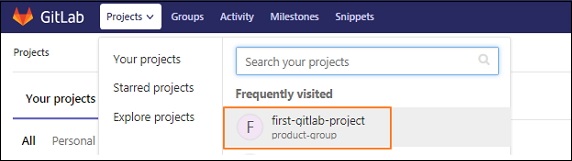
Step 3 − Now, fill the information such as title, description and if you want, you can select a user to assign an issue, milestone(refer this chapter for more information), labels upon operation or could be choose by developers themselves later.
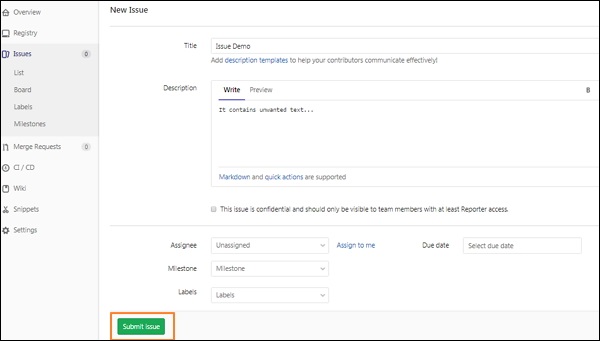
Step 4 − Click on the Submit issue button and you will get an overview of an issue along with title and description as shown below −