Conio.h
conio.h (от англ. console input-output — консольный ввод-вывод) — заголовочный файл, используемый в старых компиляторах, работающих в операционных системах MS-DOS, для создания текстового интерфейса пользователя. Тем не менее, он не является частью языка программирования Си, стандартной библиотеки языка Си, ISO C или требуемой стандартом POSIX.
Этот заголовочный файл объявляет несколько библиотечных функций для работы с «консольным вводом и выводом» программы. Большинство компиляторов языка Си, предназначенных для DOS, Windows 3.x, Phar Lap, DOSX, OS/2 или Win32 имели этот файл и обеспечивали сопутствующие библиотечные функции в библиотеке Си по умолчанию. Большинство компиляторов языка Си, предназначенных для UNIX и Linux, не имеют этого файла и не обеспечивают сопутствующих библиотечных функций.
Библиотечные функции, объявленные в conio.h, весьма различались в зависимости от компилятора. Первоначально реализованные в Microsoft Visual C++ различные функции привязывались напрямую к нескольким первым функциям DOS, связанным с прерыванием 21h. Но библиотека, поставляемая с Turbo C++ и Borland C++, не использует DOS API, а вместо этого напрямую обращается к видеопамяти для вывода информации и использования сигналов прерывания BIOS.
Компиляторы, предназначенные для операционных систем отличных от DOS, таких как Linux, Windows и OS/2, обеспечивали различные реализации этих функций.
Члены-функции
| int kbhit(void) | Определяет, было ли нажатие клавиш клавиатуры |
| int ungetch(int c) | Помещает символ c обратно в буфер клавиатуры. |
| int getch(void) | Считывает символ напрямую из консоли без использования буфера и echo-вывода. |
| int getche(void) | Считывает символ напрямую из консоли без использования буфера, но с использованием echo-вывода. |
| int putch(int c) | Функция _putch выводит символ c в консоль без буферизации. В случае успеха возвращает c. В противном случае возвращает EOF. |
| char *_cgets(char *buffer) | Считывает строку из консоли и хранит ее в массиве, указывающим на буфер. buffer[0] , должен содержать максимальную длину (в символах) строки, то есть сколько символов нужно считать. Второй элемент массива buffer[1] указывает «где». _cgets хранит текущую длину строки. _cgets считывает символы до символа возврата, перевода строки или указанного максимума числа символов. |
| int _cprintf(const char *format, arg0. argn) | Форматирование и вывод («печать») строки напрямую в консоль. |
| int _cputs(const char *string) | Вывод строки напрямую в консоль. |
| int _cscanf(char *format, arg0. argn) | Считывание и форматирование данных напрямую из консоли. |
Смотри также
Ссылки
Wikimedia Foundation . 2010 .
Полезное
Смотреть что такое «Conio.h» в других словарях:
conio.h — Conio redirects here. For the profanity, see wikt:coño. conio.h is a C header file used in old MS DOS compilers to create text user interfaces. It is not described in The C Programming Language book, and it is not part of the C standard library,… … Wikipedia
Conio.h — is a header file used in old MS DOS compilers to create text user interfaces, however, it is not part of the C programming language, the C standard library, ISO C or required by POSIX.This header declares several useful library functions for… … Wikipedia
conio.h — (от англ. console input output консольный ввод вывод) заголовочный файл, используемый в старых компиляторах, работающих в операционных системах MS DOS, для создания текстового интерфейса пользователя. Тем не менее, он не является … Википедия
conio — Element prim de compunere savantă cu semnificaţia praf , în legătură cu praful , de (la) praf . [pron. ni o , var. coni . / < fr. conio , cf. gr. konis – praf]. Trimis de LauraGellner, 18.01.2005. Sursa: DN … Dicționar Român
Conio. — Conio. (v. gr. Konia, Staub), Staub … Pierer’s Universal-Lexikon
conio — / kɔnjo/ s.m. [lat. cŭneus ]. 1. a. [utensile per stampare monete o medaglie] ▶◀ punzone. ⇑ stampo. b. [operazione ed effetto del coniare, anche fig.] ▶◀ battitura, coniatura, coniazione. 2. (fig., spreg.) … Enciclopedia Italiana
conio — 1cò·nio s.m. CO 1a. stampo in acciaio a forma di punzone su cui vengono incisi disegni, figure o iscrizioni che si vogliono imprimere in rilievo su monete o medaglie; l impronta che ne risulta: riconoscere una moneta dal conio 1b. l operazione… … Dizionario italiano
conio — s. m. 1. punzone, torsello 2. (est.) impronta, stampo 3. cuneo, zeppa 4. coniazione, coniatura FRASEOLOGIA fior di conio, moneta che non ha mai circolato □ nu … Sinonimi e Contrari. Terza edizione
conio — <
Name already in use
If nothing happens, download GitHub Desktop and try again.
Launching GitHub Desktop
If nothing happens, download GitHub Desktop and try again.
Launching Xcode
If nothing happens, download Xcode and try again.
Launching Visual Studio Code
Your codespace will open once ready.
There was a problem preparing your codespace, please try again.
Latest commit
Git stats
Files
Failed to load latest commit information.
README.md
Library <conio.h> For Linux
What is #include <conio.h>
If you see at the top of some C/C++ code, 90% of the time you’ll see the line #include <conio.h> .
We’re including the file <conio.h> into our main program. The <conio.h> header file contains certain library functions that peform input and output operation.
#include <conio.h> is a header file, conio stands for console-input-output and (.h) is basically header file extension.
It contains some functions and methods for formatting the output and getting input in the console.

The error will be shown like below :
List Function <conio.h>
Some of it’s functions which are often used :
- kbhit — Determines if a keyboard key was pressed.
- gcgets — Reads a string directly from the console.
- cscanf — Reads formatted values directly from the console.
- putch — Writes a character directly to the console.
- cputs — Writes a string directly to the console.
- cprintf — Formats values and writes them directly to the console.
- clrscr — Clears the screen.
- getch — Get char entry from the console
How To Install Library #include <conio.h>
This is a library conio.h for linux. Just copy file and paste file conio.h on /usr/include/ but don’t forget before you want copy paste on /usr/include/ you must open folder as ADMINISTRATOR first !!
- Open your terminal can as root
- sudo apt-get update
- sudo apt-get upgrade
- sudo apt-get install git
- git clone https://github.com/zoelabbb/conio.h.git or Click to Clone Repos
- cd conio.h

- sudo make install
- Restart or Close your IDE and open it again
- And done 😀
Now you can using library #include <conio.h> .
Wanna Support me ? You can buy me some coffee via :
About
This is a library conio.h for linux ��️ . you can install manual library conio.h for linux step by step here.
Заголовочный файл conio.h
Что за заголовочный файл такой <conio.h>, и для чего он нужен? В K&R такой не описывают. Заранее спасибо.
<conio.h> содержит описание нестандартной библиотеки для работы с консолью ( clrscr , kbhit и тому подобное). Поставляется, ЕМНИП, со старыми Борландовскими компиляторами. Не пользуйтесь ей, если хотите, чтобы ваш код компилировался на более современных компиляторах.
Заметьте, что непосредственная работа с консолью противоречит философии юниксовских утилит, которые должны одинаково хорошо работать как с входными данными, полученными от пользователя, так и с выводом других программ. Поэтому правильная юниксовская утилита должна читать ввод из stdin и выводить его в stdout/stderr, позволяя эффективно использовать перенаправление потоков ввода-вывода.
conio.h Library Functions in C
Till now, you must have heard a lot about stdio.h header file which is one of the standard header files in C. In this tutorial, we will learn about a non-standard but very useful header file in C, conio.h.
conio stands for console input output. It contains console input and output functions which are mostly used by MS-DOS compilers. GCC compiler does not support this header file. Here, we will use Turbo C to compile our programs.
List of Functions in conio.h
Following are some of the functions of the header file conio.h-
- clrscr()
- getch()
- getche()
- putch()
- cgets()
- cputs()
- cscanf()
- cprintf()
- kbhit()
- textcolor()
- textbackground()
- delline
- gotoxy
- wherex
- wherey
Let’s look at the functions one-by-one.
1). clrscr()
This function is used to clear the output screen.
This appears after clearing the screen.
Press any key to continue.
2). getch()
It reads one character from the keyboard. We don’t care about the input here.We want that the window should wait for the user’s input to proceed/end the program.
Enter a character:
Press any key to continue.
3). getche()
getche() is similar to getch() but it can input alphanumeric values too. It also prints the value of the character we input on the screen.
Enter a character: a
Press any key to continue.
4). putch()
It prints one character on the output screen.
a
Press any key to continue.
5). cgets()
char* cgets(char* str);
It reads a string of characters from the console until it encounters carriage-return (CR) and linefeed (LF)(Carriage return points the cursor to the beginning of the line horizontly and Line feed shifts the cursor to the next line vertically. Combination of both gives us new line(\n) effect.). It replaces CR/LF with the null terminator (\0) at the end of the string.
Enter some characters:studytonight
Entered characters: studytonight
Press any key to continue.
6). cputs()
int cputs(const char* str);
It prints a string of characters on the output screen.
Hola amigo!
Press any key to continue.
7). cscanf() and cprintf()
These work like printf() and scanf(). They work on values as per the format speficier.
Enter your name: abc
Hello, abc
Press any key to continue.
8). kbhit()
kbhit() tells us if a user has pressed any key or not. It is useful in games to tell whether a user has pressed key or not.
Press any key to stop the process.
Press any key to stop the process.
Press any key to stop the process.
Press any key to stop the process.
Press any key to stop the process.
Press any key to stop the process.
Press any key to stop the process.
Press any key to continue.
9). textcolor()
It is used to change the color of text.

We can also set it as blinking color as follows-
10). textbackground()
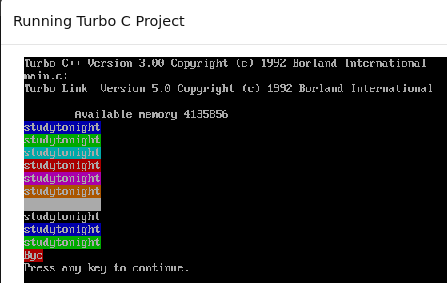
11). delline()
This function is used to clear single or multiple lines from the screen.
Welcome to studytonight.
This appears after clearing the screen.
Press any key to continue.
12). gotoxy()
This function takes two parameters and takes your cursor on a particular coordinate on the window.
The position of cursor is changed.
Press any key to continue.
13). wherex() and wherey()
They tell us the position of the cursor. wherex() gives us the X-axis co-ordinate while wherey() gives us the Y-axis co-ordinate.