ACTIONS
Red Hat introduced DDv3 starting with RHEL6. To create Red Hat DDv3, specify -d redhat3 and specify the specfile to use with —spec=specfile. If no specfile is specified, DKMS will use /etc/dkms/template-dkms-redhat-kmod.spec
For suse/UnitedLinux driver disks, /usr/share/YaST2/modules/Vendor.ycp will also be copied to the driver disk; no other files are needed. However, for these distros, you must specify a -r release. For SuSE 9.1, it would be -d suse -r 9.1. For SLES9, it would be -d suse -r sles9.
By default the disk image it creates is 1440 (k) in size. This can be overridden by specifying a different —size #### which should should be given as a number in kilobytes divisible by 20.
You may have more content than will fit on a floppy. Therefore, DKMS can now generate image files of different types. —media floppy (default) to generate a floppy disk image, or —media iso to generate a CD-ROM ISO file, or —media tar to generate a tar file.
You may copy the floppy or ISO image file to a USB key to be used with OS installer.
| mktarball | [ module/module-version] [ -k kernel/arch] [ —archive /path/to/tarball.tar] [ —source-only] [ —binaries-only] |
Creates a tarball archive for the specified module/version of all files in the DKMS tree for that module/version combination. This includes the source and any built modules for kernels in the tree (as specified). Otherwise, you can specify a singular kernel to archive only, or multiple kernels to archive (-k kernel1/arch1 -k kernel2/arch2). Optionally, you can use —archive to specify the file that you would like to save this tarball to. You can also specify —binaries-only if you want the resultant tarball not to include the module source. Likewise, —source-only can be used to specify that no prebuilt binaries should be included in the tarball. In general, mktarball is great for systems management purposes as you can build your driver on just one system and then use ldtarball on all of your other systems to get the same built modules loaded without having to wait for anything to compile.
| ldtarball |
This takes a tarball made from the mktarball command and loads it into your DKMS tree. This will leave any newly added modules in the built state and dkms install should then be called to install any of them. If files already exist where ldtarball is attempting to place them, it will warn and not copy over them. The —force option should be used to override this.
| mkrpm | [ module/module-version] [ -k kernel/arch] [ —source-only] [ —binaries-only] |
This action allows you to create an RPM package for a specified module / version. It uses a template .spec file found in /etc/dkms/template-dkms-mkrpm.spec as the basis for the RPM. Alternatively, if DKMS finds a file called /usr/src/<module>-<module-version>/<module>-dkms-mkrpm.spec it will use that .spec file instead. In general, a DKMS tarball is placed inside the contents of this RPM, and the RPM itself calls various DKMS commands to load this tarball, build and install modules on the end user's system. If you do not want your RPM to contain any prebuilt binaries, be sure to specify —source-only in the mkrpm command.
| mkdeb | [ module/module-version] [ -k kernel/arch] [ —binaries-only] [ —source-only] |
This action allows you to create a debian binary package for a specified module / version. It uses a template debian directory found in /etc/dkms/template-dkms-mkdeb as the basis for the package. Alternatively, if DKMS finds a file called /usr/src/<module>-<module-version>/<module>-dkms-mkdeb it will use that folder instead. In general, a DKMS tarball is placed inside the contents of this package, and the package itself calls various DKMS commands to load this tarball, build and install modules on the end user's system. If you do not want your debian package to contain any prebuilt binaries, be sure to specify —source-only in the mkdeb command.
| mkbmdeb | [ module/module-version] [ -k kernel/arch] |
Creates a Debian binary package containing just the binary modules in the /lib/modules installation path. This package does not depend on dkms and does not require a toolchain to be installed on the target host. Useful if you want to have a package to install on hosts identical to the build system without installing the full toolchain on them. It uses a template debian directory found in /etc/dkms/template-dkms-mkbmdeb as the basis for the package.
| mkdsc | [ module/module-version] [ -k kernel/arch] [ —binaries-only] [ —source-only] |
This action allows you to create a debian source package for a specified module / version. It will create a .tar.gz, and a .dsc. All options supported by mkdeb are supported by it. The main difference in it's usage is that it will look in /etc/dkms/template-dkms-mkdsc as the basis for the package. Alternatively, if DKMS finds a file called /usr/src/<module>-<module-version>/<module>-dkms-mkdsc it will use that folder instead. If you do not want your debian source package to contain any prebuilt binaries, be sure to specify —source-only in the mkdsc command.
| mkkmp | [ module/module-version] [ —spec specfile] |
This action allows you to create an Kernel Module Package source RPM for a specified module / version. It uses the .spec file specified by —spec=specfile else $module-kmp.spec as the basis for the RPM. The generated source RPM may then be built using SuSE's build.rpm or Fedora/RHEL's mock chroot environments. See http://kerneldrivers.org/ for more details on KMPs.
| status | [ module/module-version] [ -k kernel/arch] |
Returns the current status of modules, versions and kernels within the tree as well as whether they have been added, built or installed. Status can be shown for just a certain module, a certain kernel, a module/version combination or a module/version/kernel combination.
| autoinstall |
Attempt to install the latest revision of all modules that have been installed for other kernel revisions. dkms_autoinstaller is a stub that uses this action to perform its work.
OPTIONS
For example, if you were to specify: -k kernel1 -k kernel2 -a i386 -k kernel3 -a i686 -a x86_64, DKMS would process this as: kernel1-i386, kernel2-i686, kernel3-x86_64.
-q, —quiet Quiet. -V, —version Prints the currently installed version of dkms and exits. -c <dkms.conf-location> The location of the dkms.conf file. This is needed for the add action and if not specified, it is assumed to be located in /usr/src/<module>-<module-version>/. See below for more information on the format of dkms.conf. -d, —distro The distribution being used. This is only currently needed for mkdriverdisk. The supported distros are redhat, suse and UnitedLinux. See the sections on mkdriverdisk and mkkmp for more information. -r, —release The release being used. This is only currently used for mkdriverdisk and is only used for suse or UnitedLinux distros (eg. -r 9.1). It is used in the internal makeup of the driverdisk. —size The size of the driver disk image to be created. By default, this value is set at 1440. Any different size should be given as an integer value only, should be divisible by 20 and should represent the number of kilobytes of the image size you desire. —config <kernel-.config-location> During a build this option is used to specify an alternate location for the kernel .config file which was used to compile that kernel. Normally, dkms uses the Red Hat standard location and config filenames located in /usr/src/linux-<kernel>/configs/. If the config for the kernel that you are building a module for is not located here or does not have the expected name in this location, you will need to tell dkms where the necessary .config can be found so that your kernel can be properly prepared for the module build. —archive <tarball-location> This option is used during a ldtarball action to specify the location of the tarball you wish to load into your DKMS tree. You only have to specify the —archive part of this option if <tarball-location> does not already exist as a file. —templatekernel <kernel-version> This option is required for the action: match. Match will look at the templatekernel specified and install all of the same module/version combinations on the other kernel. —force This option can be used in conjunction with ldtarball to force copying over of extant files. —binaries-only This option can be used in conjunction with mktarball in order to create a DKMS tarball which does not contain the source for the module within it. This can be helpful in reducing the size of the tarball if you know that the system which this tarball will be loaded upon already has the source installed. In order to load a tarball made as binaries-only you must have the module source in that systems DKMS tree. If you do not, DKMS will refuse to load a binaries-only tarball. —source-only This option can be used in conjunction with mktarball or mkrpm or mkdeb in order to create a DKMS tarball which does not contain any prebuilt kernel module binaries within it. This is helpful if you simply want to easily tar up your source but don't want anything prebuilt within it. Likewise, if you are using mkrpm but do not want the RPM you create to have any prebuilt modules within it, passing this option will keep its internal DKMS tarball from containing any prebuilt modules. —all This option can be used to automatically specify all relevant kernels/arches for a module/module-version. This is useful for things like remove , mktarball , etc. This saves the trouble of having to actually specify -k kernel1 -a arch1 -k kernel2 -a arch2 for every kernel you have built your module for. —no-prepare-kernel This option keeps DKMS from first preparing your kernel before building a module for it. Generally, this option should not be used so as to ensure that modules are compiled correctly. —no-clean-kernel This option keeps DKMS from cleaning your kernel source tree after a build. —no-depmod This option prevents DKMS from running the depmod command during install and uninstall which will avoid (re)calculating module dependencies and thereby save time. —kernelsourcedir <kernel-source-directory-location> Using this option you can specify the location of your kernel source directory. Most likely you will not need to set this if your kernel source is accessible via /lib/modules/$kernel_version/build. —directive <"cli-directive=cli-value"> Using this option, you can specify additional directives from the command line. The —directive option can be used multiple times on the same command-line to specify multiple additional command line directives. —rpm_safe_upgrade This flag should be used when packaging DKMS enabled modules in RPMs. It should be specified during both the add and remove actions in the RPM spec to ensure that DKMS and RPM behave correctly in all scenarios when upgrading between various versions of a dkms enabled module RPM package. See the sample.spec file for an example or read more in the section below on Creating RPMs Which Utilize DKMS. —spec specfile This option is used by the mkkmp action to specify which RPM spec file to use when generating the KMP. specfile will be sought in the module source directory. —dkmstree path/to/place Provides a destination tree for building and installing modules to. Useful in cases that you don't want to contaminate a system when using solely for building. —sourcetree path/to/place Provides a location to build a DKMS package from. Useful for systems that you may not have root access, but would still like to be able to build DKMS packages. —installtree path/to/place Provides a location to place modules when a dkms install command is issued. —legacy-postinst=[0|1] Includes a legacy postinstall script so that a DEB or RPM built by DKMS can be used on versions prior than DKMS 2.1. This option currently defaults to 1. —dkmsframework path/to/file A supplemental configuration file to the system-wide dkms framework, typically located in /etc/dkms/framework.conf. All option that are normally provided on a command line can be provided in this file. -j number Run no more than number jobs in parallel; see the -j option of make(1). Defaults to the number of CPUs in the system, detected by nproc(1). Specify 0 to impose no limit on the number of parallel jobs.
ORIGINAL MODULES
If more than one is found, then the first one located (by preference indicated above) will be considered the "original_module". As well, all copies of the same-named module will be removed from your kernel tree and placed into /var/lib/dkms/<module>/original_module/$kernelver/collisions so that they can be *manually* accessible later. DKMS will never actually do anything with the modules found underneath the /collisions directory, and they will be stored there until you manually delete them.
DKMS.CONF
It is important to understand that many of the DKMS directives are arrays whose index values are tied together. These array associations can be considered families, and there are currently four such families of directive arrays. MAKE[#] and MAKE_MATCH[#] make up one family. PATCH[#] and PATCH_MATCH[#] make up the second family. The third and largest family consists of BUILT_MODULE_NAME[#], BUILT_MODULE_LOCATION[#], DEST_MODULE_NAME[#], DEST_MODULE_LOCATION[#], MODULES_CONF_ALIAS_TYPE[#], MODULES_CONF_OBSOLETES[#], MODULES_CONF_OBSOLETE_ONLY[#] and STRIP[#]. The fourth family is made up of only MODULES_CONF[#]. When indexing these arrays when creating your dkms.conf, each family should start at index value 0.
MAKE[#]= The MAKE directive array tells DKMS which make command should be used for building your module. The default make command should be put into MAKE[0]. Other entries in the MAKE array will only be used if their corresponding entry in MAKE_MATCH[#] matches, as a regular expression (using egrep), the kernel that the module is being built for. Note that if no value is placed in MAKE_MATCH[#] for any MAKE[#] where # > 0, then that MAKE directive is ignored. MAKE_MATCH[0] is optional and if it is populated, it will be used to determine if MAKE[0] should be used to build the module for that kernel. If multiple MAKE_MATCH directives match against the kernel being built for, the last matching MAKE[#] will be used to build your module. If no MAKE directive is specified or if no MAKE_MATCH matches the kernel being built for, DKMS will attempt to use a generic MAKE command to build your module.
KERNELRELEASE will be automatically appended to MAKE[#]. If you want to suppress this behavior, you can quote the make command: 'make'.
MAKE_MATCH[#]= See the above entry on MAKE[#] directives. This array should be populated with regular expressions which, when matched against the kernel being built for, will tell DKMS to use the corresponding make command in the MAKE[#] directive array to build your module. BUILT_MODULE_NAME[#]= This directive gives the name of the module just after it is built. If your DKMS module package contains more than one module to install, this is a required directive for all of the modules. This directive should explicitly not contain any trailing ".o" or ".ko". Note that for each module within a dkms package, the numeric value of # must be the same for each of BUILT_MODULE_NAME, BUILT_MODULE_LOCATION, DEST_MODULE_NAME and DEST_MODULE_LOCATION and that the numbering should start at 0 (eg. BUILT_MODULE_NAME[0]="qla2200" BUILT_MODULE_NAME[1]="qla2300"). BUILT_MODULE_LOCATION[#]= This directive tells DKMS where to find your built module after it has been built. This pathname should be given relative to the root directory of your source files (where your dkms.conf file can be found). If unset, DKMS expects to find your BUILT_MODULE_NAME[#] in the root directory of your source files. Note that for each module within a dkms package, the numeric value of # must be the same for each of BUILT_MODULE_NAME, BUILT_MODULE_LOCATION, DEST_MODULE_NAME and DEST_MODULE_LOCATION and that the numbering should start at 0 (eg. BUILT_MODULE_LOCATION[0]="some/dir/" BUILT_MODULE_LOCATION[1]="other/dir/"). DEST_MODULE_NAME[#]= This directive can be used to specify the name of the module as it should be installed. This will rename the module from BUILT_MODULE_NAME[#] to DEST_MODULE_NAME[#]. This directive should explicitly not contain any trailing ".o" or ".ko". If unset, it is assumed to be the same value as BUILT_MODULE_NAME[#]. Note that for each module within a dkms package, the numeric value of # must be the same for each of BUILT_MODULE_NAME, BUILT_MODULE_LOCATION, DEST_MODULE_NAME and DEST_MODULE_LOCATION and that the numbering should start at 0 (eg. DEST_MODULE_NAME[0]="qla2200_6x" DEST_MODULE_NAME[1]="qla2300_6x"). DEST_MODULE_LOCATION[#]= This directive specifies the destination where a module should be installed to, once compiled. It also is used for finding original_modules. This is a required directive, except as noted below. This directive must start with the text "/kernel" which is in reference to /lib/modules/<kernelversion>/kernel. Note that for each module within a dkms package, the numeric value of # must be the same for each of BUILT_MODULE_NAME, BUILT_MODULE_LOCATION, DEST_MODULE_NAME and DEST_MODULE_LOCATION and that the numbering should start at 0 (eg. DEST_MODULE_LOCATION[0]="/kernel/drivers/something/" DEST_MODULE_LOCATION[1]="/kernel/drivers/other/").
DEST_MODULE_LOCATION is ignored on Fedora and Red Hat Enterprise Linux, Novell SuSE Linux Enterprise Server 10 and higher, Novell SuSE Linux 10.0 and higher, and Ubuntu. Instead, the proper distribution-specific directory is used.
MODULES_CONF_ALIAS_TYPE[#]= This directive array specifies how your modules should be aliased in /etc/modules.conf when your module is installed. This is done in an intelligent fashion so if DKMS detects an already existing reference in modules.conf, it won't add a new line. If it is not detected, it will add it to the modules.conf as the last alias number for that alias type (eg. if MODULES_CONF_ALIAS_TYPE="scsi_hostadapter", no alias currently exists for that module and the last scsi_hostadapter reference is 6, then your module will be added as "scsi_hostadapter7"). Common values for this directive include: scsi_hostadapter , sound-slot- and eth. Note that the numeric value of # is tied to the index of BUILD_MODULE_NAME, BUILT_MODULE_LOCATION, DEST_MODULE_NAME and DEST_MODULE_LOCATION. The index is also tied to MODULES_CONF_OBSOLETES. MODULES_CONF_OBSOLETES[#]= This directive array tells DKMS what modules.conf alias references are obsoleted by the module you are installing. If your module obsoletes more than one module, this directive should be a comma-delimited list of those modules that are obsoleted (eg. for megaraid2, MODULES_CONF_OBSOLETES[0]="megaraid,megaraid_2002"). When you are installing your module, DKMS ensures that any entries in /etc/modules.conf with the same MODULES_CONF_ALIAS_TYPE are changed over to the new module name. When you are uninstalling your module, depending on the modules in your /lib/modules tree, DKMS will take different actions. If you kernel has an original_module, then modules.conf will not be touched and the non-obsolete reference will remain. If the kernel does not have an original_module but does have one of the obsolete modules, it will replace those references with the first obsolete module name in the comma-delimited list that is also in that kernel (thus, your obsolete list should be prioritized from left to right). If no original_module or obsolete modules are found within the kernel, the alias entry is removed all-together. Note that the numeric value of # is tied to the index of BUILD_MODULE_NAME, BUILT_MODULE_LOCATION, DEST_MODULE_NAME and DEST_MODULE_LOCATION. The index is also tied to MODULES_CONF_ALIAS_TYPE. MODULES_CONF_OBSOLETE_ONLY[#]= If set to yes , this directive will tell DKMS to only modify /etc/modules.conf if it finds within it an obsolete reference as specified in the corresponding value of MODULES_CONF_OBSOLETES[#] array directive. STRIP[#]= By default strip is considered to be "yes". If set to "no", DKMS will not run strip -g against your built module to remove debug symbols from it. STRIP[0] is used as the default for any unset entries in the STRIP array. PACKAGE_NAME= This directive is used to give the name associated with the entire package of modules. This is the same name that is used with the -m option when building, adding, etc. and may not necessarily be the same as the MODULE_NAME. This directive must be present in every dkms.conf. PACKAGE_VERSION= This directive is used to give the version associated with the entire package of modules being installed within that dkms package. This directive must be present in every dkms.conf. CLEAN= CLEAN specifies the make clean command to be used to clean up both before and after building the module. If unset, it is assumed to be "make clean". REMAKE_INITRD= This directive specifies whether your initrd should be remade after the module is installed onto the kernel. Any text after the first character is ignored and if the first character is not a "y" or a "Y", it is assumed that REMAKE_INITRD="no". MODULES_CONF[#]= This directive array specifies what static configuration text lines need to be added into /etc/modules.conf for your module. See the section on MODULES.CONF CHANGES for more information regarding the implications of modifying /etc/modules.conf OBSOLETE_BY= This directive allows you to specify a kernel version that obsoletes the necessity for this particular DKMS module. This can be specified as a particular upstream kernel or an ABI bump of a kernel. For example, "2.6.24" would be an upstream kernel and "2.6.24-16" would represent an ABI bump for a kernel. Both are valid in this area.
Please avoid the use of OBSOLETE_BY wherever possible. It's use indicates a lack of proper module versioning using MODULE_VERSION() tags in the module source itself. It is better to fix the MODULE_VERSION() tags than use OBSOLETE_BY. This also introduces a implicit distribution/version dependency on the package, as the value of OBSOLETE_BY is meaningful only in the context of a single distribution/version.
If you feel you must use it, please use as such in dkms.conf:
ubuntu_804="Ubuntu 8.04" if [ -x /usr/bin/lsb_release ]; then if [ "$(/usr/bin/lsb_release -sir)" == "$
PATCH[#]= Use the PATCH directive array to specify patches which should be applied to your source before a build occurs. All patches are expected to be in -p1 format and are applied with the patch -p1 command. Each directive should specify the filename of the patch to apply, and all patches must be located in the patches subdirectory of your source directory ( /usr/src/<module>-<module-version>/patches/ ). If any patch fails to apply, the build will be halted and the rejections can be inspected in /var/lib/dkms/<module>/<module-version>/build/. If a PATCH should only be applied conditionally, the PATCH_MATCH[#] array should be used, and a corresponding regular expression should be placed in PATCH_MATCH[#] which will alert dkms to only use that PATCH[#] if the regular expression matches the kernel which the module is currently being built for. PATCH_MATCH[#]= See the above description for PATCH[#] directives. If you only want a patch applied in certain scenarios, the PATCH_MATCH array should be utilized by giving a regular expression which matches the kernels you intend the corresponding PATCH[#] to be applied to before building that module. AUTOINSTALL= If this directive is set to yes then the service /etc/rc.d/init.d/dkms_autoinstaller will automatically try to install this module on any kernel you boot into. See the section on dkms_autoinstaller for more information. BUILD_DEPENDS[#]= This optional directive is an array that allows you to specify other modules as dependencies for your module. Each array element should be the PACKAGE_NAME of another module that is managed by dkms. Do not specify a version or architecture in the dependency. Note that this directive is only advisory; missing or broken dependencies cause non-fatal warnings. BUILD_EXCLUSIVE_KERNEL= This optional directive allows you to specify a regular expression which defines the subset of kernels which DKMS is allowed to build your module for. If the kernel being built for does not match against this regular expression, the dkms build will error out. For example, if you set it as ="^2.4.*", your module would not be built for 2.6 kernels. BUILD_EXCLUSIVE_ARCH= This optional directive functions very similarly to BUILD_EXCLUSIVE_KERNEL except that it matches against the kernel architecture. For example, if you set it to ="i.86", your module would not be built for ia32e, x86_64, amd64, s390, etc. POST_ADD= The name of the script to be run after an add is performed. The path should be given relative to the root directory of your source. POST_BUILD= The name of the script to be run after a build is performed. The path should be given relative to the root directory of your source. POST_INSTALL= The name of the script to be run after an install is performed. The path should be given relative to the root directory of your source. POST_REMOVE= The name of the script to be run after a remove is performed. The path should be given relative to the root directory of your source. PRE_BUILD= The name of the script to be run before a build is performed. The path should be given relative to the root directory of your source. PRE_INSTALL= The name of the script to be run before an install is performed. The path should be given relative to the root directory of your source. If the script exits with a non-zero value, the install will be aborted. This is typically used to perform a custom version comparison.
DKMS.CONF VARIABLES
DKMS.CONF OVERRIDES
/etc/dkms/<module>.conf /etc/dkms/<module>-<module-version>.conf /etc/dkms/<module>-<module-version>-<kernel>.conf /etc/dkms/<module>-<module-version>-<kernel>-<arch>.conf
You can use these files to override settings in the module-provided dkms.conf files.
/etc/dkms/framework.conf
The $autoinstall_all_kernels variable is used by the common postinst for DKMS modules. It controls if the build should be done for all installed kernels or only for the current and latest installed kernel. It has no command line equivalent.
dkms_autoinstaller
MODULES.CONF / MODPROBE.CONF CHANGES
When the first module is installed upon the first kernel within the user's system, these entries in MODULES_CONF[#] are automatically added to /etc/modules.conf and if REMAKE_INITRD is specified, then the user's initrd is then remade. Subsequently, as your modules are then later removed from the user's system, until the final module/version combination is removed from the final kernel version, those references in modules.conf will remain. Once the last module/version combination is removed, those references are then removed.
As modules/versions are removed and initrds are remade, one of three things will happen if you have specified a MODULES_CONF_ALIAS_TYPE. If no original_module exists for that kernel, and no MODULES_CONF_OBSOLETES modules are found in that kernel too, the modules.conf alias references will temporarily be removed so that the initrd will successfully remake. Once the initrd is remade, however; those references are then automatically put back into modules.conf (unless you are removing the last instance of the module on the last kernel). However, if no original_module exists, but there is an OBSOLETE module found within that kernel, the alias reference is temporarily shifted to point to the OBSOLETE module so that the initrd can be remade. After it is remade, it then automatically puts back the alias reference (unless you are removing the last instance of the module on the last kernel). Lastly, if an original_module does exist for the kernel version, then modules.conf is not touched and all references persist (even if you are removing the last instance of the module on the last kernel).
Certain module installations might not only require adding references to modules.conf but also require removing conflicting references that might exist in the user's system. If this is the case, the MODULES_CONF_OBSOLETES[#] directive should be utilized to remove these references. More information about this directive can be found in the DKMS.CONF section of this man page.
Note that the end state of your modules.conf file very much depends on what kernel modules exist in the final kernel you remove your DKMS module from. This is an imperfect system caused by the fact that there is only one modules.conf file for every kernel on your system even though various kernels use different modules. In a perfect world, there would be one modules.conf file for every kernel (just like System.map).
CREATING RPMS WHICH UTILIZE DKMS
Under the removal parts of the .spec file, all that needs to be called is a: dkms remove -m <module> -v <module-version> —all —rpm_safe_upgrade. Use of the —rpm_safe_upgrade flag is imperative for making sure DKMS and RPM play nicely together in all scenarios of using the -Uvh flag with RPM to upgrade dkms enabled packages. It will only function if used during both the add and remove actions within the same RPM spec file. Its use makes sure that when upgrading between different releases of an RPM for the same <module-version>, DKMS does not do anything dumb (eg. it ensures a smooth upgrade from megaraid-2.09-5.noarch.rpm to megaraid-2.09-6.noarch.rpm).
It should be noted that a binary RPM which contains source is not a traditional practice. However, given the benefits of dkms it hopefully will become so. As the RPM created which utilizes dkms is not architecture specific, BuildArch: noarch should be specified in the .spec file to indicate that the package can work regardless of the system architecture. Also note that DKMS RPM upgrades (-U option) will automatically work because of the structure of the dkms tree.
What is DKMS in Linux
DKMS has many benefits for the Linux service provider communities, e.g.:
- From the driver developer’s point of view, it aids in adding drivers that are not already in the base kernel. Also, the driver developers who are required to make available updated device drivers for testing and common use on a large variety of kernels also benefit. Another advantage of DKMS is that the developers can test run their driver’s code on different machines. In fact, this speeds up the driver development process.
- From a system administrator standpoint, DKMS simplifies the process of installing device driver updates to the active kernel without adding any changes to it. Hence they do not need to wait for the arrival of a new kernel.
- Selected bug fixes or patches can be rolled out in between large-size updates.
- New hardware which requires modification in a single module can be easily integrated. Again this can be achieved without entirely testing the new kernels.
What will we cover?
This guide will discuss various kernel-related terminologies and specifically what is DKMS.
A Quick review of Terminologies
What is the Linux kernel?
It is the core part of a Linux OS. It is the main interface between the processes running on the OS and its hardware. It manages major functions like memory management, process management, CPU management, device driver management, and System calls and security management.
Kernel Space
The kernel is actually hidden from the user and works in its own area called Kernel Space. The user interacts with the kernel using the user applications like files browser, web browser, etc. These interactions use a specific programming construct called System Call.
Kernel Source Tree
It has all the source code for kernel and device drivers. It consists of many directories and subdirectories like arch, block, crypto, include, init, lib, usr, etc.
Linux kernel modules
Linux kernel modules are basically chunks of code. These can be added and removed from the kernel as per requirement. They can be built-in or loadable. The kernel module increases the functions of the kernel without requiring a system reboot. Unlike microkernels, where adding new components into the kernel requires configuring and building a new kernel, we can load and unload components or modules of the OS at runtime. These modules are device drivers, file systems, etc.
After a module is loaded, it is just like a piece of kernel code. It has the same privileges and duties as a normal kernel code.
Definition of DKMS
Here is an excerpt of the DKMS definition I found here:
“DKMS is a framework where device driver source can reside outside the kernel source tree so that it is very easy to rebuild modules as you upgrade kernels.”
Let us elaborate on the above. The DKMS system is a tree out of the base kernel tree on the ground. It contains the module source and compiled module binaries. As a result of this replication, modules are not coupled to the kernel. (Although modules are not entirely decoupled).
I myself first encountered the DKMS concept when I bought an HP laptop and installed Ubuntu 18.04 on it. Everything was working fine except for my wifi. My laptop was not able to locate any wifi adapter. In the Settings, the wifi menu displayed a message “No WiFi Adapter Found”. I started searching forums on the internet and discovered many people were experiencing the same issue. I found many solutions suggesting installing header files, drivers, and other packages.
I just blindly followed those guides without actually knowing what they actually wanted to convey. Anyway, those guides helped me out, and I got working wifi somehow. But the problem was that whenever I updated my Ubuntu system, the same problem arose, and I had to repeat the same steps of recompiling the downloaded drivers. Also, I have to fix the low signal problem every time after installing the driver. I even installed Windows OS, and to my surprise, the Wifi was actually working flawlessly. But I have to use Ubuntu for my work anyway. So I decided to live with the temporary patch I got earlier.
DKMS comes to the rescue
A recent solution that I just came across that I did not care about in the past used the DKMS way. Instead of using the make or make install command, DKMS performs three operations on the source code: add, build and install.
Using DKMS
For DKMS to work, the module source should be present on the system where we are building the module, and the location path should be like ‘/usr/src/<module>-<module-version>/’ and remember this is the very first requirement of DKMS. Another requirement is a file called ‘dkms.conf’, which will guide how to build and install a module. And just to mention, DKMS should already be installed on the system. Once everything is in place, we can add a module to the DKMS tree.
Let us see these steps by installing a demo module ‘demo-v0.1.tar.gz’ with DKMS. We are doing this sample is only for the purpose of understanding how DKMS works. After extracting the file, we need to ‘cd’ inside it:
Now create a dkms.conf file that contains the following lines:
Now that our dkms.conf file is ready, we can add our demo module as:
The beauty of the DKMS is that we can specify the kernel version against which we want to build or module as shown here:
If we do not specify the kernel, DKMS will build the module with the current kernel version.
If everything goes well, we can now install the module using:
If we upgrade our kernel or change the hardware architecture, a module must be manually rebuilt again. With the help of DKMS, this procedure becomes redundant as the DKMS dynamically builds these kernel modules for each kernel present on the system.
Conclusion
Tools like DKMS have greatly helped administrators, driver developers, and others reduce the kernel management task. While the end-users do not care about how the underlying system is working until their goals are met, DKMS lets developers and administrators focus on their work.
About the author

Ali Imran Nagori
Ali imran is a technical writer and Linux enthusiast who loves to write about Linux system administration and related technologies. You can connect with him on LinkedIn
.
Dkms linux что это
List currently installed modules
Rebuild all modules for the currently running kernel
Install version 1.2.1 of the acpi_call module for the currently running kernel
Remove version 1.2.1 of the acpi_call module from all kernels
SYNOPSIS
DESCRIPTION
dkms is a framework which allows kernel modules to be dynamically built for each kernel on your system in a simplified and organized fashion.
ACTIONS
Adds a module/module-version combination to the tree for builds and installs. If module/module-version, -m module/module-version, or -m module -v version are passed as options, this command requires source in /usr/src/<module>-<module-version>/ as well as a properly formatted dkms.conf file. If /path/to/source-tree is passed as an option, and source-tree contains a dkms.conf file, it will copy /path/to/source-tree to /usr/src/module-module-version. If /path/to/tarball.tar is passed, this command behaves like the ldtarball command.
Removes a module/version or module/version/kernel/arch combination from the tree. If the module is currently installed, it first uninstalls it and if applicable, will replace it with its original_module. Use the —all option in order to remove all instances for every kernel at once.
Builds the specified module/version combo for the specified kernel/arch. If the -k option is not specified it builds for the currently running kernel and arch. All builds occur in the directory /var/lib/dkms/<module>/<module-version>/build/. If the module/module-version combo has not been added, dkms will try to add it, and in that case build can take the same arguments that add can.
Undoes the build for a module/version or module/version/kernel/arch combination from the tree. If the module is currently installed, it first uninstalls it and if applicable, will replace it with its original_module. Finally all binary kernel modules are removed. Use the —all option in order to remove all instances for every kernel at once.
Installs a built module/version combo onto the kernel it was built for. If the kernel option is not specified it assumes the currently running kernel. If the module has not been built, dkms will try to build it. If the module has not been added, dkms will try to add it. In both cases, the install command can then take the same arguments as the build or add commands. If you pass a .rpm file, dkms will try to install that file with rpm -Uvh , and it will perform an autoinstall action to be sure that everything is built for your kernel if the RPM installed successfully.
Uninstalls an installed module/module-version combo from the kernel/arch passed in the -k option, or the current kernel if the -k option was not passed. Use the —all option in order to uninstall all instances for every kernel at once. After uninstall completion, the driver will be left in the built state. To completely remove a driver, the remove action should be utilized.
Match installs modules onto the specified kernel by looking at the configuration of the specified templatekernel. Every module that is installed on the templatekernel within dkms is then installed on that specified kernel.
Creates a tarball archive for the specified module/version of all files in the DKMS tree for that module/version combination. This includes the source and any built modules for kernels in the tree (as specified). Otherwise, you can specify a singular kernel to archive only, or multiple kernels to archive (-k kernel1/arch1 -k kernel2/arch2). Optionally, you can use —archive to specify the file that you would like to save this tarball to. You can also specify —binaries-only if you want the resultant tarball not to include the module source. Likewise, —source-only can be used to specify that no prebuilt binaries should be included in the tarball. In general, mktarball is great for systems management purposes as you can build your driver on just one system and then use ldtarball on all of your other systems to get the same built modules loaded without having to wait for anything to compile.
This takes a tarball made from the mktarball command and loads it into your DKMS tree. This will leave any newly added modules in the built state and dkms install should then be called to install any of them. If files already exist where ldtarball is attempting to place them, it will warn and not copy over them. The —force option should be used to override this.
Returns the current status of modules, versions and kernels within the tree as well as whether they have been added, built or installed. Status can be shown for just a certain module, a certain kernel, a module/version combination or a module/version/kernel combination.
Attempt to install the latest revision of all modules that have been installed for other kernel revisions. dkms_autoinstaller is a stub that uses this action to perform its work.
OPTIONS
The name of the module and module version you want to operate on. The -m part of this option is optional, and can be omitted in virtually all circumstances.
-v <module-version>
The version of the module to execute the specified action upon. This option only has to be specified if you pass a -m option without a <module-version> component of its own.
The kernel and arch to perform the action upon. You can specify multiple kernel version/arch pairs on the command line by repeating the -k argument with a different kernel version and arch. However, not all actions support multiple kernel versions (it will error out in this case). The arch part can be omitted, and DKMS will assume you want it to be the arch of the currently running system.
The system architecture to perform the action upon. It is optional if you pass it as part of the -k option. If not specified, it assumes the arch of the currently running system (`uname -m`). You can specify multiple arch parameters on the same command line by repeating the -a argument with a different arch name. When multiple architectures are specified, there must be a 1:1 relationship between -k arguments to -a arguments. DKMS will then assume the first -a argument aligns with the first -k kernel and so on for the second, third, etc.
For example, if you were to specify: -k kernel1 -k kernel2 -a i386 -k kernel3 -a i686 -a x86_64, DKMS would process this as: kernel1-i386, kernel2-i686, kernel3-x86_64.
Prints the currently installed version of dkms and exits.
-c <dkms.conf-location>
The location of the dkms.conf file. This is needed for the add action and if not specified, it is assumed to be located in /usr/src/<module>-<module-version>/. See below for more information on the format of dkms.conf.
—config <kernel-.config-location>
During a build this option is used to specify an alternate location for the kernel .config file which was used to compile that kernel. Normally, dkms uses the Red Hat standard location and config filenames located in /usr/src/linux-<kernel>/configs/. If the config for the kernel that you are building a module for is not located here or does not have the expected name in this location, you will need to tell dkms where the necessary .config can be found so that your kernel can be properly prepared for the module build.
—archive <tarball-location>
This option is used during a ldtarball action to specify the location of the tarball you wish to load into your DKMS tree. You only have to specify the —archive part of this option if <tarball-location> does not already exist as a file.
—templatekernel <kernel-version>
This option is required for the action: match. Match will look at the templatekernel specified and install all of the same module/version combinations on the other kernel.
This option can be used in conjunction with ldtarball to force copying over of extant files.
—binaries-only
This option can be used in conjunction with mktarball in order to create a DKMS tarball which does not contain the source for the module within it. This can be helpful in reducing the size of the tarball if you know that the system which this tarball will be loaded upon already has the source installed. In order to load a tarball made as binaries-only you must have the module source in that systems DKMS tree. If you do not, DKMS will refuse to load a binaries-only tarball.
This option can be used in conjunction with mktarball but do not want the tarball you create to have any prebuilt modules within it, passing this option will keep its internal DKMS tarball from containing any prebuilt modules.
This option can be used to automatically specify all relevant kernels/arches for a module/module-version. This can be used for things like remove, unbuild and uninstall. This saves the trouble of having to actually specify -k kernel1 -a arch1 -k kernel2 -a arch2 for every kernel you have built your module for.
This option prevents DKMS from running the depmod command during install and uninstall which will avoid (re)calculating module dependencies and thereby save time.
—modprobe-on-install
This option executes modprobe on the modules upon successful installation.
—kernelsourcedir <kernel-source-directory-location>
Using this option you can specify the location of your kernel source directory. Most likely you will not need to set this if your kernel source is accessible via /usr/lib/modules/$kernel_version/build.
—directive <«cli-directive=cli-value»>
Using this option, you can specify additional directives from the command line. The —directive option can be used multiple times on the same command-line to specify multiple additional command line directives.
—rpm_safe_upgrade
This flag should be used when packaging DKMS enabled modules in RPMs. It should be specified during both the add and remove actions in the RPM spec to ensure that DKMS and RPM behave correctly in all scenarios when upgrading between various versions of a dkms enabled module RPM package.
—dkmstree path/to/place
Provides a destination tree for building and installing modules to. Useful in cases that you don’t want to contaminate a system when using solely for building.
—sourcetree path/to/place
Provides a location to build a DKMS package from. Useful for systems that you may not have root access, but would still like to be able to build DKMS packages.
—installtree path/to/place
Provides a location to place modules when a dkms install command is issued.
—dkmsframework path/to/file
A supplemental configuration file to the system-wide dkms framework, typically located in /etc/dkms/framework.conf. All option that are normally provided on a command line can be provided in this file.
Run no more than number jobs in parallel; see the -j option of make(1). Defaults to the number of CPUs in the system, detected by nproc(1). Specify 0 to impose no limit on the number of parallel jobs.
ORIGINAL MODULES
During the first install of a module for a <kernelversion>, dkms will search /usr/lib/modules/<kernelversion> for a pre-existing module of the same name. If one is found, it will automatically be saved as an «original_module» so that if the newer module is later removed, dkms will put the original module back in its place. Currently, DKMS searches for these original modules with first preference going to modules located in /usr/lib/modules/<kernelversion>/updates/ followed by $DEST_MODULE_LOCATION (as specified in dkms.conf ). If one cannot be found in either location, a find will be used to locate one for that kernel. If none are found, then during a later uninstall, your kernel will not have that module replaced.
If more than one is found, then the first one located (by preference indicated above) will be considered the «original_module». As well, all copies of the same-named module will be removed from your kernel tree and placed into /var/lib/dkms/<module>/original_module/$kernelver/collisions so that they can be *manually* accessible later. DKMS will never actually do anything with the modules found underneath the /collisions directory, and they will be stored there until you manually delete them.
DKMS.CONF
When performing an add , a proper dkms.conf file must be found. A properly formatted conf file is essential for communicating to dkms how and where the module should be installed. While not all the directives are required, providing as many as possible helps to limit any ambiguity. Note that the dkms.conf is really only a shell-script of variable definitions which are then sourced in by the dkms executable (of the format, DIRECTIVE=»directive text goes here»). As well, the directives are case-sensitive and should be given in ALL CAPS.
It is important to understand that many of the DKMS directives are arrays whose index values are tied together. These array associations can be considered families, and there are currently three such families of directive arrays. MAKE[#] and MAKE_MATCH[#] make up one family. PATCH[#] and PATCH_MATCH[#] make up the second family. The third and largest family consists of BUILT_MODULE_NAME[#], BUILT_MODULE_LOCATION[#], DEST_MODULE_NAME[#], DEST_MODULE_LOCATION[#] and STRIP[#]. When indexing these arrays when creating your dkms.conf, each family should start at index value 0.
The MAKE directive array tells DKMS which make command should be used for building your module. The default make command should be put into MAKE[0]. Other entries in the MAKE array will only be used if their corresponding entry in MAKE_MATCH[#] matches, as a regular expression (using egrep), the kernel that the module is being built for. Note that if no value is placed in MAKE_MATCH[#] for any MAKE[#] where # > 0, then that MAKE directive is ignored. MAKE_MATCH[0] is optional and if it is populated, it will be used to determine if MAKE[0] should be used to build the module for that kernel. If multiple MAKE_MATCH directives match against the kernel being built for, the last matching MAKE[#] will be used to build your module. If no MAKE directive is specified or if no MAKE_MATCH matches the kernel being built for, DKMS will attempt to use a generic MAKE command to build your module.
KERNELRELEASE will be automatically appended to MAKE[#]. If you want to suppress this behavior, you can quote the make command: ‘make’.
See the above entry on MAKE[#] directives. This array should be populated with regular expressions which, when matched against the kernel being built for, will tell DKMS to use the corresponding make command in the MAKE[#] directive array to build your module.
BUILT_MODULE_NAME[#]=
This directive gives the name of the module just after it is built. If your DKMS module package contains more than one module to install, this is a required directive for all of the modules. This directive should explicitly not contain any trailing «.o» or «.ko». Note that for each module within a dkms package, the numeric value of # must be the same for each of BUILT_MODULE_NAME, BUILT_MODULE_LOCATION, DEST_MODULE_NAME and DEST_MODULE_LOCATION and that the numbering should start at 0 (eg. BUILT_MODULE_NAME[0]=»qla2200″ BUILT_MODULE_NAME[1]=»qla2300″).
BUILT_MODULE_LOCATION[#]=
This directive tells DKMS where to find your built module after it has been built. This pathname should be given relative to the root directory of your source files (where your dkms.conf file can be found). If unset, DKMS expects to find your BUILT_MODULE_NAME[#] in the root directory of your source files. Note that for each module within a dkms package, the numeric value of # must be the same for each of BUILT_MODULE_NAME, BUILT_MODULE_LOCATION, DEST_MODULE_NAME and DEST_MODULE_LOCATION and that the numbering should start at 0 (eg. BUILT_MODULE_LOCATION[0]=»some/dir/» BUILT_MODULE_LOCATION[1]=»other/dir/»).
DEST_MODULE_NAME[#]=
This directive can be used to specify the name of the module as it should be installed. This will rename the module from BUILT_MODULE_NAME[#] to DEST_MODULE_NAME[#]. This directive should explicitly not contain any trailing «.o» or «.ko». If unset, it is assumed to be the same value as BUILT_MODULE_NAME[#]. Note that for each module within a dkms package, the numeric value of # must be the same for each of BUILT_MODULE_NAME, BUILT_MODULE_LOCATION, DEST_MODULE_NAME and DEST_MODULE_LOCATION and that the numbering should start at 0 (eg. DEST_MODULE_NAME[0]=»qla2200_6x» DEST_MODULE_NAME[1]=»qla2300_6x»).
DEST_MODULE_LOCATION[#]=
This directive specifies the destination where a module should be installed to, once compiled. It also is used for finding original_modules. This is a required directive, except as noted below. This directive must start with the text «/kernel» which is in reference to /usr/lib/modules/<kernelversion>/kernel. Note that for each module within a dkms package, the numeric value of # must be the same for each of BUILT_MODULE_NAME, BUILT_MODULE_LOCATION, DEST_MODULE_NAME and DEST_MODULE_LOCATION and that the numbering should start at 0 (eg. DEST_MODULE_LOCATION[0]=»/kernel/drivers/something/» DEST_MODULE_LOCATION[1]=»/kernel/drivers/other/»).
DEST_MODULE_LOCATION is ignored on Fedora and Red Hat Enterprise Linux, Novell SuSE Linux Enterprise Server 10 and higher, Novell SuSE Linux 10.0 and higher, and Ubuntu. Instead, the proper distribution-specific directory is used.
By default strip is considered to be «yes». If set to «no», DKMS will not run strip -g against your built module to remove debug symbols from it. STRIP[0] is used as the default for any unset entries in the STRIP array.
PACKAGE_NAME=
This directive is used to give the name associated with the entire package of modules. This is the same name that is used with the -m option when building, adding, etc. and may not necessarily be the same as the MODULE_NAME. This directive must be present in every dkms.conf.
PACKAGE_VERSION=
This directive is used to give the version associated with the entire package of modules being installed within that dkms package. This directive must be present in every dkms.conf.
CLEAN specifies the make clean command to be used to clean up both before and after building the module. If unset, it is assumed to be «make clean».
OBSOLETE_BY=
This directive allows you to specify a kernel version that obsoletes the necessity for this particular DKMS module. This can be specified as a particular upstream kernel or an ABI bump of a kernel. For example, «2.6.24» would be an upstream kernel and «2.6.24-16» would represent an ABI bump for a kernel. Both are valid in this area.
Please avoid the use of OBSOLETE_BY wherever possible. It’s use indicates a lack of proper module versioning using MODULE_VERSION() tags in the module source itself. It is better to fix the MODULE_VERSION() tags than use OBSOLETE_BY. This also introduces a implicit distribution/version dependency on the package, as the value of OBSOLETE_BY is meaningful only in the context of a single distribution/version.
If you feel you must use it, please use as such in dkms.conf:
ubuntu_804=»Ubuntu 8.04″ if [ -x /usr/bin/lsb_release ]; then if [ «$(/usr/bin/lsb_release -sir)» == «$
Use the PATCH directive array to specify patches which should be applied to your source before a build occurs. All patches are expected to be in -p1 format and are applied with the patch -p1 command. Each directive should specify the filename of the patch to apply, and all patches must be located in the patches subdirectory of your source directory ( /usr/src/<module>-<module-version>/patches/ ). If any patch fails to apply, the build will be halted and the rejections can be inspected in /var/lib/dkms/<module>/<module-version>/build/. If a PATCH should only be applied conditionally, the PATCH_MATCH[#] array should be used, and a corresponding regular expression should be placed in PATCH_MATCH[#] which will alert dkms to only use that PATCH[#] if the regular expression matches the kernel which the module is currently being built for.
PATCH_MATCH[#]=
See the above description for PATCH[#] directives. If you only want a patch applied in certain scenarios, the PATCH_MATCH array should be utilized by giving a regular expression which matches the kernels you intend the corresponding PATCH[#] to be applied to before building that module.
AUTOINSTALL=
If this directive is set to yes then the service /etc/rc.d/init.d/dkms_autoinstaller will automatically try to install this module on any kernel you boot into. See the section on dkms_autoinstaller for more information.
BUILD_DEPENDS[#]=
This optional directive is an array that allows you to specify other modules as dependencies for your module. Each array element should be the PACKAGE_NAME of another module that is managed by dkms. Do not specify a version or architecture in the dependency. Note that this directive is only advisory; missing or broken dependencies cause non-fatal warnings.
BUILD_EXCLUSIVE_KERNEL=
This optional directive allows you to specify a regular expression which defines the subset of kernels which DKMS is allowed to build your module for. If the kernel being built for does not match against this regular expression, the dkms build will error out. For example, if you set it as =»^2.4.*», your module would not be built for 2.6 kernels.
BUILD_EXCLUSIVE_ARCH=
This optional directive functions very similarly to BUILD_EXCLUSIVE_KERNEL except that it matches against the kernel architecture. For example, if you set it to =»i.86″, your module would not be built for ia32e, x86_64, amd64, s390, etc.
The name of the script to be run after an add is performed. The path should be given relative to the root directory of your source.
The name of the script to be run after a build is performed. The path should be given relative to the root directory of your source.
POST_INSTALL=
The name of the script to be run after an install is performed. The path should be given relative to the root directory of your source.
POST_REMOVE=
The name of the script to be run after a remove is performed. The path should be given relative to the root directory of your source.
The name of the script to be run before a build is performed. The path should be given relative to the root directory of your source.
PRE_INSTALL=
The name of the script to be run before an install is performed. The path should be given relative to the root directory of your source. If the script exits with a non-zero value, the install will be aborted. This is typically used to perform a custom version comparison.
DKMS.CONF VARIABLES
Within your dkms.conf file, you can use certain variables which will be replaced at run-time with their values.
This variable can be used within a directive definition and during use, the actual kernel version in question will be substituted in its place. This is especially useful in MAKE commands when specifying which INCLUDE statements should be used when compiling your module (eg. MAKE=»make all INCLUDEDIR=/usr/lib/modules/$
See the section on /etc/dkms/framework.conf for more information. This variable represents the location of the DKMS tree on the local system. By default this is /var/lib/dkms , but this value should not be hard-coded into a dkms.conf in the event that the local user has changed it on their system.
$source_tree
See the section on /etc/dkms/framework.conf for more information. This variable represents the location where DKMS keeps source on the local system. By default this is /usr/src , but this value should not be hard-coded into a dkms.conf in the event that the local user has changed it on their system.
$kernel_source_dir
This variable holds the value of the location of your kernel source directory. Usually, this will be /usr/lib/modules/$kernelver/build , unless otherwise specified with the —kernelsourcedir option.
DKMS.CONF OVERRIDES
You can override the module-provided dkms.conf files. Every time after a dkms.conf file is read, dkms will look for and read the following files in order:
You can use these files to override settings in the module-provided dkms.conf files.
/etc/dkms/framework.conf
This configuration file controls how the overall DKMS framework handles. It is sourced in every time the dkms command is run. Mainly it can currently be used to set different default values for the variables.
$dkms_tree, $source_tree, $install_tree
control where DKMS looks for its framework.
$symlink_modules
controls whether binary modules are copied to /usr/lib/modules or if only symlinks are created there. Note that these variables can also be manipulated on the command line with —dkmstree, —sourcetree, —installtree and —symlink-modules options.
Script to be run at build for signing modules. Two arguments will be passed to the script. The first argument is the target kernel version , the second is the module file path. If the script exits with a non-zero value, the build will be aborted.
$autoinstall_all_kernels
used by the common postinst for DKMS modules. It controls if the build should be done for all installed kernels or only for the current and latest installed kernel. It has no command line equivalent.
How to build a kernel module with DKMS on Linux
Suppose you wanted to install a device driver for a new graphics card, a WiFi dongle, or a network interface card that you purchased, and for whatever reason (e.g., missing prebuilt driver, outdated driver version, non-common build options), you decided to compile and install the driver module from the source. So you went ahead and downloaded the official source code of the device driver, compiled it against the kernel, installed and activated it. The new hardware is successfully recognized, and everything works fine.
Now think about what will happen to the driver if you upgrade to a newer kernel later. The driver was built outside the stock kernel source tree, so once your system is upgraded to a newer kernel, the driver you built will cease to work properly.
How to solve this problem? Well, you need to re-compile the driver against the newer kernel and re-install it. Obviously it becomes quite cumbersome if you have to re-build the driver manually every time you upgrade your kernel.
This is when dynamic kernel module support (DKMS) comes in handy. The DKMS framework enables you to automatically re-build kernel modules into the current kernel tree as you upgrade your kernel. Hardware vendors often distribute their hardware’s device driver as a DKMS package, so that users can auto-update the installed driver while they upgrade to a newer kernel. As an end-user you can easily configure DKMS to auto-update any custom device driver or kernel module that resides outside the stock kernel tree.
In this tutorial, I will demonstrate how to auto-build a kernel module with DKMS on Linux.
Install DKMS on Linux
You can install DKMS on various Linux distros as follows. As part of DKMS installation, necessary build tools (e.g., gcc , make ) and kernel headers will also be installed by the distro’s package manager.
Install DKMS on Ubuntu, Debian or or Linux Mint
Install DKMS on Fedora
Install DKMS on CentOS or RHEL
Install DKMS on Arch Linux
Auto-Build a Kernel Module with DKMS
Now let me show how to configure DKMS to re-build a kernel module for a new kernel automatically. In a nutshell, you need to create a DKMS configuration for the kernel module, and install the module with DKMS. Then any subsequent kernel upgrade will trigger DKMS to re-build the module.
In this tutorial, I will use ixgbe Intel NIC driver as an example kernel module.
First, download and install the source code of the driver under /usr/src/<driver-name>-<version> .
Create the following dkms . conf file under this directory as follows.
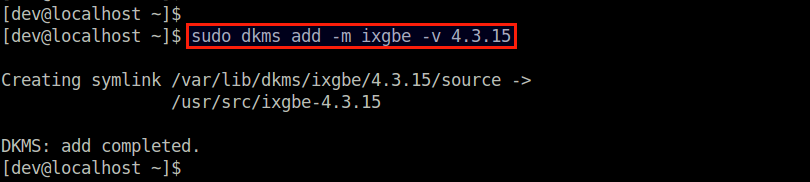
Next, add the module to the kernel tree.
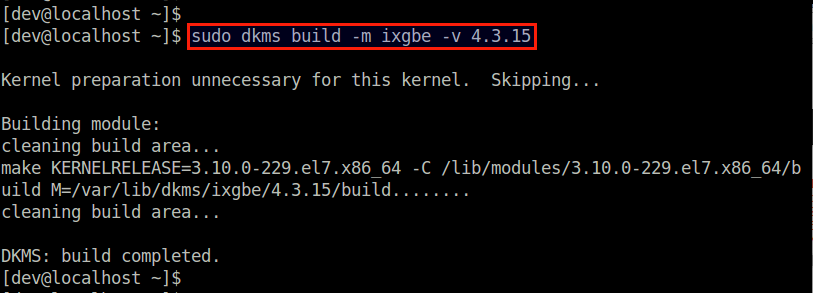
Build the specified module against the currently running kernel.
Finally, install the module under the current kernel tree.
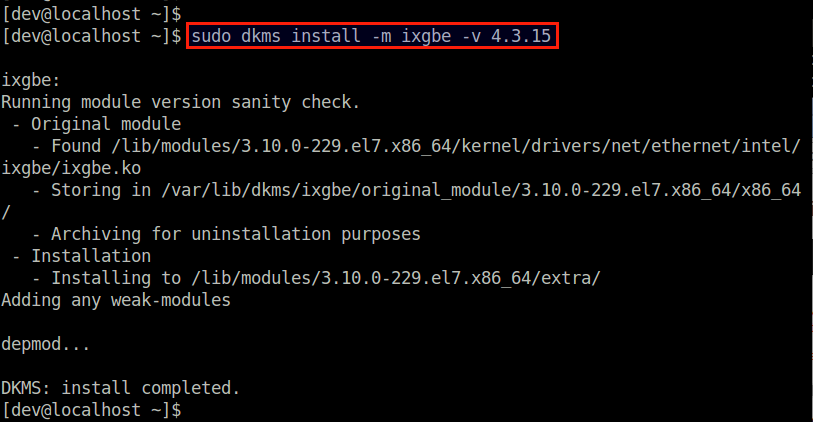
At this point, the kernel module should be successfully installed. You can check the status of the module with:

Verify Auto-Build of a Kernel Module during Kernel Upgrade
With DKMS configured for ixgbe driver, let’s see what happens to the installed driver when we upgrade to a new kernel. In this test, I am going to upgrade the kernel from 3.10.0-229 to 3.10.0-327. The test environment used is CentOS 7, so I am going to use yum to upgrade to the new kernel. Note that the new kernel’s matching kernel headers also need to be installed for DKMS to re-build the device driver.
Before upgrading the kernel, check the version of ixgbe driver and the kernel.
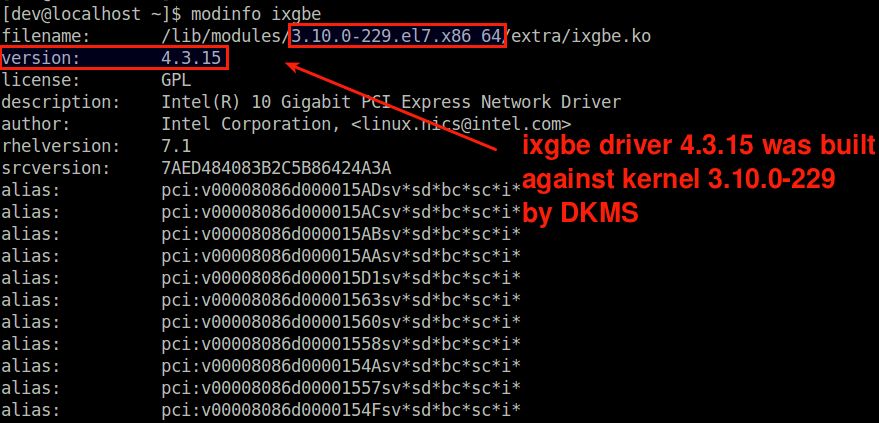
We can see that the device driver 4.3.15 was installed by DKMS for the kernel 3.10.0-229.
Now go ahead and install a newer kernel and matching header files.
After rebooting into the new kernel, check the module information of ixgbe driver again.
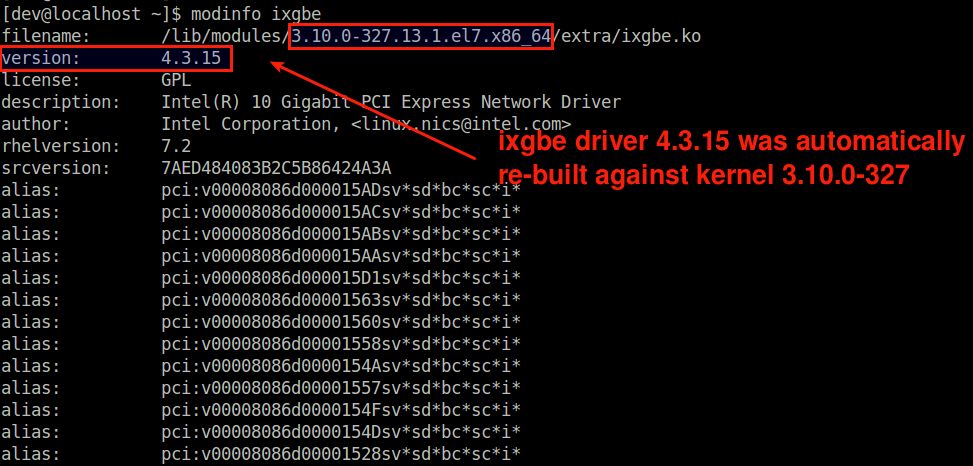
You should see that the ixgbe driver of the same version has automatically been built for a new kernel 3.10.0-327.
Note that if you had upgraded to a new kernel without installing matching kernel headers, DKMS wouldn’t have been triggered, and the driver wouldn’t have been re-built from its source. Instead, a stock kernel driver (if available) that came with the new kernel would have been used.
For example, the following is the result of upgrading to a new kernel without matching kernel headers, where you can see that the new kernel loaded a stock ixgbe driver whose version is a little outdated.
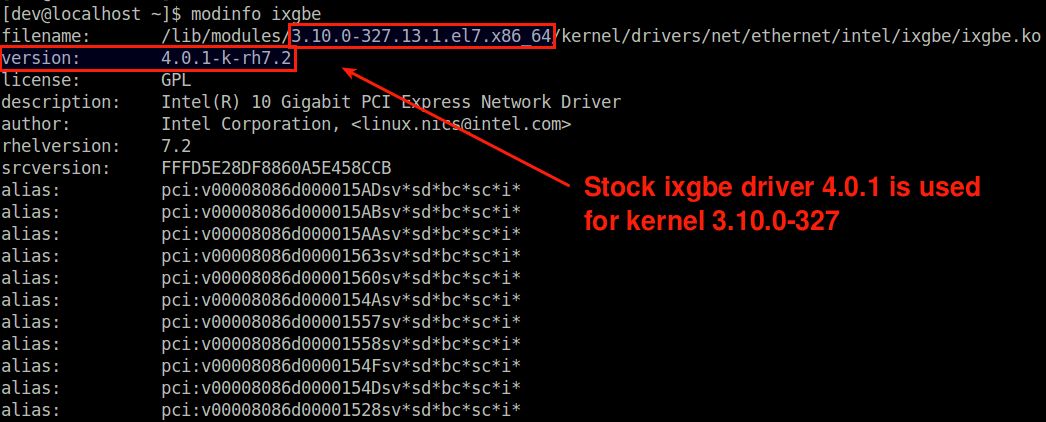
You can always re-build the custom driver at any time by triggering DKMS manually as follows. Be sure to install matching kernel headers first.
Conclusion
In this post I demonstrated how to use DKMS to auto-build a kernel module. Granted, DKMS may not always be preferred especially in production Linux environments where development packages and build tools are typically not allowed. But for development environments or personal desktop, if you have any custom-built kernel module, DKMS makes your life easy by keeping the module updated against new kernels.
Support Xmodulo
This website is made possible by minimal ads and your gracious donation via PayPal or credit card