Русские Блоги
golang go doc и представление создания документа godoc
В языковом проекте Go большое значение придается документации кода. При разработке программного обеспечения документация существенно влияет на ремонтопригодность и простоту использования программного обеспечения. Следовательно, документ должен быть хорошо написан и точен, и в то же время его должно быть легко писать и поддерживать.
Заметки на языке Go
Комментарии в языке Go обычно делятся на два типа: однострочные и многострочные.
- Однострочный комментарий // Комментарий в начале может появиться где угодно.
- Многострочные комментарии также называются блочными комментариями. /* Начинается с */ В конце концов, он не может быть вложенным, он обычно используется для описания документа пакета или аннотированных фрагментов кода.
Каждые package Там должны быть соответствующие примечания, в package Содержание комментария перед предложением по умолчанию будет считаться документом этого пакета. package Примечания должны содержать некоторую соответствующую информацию и давать краткое введение в общую функцию.
В повседневном процессе разработки вы можете использовать go doc с участием godoc Документация кода, сгенерированного командой.
go doc
go doc Команда для печати документа на объекте программы на языке Go. Вы можете использовать параметры, чтобы указать идентификатор программного объекта.
Сущности программ на языке Go относятся к переменным, константам, функциям, структурам и интерфейсам.
Идентификатор программного объекта — это имя программного объекта.
перейти к использованию документов
| Логотип | Описание |
|---|---|
| -all | Показать все документы |
| -c | При сопоставлении программных объектов учитывается регистр |
| -cmd | Считайте команду (основной пакет) обычным пакетом. Если вы хотите отобразить документ основного пакета, укажите этот флаг. |
| -src | Показать полный исходный код |
| -u | Показать неэкспортированные программные объекты |
Вывести комментарий указанного пакета, указанного типа и указанного метода
Вывести указанный пакет, все программные сущности указанного типа, включая неэкспортированные.
Вывести все программные сущности указанного пакета (не все подробные комментарии)
godoc
godoc Команды в основном используются для просмотра документов стандартной библиотеки языка Go и библиотек, зависящих от проекта, в форме Интернета в среде, где Интернет недоступен.
В go 1.12 В последующих версиях godoc Больше не существует как часть компилятора go. Еще пройти go get Установка команды:
Внутренний способ установки
Просмотр документов через терминал
Просмотр информации о пакете системного журнала
Просмотрите фатальный метод в пакете системного журнала
Просмотр структуры Регистратора в пакете системного журнала
Перечислите определение структуры регистратора и набор методов работы структуры регистратора
Просмотр документов через веб-страницы
godoc будет отслеживать порт 6060 и получать к нему доступ через Интернет http://127.0.0.1:6060 , Godoc создает документацию на основе кода в путях GOROOT и GOPATH. Откройте домашнюю страницу, как показано ниже, наши собственные проектные документы и документы кода через go get находятся в сторонних пакетах.
Напишите свой собственный документ
1. Код функции интерфейса Design
Создать файл documents / calc.go
2. Пример кода дизайна
Создайте файл documents / calc_test.go и напишите пример функции для каждой функции в calc.go
3. Просмотр документов на веб-страницах.
Обратите внимание, что указанные выше два файла должны находиться в пути $ GOPATH / src, используйте команду godoc для создания документа, откройте его с помощью веб-страницы и отобразите его следующим образом

Написание правил документа
1. Подробное основное содержание, отображаемое в документе, в основном обеспечивается комментариями пользователя. Есть два способа комментирования: однострочный комментарий «//» и комментарий блока кода «/ * * /».
2. В исходном файле в package Сделайте комментарий перед утверждением. То, что вы видите в документе, является частью обзора. Примечание. Этот комментарий должен быть рядом с package Строка перед оператором должна использоваться как часть обзора, и в блоке комментариев не может быть пустых строк.
3. Если вы делаете комментарии перед функциями, структурами, переменными и т. Д., То в документе вы увидите подробное описание элемента. Правила аннотации такие же, как указано выше.
4. Подготовлено Example Программа, имя функции должно начинаться с Example В качестве префикса вы можете поместить выходной результат теста в конец функции, начать новую строку с «// Output:», а затем прокомментировать выходной контент и добавить его.
Introduction
To enable the search index with the -index flag, this index will be created and maintained when the server starts.
Otherwise, the error "Search index disabled: no results available" will be returned regardless of whether the query is submitted on the Web page or the command line terminal
If you don’t want to provide so many result entries, you can set a smaller value
Even if you don’t want to provide full text search results, you can mark -maxresults The value of is set to 0, so that the server will only create an identifier index, not a full-text search index at all
The identifier index is the index to the name of the program entity (variables, constants, functions, structures and interfaces)
- go doc This is the documentation viewing tool that comes with the golang language
Golang releases query code comment documentation
Publish documents
This is used on this machinehttp://127.0.0.1:9090/pkg/ View published packages
Of course you can usehttp://127.0.0.1:9090/pkg/github.com/github.com/sinlov/XXXServer/userbiz/ To query your own code package github.com/sinlov/XXXServer/userbiz The following document
Query published documents
Query the publishing document service through the godoc -q command, which is generally used to query through the following commands in another command line terminal or even another computer that can communicate with this machine
- Mark -q Enable remote query function
- Mark -server="192.168.2.201:9090" Specify the IP address and port number of the remote document server
If you do not specify the address of the remote query server, the command will automatically change the address :6060 with golang.org As the address of the remote query server
This address golang.org:6060 is the default local document website address and the official document website address
golang code document management
Code documentation
In fact, as long as you write it according to the standard annotation writing of go, you can display the code document
For example, defined in github.com/sinlov/XXXServer/userbiz There is a file biz.go
Attention // Followed by a space before parsing the document
If you need to show code // Followed by [[:tab]] tab, then go doc will treat this line as code
Unfortunately, go can’t add links in the comments by itself, but the parser tracks the use to generate links
The documentation command to view this code is godoc github.com/sinlov/XXXServer/userbiz
View the documentation of a function, such as the Init function godoc github.com/sinlov/XXXServer/userbiz Init
Code document export
Just use the ones mentioned in the above article godoc -q -server= Directly deploy in the server
Author: Wood cat tail
Link: https://www.jianshu.com/p/b9ce0cbaabd5
Source: Jianshu
The copyright belongs to the author. For commercial reprints, please contact the author for authorization. For non-commercial reprints, please indicate the source.
Write your own document
1. Design interface function code
Create documents/calc.go file
2. Design Example code
Create documents/calc_test.go file and write Example function for each function in calc.go
3. View documents on web pages
Note that the above two files must be in the $GOPATH/src path, use the godoc command to create a document, open it with a web page, and display it as follows
The actual operation is placed in E:\go1.13\src

For flexible use, you can use custom addresses
godoc -http=localhost:6060 -goroot E:\go_path\go_st\documents
Then goroot will need the doc folder src folder src is mainly to store the project package and code
Actual combat: godoc -http=localhost:6060 -goroot E:\go_path\mqtt_agent
[External link image transfer failed. The source site may have an anti-hotlinking mechanism. It is recommended to save the image and upload it directly (img-qqjQpl9U-1580914429305) (F:\MyBook\MypythonNote\go\go document.assets\image-20200204112856128.png )]
Writing rules
1. The detailed main content displayed in the document is mostly provided by the user comments. There are two ways to comment, single-line comment "//" and code block"/* */" comment.
2. In the source code file, in package Make a comment before the statement. What you see in the document is the Overview part. Note: This comment must be next to package The line before the statement should be used as the Overview part, and there can be no blank lines in the comment block.
3. If you make comments before functions, structures, variables, etc., what you see in the document is the detailed description of the item. The annotation rules are the same as above.
4. Prepared Example Program, the function name must start with Example As a prefix, you can put the output result of the test at the end of the function, start a new line with "// Output:", and then comment the output content and append it.
How to write godoc (Go document)
Published onBackstage full stack roadsubscription
In this article:
- [What is godoc](javascript:��
- [godoc list](javascript:��
- Overview of godoc
- [Text part of Overview](javascript:��
- [Code part of Overview](javascript:��
- [Declaration of sample code](javascript:��
When doing Go development, we often see such a badge on the homepage of an open source project:
Click on the badge to open godoc.org The webpage of the webpage gives the Go document corresponding to this open source project. As a newbie to the Go language, I once thought, godoc.org The above documents need to be uploaded and reviewed by the developer-otherwise the documents look so professional.
However, when I wrote about my own wheels, I slowly realized that this was not the case.Focus: At godoc.org The above documents are all automatically collected and formatted by Go from the engineering code of the open source project. In other words, everyone can write their own godoc And show in godoc.org Above, only need to comply with the godoc format standard, and no review action is required.
The purpose of this article is to briefly explain the format of godoc through examples, so that readers can also write a paragraph on the tall godoc . The following content is based on my ownjsonvalue The warehouse is an example. The corresponding godoc is inHere. Readers can click on it and compare it with the content in the code.
This article address:
What is godoc
As the name suggests, godoc is the documentation of the Go language. In practical applications, godoc It may mean the following:
- https://godoc.org Content in
- After the Go development tools are installed, a command that comes with it is called godoc
- The documentation of the Go toolkit and the relevant format for generating the documentation
We came from Go godoc Let’s talk about tools. What we said earlier godoc.org , Is the most official documentation site for Go. Among them, we can refer to the documentation of the Go native package. While godoc The role of the command is to allow us to build a local godoc Web service (official godoc In fact, it is basically built with the same tool).
Self-built godoc There are two functions, one is to solve the inaccessibility of a LAN godoc.org The other is that you can debug your own documents locally.
We can start our own locally with the following command godoc service:
Or abbreviated as:
Type in the browser http://127.0.0.1:6060 After that, you can see the familiar Go documentation page:

In principle, godoc The package path read comes from $GOROOT . Therefore, if you want local godoc Know and analyze your own development kit, it should be in $GOROOT Put your own project code in the directory according to the path structure-soft links are also supported. Such as the author’s jsonvalue Package, I put it under this path:
/project/github.com/Andrew-M-C/go.jsonvalue , So I was $GOROOT A soft link is built under:
Then enter in the browser http://127.0.0.1:6060/pkg/github.com/Andrew-M-C/go.jsonvalue/ , You can see and godoc.org The same page.
godoc at a glance
Go adhering to the concept of "notes as documents", in line with godoc The documents are extracted and generated from the Go code. We still start from jsonvalue Look at the godoc, one by one. In godoc, the document consists of three parts:
composition effect Overview Contains the import statement and summary description of the package Index directory Contains the general catalog and description of the constants, types, methods, and functions in the package whose visibility is public Examples Contains quick jumps to all examples in the document Files List the hyperlinks of all code files in the package The fourth part is irrelevant. Below we explain the first three parts in order
godoc’s Overview
The Overview section of Package jsonvalue contains three parts:
- import statement
- Text description
- Code part
The import part is automatically generated by godoc according to the URL, so don’t worry about this. As for the text part and the code part, godoc is extracted from the source code. The principle of extraction is:
- All in the code package jsonvalue In the sentence, find the // jsonvalue XXX or it could be /* jsonvalue XXX */ Comment block
- The comment block can have multiple lines, but they must be continuous // Or /* XXX */ beginning. If you need to wrap, leave a blank comment
- If you find multiple comments that meet the criteria, they will be displayed in alphabetical order of the files-it is recommended to put the Overview in a comment block instead of writing separately.
For example, the Overview description of jsonvalue is unified indoc.go In this file only package jsonvalue Statements and package descriptions-this is also the recommended practice in many articles.
Text part of Overview
Please opendoc.go, Then comparegodoc, You can compare to see how the text part is presented by godoc.
Code part of Overview
In the comments, if in // In the following note text, if tab Locked in, then godoc Think of this line as a code block. For example, the following paragraph:

among them " As a quick start: "The left side of the line is: two slashes + one space. This line, godoc Treated as ordinary text; and the left side of the rest is: two slashes + one space + one tab, which are godoc Treated as part of the code. So we are godoc On the web page, you can see this display result:

Code documentation for godoc
godoc The tool will search for all source files in the code (except the self-test files) and display them on the page. The search is based on the following:
- Search objects are all common parts of the code, including constants, variables, interfaces, types, and functions
- Similar to Overview, the comment section immediately following a public element and beginning with the element will be godoc Treat as a comment for the element
- The processing of line break logic and code block logic is also the same as Overview
However, in the source code description, more code examples are used to illustrate the logic, so in this link, code blocks are less used.
Here i use jsonvalue of At() Take function as an example. inCodeFor Set() I wrote the function like this (please ignore my bad English):
The parsing and formatting effect of godoc is as follows:

Code example for godoc
Readers can notice that in my At() Under the function, in addition to the document body mentioned above, there are five code examples. So, how should the code examples in the documentation be written?
First of all, we should create at least one file, dedicated to storing the sample code. For example, I wrote the sample code in example_jsonvalue_test.go File. Of this file package The name must not be the same as the current package name, but should be named Package name_test Format.
Declaration of sample code
How to declare a sample code, here I give two examples. First is in At() An example named "Example (1)" under the function. inCodeIn, I named this function:
The function name has several parts:
Function name components Description Example This is the inherent beginning of the sample code Set Means this is the type Set Example of First underscore _ The separator, after this separator, is Set Type member function name At Means this is a function At() Example, with the previous content, it means that this is the type Set Member function At() Example of Second underscore _ Separator, the content after this separator is an additional description of the sample code 1 This is an additional description of the example code, which is the part in parentheses in the previous "Example (1)" In addition, the standard output content should be included in the sample code, so that readers can understand the implementation. The standard output content is at the end of the function, using // Output: Start a line separately, and write a comment for each remaining line of standard output.
Correspondingly, if you want to write an example for a function (not of any type), remove the "type" field above; if you don’t need the additional specifier for the example, remove the "extra description" field . For example, I give the type Opt writtenExampleThere is only one inCodeThere is only one line:
There is not even an example.
If an element contains multiple examples, then godoc The examples and their corresponding descriptions will be sorted alphabetically. That’s why I simply At() In the function, the examples are marked as one, two, three, four, five, because this is the order in which I want readers to read the examples.
Publish godoc on the official website
Well, when you write your own godoc After that, it’s not just for self-entertainment, but for everyone to see.
In fact, publishing is also very simple: after you push the code that contains godox (for example, publish it to github), you can enter it in the browser https://godoc/org/$
. Such as jsonvalue The Github path (also equivalent to the import path) is github.com/Andrew-M-C/go.jsonvalue , So enter godoc.org/github.com/Andrew-M-C/go.jsonvalue 。 If this is the first time this page is entered, then godoc.org It will first obtain, parse and update the content of the document in the code repository, and display it after formatting. At the bottom of the page, the update time of the godoc will be listed.

If you find on the official website godoc The content has fallen behind, so you can click " Refresh now "Link to refresh it.
More importantly, put this official website godoc Link to your own README. Still click on the picture above " Tools "Link, you can see the corresponding godoc The logo is linked up. Have html with markdown You can choose the format.
Godoc: documenting Go code
The Go project takes documentation seriously. Documentation is a huge part of making software accessible and maintainable. Of course it must be well-written and accurate, but it also must be easy to write and to maintain. Ideally, it should be coupled to the code itself so the documentation evolves along with the code. The easier it is for programmers to produce good documentation, the better for everyone.
To that end, we have developed the godoc documentation tool. This article describes godoc’s approach to documentation, and explains how you can use our conventions and tools to write good documentation for your own projects.
Godoc parses Go source code — including comments — and produces documentation as HTML or plain text. The end result is documentation tightly coupled with the code it documents. For example, through godoc’s web interface you can navigate from a function’s documentation to its implementation with one click.
Godoc is conceptually related to Python’s Docstring and Java’s Javadoc but its design is simpler. The comments read by godoc are not language constructs (as with Docstring) nor must they have their own machine-readable syntax (as with Javadoc). Godoc comments are just good comments, the sort you would want to read even if godoc didn’t exist.
The convention is simple: to document a type, variable, constant, function, or even a package, write a regular comment directly preceding its declaration, with no intervening blank line. Godoc will then present that comment as text alongside the item it documents. For example, this is the documentation for the fmt package’s Fprint function:
Notice this comment is a complete sentence that begins with the name of the element it describes. This important convention allows us to generate documentation in a variety of formats, from plain text to HTML to UNIX man pages, and makes it read better when tools truncate it for brevity, such as when they extract the first line or sentence.
Comments on package declarations should provide general package documentation. These comments can be short, like the sort package’s brief description:
They can also be detailed like the gob package’s overview. That package uses another convention for packages that need large amounts of introductory documentation: the package comment is placed in its own file, doc.go, which contains only those comments and a package clause.
When writing package comments of any size, keep in mind that their first sentence will appear in godoc’s package list.
Comments that are not adjacent to a top-level declaration are omitted from godoc’s output, with one notable exception. Top-level comments that begin with the word "BUG(who)” are recognized as known bugs, and included in the “Bugs” section of the package documentation. The “who” part should be the user name of someone who could provide more information. For example, this is a known issue from the bytes package:
Sometimes a struct field, function, type, or even a whole package becomes redundant or unnecessary, but must be kept for compatibility with existing programs. To signal that an identifier should not be used, add a paragraph to its doc comment that begins with “Deprecated:” followed by some information about the deprecation.
There are a few formatting rules that Godoc uses when converting comments to HTML:
Subsequent lines of text are considered part of the same paragraph; you must leave a blank line to separate paragraphs.
Pre-formatted text must be indented relative to the surrounding comment text (see gob’s doc.go for an example).
URLs will be converted to HTML links; no special markup is necessary.
Note that none of these rules requires you to do anything out of the ordinary.
In fact, the best thing about godoc’s minimal approach is how easy it is to use. As a result, a lot of Go code, including all of the standard library, already follows the conventions.
Your own code can present good documentation just by having comments as described above. Any Go packages installed inside $GOROOT/src/pkg and any GOPATH work spaces will already be accessible via godoc’s command-line and HTTP interfaces, and you can specify additional paths for indexing via the -path flag or just by running "godoc ." in the source directory. See the godoc documentation for more details.
Documenting Go Code With Godoc
As you know if you read my blog, I have been building a set of new utility packages so I can start developing an application server I need for a new project. I am brand new to Go and the Mac OS. Needless to say it has been one hell of an education over the past month. But I don’t miss Windows or C# at all.
I made some progress in my coding and wanted to build documentation for the code. I have been using the documentation viewer in LiteIDE and I was hoping to integrate my documentation in there was well. I was really surprised to see see that LiteIDE already had my packages listed inside of their integrated Godoc viewer. So it then begged the question. How is that working?
After some digging around I found this local HTML file. If you have LiteIDE installed you can copy the following url into your browser.
This is what it shows
Overview
Supported URL Schemes
-
— displays the Golang packages — displays the Golang commands
Automatic Schemes
File Browser
When I clicked on my package ArdanStudios/threadpool from within the LiteIDE Godoc search tool it used the pdoc URL scheme, pdoc:ArdanStudios/threadpool.
I quickly reasoned that LiteIDE was using the GOROOT and GOPATH variables to find the documentation. There is only one problem, I haven’t created any documentation yet.
So I looked around in both /usr/local/go and my own space to find the documentation files and there was nothing. So how the heck was this documentation being generated and published on the screen?
Then I found this document from the Go team:
The very first line states, "Godoc extracts and generates documentation for Go programs." Ok, so this program is being used by LiteIDE but how? Where are the files that Godoc is generating for all this documentation?
LOL, boy it is difficult coming from a Windows environment for the past 20 years.
After reading the documentation a bunch of times I opened up a Terminal session and ran the following command.
godoc /Users/bill/Spaces/GoPackages/src/ArdanStudios/threadpool
Suddenly the documentation appeared on my screen in text format. But I am seeing HTML inside of LiteIDE? I found the -html option.
godoc -html /Users/bill/Spaces/GoPackages/src/ArdanStudios/threadpool
Now I produced the same documentation I am seeing inside of LiteIDE. There are no extra files on my machine, LiteIDE is streaming the output of Godoc directly into the screen. Very smart way of doing things!!So if I can see documentation for the standard Go packages, then the source code for those packages must be on my machine. After a bit of looking I found them in:
/usr/local/go/src/pkg
It seems they are located inside a folder called pkg under src. This is because the Go team likes to put source code for reusable libraries within a project under pkg. Not all developers follow that same convention and you have the freedom to choose. I personally don’t follow that convention. Apparently the Godoc tool has no problems finding the source code files.Godoc tool is always reading the source code files to produce the latest version of the documentation. So in LiteIDE when you update your documentation and save the code file, the Godoc tool will show the changes immediately.
Now the next problem I have, my documentation looks really bad. The documentation that I see from the standard library files looks much better. So how do I format my documentation properly inside the Go code files?
I found this document from the Go team:
The introduction reads:
Godoc: documenting Go code
The Go project takes documentation seriously. Documentation is a huge part of making software accessible and maintainable. Of course it must be well-written and accurate, but it also must be easy to write and to maintain. Ideally, it should be coupled to the code itself so the documentation evolves along with the code. The easier it is for programmers to produce good documentation, the better for everyone.
To that end, we have developed the godoc documentation tool. This article describes godoc’s approach to documentation, and explains how you can use our conventions and tools to write good documentation for your own projects.
Godoc parses Go source code — including comments — and produces documentation as HTML or plain text. The end result is documentation tightly coupled with the code it documents. For example, through godoc’s web interface you can navigate from a function’s documentation to its implementation with one click.
Coming from the C# world and using XML tags like <summary> for that past 10 years and having to remember to check the "produce XML documentation file" option, this was a dream. Oh yea, no extra documentation file.
However the rest of the page was lacking. I liked the way the documentation for fmt.Printf looked so I quickly found the go source files and studied what the programmer did. After a bit of playing I finally figured out the 3 basic rules you need to help the Godoc tool format the documentation cleanly.
Here is a sample of the documentation I have for my tracelog package:
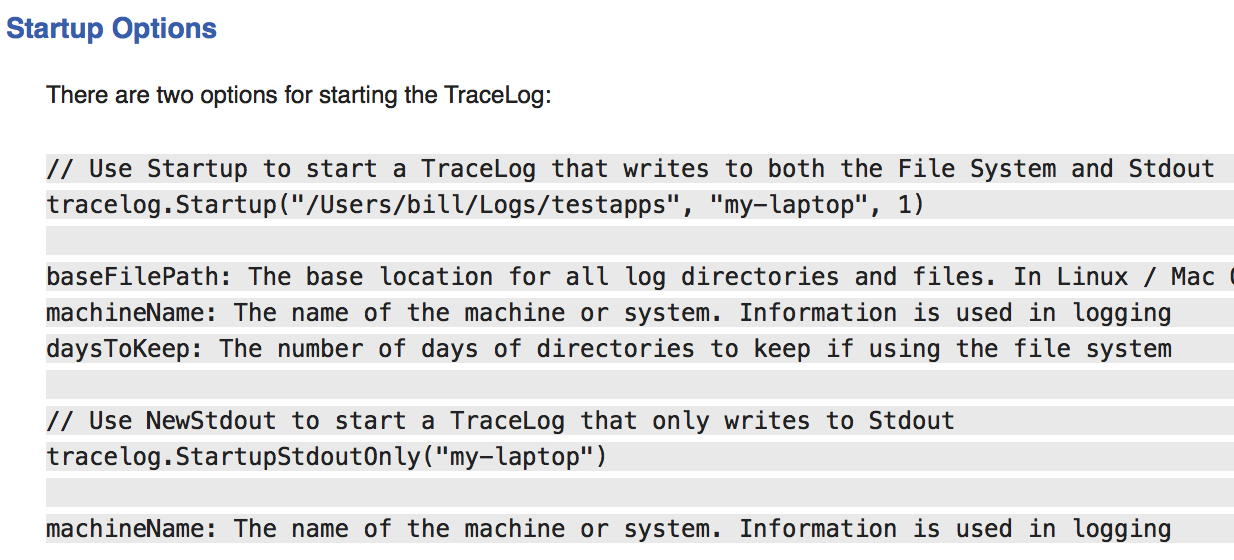
There are 3 elements in play when writing your documentation. You have header sections, standard text and highlighted text.
At the very top of your code file add the following using the // comment operation or something similar. Obviously you want to give yourself the credit for your work, LOL.
// Copyright 2022 Ardan Studios. All rights reserved.
// Use of this source code is governed by a BSD-style
// license that can be found in the LICENSE file.Then add a block comment operator and we can start. Make sure the package code statement is exactly after the closing comment operator. There can not be no blank lines between the two.
Tabbing is very important. We are using two layers of tabbing. Keep these two layers of tabbing consistent.
/*
->TAB Package TraceLog implements a file based logging.
->TAB The programmer should feel free to tace log as much of the code.
->CRLF
->TAB New Parameters
->CRLF
->TAB The following is a list of parameters for creating a TraceLog:
->TAB baseFilePath: The base location to store all log directories.
->TAB machineName: The name of the machine or system. Information is used.
->TAB writeToStdout: Set to True if you want the system to also write.
->CRLF
->TAB TraceLog File Management
->CRLF
->TAB Every 2 minutes TraceLog will check each open file for two conditions:
->CRLF
->TAB 1. Has a message been written to the file within the last 2 minutes.
->TAB 2. Is the size of the file greater than 10 Meg.
*/
package tracelogThe first section of comments will show at the top of our documentation just below the Overview Section. Also the first sentence will appear in Godoc’s package list.
If you are building a public package you can use the GoDoc website to publish your documentation. Check out the GoDoc website:
This website has been setup to read your code files and display all of your great documentation. Enter this url (github.com/goinggo/utilities/v1/workpool) into the search box and see the documentation that GoDoc produces for my workpool package:

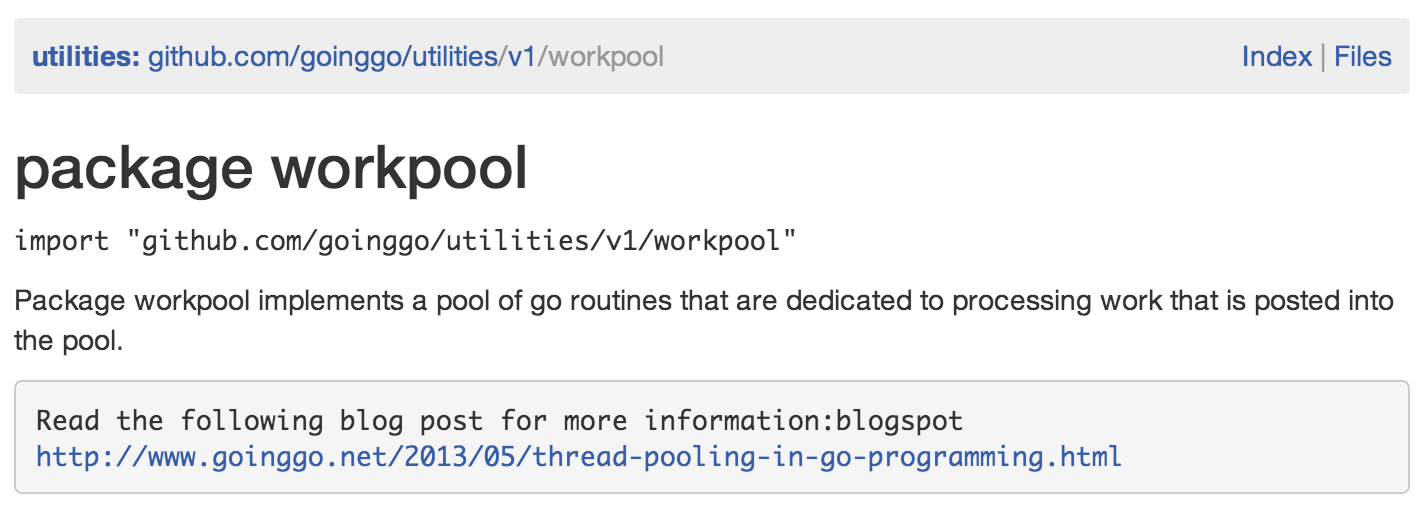
You can see the same documentation that is being given to you locally is now published on the GoDoc website with your own reuseable url:
So how can you best use this url to provide people your documentation? When you create a repository for your package add a README.md file. This is a special “Markdown” file that supports standard text, html and a few special operators of its own. Github has its own extensions and you can find documentation about Markdown here:
If you happened to come across my public workpool package in Github, you would see the following:
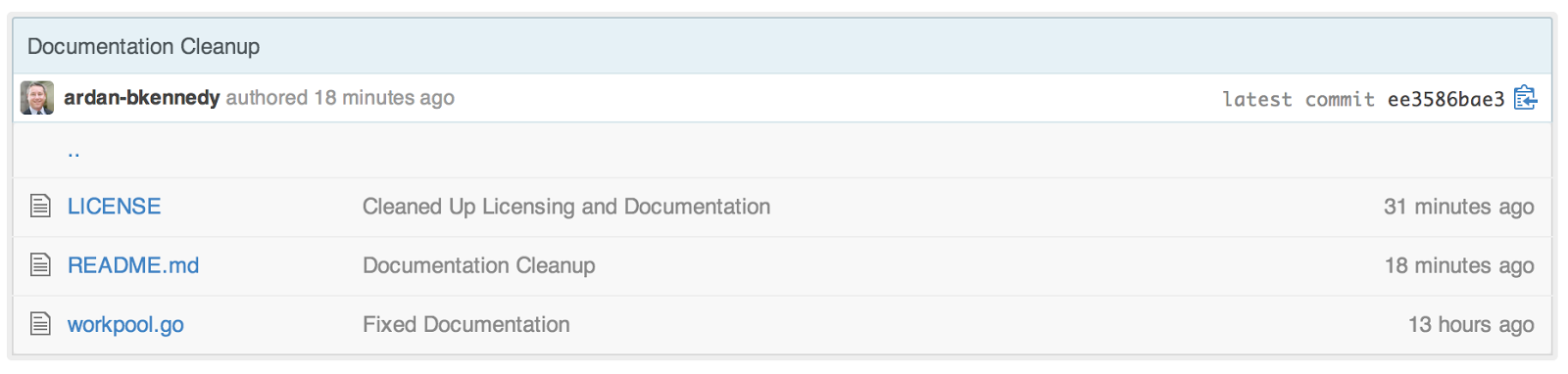
There is my code file, license file and my readme Markdown file.
Here is a typical README Markdown file that I use:
Workpool — Version 1.0.0
Copyright 2022 Ardan Studios. All rights reserved.<br />
Use of this source code is governed by a BSD-style license that can be found in the LICENSE handle.Ardan Studios<br />
12973 SW 112 ST, Suite 153<br />
Miami, FL 33186<br />
bill@ardanstudios.com<br />Look at the Markdown link at the bottom of the file. This syntax creates a link to the documentation. The text in the hard brackets [], provides the anchor text for the link.
Since Github always display the Readme Markdown file to the user if one exists, this is what people see when they come to that Github page:
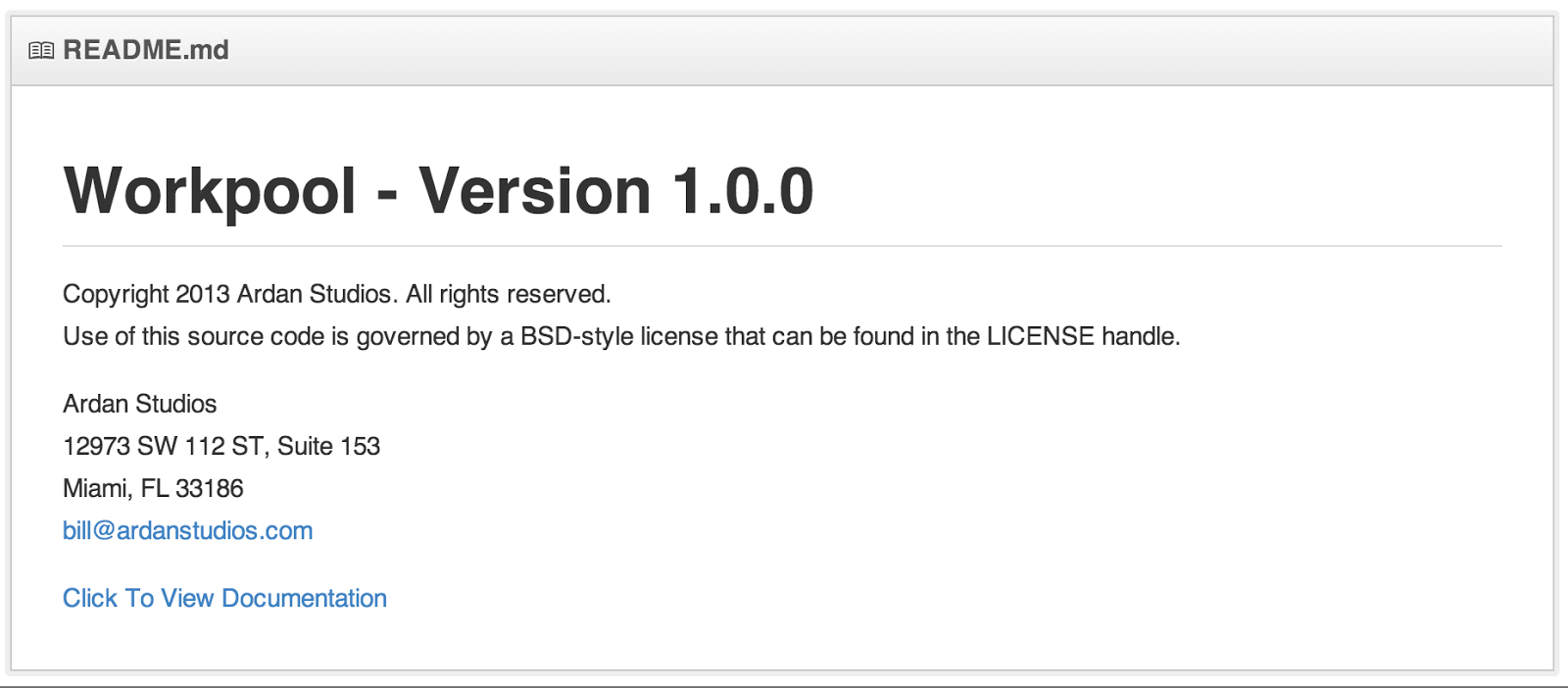
Now people have access to the documentation I write on the web as well. I don’t need to copy and paste the documentation into the Readme Markdown file, just provide a link. All the documentation is in one place and formatted cleanly and consistently.
As always, I hope this helps you in some small way and your documentation draws people to your work.
Go Training
We have taught Go to thousands of developers all around the world since 2014. There is no other company that has been doing it longer and our material has proven to help jump start developers 6 to 12 months ahead of their knowledge of Go. We know what knowledge developers need in order to be productive and efficient when writing software in Go.
Our classes are perfect for both experienced and beginning engineers. We start every class from the beginning and get very detailed about the internals, mechanics, specification, guidelines, best practices and design philosophies. We cover a lot about «if performance matters» with a focus on mechanical sympathy, data oriented design, decoupling and writing production software.
Interested in Ultimate Go Corporate Training and special pricing?
Join Our Online
Education ProgramOur courses have been designed from training over 30,000 engineers since 2013, and they go beyond just being a language course. Our goal is to challenge every student to think about what they are doing and why.