ip-route — Man Page
INFO_SPEC := < NH | nhid ID > OPTIONS FLAGS [ nexthop NH ] .
NH := [ encap ENCAP ] [ via [ FAMILY ] ADDRESS ] [ dev STRING ] [ weight NUMBER ] NHFLAGS
FAMILY := [ inet | inet6 | mpls | bridge | link ]
OPTIONS := FLAGS [ mtu NUMBER ] [ advmss NUMBER ] [ as [ to ] ADDRESS ] rtt TIME ] [ rttvar TIME ] [ reordering NUMBER ] [ window NUMBER ] [ cwnd NUMBER ] [ ssthresh NUMBER ] [ realms REALM ] [ rto_min TIME ] [ initcwnd NUMBER ] [ initrwnd NUMBER ] [ features FEATURES ] [ quickack BOOL ] [ congctl NAME ] [ pref PREF ] [ expires TIME ] [ fastopen_no_cookie BOOL ]
TYPE := [ unicast | local | broadcast | multicast | throw | unreachable | prohibit | blackhole | nat ]
TABLE_ID := [ local| main | default | all | NUMBER ]
SCOPE := [ host | link | global | NUMBER ]
NHFLAGS := [ onlink | pervasive ]
RTPROTO := [ kernel | boot | static | NUMBER ]
FEATURES := [ ecn | ]
PREF := [ low | medium | high ]
ENCAP := [ ENCAP_MPLS | ENCAP_IP | ENCAP_BPF | ENCAP_SEG6 | ENCAP_SEG6LOCAL | ENCAP_IOAM6 ]
ENCAP_MPLS := mpls [ LABEL ] [ ttl TTL ]
ENCAP_IP := ip id TUNNEL_ID dst REMOTE_IP [ src SRC ] [ tos TOS ] [ ttl TTL ]
ENCAP_BPF := bpf [ in PROG ] [ out PROG ] [ xmit PROG ] [ headroom SIZE ]
ENCAP_SEG6 := seg6 mode [ encap | encap.red | inline | l2encap | l2encap.red ] segs SEGMENTS [ hmac KEYID ]
ENCAP_SEG6LOCAL := seg6local action SEG6_ACTION [ SEG6_ACTION_PARAM ] [ count ]
ENCAP_IOAM6 := ioam6 [ freq K/N ] mode [ inline | encap | auto ] [ tundst ADDRESS ] trace prealloc type IOAM6_TRACE_TYPE ns IOAM6_NAMESPACE size IOAM6_TRACE_SIZE
ROUTE_GET_FLAGS := [ fibmatch ]
Description
ip route is used to manipulate entries in the kernel routing tables.
Route types:
unicast — the route entry describes real paths to the destinations covered by the route prefix.
unreachable — these destinations are unreachable. Packets are discarded and the ICMP message host unreachable is generated. The local senders get an EHOSTUNREACH error.
blackhole — these destinations are unreachable. Packets are discarded silently. The local senders get an EINVAL error.
prohibit — these destinations are unreachable. Packets are discarded and the ICMP message communication administratively prohibited is generated. The local senders get an EACCES error.
local — the destinations are assigned to this host. The packets are looped back and delivered locally.
broadcast — the destinations are broadcast addresses. The packets are sent as link broadcasts.
throw — a special control route used together with policy rules. If such a route is selected, lookup in this table is terminated pretending that no route was found. Without policy routing it is equivalent to the absence of the route in the routing table. The packets are dropped and the ICMP message net unreachable is generated. The local senders get an ENETUNREACH error.
nat — a special NAT route. Destinations covered by the prefix are considered to be dummy (or external) addresses which require translation to real (or internal) ones before forwarding. The addresses to translate to are selected with the attribute via. Warning: Route NAT is no longer supported in Linux 2.6.
anycast — not implemented the destinations are anycast addresses assigned to this host. They are mainly equivalent to local with one difference: such addresses are invalid when used as the source address of any packet.
multicast — a special type used for multicast routing. It is not present in normal routing tables.
Route tables: Linux-2.x can pack routes into several routing tables identified by a number in the range from 1 to 2^32-1 or by name from the file /etc/iproute2/rt_tables By default all normal routes are inserted into the main table (ID 254) and the kernel only uses this table when calculating routes. Values (0, 253, 254, and 255) are reserved for built-in use.
Actually, one other table always exists, which is invisible but even more important. It is the local table (ID 255). This table consists of routes for local and broadcast addresses. The kernel maintains this table automatically and the administrator usually need not modify it or even look at it.
The multiple routing tables enter the game when policy routing is used.
ip route change
ip route replace
change or add new one
to TYPE PREFIX (default)
the destination prefix of the route. If TYPE is omitted, ip assumes type unicast. Other values of TYPE are listed above. PREFIX is an IP or IPv6 address optionally followed by a slash and the prefix length. If the length of the prefix is missing, ip assumes a full-length host route. There is also a special PREFIX default — which is equivalent to IP 0/0 or to IPv6 ::/0.
tos TOS dsfield TOS
the Type Of Service (TOS) key. This key has no associated mask and the longest match is understood as: First, compare the TOS of the route and of the packet. If they are not equal, then the packet may still match a route with a zero TOS. TOS is either an 8 bit hexadecimal number or an identifier from /etc/iproute2/rt_dsfield.
metric NUMBER preference NUMBER
the preference value of the route. NUMBER is an arbitrary 32bit number, where routes with lower values are preferred.
table TABLEID
the table to add this route to. TABLEID may be a number or a string from the file /etc/iproute2/rt_tables. If this parameter is omitted, ip assumes the main table, with the exception of local, broadcast and nat routes, which are put into the local table by default.
vrf NAME
the vrf name to add this route to. Implicitly means the table associated with the VRF.
dev NAME
the output device name.
via [ FAMILY ] ADDRESS
the address of the nexthop router, in the address family FAMILY. Actually, the sense of this field depends on the route type. For normal unicast routes it is either the true next hop router or, if it is a direct route installed in BSD compatibility mode, it can be a local address of the interface. For NAT routes it is the first address of the block of translated IP destinations.
src ADDRESS
the source address to prefer when sending to the destinations covered by the route prefix.
realm REALMID
the realm to which this route is assigned. REALMID may be a number or a string from the file /etc/iproute2/rt_realms.
mtu MTU mtu lock MTU
the MTU along the path to the destination. If the modifier lock is not used, the MTU may be updated by the kernel due to Path MTU Discovery. If the modifier lock is used, no path MTU discovery will be tried, all packets will be sent without the DF bit in IPv4 case or fragmented to MTU for IPv6.
window NUMBER
the maximal window for TCP to advertise to these destinations, measured in bytes. It limits maximal data bursts that our TCP peers are allowed to send to us.
rtt TIME
the initial RTT (‘Round Trip Time’) estimate. If no suffix is specified the units are raw values passed directly to the routing code to maintain compatibility with previous releases. Otherwise if a suffix of s, sec or secs is used to specify seconds and ms, msec or msecs to specify milliseconds.
rttvar TIME (Linux 2.3.15+ only)
the initial RTT variance estimate. Values are specified as with rtt above.
rto_min TIME (Linux 2.6.23+ only)
the minimum TCP Retransmission TimeOut to use when communicating with this destination. Values are specified as with rtt above.
ssthresh NUMBER (Linux 2.3.15+ only)
an estimate for the initial slow start threshold.
cwnd NUMBER (Linux 2.3.15+ only)
the clamp for congestion window. It is ignored if the lock flag is not used.
initcwnd NUMBER (Linux 2.5.70+ only)
the initial congestion window size for connections to this destination. Actual window size is this value multiplied by the MSS (“Maximal Segment Size”) for same connection. The default is zero, meaning to use the values specified in RFC2414.
initrwnd NUMBER (Linux 2.6.33+ only)
the initial receive window size for connections to this destination. Actual window size is this value multiplied by the MSS of the connection. The default value is zero, meaning to use Slow Start value.
features FEATURES (Linux3.18+only)
Enable or disable per-route features. Only available feature at this time is ecn to enable explicit congestion notification when initiating connections to the given destination network. When responding to a connection request from the given network, ecn will also be used even if the net.ipv4.tcp_ecn sysctl is set to 0.
quickack BOOL (Linux 3.11+ only)
Enable or disable quick ack for connections to this destination.
fastopen_no_cookie BOOL (Linux 4.15+ only)
Enable TCP Fastopen without a cookie for connections to this destination.
congctl NAME (Linux 3.20+ only) congctl lock NAME (Linux 3.20+ only)
Sets a specific TCP congestion control algorithm only for a given destination. If not specified, Linux keeps the current global default TCP congestion control algorithm, or the one set from the application. If the modifier lock is not used, an application may nevertheless overwrite the suggested congestion control algorithm for that destination. If the modifier lock is used, then an application is not allowed to overwrite the specified congestion control algorithm for that destination, thus it will be enforced/guaranteed to use the proposed algorithm.
advmss NUMBER (Linux 2.3.15+ only)
the MSS (‘Maximal Segment Size’) to advertise to these destinations when establishing TCP connections. If it is not given, Linux uses a default value calculated from the first hop device MTU. (If the path to these destination is asymmetric, this guess may be wrong.)
reordering NUMBER (Linux 2.3.15+ only)
Maximal reordering on the path to this destination. If it is not given, Linux uses the value selected with sysctl variable net/ipv4/tcp_reordering.
nexthop NEXTHOP
the nexthop of a multipath route. NEXTHOP is a complex value with its own syntax similar to the top level argument lists:
via [ FAMILY ] ADDRESS — is the nexthop router.
dev NAME — is the output device.
weight NUMBER — is a weight for this element of a multipath route reflecting its relative bandwidth or quality.
The internal buffer used in iproute2 limits the maximum number of nexthops that may be specified in one go. If only ADDRESS is given, the current buffer size allows for 144 IPv6 nexthops and 253 IPv4 ones. For IPv4, this effectively limits the number of nexthops possible per route. With IPv6, further nexthops may be appended to the same route via ip route append command.
scope SCOPE_VAL
the scope of the destinations covered by the route prefix. SCOPE_VAL may be a number or a string from the file /etc/iproute2/rt_scopes. If this parameter is omitted, ip assumes scope global for all gatewayed unicast routes, scope link for direct unicast and broadcast routes and scope host for local routes.
protocol RTPROTO
the routing protocol identifier of this route. RTPROTO may be a number or a string from the file /etc/iproute2/rt_protos. If the routing protocol ID is not given, ip assumes protocol boot (i.e. it assumes the route was added by someone who doesn’t understand what they are doing). Several protocol values have a fixed interpretation. Namely:
redirect — the route was installed due to an ICMP redirect.
kernel — the route was installed by the kernel during autoconfiguration.
boot — the route was installed during the bootup sequence. If a routing daemon starts, it will purge all of them.
static — the route was installed by the administrator to override dynamic routing. Routing daemon will respect them and, probably, even advertise them to its peers.
ra — the route was installed by Router Discovery protocol.
The rest of the values are not reserved and the administrator is free to assign (or not to assign) protocol tags.
onlink
pretend that the nexthop is directly attached to this link, even if it does not match any interface prefix.
pref PREF
the IPv6 route preference. PREF is a string specifying the route preference as defined in RFC4191 for Router Discovery messages. Namely:
low — the route has a lowest priority
medium — the route has a default priority
high — the route has a highest priority
nhid ID
use nexthop object with given id as nexthop specification.
encap ENCAPTYPE ENCAPHDR
attach tunnel encapsulation attributes to this route.
ENCAPTYPE is a string specifying the supported encapsulation type. Namely:
mpls — encapsulation type MPLS
ip — IP encapsulation (Geneve, GRE, VXLAN, . )
bpf — Execution of BPF program
seg6 — encapsulation type IPv6 Segment Routing
seg6local — local SRv6 segment processing
ioam6 — encapsulation type IPv6 IOAM
xfrm — encapsulation type XFRM
ENCAPHDR is a set of encapsulation attributes specific to the ENCAPTYPE.
mpls MPLSLABEL — mpls label stack with labels separated by /
ttl TTL — TTL to use for MPLS header or 0 to inherit from IP header
ip id TUNNEL_ID dst REMOTE_IP [ src SRC ] [ tos TOS ] [ ttl TTL ] [ key ] [ csum ] [ seq ]
bpf in PROG — BPF program to execute for incoming packets
out PROG — BPF program to execute for outgoing packets
xmit PROG — BPF program to execute for transmitted packets
headroom SIZE — Size of header BPF program will attach (xmit)
seg6 mode inline — Directly insert Segment Routing Header after IPv6 header
mode encap — Encapsulate packet in an outer IPv6 header with SRH
mode encap.red — Encapsulate packet in an outer IPv6 header with SRH applying the reduced segment list. When there is only one segment and the HMAC is not present, the SRH is omitted.
mode l2encap — Encapsulate ingress L2 frame within an outer IPv6 header and SRH
mode l2encap.red — Encapsulate ingress L2 frame within an outer IPv6 header and SRH applying the reduced segment list. When there is only one segment and the HMAC is not present, the SRH is omitted.
SEGMENTS — List of comma-separated IPv6 addresses
KEYID — Numerical value in decimal representation. See ip-sr(8).
seg6local SEG6_ACTION [ SEG6_ACTION_PARAM ] [ count ] — Operation to perform on matching packets. The optional count attribute is used to collect statistics on the processing of actions. Three counters are implemented: 1) packets correctly processed; 2) bytes correctly processed; 3) packets that cause a processing error (i.e., missing SID List, wrong SID List, etc). To retrieve the counters related to an action use the -s flag in the show command. The following actions are currently supported (Linux 4.14+ only).
End [ flavors FLAVORS ] — Regular SRv6 processing as intermediate segment endpoint. This action only accepts packets with a non-zero Segments Left value. Other matching packets are dropped. The presence of flavors can change the regular processing of an End behavior according to the user-provided Flavor operations and information carried in the packet. See Flavors parameters section.
End.X nh6 NEXTHOP — Regular SRv6 processing as intermediate segment endpoint. Additionally, forward processed packets to given next-hop. This action only accepts packets with a non-zero Segments Left value. Other matching packets are dropped.
End.DX6 nh6 NEXTHOP — Decapsulate inner IPv6 packet and forward it to the specified next-hop. If the argument is set to . then the next-hop is selected according to the local selection rules. This action only accepts packets with either a zero Segments Left value or no SRH at all, and an inner IPv6 packet. Other matching packets are dropped.
End.DT6 < table | vrftable > TABLEID — Decapsulate the inner IPv6 packet and forward it according to the specified lookup table. TABLEID is either a number or a string from the file /etc/iproute2/rt_tables. If vrftable is used, the argument must be a VRF device associated with the table id. Moreover, the VRF table associated with the table id must be configured with the VRF strict mode turned on (net.vrf.strict_mode=1). This action only accepts packets with either a zero Segments Left value or no SRH at all, and an inner IPv6 packet. Other matching packets are dropped.
End.DT4 vrftable TABLEID — Decapsulate the inner IPv4 packet and forward it according to the specified lookup table. TABLEID is either a number or a string from the file /etc/iproute2/rt_tables. The argument must be a VRF device associated with the table id. Moreover, the VRF table associated with the table id must be configured with the VRF strict mode turned on (net.vrf.strict_mode=1). This action only accepts packets with either a zero Segments Left value or no SRH at all, and an inner IPv4 packet. Other matching packets are dropped.
End.DT46 vrftable TABLEID — Decapsulate the inner IPv4 or IPv6 packet and forward it according to the specified lookup table. TABLEID is either a number or a string from the file /etc/iproute2/rt_tables. The argument must be a VRF device associated with the table id. Moreover, the VRF table associated with the table id must be configured with the VRF strict mode turned on (net.vrf.strict_mode=1). This action only accepts packets with either a zero Segments Left value or no SRH at all, and an inner IPv4 or IPv6 packet. Other matching packets are dropped.
End.B6 srh segs SEGMENTS [ hmac KEYID ] — Insert the specified SRH immediately after the IPv6 header, update the DA with the first segment of the newly inserted SRH, then forward the resulting packet. The original SRH is not modified. This action only accepts packets with a non-zero Segments Left value. Other matching packets are dropped.
End.B6.Encaps srh segs SEGMENTS [ hmac KEYID ] — Regular SRv6 processing as intermediate segment endpoint. Additionally, encapsulate the matching packet within an outer IPv6 header followed by the specified SRH. The destination address of the outer IPv6 header is set to the first segment of the new SRH. The source address is set as described in ip-sr(8).
Flavors parameters
The flavors represent additional operations that can modify or extend a subset of the existing behaviors.
flavors OPERATION[,OPERATION] [ATTRIBUTES]
ATTRIBUTES := < KEY VALUE > [ ATTRIBUTES ]
psp — Penultimate Segment Pop of the SRH (not yet supported in kernel)
usp — Ultimate Segment Pop of the SRH (not yet supported in kernel)
usd — Ultimate Segment Decapsulation (not yet supported in kernel)
next-csid — The NEXT-C-SID mechanism offers the possibility of encoding several SRv6 segments within a single 128 bit SID address. The NEXT-C-SID flavor can be configured to support user-provided Locator-Block and Locator-Node Function lengths. If Locator-Block and/or Locator-Node Function lengths are not provided by the user during configuration of an SRv6 End behavior instance with NEXT-C-SID flavor, the default value is 32-bit for Locator-Block and 16-bit for Locator-Node Function.
lblen VALUE — defines the Locator-Block length for NEXT-C-SID flavor. The Locator-Block length must be greater than 0 and evenly divisible by 8. This attribute can be used only with NEXT-C-SID flavor.
nflen VALUE — defines the Locator-Node Function length for NEXT-C-SID flavors. The Locator-Node Function length must be greater than 0 and evenly divisible by 8. This attribute can be used only with NEXT-C-SID flavor.
ioam6 freq K/N — Inject IOAM in K packets every N packets (default is 1/1).
mode inline — Directly insert IOAM after IPv6 header (default mode).
mode encap — Encapsulate packet in an outer IPv6 header with IOAM.
mode auto — Automatically use inline mode for local packets and encap mode for in-transit packets.
tundst ADDRESS — IPv6 address of the tunnel destination (outer header), not used with inline mode.
type IOAM6_TRACE_TYPE — List of IOAM data required in the trace, represented by a bitfield (24 bits).
ns IOAM6_NAMESPACE — Numerical value to represent an IOAM namespace. See ip-ioam(8).
size IOAM6_TRACE_SIZE — Size, in octets, of the pre-allocated trace data block.
xfrm if_id IF_ID [ link_dev LINK_DEV ]
expires TIME (Linux 4.4+ only)
the route will be deleted after the expires time. Only support IPv6 at present.
Control whether TTL should be propagated from any encap into the un-encapsulated packet, overriding any global configuration. Only supported for MPLS at present.
ip route delete
delete route
ip route del has the same arguments as ip route add, but their semantics are a bit different.
Key values (to, tos, preference and table) select the route to delete. If optional attributes are present, ip verifies that they coincide with the attributes of the route to delete. If no route with the given key and attributes was found, ip route del fails.
the command displays the contents of the routing tables or the route(s) selected by some criteria.
to SELECTOR (default)
only select routes from the given range of destinations. SELECTOR consists of an optional modifier (root, match or exact) and a prefix. root PREFIX selects routes with prefixes not shorter than PREFIX. F.e. root 0/0 selects the entire routing table. match PREFIX selects routes with prefixes not longer than PREFIX. F.e. match 10.0/16 selects 10.0/16, 10/8 and 0/0, but it does not select 10.1/16 and 10.0.0/24. And exact PREFIX (or just PREFIX) selects routes with this exact prefix. If neither of these options are present, ip assumes root 0/0 i.e. it lists the entire table.
tos TOS dsfield TOS
only select routes with the given TOS.
table TABLEID
show the routes from this table(s). The default setting is to show table main. TABLEID may either be the ID of a real table or one of the special values:
all — list all of the tables.
cache — dump the routing cache.
vrf NAME
show the routes for the table associated with the vrf name
cloned cached
list cloned routes i.e. routes which were dynamically forked from other routes because some route attribute (f.e. MTU) was updated. Actually, it is equivalent to table cache.
from SELECTOR
the same syntax as for to, but it binds the source address range rather than destinations. Note that the from option only works with cloned routes.
protocol RTPROTO
only list routes of this protocol.
scope SCOPE_VAL
only list routes with this scope.
type TYPE
only list routes of this type.
dev NAME
only list routes going via this device.
via [ FAMILY ] PREFIX
only list routes going via the nexthop routers selected by PREFIX.
src PREFIX
only list routes with preferred source addresses selected by PREFIX.
realm REALMID realms FROMREALM/TOREALM
only list routes with these realms.
flush routing tables
this command flushes routes selected by some criteria.
The arguments have the same syntax and semantics as the arguments of ip route show, but routing tables are not listed but purged. The only difference is the default action: show dumps all the IP main routing table but flush prints the helper page.
With the -statistics option, the command becomes verbose. It prints out the number of deleted routes and the number of rounds made to flush the routing table. If the option is given twice, ip route flush also dumps all the deleted routes in the format described in the previous subsection.
get a single route
this command gets a single route to a destination and prints its contents exactly as the kernel sees it.
fibmatch
Return full fib lookup matched route. Default is to return the resolved dst entry
to ADDRESS (default)
the destination address.
from ADDRESS
the source address.
tos TOS dsfield TOS
the Type Of Service.
iif NAME
the device from which this packet is expected to arrive.
oif NAME
force the output device on which this packet will be routed.
mark MARK
the firewall mark (fwmark)
vrf NAME
force the vrf device on which this packet will be routed.
ipproto PROTOCOL
ip protocol as seen by the route lookup
sport NUMBER
source port as seen by the route lookup
dport NUMBER
destination port as seen by the route lookup
connected
if no source address (option from) was given, relookup the route with the source set to the preferred address received from the first lookup. If policy routing is used, it may be a different route.
Note that this operation is not equivalent to ip route show. show shows existing routes. get resolves them and creates new clones if necessary. Essentially, get is equivalent to sending a packet along this path. If the iif argument is not given, the kernel creates a route to output packets towards the requested destination. This is equivalent to pinging the destination with a subsequent ip route ls cache, however, no packets are actually sent. With the iif argument, the kernel pretends that a packet arrived from this interface and searches for a path to forward the packet.
save routing table information to stdout
This command behaves like ip route show except that the output is raw data suitable for passing to ip route restore.
ip route restore
restore routing table information from stdin
This command expects to read a data stream as returned from ip route save. It will attempt to restore the routing table information exactly as it was at the time of the save, so any translation of information in the stream (such as device indexes) must be done first. Any existing routes are left unchanged. Any routes specified in the data stream that already exist in the table will be ignored.
Notes
Starting with Linux kernel version 3.6, there is no routing cache for IPv4 anymore. Hence ip route show cached will never print any entries on systems with this or newer kernel versions.
Examples
Show all route entries in the kernel.
ip route add default via 192.168.1.1 dev eth0
Adds a default route (for all addresses) via the local gateway 192.168.1.1 that can be reached on device eth0.
ip route add 10.1.1.0/30 encap mpls 200/300 via 10.1.1.1 dev eth0
Adds an ipv4 route with mpls encapsulation attributes attached to it.
ip -6 route add 2001:db8:1::/64 encap seg6 mode encap segs 2001:db8:42::1,2001:db8:ffff::2 dev eth0
Adds an IPv6 route with SRv6 encapsulation and two segments attached.
ip -6 route add 2001:db8:1::/64 encap seg6local action End.DT46 vrftable 100 dev vrf100
Adds an IPv6 route with SRv6 decapsulation and forward with lookup in VRF table.
ip -6 route add 2001:db8:1::/64 encap seg6local action End flavors next-csid dev eth0
Adds an IPv6 route with SRv6 End behavior with next-csid flavor enabled.
ip -6 route add 2001:db8:1::/64 encap seg6local action End flavors next-csid lblen 48 nflen 16 dev eth0
Adds an IPv6 route with SRv6 End behavior with next-csid flavor enabled and user-provided Locator-Block and Locator-Node Function lengths.
ip -6 route add 2001:db8:1::/64 encap ioam6 freq 2/5 mode encap tundst 2001:db8:42::1 trace prealloc type 0x800000 ns 1 size 12 dev eth0
Adds an IPv6 route with an IOAM Pre-allocated Trace encapsulation (ip6ip6) that only includes the hop limit and the node id, configured for the IOAM namespace 1 and a pre-allocated data block of 12 octets (will be injected in 2 packets every 5 packets).
Как удалить ip route
Настройка сетевых интерфейсов и маршрутизация с помощью пакета iproute 2
Большинство дистрибутивов Linux, впрочем как и UNIX, для настройки сети и маршрутизации используют команды ifconfig, arp и route. Однако в Linux, начиная с ядра 2.2, была полностью переделана сетевая система и были добавлены новые возможности, которые ранее требовали дополнительных утилит, такие как маршрутизация на основе правил, управление трафиком и т.д. К этим возможностям предоставляет доступ пакет программ iproute2, который в настоящее время входит в большинство современных дистрибутивов.
Утилита ip объединяет в себе возможности команд ifconfig, arp и route, рассмотрим синтаксис команды:
ip [Опции] Объект [ Команда [Аргументы команды] ]
где Опции — опциональные параметры, который влияют на общую работу утилиты или вывод результатов.
В настоящее время доступны следующие опции:
- -V, -Version — выводит в стандартный вывод (stdout) версию программы ip
- -s, -stats, -statistic — выводит статистическую информацию.
- -f, — family — указывается перед идентификатором протокола, таким как inet (IPv4), inet6(IPv6) или link (Устройстов). Служит для выбора указания протокола, если протокол не указан, то по умолчанию протокол выбирается из параметров команд.
- -4 — аналог параметра -family inet
- -6 — аналог параметра -family inet6
- -0 — аналог параметра -family link
- -o, -oneline — каждая запись будет выводиться на новой строке.
- -r — выводить на экран символические имена хостов.
Объект — это объект, с которым будут работать или получать о котором информацию. Объекты бывают следующими:
- link — сетевое устройство
- address — IPv4 или IPv6 адрес на устройстве.
- neighbour — ARP адреса
- route — машрутизация
- rule — база данных правил машрутизации
- madress — Multicast-адреса представляют собой особый подвид широковещательных адресов, позволяющих обращаться к группе машин, которые не обязательно должны быть в той же самой подсети. Они весьма полезны при сетевых голосовых переговорах и видеоконференциях. Поддерживаются многими, но не всеми картами Ethernet.
- mroute — Multicast-пакетов.
- tunnel — туннель через IP.
Команда описывает действие над Объектом.
ip link — конфигурация сетевого устройства.
Доступные команды: set и show (или list).
ip link set — изменение параметров сетевого устройства.
- dev — Имя интерфейса, с которым будем проводить какие-то манипуляции.
- up (включить) или down (выключить) — включить или выключить сетевой интерфейс.
- arp on или arp off — изменяет значение флага NOARP на устройстве.
- multicast on или multicast off — изменяет флаг MULTICAST на устройстве.
- dynamic on или dynamic off — изменяет флаг DYNAMIC на устройстве.
- name — Изменяет имя устройства
- txqueuelen Число или txqlen Число — изменяет длину передаваемой очереди.
- mtu Число — изменяет значение MTU на устройстве.
- address Адрес — изменяет адрес на устройстве.
- broadcast Адрес или brd Адрес — изменяет широковещательный адрес на устройстве.
ip link show (list, ls, sh, lst, l) — показывает информацию об сетевом интерфейсе. Аргументы:
- dev — Имя интерфейса с которым будем проводить какие-то манипуляции.
- up — показать только включенные интерфейсы.
Выведем информацию о состоянии интерфейса eth0
# ip link ls dev eth0
В результате получим:
eth0: mtu 1500 qdisc cbq qlen 100
link/ether 00:04:61:92:21:1d brd ff:ff:ff:ff:ff:ff
Выведем статистику интерфейса eth0
#ip -s link ls dev eth0
2: eth0: mtu 1500 qdisc cbq qlen 100
link/ether 00:04:61:92:21:1d brd ff:ff:ff:ff:ff:ff
RX: bytes packets errors dropped overrun mcast
2891892504 15070935 0 0 0 0
TX: bytes packets errors dropped carrier collsns
3139067270 54387014 0 0 0 132934
ip address — управление адресами на интерфейсе.
Команда address имеет ряд псевдонимов: addr, a. Объект address — это адрес IPv4 или IPv6 протокола, связанный с каким-то устройством, чтобы оно могло работать с данными протоколами. Так же каждое устройство может иметь несколько IP адресов. Команда ip address показывает адреса, их свойства, а так же добавляет новые или удаляет старые.
ip address add — добавляет новый адрес.
- dev Имя — имя устройства.
- local Адрес — адрес интерфейса.
- peer Адрес — адрес удаленной машины при использовании протокола PPP.
- broadcast Адрес — широковещательный адрес на интерфейсе. Вы можете использовать специальные символы "+" и "-", в этом случае широковещательный адрес получается путем установки/сброса бит в адрес хоста.
- label Метка — каждый адрес может быть подписан строкой, однако следует помнить, что имя должно начинаться с имени устройства, затем после двоеточия идет сама метка.
ip addr add 10.0.0.1/24 brd + dev eth0 label eth0:Alias
Данная команда добавляет адрес 10.0.0.1/24 с маской подсети 255.255.255.0 со стандартным широковещательным адресом и именем eth0:Alias.
ip address delete — удаляет адреса. Сокращения: delete, del, d.
ip addr del 127.0.0.1/8 dev lo
Удаляет адрес 127.0.0.1/8 с устройства lo.
ip address show — выводит информацию об адресе. Сокращения: show, list, lst, sh, ls, l. Аргументы:
- dev Имя — имя устройства.
- to Префикс — вывести информация о адресах с заданным префиксом.
- label Имя — вывести информацию об адресах с заданным именем.
Пример работы команды:
$ ip addr ls eth0
3: eth0: mtu 1500 qdisc cbq qlen 100
link/ether 00:a0:cc:66:18:78 brd ff:ff:ff:ff:ff:ff
inet 193.233.7.90/24 brd 193.233.7.255 scope global eth0
inet6 3ffe:2400:0:1:2a0:ccff:fe66:1878/64 scope global dynamic
valid_lft forever preferred_lft 604746sec
inet6 fe80::2a0:ccff:fe66:1878/10 scope link
[email protected]:
ip route — управление таблицей машрутизации.
Сокращения: route, ro, r.
ip route add — добавить новый маршрут
ip route change — изменить маршрут
ip route replace — заменить маршрут
Сокращения: add, a; change, chg; replace, repl.
- to — назначение маршрута.
- metric Число — задание метрики маршрута.
- table Идентификатор таблицы — таблица связанная с маршрутом. Идентификатором таблицы может быть номер или строка из файла /etc/iproute2/rt_tables
- dev Имя — имя устройства.
- via Адрес — адрес перехода к следующему маршрутизатору
- src Адрес — адрес источника
- nexthop NEXTHOP — следующий переход в случае, если используется многоканальная маршрутизация.
- via Адрес
- dev Имя — имя устройства.
- weight Число — вес маршрута, определяющийся шириной канала или качеством .
Добавляем маршрут к сети 10.0.0/24 через 193.233.7.65
ip route add 10.0.0/24 via 193.233.7.65
Добавим шлюз по умолчанию в случае использования двух каналов в зависимости от загрузки канала:
ip route add default scope global nexthop dev ppp0
nexthop dev ppp1
ip route delete — удалить маршрут.
Сокращения: delete, del, d.
Аргументы: Аргументы данной команды сходны с ip route add.
Удаляем маршрут, созданный в предыдущем разделе.
ip route del default scope global nexthop dev ppp0
nexthop dev ppp1
ip rule — управление правилами машрутизации
Сокращения: rule, ru
Маршрутизация может производиться не только в зависимости от адреса получателя, но и по адресу источника, IP протокола и транспортного протокола. По умолчанию существуют 3 правила:
- Таблица Local (ID 255) — специальная таблица маршрутизации с самым большим приоритетом, которая содержит таблицы для локальных и широковещательных адресов.
- Таблица Main (ID 254) — обычная таблица маршрутизации.
- Таблица Default (ID 253) — пустая по умолчанию таблица.
ip rule add — добавить новое правило.
Ip rule delete — удалить правило.
Сокращения: add, a; delete, del, d
- from — адрес источник
- to — адрес получателя
- iif Имя — имя интерфейса с которого будет получен пакет
- fwmark Метка — метка пакета, устанавливаемая firewall.
- table Идентификатор таблицы — таблица связанная с маршрутом. Идентификатором таблицы может быть номер или строка из файла /etc/iproute2/rt_tables
- priority Число- приоритет таблицы.
Маршрутизировать пакеты с сети 192.203.80.0/24 согласно таблицы example.
ip ru add from 192.203.80.0/24 table example prio 220
Рассмотрим примеры использования маршрутизации на основе правил.
1. Пусть у нас есть два канала в интернет: быстрый модем с IP адресом 212.64.94.251, связанный PPP c 212.64.94.1, и медленный c 212.64.78.148, связанный PPP c 195.96.98.253. Надо пакеты одного пользователя отправлять через медленный модем. Для этого сформируем новое правило:
# echo 200 User >> /etc/iproute2/rt_tables
# ip rule add from 10.0.0.10 table John
# ip rule ls
0: from all lookup local
32765: from 10.0.0.10 lookup John
32766: from all lookup main
32767: from all lookup default
Далее назначаем для этого пользователя шлюз по умолчанию и очищаем кэш таблицы маршрутизации для того чтобы наши изменения вступили в действие.
# ip route add default via 195.96.98.253 dev ppp2 table John
# ip route flush cache
2. Необходимо направить весь трафик на 80 порт через сетевую карту eth0. Пометим пакеты, идущие на 80 порт.
# iptables -A PREROUTING -i eth0 -t mangle -p tcp —dport 80
-j MARK —set-mark 2
Создадим правила для помеченных пакетов.
# echo 202 www.out >> /etc/iproute2/rt_tables
# ip rule add fwmark 2 table www.out
# ip route add default via 10.0.0.2 dev eth0 table www.out
# ip route flush cache
СПИСОК ИСПОЛЬЗОВАННОЙ ЛИТЕРАТУРЫ:
1. IP Command Reference — Alexey N. Kuznetsov
2. Linux Advanced Routing & Traffic Control HOWTO
How to delete an IP route?
How to delete a route like the one below from a UNIX server?

2 Answers 2
You haven’t included which system you’re on or which tool-set you’re using, but the two most common commands for managing the routing tables are the route and ip commands.
Here is how you might remove the route by using the route command (from the net-tools package):
And here is how you might delete the same route using the ip command (from the iproute2 package):
Настройка сетевых маршрутов в Linux (CentOS)
 13.04.2020
 VyacheslavK
 CentOS, Linux
 Один комментарий
В этой статье мы рассмотрим особенности настройки маршрутизации и управления маршрутами в Linux (просмотр таблицы маршрутизации, добавление/удаление статических маршрутов и т.д.) на примере CentOS с помощью утилиты ip. Статья применима и для любого другого дистрибутива Linux с утилитой ip (Red Hat, Fedora и т.д.).
Просмотр таблицы маршрутизации в Linux
Чтобы вывести текущую таблицу маршрутизации в Linux выполните команду:

- default via 192.168.1.1 dev enp0s3 – шлюз по умолчанию, в данном примере работающий через интерфейс enp0s3. Если для target адреса в таблице маршрутизации отсутствует маршрут, то такой пакет отправляется через данный шлюз (маршрут по умолчанию)
- 192.168.1.0/24 dev enp0s3 proto kernel scope link src 192.168.1.201 — статический маршрут для сети 192.168.1.0/24 через адрес 192.168.1.201, который прописан на интерфейсе
- proto kernel – маршрут создан ядром ( proto static – маршрут добавлен администратором)
- metric – приоритет маршрута (чем меньше значение metric, тем выше приоритет). При наличии двух маршрутов с одинаковой метрикой (не стоит так делать!), ядро начинает выбирать маршруты случайным образом.
Чтобы узнать через какой интерфейс (шлюз) должен маршрутизироваться трафик к определенному IP адресу используется команда:
# ip route get 192.168.2.45
Как добавить или удалить статический маршрут?
Чтобы добавить новый маршрут к определенной IP подсети в таблицу маршрутизации Linux, нужно выполнить следующую команду:
# ip route add 192.168.0.0/24 via 192.168.1.1
Таким образом, мы добавим маршрут для IP сети 192.168.0.0/24 через шлюз 192.168.1.1.
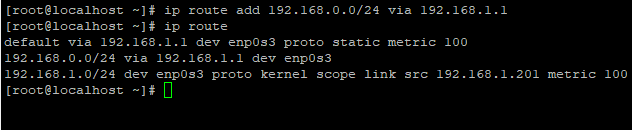
Также можно добавить отдельный маршрут для одного IP адреса (хоста):
# ip route add 192.168.1.0 via 192.168.1.1
Можно сделать аналог null route маршрута в Cisco (ip route null0), пакеты в такую сеть удаляются по причине No route to host:
# ip route add blackhole 10.1.20.0/24
Маршруты, добавленные таким образом являются временным и будут работать до перезагрузки сетевой службы или сервера.
Чтобы удалить созданный вручную маршрут, выполните:
# ip route del 192.168.0.0/24

Как видите, маршрут удален из таблицы маршрутизации.
Чтобы добавить постоянный маршрут, нужно создать файл для этого маршрута, либо добавить правило в файл rc.local (выполняется при загрузке сервера).
Чтобы добавить постоянный (статический) маршрут, нужно знать имя сетевого интерфейса, который будет использоваться для маршрутизации. Узнать имя сетевого интерфейса можно командой:
В моем случае, интерфейс enp0s3.
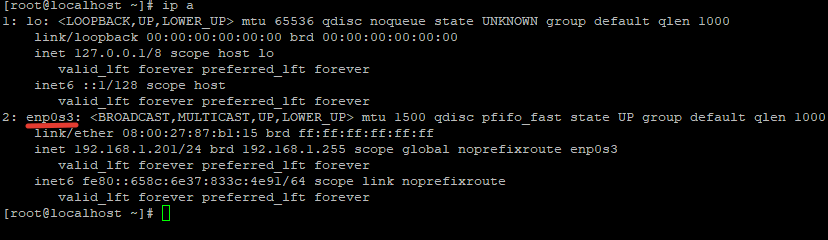
Далее открываем следующий файл:
И добавляем туда строку с маршрутом:
После добавления маршрута в файл нужно перезапустить сервис network:
# service network restart
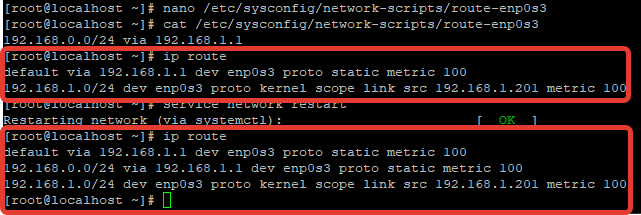
После перещаауска сетевого сервиса, в таблице маршрутизации появился статический маршрут.
Также можно добавить команду добавления нового маршрута в файл rc.local, чтобы он автоматически добавлялся при загрузке сервера. Откройте файл:
И укажите команду добавления маршрута:
# ip route add 192.168.0.0/24 via 192.168.1.1
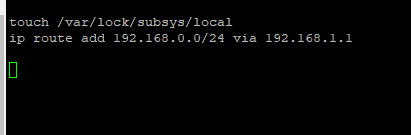
Теперь, если ваш сервер будет перезагружен, маршрут пропишется автоматически при загрузке системы.
Изменить маршрут в Linux
Чтобы изменить уже существующий маршрут, можно использовать команду ip route replace:
# ip route replace 192.168.0.0/24 via 192.168.1.1

Чтобы сбросить все временные маршруты в таблице маршрутизации, просто перезапустите сетевой сервис:
]# service network restart
Изменить маршрут по умолчанию
Вы можете удалить маршрут по-умолчаню с помощью команды ip route del:
# ip route del default via 192.168.1.1 dev enp0s3
Чтобы указать новый маршрут по-умолчанию в CentOS используется команда:
# ip route add default via 192.168.1.2 (маршрут через IP адрес шлюза)
# ip route add default via enp0s3 (маршрут через имя устройства)
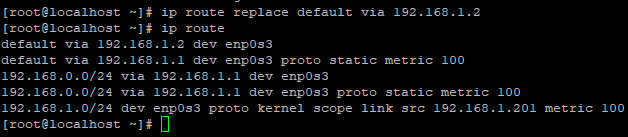
Чтобы изменить параметры маршрута по умолчанию, используется команда:
# ip route replace default via 192.168.1.2
 Предыдущая статья Следующая статья
