Intel GNA: маломощный сопроцессор для Intel Inference

Если вы прочитали полные спецификации некоторых из последних Intel Процессоры, вы будете видели, как появляются загадочные аббревиатуры: ВНС. На самом деле это небольшой процессор или, скорее, сопроцессор, который отвечает за ускорение определенных Глубокое обучение алгоритмы и, следовательно, тесно связаны с реализацией искусственного интеллекта. Объясняем, из чего состоит этот сопроцессор и каковы его функции.
Процессоры, предназначенные для ускорения определенных повседневных задач с использованием моделей, разработанных с помощью искусственного интеллекта, появляются в последние годы во всех конфигурациях и размерах, и неудивительно, что Intel не хотела отставать.
Что такое Intel GNA?
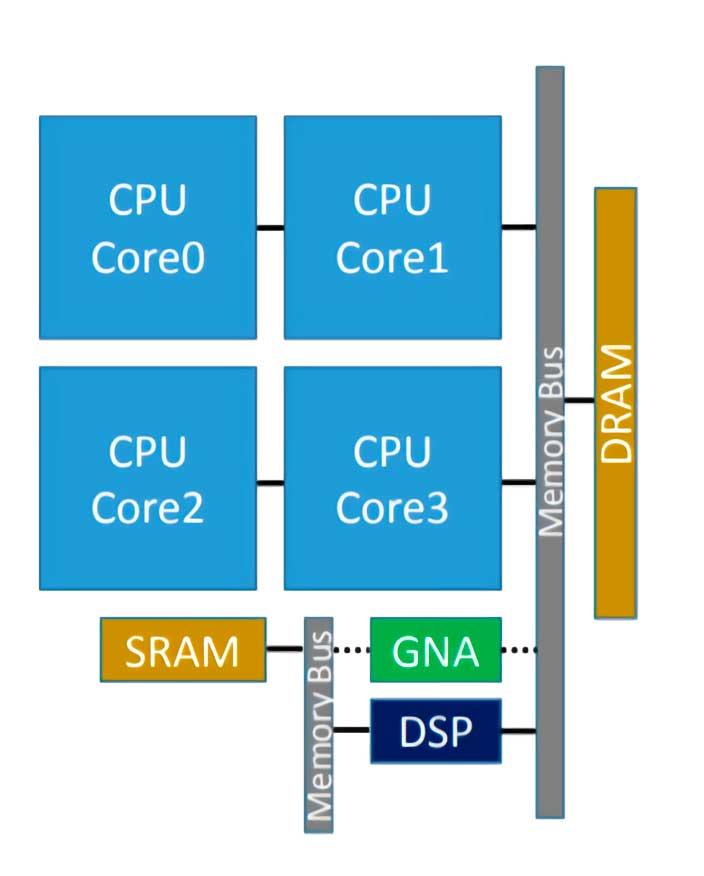
Intel GNA — это сопроцессор, который интегрирован в некоторые процессоры Intel и который служит для ускорения выполнения некоторых алгоритмов вывода. Тем не менее, многие из вас уже знают, что, следовательно, мы имеем дело с процессором нейронного типа, который в данном случае был впервые представлен в Intel Ice Lake, а его аббревиатура означает Гауссовский нейронный ускоритель ( GNA ), и будучи интегрированным в собственный процессор, работает с очень низким потреблением энергии.
Please enable JavaScript
Он предназначен для использования для таких задач, как транскрипция звука в реальном времени или удаление фотошума, которые типичны для ИИ, но не требуют мощного ускорителя.
Недавно он был улучшен в Tiger Lake, где была реализована версия 2.0 GNA, которая также предназначена для подавления окружающего шума и уменьшения шума на фотографиях. Исходя из этого, мы можем сделать вывод, что GNA разработан для совместной работы в бизнес-средах, особенно в тех, которые основаны на удаленной работе, в которой очень важна транскрипция текста и общение без какого-либо шума.
Как это работает?
Intel GNA не является исполнительным устройством ЦП Итак, мы имеем дело с процессором внутри другого, и он служит для ускорения определенных задач для своего гостя. Это означает, что он должен быть явно вызван в коде через API, в данном случае выделенный Intel API.
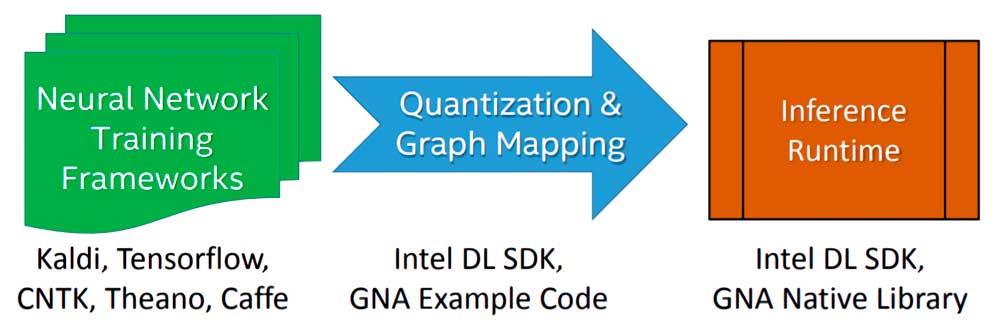
Реализация алгоритма или модели глубокого обучения, выполняемой Intel GNA на этапе вывода, выполняется в три этапа:
- Начнем с обучения алгоритма с использованием нейронной сети с плавающей запятой со структурой свободного выбора.
- Модель, полученная в результате обучения, импортируется с помощью инструмента развертывания Intel Deep Learning SDK, который позволяет импортировать любую модель, созданную наиболее известными и используемыми платформами глубокого обучения.
- Он связан с Intel Deep Learning SDK Inference Engine или собственными библиотеками GNA, которых две: одна для Intel Quark, а другая для Intel Atom и Intel Core.
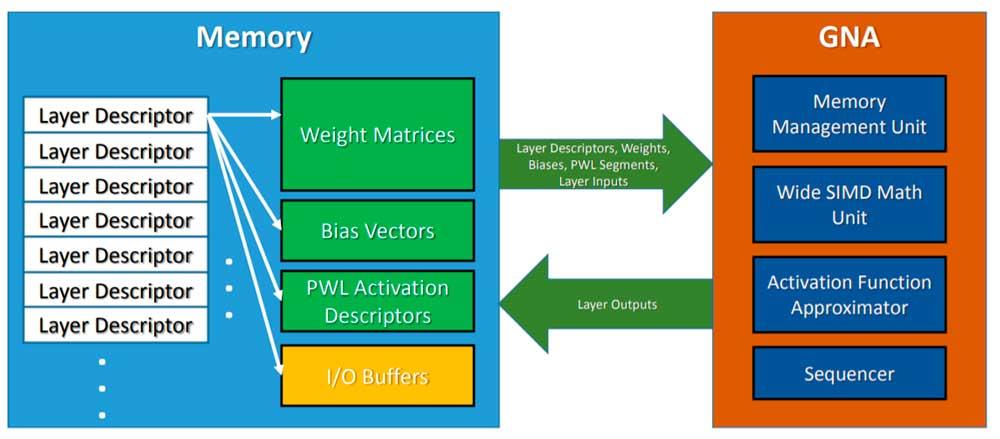
Чтобы вызвать GNA, ЦП оставляет модель вывода в памяти, а GNA вызывается для принятия указанного алгоритма и его выполнения параллельно с работой процессора, хостом которого он является. Также необходимо учитывать, что это маломощный блок, поэтому мы не можем ожидать тех же результатов, что и при использовании высокопроизводительной нейронной сети или FPGA, настроенных как таковые, но он достаточно хорош для простых повседневных задач. .
Intel GNA вне процессоров Intel
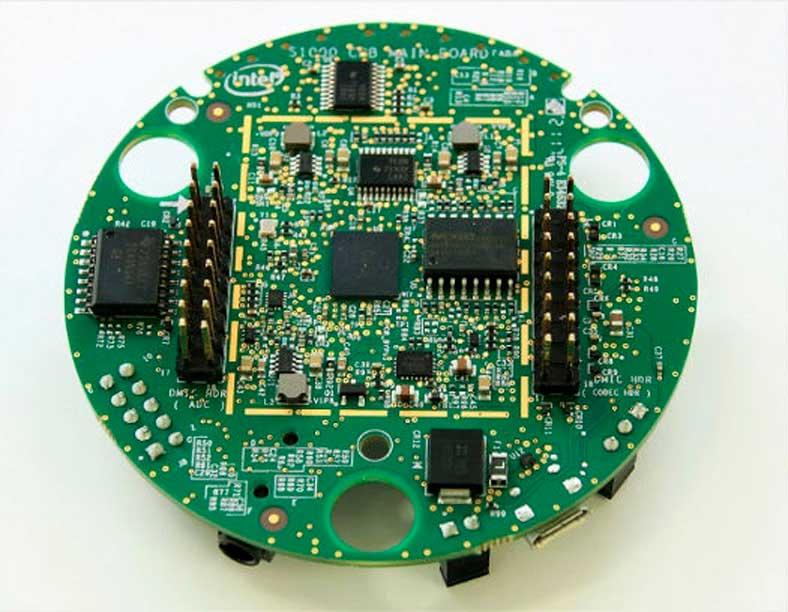
Хотя GNA сам по себе является процессором, интегрированным как часть процессоров x86, при желании он может быть развернут вне процессора, наиболее известным случаем является Комплект разработчика Intel для работы с речью , который используется специально для вывода голосовых команд для приложений для Амазонки Alexa устройств.
Thread: GNA device
I have just finished to built my new setup based on a M13H, bios 0704. I don’t understand the aim of the setting "GNA device" in the Bios . Is it useful ? Does it need to be completed by a Windows driver ?
By the way, after several days, I can say that my system is really very stable (Prime 95, several hours of MSFS, Aida burn test. ) but I had to disable HT. Otherwise I had several and almost regular clock.watchdog.timeout BSOD’s.
Resize bar and ABT are on and fonctional
- View Profile
- View Forum Posts
- Private Message
ROG Guru: Orange Belt Array sdmf74 PC Specs
| sdmf74 PC Specs | |
| Laptop (Model) | N/A |
| Motherboard | MAXIMUS IX FORMULA |
| Processor | I7 7700K |
| Memory (part number) | F4-3600C16Q-32GTZR |
| Graphics Card #1 | GTX 980TI K|NGP|N |
| Graphics Card #2 | N/A |
| Graphics Card #3 | N/A |
| Graphics Card #4 | N/A |
| Sound Card | ON BOARD |
| Monitor | ASUS PG279Q, BENQ XL2420TE, HISENSE 55H9F |
| Storage #1 | SAMSUNG 960 PRO M.2 512GB |
| Storage #2 | SAMSUNG 970 EVO PLUS 1TB, SAMSUNG 850 PRO 512GB, SAMSUNG 850 EVO 1TB |
| CPU Cooler | EK VELOCITY RGB |
| Case | CASELABS MERLIN SM8 (2 TONE) |
| Power Supply | EVGA 1300G2 SUPERNOVA |
| Keyboard | WOOTING ONE, DUCKY ONE TKL RGB |
| Mouse | LOGITECH G PRO HERO |
| Headset | SENNHESIER G4ME ZERO |
| Mouse Pad | REFLEX LAB XXXL |
| Headset/Speakers | KLIPSCH PRO MEDIA 2.1 |
| OS | WINDOWS 10 PRO |
| Network Router | ASUS RT-AC86U, ASUS RT-AC68U |
 Join Date Nov 2012 Reputation 27 Posts 378
- View Profile
- View Forum Posts
- Private Message
Here my question — how to install the drivers:
- View Profile
- View Forum Posts
- Private Message
- View Profile
- View Forum Posts
- Private Message
ROG Guru: Orange Belt Array sdmf74 PC Specs
| sdmf74 PC Specs | |
| Laptop (Model) | N/A |
| Motherboard | MAXIMUS IX FORMULA |
| Processor | I7 7700K |
| Memory (part number) | F4-3600C16Q-32GTZR |
| Graphics Card #1 | GTX 980TI K|NGP|N |
| Graphics Card #2 | N/A |
| Graphics Card #3 | N/A |
| Graphics Card #4 | N/A |
| Sound Card | ON BOARD |
| Monitor | ASUS PG279Q, BENQ XL2420TE, HISENSE 55H9F |
| Storage #1 | SAMSUNG 960 PRO M.2 512GB |
| Storage #2 | SAMSUNG 970 EVO PLUS 1TB, SAMSUNG 850 PRO 512GB, SAMSUNG 850 EVO 1TB |
| CPU Cooler | EK VELOCITY RGB |
| Case | CASELABS MERLIN SM8 (2 TONE) |
| Power Supply | EVGA 1300G2 SUPERNOVA |
| Keyboard | WOOTING ONE, DUCKY ONE TKL RGB |
| Mouse | LOGITECH G PRO HERO |
| Headset | SENNHESIER G4ME ZERO |
| Mouse Pad | REFLEX LAB XXXL |
| Headset/Speakers | KLIPSCH PRO MEDIA 2.1 |
| OS | WINDOWS 10 PRO |
| Network Router | ASUS RT-AC86U, ASUS RT-AC68U |
Join Date Nov 2012 Reputation 27 Posts 378
Originally Posted by thomas_yiu@ROG
- View Profile
- View Forum Posts
- Private Message
- View Profile
- View Forum Posts
- Private Message
Originally Posted by sl910
I have just finished to built my new setup based on a M13H, bios 0704. I don’t understand the aim of the setting "GNA device" in the Bios . Is it useful ? Does it need to be completed by a Windows driver ?
By the way, after several days, I can say that my system is really very stable (Prime 95, several hours of MSFS, Aida burn test. ) but I had to disable HT. Otherwise I had several and almost regular clock.watchdog.timeout BSOD’s.
Resize bar and ABT are on and fonctional
- View Profile
- View Forum Posts
- Private Message
Thank you very much for the information.
For my understanding i have to enable this option in the bios and then i can install the drivers..
- View Profile
- View Forum Posts
- Private Message
ROG Enthusiast Array sl910 PC Specs
| sl910 PC Specs | |
| Motherboard | Strix Z790-E Gaming Wifi |
| Processor | Intel i9 13900K |
| Memory (part number) | Crucial 64 GB 4800MHz DDR5 (2x32GB, CL40) |
| Graphics Card #1 | Nvidia RTX 4090 Founders Edition |
| Storage #1 | Samsung NVMe 980 Pro 1TB |
| Storage #2 | Samsung NVMe 970 EVO Plus 2TB |
| CPU Cooler | Noctua NH-D15S chromax.black |
| Case | Lian-Li PC-A61WX |
| Power Supply | Seasonic PRIME TX-1000 |
| Keyboard | Microsoft Wired Keyboard 600 |
| Mouse | Microsoft Classic Intellimouse |
| OS | Windows 11 Pro FR 22H2 |
Join Date Jan 2020 Reputation 10 Posts 50
Originally Posted by thomas_yiu@ROG
Yes. I have updated Bios to the latest version 0707. BSOD are still there when I enable HT. When diseabled the computer is really very stable. I have used it for several tasks including long Microsoft Flight simulator sessions in Ultra mode, daily.
All the other options in the Bios have no effect on BSOD’s, such as ABT, Turbo modes.
When HT is off, there is absolutely no BSOD, even if the CPU power package reaches values such as 250W. By the way, I am really very happy with my new Noctua NH-D15S cooler.
When HT is On, BSOD’s appear even with almost no load (i.e. Vcore=0,750V, 800MHz, 17W. )
Well, it is not really a problem. I don’t know if HT brings some performance enhancements in my case.
Что необычного в процессах Ice Lake от Intel
Технологический процесс 10 нм+. Новая архитектура Sunny Cove (солнечная бухта). Искусственный интеллект (DL Boost и GNA), в центре особого внимания максимизация производительности ядра и стабильность. Чем-то “яблочным” отдает, не правда ли? Первое поколения Intel’овского процесса 10 нм потерпело неудачу. Это и ущерб репутации компании, и недополученные прибыли (главный конкурент, AMD, успешно пользуется 7 нм процессом – это неслыханно), и реальная опасность потерять важных клиентов. Во всем, как всегда, виноваты люди.

Ice Lake — еще более мощные процессоры от Intel
А технические проблемы, помешавшие компании быстро и по-умному преодолеть очередное препятствие на их пути (сколько их было в прошлом) всего лишь следствие проблем с персоналом. Второе поколение Intel’овского 10 нм процесса, по сведениям из неофициальных источников, отличается от первого поколения применением экстремального ультрафиолета (EUV). Обычный UV, успешно применявшийся в технологиях большей размерности, применим и для 10- и 14-нанометровых технологических процессов, только процесс состоит из все большего число этапов, а количество, рано или поздно, переходит в качество. Становится неуправляемым.
При старом добром UV используется ультрафиолетовое излучение с длиной волны в 193 нм. В EUV (экстремальном UV) используется ультрафиолет с длиной волны в 13,5 нм. Это, с одной стороны, упрощает процесс – уменьшает число стадий производства, уменьшает вероятность ошибок, но EUV тоже не прост. Цвет с такой длиной волны поглощается линзами, для управления им используют сложные системы зеркал. Затраты на переход от UV на EUV, особенно для компании доходы которой уменьшаются, в которой сокращают персонал и всеми мыслимыми силами снижают затраты – экстремальны. Результат был, казалось бы, где-то совсем рядом, еще одно-два усилия и все получится. И никто не взял на себя ответственность и не разрубил гордиев узел. Теперь – решение принято. Процесс уже работает, но все еще не идеально. Провалиться еще и на этот раз у них нет права. Это уже вопрос жизни и смерти. СМИ не верят в них. Не верят даже сильнее чем в клавиатуру типа “бабочка”. Почти все шедевры компьютерной и мобильной индустрии о которых мне известно были созданы именно в таких ситуациях.
Взойдет ли солнце над солнечной бухтой?
Предыдущая архитектура, которая должна была разнести конкурентов в пыль и прах еще в 2015 году, называлась Palm Cove. Пальмовая бухта. Для того времени она была передовой и почти немыслимой. Впереди у компании был 50-летний юбилей, к которому надо было подойти с новыми грандиозными победами, может быть даже вернув утраченный статус лидера. В 2018 “пальмовая бухта” не впечатляла, процесс 10 нм упорно сопротивлялся, и первый пробный процессор с этой архитектурой, 2-ядерный Cannon Lake без графического процессора на кристалле, пал жертвой собственных дефектов. TSMC и Samsung легко и непринужденно ушли вперед, ситуация казалась почти безнадежной. Выбрасывать белый флаг, тем не менее, Intel не стала.
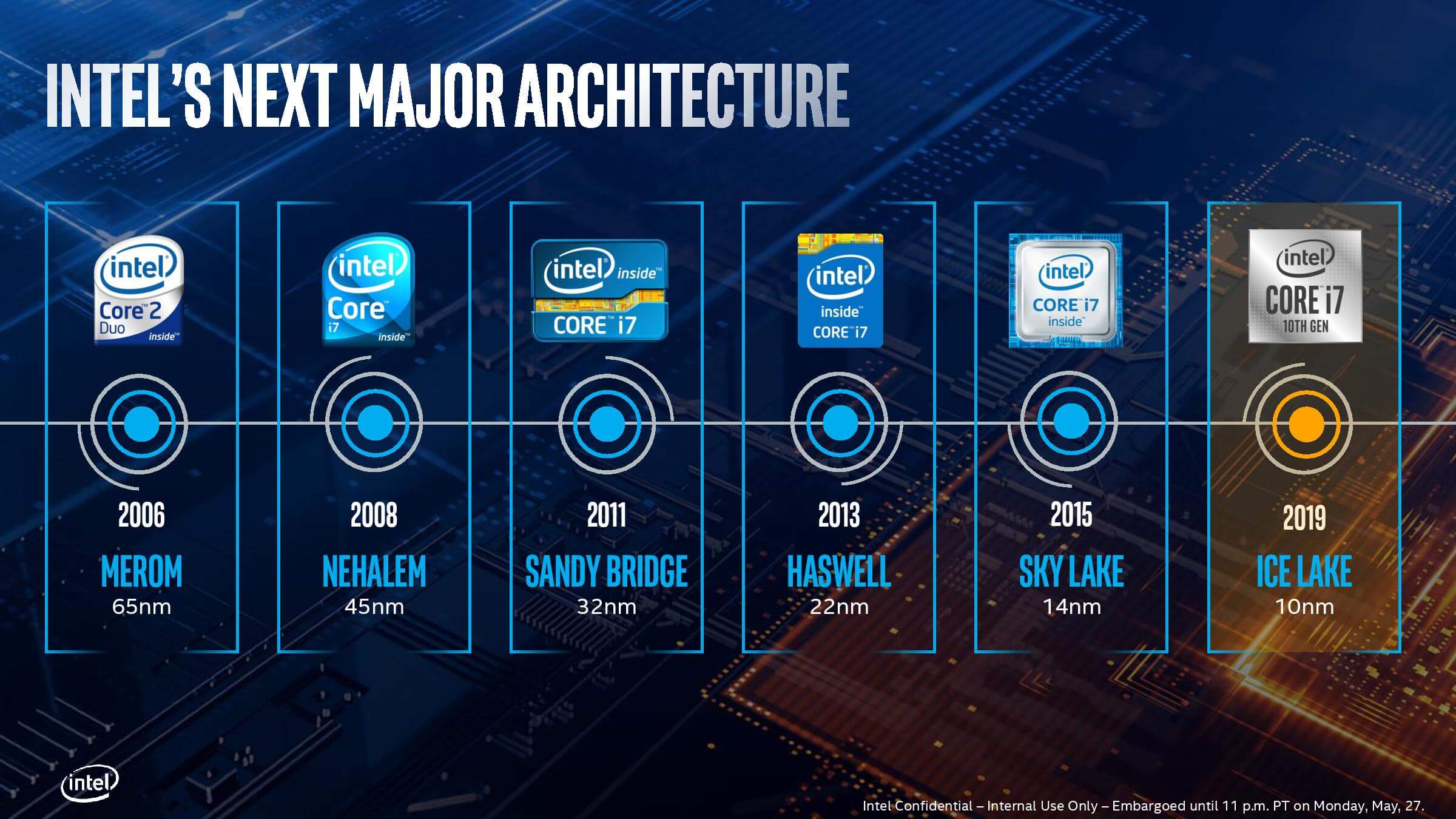
Архитектура процессоров Intel
Новая архитектура, еще одна бухта – на этот раз “солнечная”, была разработана в центре НИОКР в Хайфе еще в 2017 году. Примерно тогда же, в другом месте (видимо, в городе Санта Клара в Калифорнии, где расположена штаб-квартира Intel) закончилась разработка графической подсистемы нового поколения. Предыдущее поколение, неофициально, было поколением 9.5, графика этого поколения ничем существенным не отличалась от графики поколения 9. И архитектура, и первое поколение процессоров новой архитектуры, и даже графика для неё разрабатывались для 10 нм. Во все это были вложены неимоверные силы и средства, и получилось Нечто Великое, которое тестировали и дорабатывали еще два с лишним года.
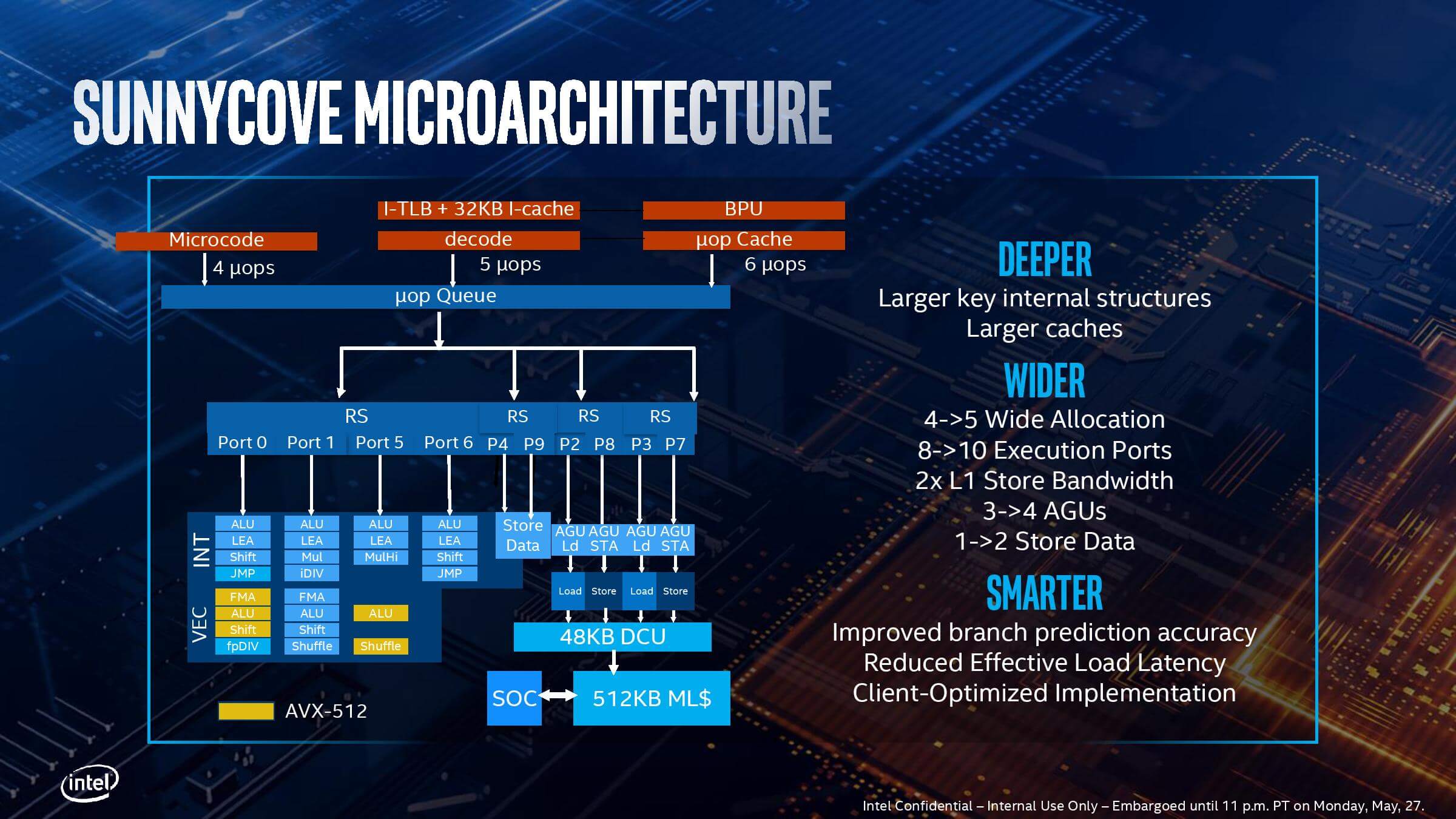
Микроархитекрура процессоров Intel
В конце этого года, к праздничному сезону, “солнечная бухта” должна выйти в свет. Если все получится, вскоре после этого, наверное весной, Ice Lake скорее всего дополнят чипами для амбициозно мощных ноутбуков. 16- или 16,5-дюймовый MacBook Pro, без рамок и с новой клавиатурой может быть построен либо вокруг Ice Lake, либо вокруг процессора собственной разработки Apple, и я бы предпочел более безопасный вариант, с Intel внутри. Пусть это будет “солнечная бухта”.
Что нового в Ice Lake
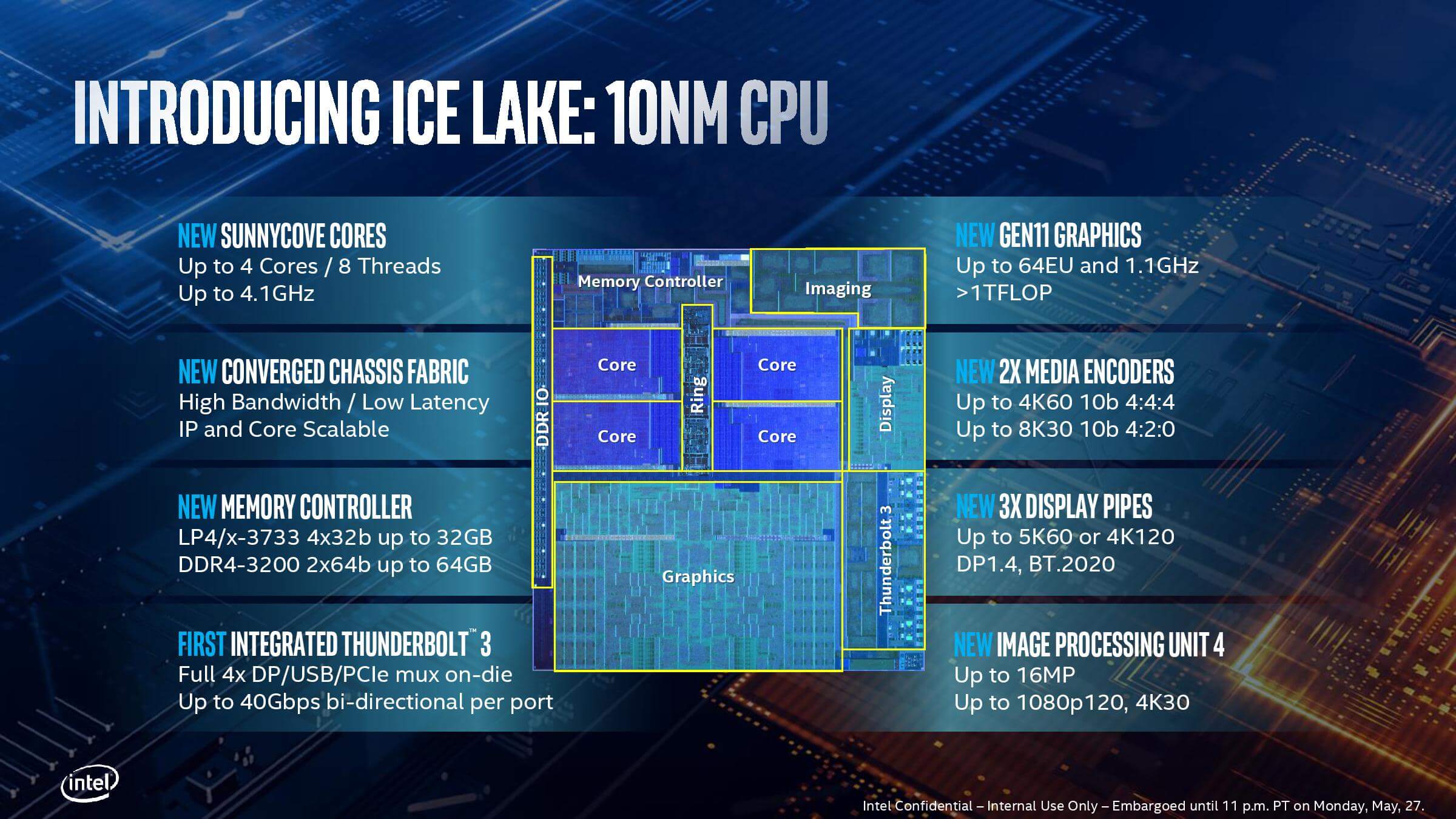
Устройство процессора Intel Ice Lake
Множество новых инструкций, открывающих новые горизонты перед разработчиками программ и операционных систем. Набор инструкций Intel Deep Learning Boost (DL Boost). Gaussian and Neural Accelerator (GNA) – специализированный процессор для отработки в фоновом режиме задач вроде обработки человеческого голоса или подавления шума, тратя на все эти трудоемкие задачи минимум энергии. И много всего интересного еще. Поддержка WiFi 6 (802.11ax) и Thunderbolt 3. Intel участвует в разработке USB 4, новый стандарт тоже будет поддерживать Thunderbolt 3. Я не знаю почему они не могли сделать это раньше, но в Ice Lake (как и в Comet Lakе, кстати) поддерживаются все самые востребованные типы оперативной памяти: LPDDR4/LPDDR4X, DDR4 и LPDDR3.
В первой серии Ice Lake 5 Y- и 6 U-чипов, предназначенных для использования в легких и тонких, в том числе и бесшумных, ноутбуках. Типа MacBook Air. Intel объявила еще один проект, Athena – это что-то вроде Centrino и Ultrabook. Когда-то (в 2011 году) MacBook Air был источником вдохновения для Ultrabook. От ноутбуков проекта Athena требуется, среди прочего, поддержка биометрической аутентификации, пробуждение от сна менее чем за секунду, и много чего еще. Похоже, MacBook Air отвечает почти всем требованиям нового проекта.
Intel радикально изменила обозначения процессоров, теперь узнать к какому классу, Y или U, относится конкретный процессор невозможно если под рукой нет справочника. Зато в обозначении теперь указывается тип встроенного графического процессора. В новом поколении встроенной графики из всего три варианта: G1, или Intel UHD Graphics, с 32 исполняемыми блоками, G4 – Intel Iris Plus с 48 исполняемыми блоками и G7, Intel Iris Plus с 64 исполняемыми блоками. Производительность G7 небывалая для Intel iGPU, до 1,12 Терафлоп.
Это продолжение мини-серии про Intel Core 10-го поколения, предыдущая часть здесь.
Gna device что это
The Intel® Gaussian & Neural Accelerator (GNA) is a low-power neural coprocessor for continuous inference at the edge.
Intel® GNA is not intended to replace typical inference devices such as the CPU, graphics processing unit (GPU), or vision processing unit (VPU). It is designed for offloading continuous inference workloads including but not limited to noise reduction or speech recognition to save power and free CPU resources.
The GNA plugin provides a way to run inference on Intel® GNA, as well as in the software execution mode on CPU.
For more details on how to configure a machine to use GNA plugin, see GNA configuration page .
Intel® GNA Generational Differences
The first (1.0) and second (2.0) versions of Intel® GNA found in 10th and 11th generation Intel® Core™ Processors may be considered to be functionally equivalent. Intel® GNA 2.0 provided performance improvement with respect to Intel® GNA 1.0. Starting with 12th Generation Intel® Core™ Processors (formerly codenamed Alder Lake), support for Intel® GNA 3.0 features is being added.
In the rest of this documentation, “GNA 2.0” refers to Intel® GNA hardware delivered on 10th and 11th generation Intel® Core™ processors, and the term “GNA 3.0” refers to GNA hardware delivered on 12th generation Intel® Core™ processors.
Intel® GNA Forward and Backward Compatibility
When you run a model using the GNA plugin, it is compiled internally for the specific hardware target. It is possible to export compiled model using Import/Export functionality to use it later, but in the general case, there is no guarantee that a model compiled and exported for GNA 2.0 runs on GNA 3.0, or vice versa.
Compile target 2.0
Compile target 3.0
Not supported (incompatible layers emulated on CPU)
In most cases, networks compiled for GNA 2.0 runs as expected on GNA 3.0, although the performance may be worse compared to the case when a network is compiled specifically for the latter. The exception is networks with convolutions with the number of filters greater than 8192 (see the Models and Operations Limitations section).
For optimal work with POT quantized models which includes 2D convolutions on GNA 3.0 hardware, the following requirements should be satisfied.
Choose a compile target depending on the priority: cross-platform execution, performance, memory, or power optimization..
Use the following properties to check interoperability in your application: ov::intel_gna::execution_target and ov::intel_gna::compile_target
Speech C++ Sample can be used for experiments (see -exec_target and -compile_target command line options).
Software emulation mode
On platforms without GNA hardware support plugin chooses software emulation mode by default. It means, model runs even if you do not have GNA HW within your platform. GNA plugin enables you to switch the execution between software emulation mode and hardware execution mode after the model is loaded. For details, see description of the ov::intel_gna::execution_mode property.
Recovery from Interruption by High-Priority Windows Audio Processes*
GNA is designed for real-time workloads such as noise reduction. For such workloads, processing should be time constrained, otherwise extra delays may cause undesired effects such as audio glitches. To make sure that processing can satisfy real-time requirements, the GNA driver provides a Quality of Service (QoS) mechanism, which interrupts requests that might cause high-priority Windows audio processes to miss the schedule, thereby causing long running GNA tasks to terminate early.
To prepare the applications correctly, use Automatic QoS Feature described below.
Automatic QoS Feature on Windows*
Starting with 2021.4.1 release of OpenVINO and 03.00.00.1363 version of Windows* GNA driver, a new execution mode ov::intel_gna::ExecutionMode::HW_WITH_SW_FBACK is introduced to assure that workloads satisfy real-time execution. In this mode, the GNA driver automatically falls back on CPU for a particular infer request if the HW queue is not empty, so there is no need for explicitly switching between GNA and CPU.
Due to the “first come — first served” nature of GNA driver and the QoS feature, this mode may lead to increased CPU consumption
if there are several clients using GNA simultaneously. Even a lightweight competing infer request which has not been cleared at the time when the user’s GNA client process makes its request, can cause the user’s request to be executed on CPU, thereby unnecessarily increasing CPU utilization and power.
Supported inference data types
Intel® GNA essentially operates in the low-precision mode which represents a mix of 8-bit ( i8 ), 16-bit ( i16 ), and 32-bit ( i32 ) integer computations.
GNA plugin users are encouraged to use the Post-Training Optimization Tool to get a model with quantization hints based on statistics for the provided dataset.
Unlike other plugins supporting low-precision execution, the GNA plugin can calculate quantization factors at the model loading time, so you can run a model without calibration. However, this mode may not provide satisfactory accuracy because the internal quantization algorithm is based on heuristics which may or may not be efficient, depending on the model and dynamic range of input data and this mode is going to be deprecated soon.
GNA plugin supports the following data types as inference precision of internal primitives
Quantized data types:
Hello Query Device C++ Sample can be used to print out supported data types for all detected devices.
POT API Usage sample for GNA demonstrates how a model can be quantized for GNA using POT API in 2 modes:
Accuracy (i16 weights)
Performance (i8 weights)
For POT quantized model ov::hint::inference_precision property has no effect except cases described in Support for 2D Convolutions using POT.
Supported features
Models caching
Cache for GNA plugin may be enabled via common OpenVINO ov::cache_dir property due to import/export functionality support (see below).
Import/Export
The GNA plugin supports import/export capability which helps to significantly decrease first inference time. The model compile target is the same as the execution target by default. The default value for the execution target corresponds to available hardware, or latest hardware version supported by the plugin (i.e., GNA 3.0) if there is no GNA HW in the system.
If you are willing to export a model for a specific version of GNA HW, please use the ov::intel_gna::compile_target property and then export the model:
Compile Tool or Speech C++ Sample can be used to compile model.
Stateful models
GNA plugin natively supports stateful models.
Please refer to Stateful models for more details about such models.
Typically, GNA is used in streaming scenarios, when minimizing the latency is important. Taking into account that POT does not support the TensorIterator operation, the recommendation is to use the —transform option of the Model Optimizer to apply LowLatency2 transformation when converting an original model.
Profiling
The GNA plugin allows to turn on profiling using the ov::enable_profiling property. With the following methods, you can collect profiling information that provides various performance data about execution on GNA:
The current GNA implementation calculates counters for the whole utterance scoring and does not provide per-layer information. The API enables you to retrieve counter units in cycles, you can convert cycles to seconds as follows:
Refer to the table below to learn about the frequency of Intel® GNA inside a particular processor:
Frequency of Intel® GNA, MHz
Intel® Core™ processors
Intel® processors formerly codenamed Elkhart Lake
Intel® processors formerly codenamed Gemini Lake
Performance counters provided for the time being:
Inference request performance results
Number of total cycles spent on scoring in hardware including compute and memory stall cycles
Number of stall cycles spent in hardware
Supported properties
The plugin supports the properties listed below.
Read-write properties
The following parameters must be set before model compilation in order to take effect or passed as additional argument to ov::Core::compile_model() :
These parameters can be changed after model compilation ov::CompiledModel::set_property :
Read-only properties
Limitations
Models and Operations Limitations
Because of specifics of hardware architecture, Intel® GNA supports a limited set of operations, their kinds and combinations. For example, you should not expect the GNA Plugin to be able to run computer vision models, except those specifically adapted for the GNA Plugin, because the plugin does not fully support 2D convolutions.
Only 1D convolutions are natively supported on the HW prior to GNA 3.0; 2D convolutions have specific limitations (see the table below).
The number of output channels for convolutions must be a multiple of 4.
The maximum number of filters is 65532 for GNA 2.0 and 8192 for GNA 3.0.
Transpose layer support is limited to the cases where no data reordering is needed or when reordering is happening for two dimensions, at least one of which is not greater than 8.
Splits and concatenations are supported for continuous portions of memory (e.g., split of 1,2,3,4 to 1,1,3,4 and 1,1,3,4 or concats of 1,2,3,4 and 1,2,3,5 to 2,2,3,4).
For Multiply, Add and Subtract layers, auto broadcasting is only supported for constant inputs.
Support for 2D Convolutions
The Intel® GNA 1.0 and 2.0 hardware natively supports only 1D convolutions. However, 2D convolutions can be mapped to 1D when a convolution kernel moves in a single direction.
Initially, a limited subset of Intel® GNA 3.0 features are added to the previous feature set including the following:
2D VALID Convolution With Small 2D Kernels: Two-dimensional convolutions with the following kernel dimensions [H,W] are supported: [1,1], [2,2], [3,3], [2,1], [3,1], [4,1], [5,1], [6,1], [7,1], [1,2], or [1,3]. Input tensor dimensions are limited to [1,8,16,16] <= [N,C,H,W] <= [1,120,384,240]. Up to 384 channels C may be used with a subset of kernel sizes (see table below). Up to 256 kernels (output channels) are supported. Pooling is limited to pool shapes of [1,1], [2,2], or [3,3]. Not all combinations of kernel shape and input tensor shape are supported (see the tables below for exact limitations).
The tables below show that the exact limitation on the input tensor width W depends on the number of input channels C (indicated as Ci below) and the kernel shape. There is much more freedom to choose the input tensor height and number of output channels.
The following tables provide a more explicit representation of the Intel(R) GNA 3.0 2D convolution operations initially supported. The limits depend strongly on number of input tensor channels (Ci) and the input tensor width (W). Other factors are kernel height (KH), kernel width (KW), pool height (PH), pool width (PW), horizontal pool step (SH), and vertical pool step (PW). For example, the first table shows that for a 3×3 kernel with max pooling, only square pools are supported, and W is limited to 87 when there are 64 input channels.
The above limitations only apply to the new hardware 2D convolution operation. When possible, the Intel® GNA plugin graph compiler flattens 2D convolutions so that the second generation Intel® GNA 1D convolution operations (without these limitations) may be used. The plugin will also flatten 2D convolutions regardless of the sizes if GNA 2.0 compilation target is selected (see below).
Support for 2D Convolutions using POT
For POT to successfully work with the models including GNA3.0 2D convolutions, the following requirements must be met:
All convolution parameters are natively supported by HW (see tables above)
The runtime precision is explicitly set by the ov::hint::inference_precision property as i8 for the models produced by the performance mode of POT, and as i16 for the models produced by the accuracy mode of POT.
Batch Size Limitation
Intel® GNA plugin supports the processing of context-windowed speech frames in batches of 1-8 frames.
Please refer to Layout API overview to determine batch dimension.
To set layout of model inputs in runtime use Optimize Preprocessing guide:
Thread: GNA device
I have just finished to built my new setup based on a M13H, bios 0704. I don’t understand the aim of the setting «GNA device» in the Bios . Is it useful ? Does it need to be completed by a Windows driver ?
By the way, after several days, I can say that my system is really very stable (Prime 95, several hours of MSFS, Aida burn test. ) but I had to disable HT. Otherwise I had several and almost regular clock.watchdog.timeout BSOD’s.
Resize bar and ABT are on and fonctional
- View Profile
- View Forum Posts
- Private Message
ROG Guru: Orange Belt Array sdmf74 PC Specs
| sdmf74 PC Specs | |
| Laptop (Model) | N/A |
| Motherboard | MAXIMUS IX FORMULA |
| Processor | I7 7700K |
| Memory (part number) | F4-3600C16Q-32GTZR |
| Graphics Card #1 | GTX 980TI K|NGP|N |
| Graphics Card #2 | N/A |
| Graphics Card #3 | N/A |
| Graphics Card #4 | N/A |
| Sound Card | ON BOARD |
| Monitor | ASUS PG279Q, BENQ XL2420TE, HISENSE 55H9F |
| Storage #1 | SAMSUNG 960 PRO M.2 512GB |
| Storage #2 | SAMSUNG 970 EVO PLUS 1TB, SAMSUNG 850 PRO 512GB, SAMSUNG 850 EVO 1TB |
| CPU Cooler | EK VELOCITY RGB |
| Case | CASELABS MERLIN SM8 (2 TONE) |
| Power Supply | EVGA 1300G2 SUPERNOVA |
| Keyboard | WOOTING ONE, DUCKY ONE TKL RGB |
| Mouse | LOGITECH G PRO HERO |
| Headset | SENNHESIER G4ME ZERO |
| Mouse Pad | REFLEX LAB XXXL |
| Headset/Speakers | KLIPSCH PRO MEDIA 2.1 |
| OS | WINDOWS 10 PRO |
| Network Router | ASUS RT-AC86U, ASUS RT-AC68U |
Join Date Nov 2012 Reputation 27 Posts 363
- View Profile
- View Forum Posts
- Private Message
Here my question — how to install the drivers:
- View Profile
- View Forum Posts
- Private Message
- View Profile
- View Forum Posts
- Private Message
ROG Guru: Orange Belt Array sdmf74 PC Specs
| sdmf74 PC Specs | |
| Laptop (Model) | N/A |
| Motherboard | MAXIMUS IX FORMULA |
| Processor | I7 7700K |
| Memory (part number) | F4-3600C16Q-32GTZR |
| Graphics Card #1 | GTX 980TI K|NGP|N |
| Graphics Card #2 | N/A |
| Graphics Card #3 | N/A |
| Graphics Card #4 | N/A |
| Sound Card | ON BOARD |
| Monitor | ASUS PG279Q, BENQ XL2420TE, HISENSE 55H9F |
| Storage #1 | SAMSUNG 960 PRO M.2 512GB |
| Storage #2 | SAMSUNG 970 EVO PLUS 1TB, SAMSUNG 850 PRO 512GB, SAMSUNG 850 EVO 1TB |
| CPU Cooler | EK VELOCITY RGB |
| Case | CASELABS MERLIN SM8 (2 TONE) |
| Power Supply | EVGA 1300G2 SUPERNOVA |
| Keyboard | WOOTING ONE, DUCKY ONE TKL RGB |
| Mouse | LOGITECH G PRO HERO |
| Headset | SENNHESIER G4ME ZERO |
| Mouse Pad | REFLEX LAB XXXL |
| Headset/Speakers | KLIPSCH PRO MEDIA 2.1 |
| OS | WINDOWS 10 PRO |
| Network Router | ASUS RT-AC86U, ASUS RT-AC68U |
Join Date Nov 2012 Reputation 27 Posts 363
Originally Posted by thomas_yiu@ROG
- View Profile
- View Forum Posts
- Private Message
- View Profile
- View Forum Posts
- Private Message
Originally Posted by sl910
I have just finished to built my new setup based on a M13H, bios 0704. I don’t understand the aim of the setting «GNA device» in the Bios . Is it useful ? Does it need to be completed by a Windows driver ?
By the way, after several days, I can say that my system is really very stable (Prime 95, several hours of MSFS, Aida burn test. ) but I had to disable HT. Otherwise I had several and almost regular clock.watchdog.timeout BSOD’s.
Resize bar and ABT are on and fonctional
- View Profile
- View Forum Posts
- Private Message
Thank you very much for the information.
For my understanding i have to enable this option in the bios and then i can install the drivers..
- View Profile
- View Forum Posts
- Private Message
ROG Enthusiast Array sl910 PC Specs
| sl910 PC Specs | |
| Motherboard | Maximus 13 Hero PCB 1.02 |
| Processor | Intel i9 11900K |
| Memory (part number) | Crucial 64 GB 3200MHz (4x16GB, CL22) |
| Graphics Card #1 | Nvidia RTX 3090 Founders Edition |
| Storage #1 | Samsung NVMe 980 Pro 1TB |
| Storage #2 | Samsung NVMe 970 EVO Plus 2TB |
| CPU Cooler | Noctua NH-D15S chromax.black |
| Case | Lian-Li PC-A61WX |
| Power Supply | Seasonic PRIME TX-1000 |
| Keyboard | Microsoft Wired Keyboard 600 |
| Mouse | Microsoft Clasic Intellimouse |
| OS | Windows 11 Pro FR 21H2 |
Join Date Jan 2020 Reputation 10 Posts 38
Originally Posted by thomas_yiu@ROG
Yes. I have updated Bios to the latest version 0707. BSOD are still there when I enable HT. When diseabled the computer is really very stable. I have used it for several tasks including long Microsoft Flight simulator sessions in Ultra mode, daily.
All the other options in the Bios have no effect on BSOD’s, such as ABT, Turbo modes.
When HT is off, there is absolutely no BSOD, even if the CPU power package reaches values such as 250W. By the way, I am really very happy with my new Noctua NH-D15S cooler.
When HT is On, BSOD’s appear even with almost no load (i.e. Vcore=0,750V, 800MHz, 17W. )
Well, it is not really a problem. I don’t know if HT brings some performance enhancements in my case.