Inno Setup uninstall executable location and name
Can I configure it to be placed in the same location C:\windows\something\ that .msi files produced by windows installer are hidden in, instead of in C:\Program Files\MyAppFolder\ ?
Also can I change the name to something more obvious in intent than unins000.exe?
2 Answers 2
The uninstaller path can be changed by setting a value in the script file:
There doesn’t appear to be a way to change the name.
With the shipping InnoSetup there is currently no way specify the Uninstall file name.
Uninstaller Command Line Parameters
The uninstaller program (unins. exe) accepts optional command line parameters. These can be useful to system administrators, and to other programs calling the uninstaller program.
When specified, the uninstaller will not ask the user for startup confirmation or display a message stating that uninstall is complete. Shared files that are no longer in use are deleted automatically without prompting. Any critical error messages will still be shown on the screen. When ‘/VERYSILENT’ is specified, the uninstallation progress window is not displayed.
If a restart is necessary and the ‘/NORESTART’ command isn’t used (see below) and ‘/VERYSILENT’ is specified, the uninstaller will reboot without asking.
Instructs the uninstaller to suppress message boxes. Only has an effect when combined with ‘/SILENT’ and ‘/VERYSILENT’. See ‘/SUPPRESSMSGBOXES’ under Setup Command Line Parameters for more details.
Causes Uninstall to create a log file in the user’s TEMP directory detailing file uninstallation and [UninstallRun] actions taken during the uninstallation process. This can be a helpful debugging aid.
The log file is created with a unique name based on the current date. (It will not overwrite or append to existing files.)
The information contained in the log file is technical in nature and therefore not intended to be understandable by end users. Nor is it designed to be machine-parseable; the format of the file is subject to change without notice.
/LOG=»filename«
Same as /LOG, except it allows you to specify a fixed path/filename to use for the log file. If a file with the specified name already exists it will be overwritten. If the file cannot be created, Uninstall will abort with an error message.
[Inno Setup] Автоматическое удаление предыдущей версии
Задача: при установки новой версии программы автоматически деинсталлировать старую.
Решение: в секцию [Code] добавить:
function GetUninstallString(): String; var sUnInstPath: String; sUnInstallString: String; begin sUnInstPath := ExpandConstant(‘Software\Microsoft\Windows\CurrentVersion\Uninstall\<#emit SetupSetting("AppId")>_is1′); sUnInstallString := »; if not RegQueryStringValue(HKLM, sUnInstPath, ‘UninstallString’, sUnInstallString) then RegQueryStringValue(HKCU, sUnInstPath, ‘UninstallString’, sUnInstallString); Result := sUnInstallString; end; function IsUpgrade(): Boolean; begin Result := (GetUninstallString() <> »); end; function UnInstallOldVersion(): Integer; var sUnInstallString: String; iResultCode: Integer; begin // Return Values: // 1 — uninstall string is empty // 2 — error executing the UnInstallString // 3 — successfully executed the UnInstallString // default return value Result := 0; // get the uninstall string of the old app sUnInstallString := GetUninstallString(); if sUnInstallString <> » then begin sUnInstallString := RemoveQuotes(sUnInstallString); if Exec(sUnInstallString, ‘/SILENT /NORESTART /SUPPRESSMSGBOXES’,», SW_HIDE, ewWaitUntilTerminated, iResultCode) then Result := 3 else Result := 2; end else Result := 1; end; procedure CurStepChanged(CurStep: TSetupStep); begin if (CurStep=ssInstall) then begin if (IsUpgrade()) then begin UnInstallOldVersion(); end; end; end;
Удалить Inno Setup Compiler
используя журнал установки
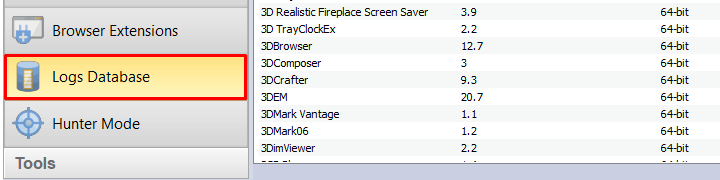
В поле поиска введит "Inno Setup Compiler" вы увидите все журналы "Inno Setup Compiler" в базе данных, совместимой с вашей версией Windows.
Выберите соответствующий журнал по версии из списка и нажмите кнопку "Удалить" на панели инструментов.
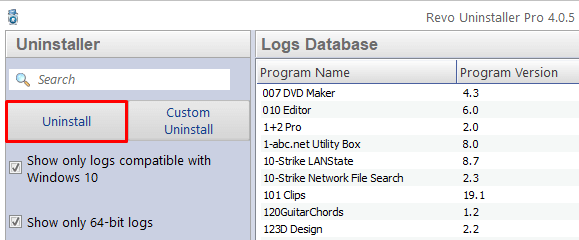
Вы увидите несколько всплывающих окон, показывающих загрузку и импорт журнала в Revo Uninstaller Pro, а затем главное окно удаления, которое показывает ход удаления Inno Setup Compiler.