Apache HTTP Server Tutorial: .htaccess files
.htaccess files provide a way to make configuration changes on a per-directory basis.
- .htaccess files
- What they are/How to use them
- When (not) to use .htaccess files
- How directives are applied
- Authentication example
- Server Side Includes example
- Rewrite Rules in .htaccess files
- CGI example
- Troubleshooting
See also
.htaccess files
- core
- mod_authn_file
- mod_authz_groupfile
- mod_cgi
- mod_include
- mod_mime
- AccessFileName
- AllowOverride
- Options
- AddHandler
- SetHandler
- AuthType
- AuthName
- AuthUserFile
- AuthGroupFile
- Require
What they are/How to use them
.htaccess files (or «distributed configuration files») provide a way to make configuration changes on a per-directory basis. A file, containing one or more configuration directives, is placed in a particular document directory, and the directives apply to that directory, and all subdirectories thereof.
If you want to call your .htaccess file something else, you can change the name of the file using the AccessFileName directive. For example, if you would rather call the file .config then you can put the following in your server configuration file:
In general, .htaccess files use the same syntax as the main configuration files. What you can put in these files is determined by the AllowOverride directive. This directive specifies, in categories, what directives will be honored if they are found in a .htaccess file. If a directive is permitted in a .htaccess file, the documentation for that directive will contain an Override section, specifying what value must be in AllowOverride in order for that directive to be permitted.
For example, if you look at the documentation for the AddDefaultCharset directive, you will find that it is permitted in .htaccess files. (See the Context line in the directive summary.) The Override line reads FileInfo . Thus, you must have at least AllowOverride FileInfo in order for this directive to be honored in .htaccess files.
Example:
| Context: | server config, virtual host, directory, .htaccess |
| Override: | FileInfo |
If you are unsure whether a particular directive is permitted in a .htaccess file, look at the documentation for that directive, and check the Context line for «.htaccess».
When (not) to use .htaccess files
In general, you should only use .htaccess files when you don’t have access to the main server configuration file. There is, for example, a common misconception that user authentication should always be done in .htaccess files, and, in more recent years, another misconception that mod_rewrite directives must go in .htaccess files. This is simply not the case. You can put user authentication configurations in the main server configuration, and this is, in fact, the preferred way to do things. Likewise, mod_rewrite directives work better, in many respects, in the main server configuration.
.htaccess files should be used in a case where the content providers need to make configuration changes to the server on a per-directory basis, but do not have root access on the server system. In the event that the server administrator is not willing to make frequent configuration changes, it might be desirable to permit individual users to make these changes in .htaccess files for themselves. This is particularly true, for example, in cases where ISPs are hosting multiple user sites on a single machine, and want their users to be able to alter their configuration.
However, in general, use of .htaccess files should be avoided when possible. Any configuration that you would consider putting in a .htaccess file, can just as effectively be made in a <Directory> section in your main server configuration file.
There are two main reasons to avoid the use of .htaccess files.
The first of these is performance. When AllowOverride is set to allow the use of .htaccess files, httpd will look in every directory for .htaccess files. Thus, permitting .htaccess files causes a performance hit, whether or not you actually even use them! Also, the .htaccess file is loaded every time a document is requested.
Further note that httpd must look for .htaccess files in all higher-level directories, in order to have a full complement of directives that it must apply. (See section on how directives are applied.) Thus, if a file is requested out of a directory /www/htdocs/example , httpd must look for the following files:
/.htaccess
/www/.htaccess
/www/htdocs/.htaccess
/www/htdocs/example/.htaccess
And so, for each file access out of that directory, there are 4 additional file-system accesses, even if none of those files are present. (Note that this would only be the case if .htaccess files were enabled for / , which is not usually the case.)
In the case of RewriteRule directives, in .htaccess context these regular expressions must be re-compiled with every request to the directory, whereas in main server configuration context they are compiled once and cached. Additionally, the rules themselves are more complicated, as one must work around the restrictions that come with per-directory context and mod_rewrite . Consult the Rewrite Guide for more detail on this subject.
The second consideration is one of security. You are permitting users to modify server configuration, which may result in changes over which you have no control. Carefully consider whether you want to give your users this privilege. Note also that giving users less privileges than they need will lead to additional technical support requests. Make sure you clearly tell your users what level of privileges you have given them. Specifying exactly what you have set AllowOverride to, and pointing them to the relevant documentation, will save yourself a lot of confusion later.
Note that it is completely equivalent to put a .htaccess file in a directory /www/htdocs/example containing a directive, and to put that same directive in a Directory section <Directory «/www/htdocs/example»> in your main server configuration:
.htaccess file in /www/htdocs/example :
Contents of .htaccess file in /www/htdocs/example
Section from your httpd.conf file
However, putting this configuration in your server configuration file will result in less of a performance hit, as the configuration is loaded once when httpd starts, rather than every time a file is requested.
The use of .htaccess files can be disabled completely by setting the AllowOverride directive to none :
How directives are applied
The configuration directives found in a .htaccess file are applied to the directory in which the .htaccess file is found, and to all subdirectories thereof. However, it is important to also remember that there may have been .htaccess files in directories higher up. Directives are applied in the order that they are found. Therefore, a .htaccess file in a particular directory may override directives found in .htaccess files found higher up in the directory tree. And those, in turn, may have overridden directives found yet higher up, or in the main server configuration file itself.
In the directory /www/htdocs/example1 we have a .htaccess file containing the following:
(Note: you must have » AllowOverride Options » in effect to permit the use of the » Options » directive in .htaccess files.)
In the directory /www/htdocs/example1/example2 we have a .htaccess file containing:
Because of this second .htaccess file, in the directory /www/htdocs/example1/example2 , CGI execution is not permitted, as only Options Includes is in effect, which completely overrides any earlier setting that may have been in place.
Merging of .htaccess with the main configuration files
As discussed in the documentation on Configuration Sections, .htaccess files can override the <Directory> sections for the corresponding directory, but will be overridden by other types of configuration sections from the main configuration files. This fact can be used to enforce certain configurations, even in the presence of a liberal AllowOverride setting. For example, to prevent script execution while allowing anything else to be set in .htaccess you can use:
Authentication example
If you jumped directly to this part of the document to find out how to do authentication, it is important to note one thing. There is a common misconception that you are required to use .htaccess files in order to implement password authentication. This is not the case. Putting authentication directives in a <Directory> section, in your main server configuration file, is the preferred way to implement this, and .htaccess files should be used only if you don’t have access to the main server configuration file. See above for a discussion of when you should and should not use .htaccess files.
Having said that, if you still think you need to use a .htaccess file, you may find that a configuration such as what follows may work for you.
.htaccess file contents:
Note that AllowOverride AuthConfig must be in effect for these directives to have any effect.
Please see the authentication tutorial for a more complete discussion of authentication and authorization.
Server Side Includes example
Another common use of .htaccess files is to enable Server Side Includes for a particular directory. This may be done with the following configuration directives, placed in a .htaccess file in the desired directory:
Note that AllowOverride Options and AllowOverride FileInfo must both be in effect for these directives to have any effect.
Please see the SSI tutorial for a more complete discussion of server-side includes.
Rewrite Rules in .htaccess files
When using RewriteRule in .htaccess files, be aware that the per-directory context changes things a bit. In particular, rules are taken to be relative to the current directory, rather than being the original requested URI. Consider the following examples:
In a .htaccess in your document directory, the leading slash is removed from the value supplied to RewriteRule , and in the images subdirectory, /images/ is removed from it. Thus, your regular expression needs to omit that portion as well.
Consult the mod_rewrite documentation for further details on using mod_rewrite .
CGI example
Finally, you may wish to use a .htaccess file to permit the execution of CGI programs in a particular directory. This may be implemented with the following configuration:
Alternately, if you wish to have all files in the given directory be considered to be CGI programs, this may be done with the following configuration:
Note that AllowOverride Options and AllowOverride FileInfo must both be in effect for these directives to have any effect.
Please see the CGI tutorial for a more complete discussion of CGI programming and configuration.
Troubleshooting
When you put configuration directives in a .htaccess file, and you don’t get the desired effect, there are a number of things that may be going wrong.
Most commonly, the problem is that AllowOverride is not set such that your configuration directives are being honored. Make sure that you don’t have a AllowOverride None in effect for the file scope in question. A good test for this is to put garbage in your .htaccess file and reload the page. If a server error is not generated, then you almost certainly have AllowOverride None in effect.
If, on the other hand, you are getting server errors when trying to access documents, check your httpd error log. It will likely tell you that the directive used in your .htaccess file is not permitted.
[Fri Sep 17 18:43:16 2010] [alert] [client 192.168.200.51] /var/www/html/.htaccess: DirectoryIndex not allowed here
This will indicate either that you’ve used a directive that is never permitted in .htaccess files, or that you simply don’t have AllowOverride set to a level sufficient for the directive you’ve used. Consult the documentation for that particular directive to determine which is the case.
Alternately, it may tell you that you had a syntax error in your usage of the directive itself.
[Sat Aug 09 16:22:34 2008] [alert] [client 192.168.200.51] /var/www/html/.htaccess: RewriteCond: bad flag delimiters
In this case, the error message should be specific to the particular syntax error that you have committed.
Comments
Copyright 2023 The Apache Software Foundation.
Licensed under the Apache License, Version 2.0.
How to Enable & Set Up .htaccess File on Apache
The .htaccess file in Apache is a tool that allows configurations at the directory and subdirectory level. Using .htaccess enables you to configure website permissions without altering server configuration files.
This tutorial will show you how to set up and enable htaccess on Apache. Also, it instructs on how to restrict access to specific localizations on the server, manage IP addresses, and redirect traffic.
Note: If you do not have Apache on your system, you can find a step-by-step instruction guide on installing Apache on Ubuntu.
- A working Apache web server
- Access to a terminal window/command line
- Access to a user account with sudo privileges
- A text editor, such as Nano, included by default
Step 1: Enable Apache .htaccess
By default, the .htaccess file is not enabled.
1. Open the default host configuration file by entering the following command in the terminal:
2. Locate the section labeled <Directory /var/www>.
In that section, change the AllowOverride None entry to all:
AllowOverride All

Save the file and exit.
3. Next, restart the Apache service:
Step 2: Create .htaccess File
Like most Linux software packages, Apache functions on configuration files. The .htaccess file is one of these. It works by specifying a setting along with a value.
To create and open the .htaccess file for editing, enter:
Replace my_website with the name of your actual website. If this file doesn’t exist, your text editor will create it.
Step 3: Restrict Directory Listings
There may be locations on your server that you want to restrict access to. You can do this by creating a list of usernames and passwords that are authorized to have access.
1. Start by creating a new file, .htpasswd in a different directory:
Enter a username and password for each user that you want to create. Make sure to use strong passwords, and enter only one username/password pair per line.
Save the file and exit.
2. Next edit .htaccess to enable authentication:

Replace /user/safe_location/htpasswd with the location of your choice. Don’t store it in the same directory as your web content, for security reasons.
AuthUserFile — This sets the location for your .htpasswd file.
AuthGroupFile — We’re not using a group, so this is a placeholder.
AuthName — This is the prompt to the user – you may rephrase if you’d like.
AuthType — Type of authentication used – don’t change this.
Require valid-user – Allows any one of several authorized people to log on. You could change this to Require user new_user to restrict access only to someone with the username new_user.
Manage IP Addresses
There are many ways you can manage IP addresses:
- Allow only specific IPs.
- Block specific IP addresses.
- Block visitors by the referrer.
Allow IP Addresses
To allow IP addresses, you can switch the behavior to allow a few designated IP addresses, and block the rest.
Enter the commands:

Block IP Addresses
To block IP addresses in htaccess, enter: order allow, deny
To block a single IP address, enter this code next: deny from 192.168.0.54
If you leave off the final digit, it will block all IP addresses in the 0 — 255 range:
For Example: deny from 192.168.0

Note: You can save your .htaccess file after each operation listed below. If you’re done making changes, just reload your Apache service before testing. Also, when editing the file, it’s helpful to make comments. Use the # sign to mark a line as a comment, which will let you make notes that the system won’t read as commands.
Block Visitors by Referrer
You may want to prevent people from being redirected from a specific site to your server. This might be helpful if you want to isolate traffic patterns. You might also use it if you were getting excess server traffic from a questionable source.
Open the .htaccess file and add the following block:
The NC option instructs to ignore the upper or lower case so that the rule can’t be bypassed by entering BlockedDomain.com.
If you want to add more domains, note the following:
The OR flag tells the system that you’re not done adding blocked referrers yet. Omit this option on the last entry.
Redirect Traffic
You can use the .htaccess file to redirect traffic.
Open the file and enter the following:
This command takes any traffic that’s searching for Other_Website.com and redirects it to My_Website.com.
Set a 404 Page
You can use the .htaccess file to point basic functions to a new location. One example is the 404 page.
1. Open the .htaccess file and enter:
This line tells the system to look at the website’s content directory for a /404.html file as the error page.
2. Create the 404 page using this command:
This should open the 404.html file in your text editor.
3. Next, add the following code:

This page can now be customized to display any kind of error message you want. You can also customize any other error pages you’d like. Just specify the ErrorDocument number, for example, Error 500 than point .htaccess to the new error.html file that you create.
Enabling .htaccess can be an incredibly valuable tool for managing your Apache web server.
This guide provides basic commands and settings, with some of the most likely scenarios you might encounter.
Файл .htaccess в Apache
Файлы .htaccess размещаются в папках сайтов веб-сервера Apache. Они позволяют изменять настройки веб-сервера на уровне конкретных папок.
По ряду причин, которые рассмотрены ниже в данной статье, если у вас есть доступ к главному конфигурационного файлу веб-сервера httpd, то следует полностью избегать использование файла .htaccess и даже отключить его поддержку. Тем не менее очень часто файл .htaccess является единственным вариантом для пользователя изменить настройки (например, на совместном хостинге), поэтому .htaccess применяется очень часто даже несмотря на то, что всё, что можно сделать с помощью .htaccess, точно также можно настроить и в главном конфигурационном файле Apache. Вместо установки директив в файле .htaccess, лучше устанавливать их в блоке Directory, поскольку эффект будет такой, но производительность улучшиться.
Файлы .htaccess ещё называют «распределёнными конфигурационными файлами», поскольку настройки, применимые к директориям и которые можно указать в конфигурации, также можно разместить по одной или сразу несколько в файлах .htaccess. Эти настройки будут применены к текущей папке, где расположен .htaccess, а также ко всем её вложенным подпапкам.
Если имеются неправильные настройки в главном конфигурационном файле Apache, то веб-сервер не запустится. Но «с помощью» .htaccess можно сделать так, что неправильные настройки будут подгружены при обращении к файлам папки — в этом случае веб-сервер продолжит работу, но для этого запроса будет выдана ошибка 500 — Сервер пока не может обработать этот запрос.
Как включить .htaccess
Включение поддержки файла .htaccess сказывается на производительность сервера даже в том случае, если фактически этот файл не используется (объяснение ниже). Поэтому по умолчанию файл .htaccess отключён в Apache.
Включить .htaccess можно индивидуально для каждой директивы Directory. Для этого внутри неё нужно указать нужную настройку с помощью директивы AllowOverride. По умолчанию в главном конфигурационном файле следующее:
Как видно, AllowOverride установлен на None. Вместо None можно указать All или любые комбинации ключевых слов, например:
Для включения всех возможностей .htaccess установите так:
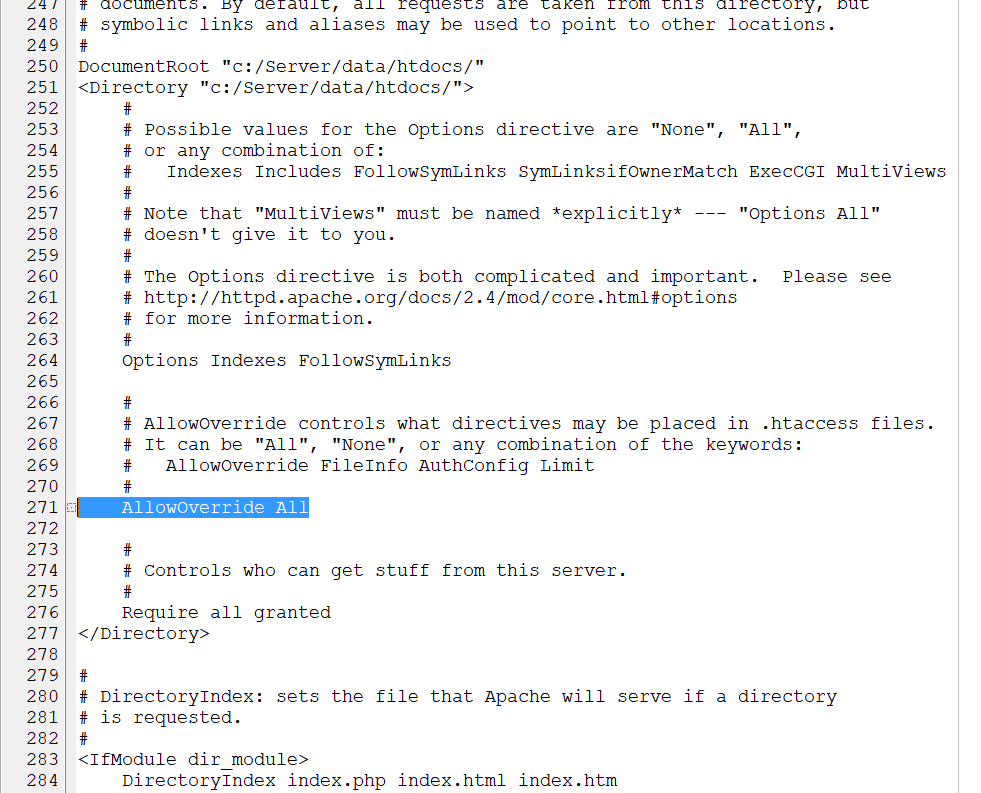
Чтобы настройки вступили в силу, перезапустите веб-сервер.
Файл .htaccess находится не в папках Apache, а в папках сайтов, то есть к нему может быть сделан запрос и, при неправильной настройке, посторонние его могут скачать. Файл .htaccess содержать информацию интересную для атакующего (хакеров), поэтому нужно запретить посторонним доступ к этому файлу. Запрет доступа к файлам .htaccess и .htpasswd для посетителей сайтов делается следующим образом:
По умолчанию эта настройка уже имеется в главном конфигурационном файле Apache.
Как поменять имя файла .htaccess
Для дополнительной безопасности, либо для своего удобства, можно поменять имя файла .htaccess. Точнее говоря, точно также как и файлы .htaccess будут обрабатываться файлы с указанным произвольным именем.
Для этого используется директива AccessFileName, которая позволяет поменять имя файла .htaccess на другое. Допустим мы решили назвать файл именем .config, тогда в конфигурационный файл сервера нужно добавить следующее:
Какие настройки можно использовать в .htaccess
В файле .htaccess можно использовать многие (но не все) настройки, которые можно прописать в конфигурационном файле сервера. Чтобы точно узнать про конкретную директиву, можно её использовать в .htaccess или нет, нужно открыть документацию https://httpd.apache.org/docs/current/, найти интересующую директиву и посмотрите, указан ли в строке Context файл .htaccess. Если указан, значит можно использовать.
Очень часто файл .htaccess используется для настройки доступа или для установки правил RewriteRule (mod_rewrite), но в этом файле можно использовать и другие настройки.
Точно также, из-за того, что обычно для контроля доступа и RewriteRule используется .htaccess, многие упускают из виду, что эти же самые настройки можно прописать и в главном конфигурационном файле Apache. То есть при желании вы можете отказаться от использования .htaccess и перенести настройки mod_rewrite в конфигурацию веб-сервера.
Синтаксис .htaccess
У .htaccess нет особенных настроек синтаксиса — директивы записываются также, как и в конфигурационных файлах.
Если вы получили ошибку 5xx — Ошибка сервера, это означает, что имеется ошибка в синтаксисе .htaccess.
Как применяются директивы файла .htaccess
Конфигурационные директивы, найденные в файле .htaccess, применяются к директории, в которой найден файл .htaccess, и всем её поддиректориям. Тем не менее, важно также помнить, что могут быть файлы .htaccess в родительских директориях. Директивы применяются в том порядке, как они были найдены. Поэтому файл .htaccess конкретной директории может перезаписывать директивы, найденные в файлах .htaccess выше в дереве директорий. А те, в свою очередь, могли уже перезаписать директивы, найденные ещё выше или директивы самого главного конфигурационного файла сервера.
В директории /www/htdocs/example1 у нас есть файл .htaccess содержащий следующее:
Примечание: у вас должна быть включена опция "AllowOverride Options" чтобы разрешить использовать директиву "Options" в .htaccess файлах. Либо значение AllowOverride должно быть установлено на All.
В директории /www/htdocs/example1/example2 у нас есть файл .htaccess содержащий:
Поскольку второй файл .htaccess в директории /www/htdocs/example1/example2, то выполнение CGI не разрешено, поскольку эффект будет иметь опция Options Includes, которая полностью перезаписывает значения настроек Options, имеющих место ранее.
Объединение файла .htaccess с главными конфигурационными файлами
Файлы .htaccess могут перезаписать раздел <Directory> для соответствующей директории, но будут перезаписаны другими типами конфигурационных разделов из главных конфигурационных файлов. Это можно использовать для закрепления конкретных конфигурацией, даже при наличии либеральных настроек AllowOverride. Например, для предотвращения выполнения скрипта, но позволив все другие настройки в .htaccess, вы можете использовать:
Этот пример подразумевает, что вашим DocumentRoot является /www/htdocs.
Когда (не) использовать файлы .htaccess
Если коротко, вы должны использовать файлы .htaccess только когда у вас нет доступа к главному конфигурационному файлу сервера. Как уже было отмечено, распространены неправильные мнения, что аутентификацию пользователей и директивы mod_rewrite можно указывать только в .htaccess. Это просто неверно. Конфигурации аутентификации можно поместить в главную конфигурацию сервера и, на самом деле, это более предпочтительный вариант. Аналогично директивы mod_rewrite в главной конфигурации сервера работают лучше по многим причинам.
Файлы .htaccess должны использоваться в случае, когда веб-мастеру нужно применить изменённые настройки к серверу на уровне директорий, но у него нет root доступа к системе сервера. Это обычный случай для виртуальных хостингов, то есть на практике очень часто файлы .htaccess являются единственной возможной альтернативой.
Тем не менее, в целом использование файлов .htaccess следует избегать когда это возможно. Любые настройки, которые вы собираетесь разместить в файле .htaccess, могут быть эффективно сделаны в разделе <Directory> в главном конфигурационном файле сервера.
Имеется две главные причины избежания использования файлов .htaccess.
Первая причина — это производительность. Когда AllowOverride установлена на разрешение использования файлов .htaccess, httpd будет искать файлы .htaccess в каждой папке. То есть разрешение файлов .htaccess ударяет по производительности не зависимо от того, используете вы на самом деле .htaccess или нет, создали вы хоть один файл .htaccess или нет. Файл .htaccess загружается каждый раз, когда запрашивается документ.
Более того, помните, что httpd должен искать файлы .htaccess в директориях более высокого уровня чтобы собрать полный набор директив, которые должны быть применены. Таким образом, если файл запрошен из директории /www/htdocs/example, то httpd должен искать эти файлы в:
- /.htaccess
- /www/.htaccess
- /www/htdocs/.htaccess
- /www/htdocs/example/.htaccess
И таким образом при каждом запросе к файлу из текущей директории, в системе выполняется 4 дополнительных доступа к файлу, даже если ни оидн из них не существует. (Примечание: описан случай, когда файл .htaccess был включён для /, что встречается не очень часто).
В случае директив RewriteRule в контексте .htaccess эти регулярные выражения должны перекомпилироваться с каждым запросом к этой директории, в то время как в контексте главной конфигурации сервера, они компилируются только один раз и кэшируются. Дополнительно, сами правила более сложные, поскольку они должны работать с ограничениями, приносимыми контекстом директории и mod_rewrite.
Второе о чём нужно помнить, это безопасность. Вы разрешаете пользователям модифицировать конфигурацию сервера, что может привести к изменениям за пределами вашего контроля.
Помещение файла .htaccess с управляющими директивами в папку /www/htdocs/example эквивалентно помещению этих же директив в раздел Directory: <Directory "/www/htdocs/example"> в главных настройках конфигурации сервера:
Содержимое файла .htaccess в /www/htdocs/example
Секция из файла httpd.conf:
При этом размещение этой конфигурации в файле настроек сервера приведёт в результате к меньшему влиянию на производительность, поскольку конфигурация загружается только один раз при запуске httpd, а не при каждом запросе к файлу.
Можно полностью отключить использование файлов .htaccess установив директиву AllowOverride на none:
Решение проблем
Когда вы помещаете директивы в файл .htaccess и не получаете желаемого эффекта, может быть несколько причин из-за которых что-то пошло не так.
Чаще всего проблема в том, что AllowOverride не установлена так, чтобы учитывались ваши конфигурационные директивы. Убедитесь, что у вас не включено
Следующий тест позволит однозначно ответить на вопрос, включена ли поддержка файлов .htaccess или нет: поместите какой-нибудь мусор в файл .htaccess и перезагрузите страницу. Если не появиться ошибка сервера, то практически наверняка включено AllowOverride None.
С другой стороны, если вы получаете ошибки сервера при попытке доступа к документам, проверьте лог error (ошибок) httpd. Весьма вероятно, что он скажет вам, что эта используемая в файле .htaccess директива не разрешена:
Это говорит о том, что либо вы используете директиву, которая не разрешена в файлах .htaccess, или что у вас просто нет установленной AllowOverride на уровень, достаточном для используемой директивы.
Ещё один вариант, в журнале может быть сказано, что у вас ошибка синтаксиса в самой используемой директиве:
В этом случае сообщение об ошибке должно быть конкретным о том, что у вас не так с файлом .htaccess и используемыми директивами.
Использование файла .htaccess
Файл .htaccess позволяет задать конфигурации веб-сайта без необходимости изменять конфигурационные файлы сервера. Точка в начале имени файла означает, что файл является скрытым.
Файл .htaccess можно создать в текстовом редакторе, а затем подгрузить его на сайт с помощью ftp-клиента
Примечание: имя файла .htaccess не содержит дополнительных слов или расширений.
Кроме того, расположение такого файла также имеет огромное значение. Конфигурации в этом файле будет влиять на все содержимое каталога, в котором находится сам файл, а также на все его подкаталоги.
Особенности файлов .htaccess
Хотя страница .htaccess невероятно полезна и может заметно улучшить сайт, при ее использовании нужно помнить о двух моментах.
Во-первых, это скорость. Страница .htaccess может немного снизить скорость сервера; в большинстве случаев это почти незаметно. Это происходит из-за расположения страницы: как уже говорилось, файл .htaccess влияет на страницы и подкаталоги в своем каталоге. Каждый раз, когда страница загружается, сервер проверяет ее каталог, а также каждый каталог уровнем выше, пока не достигает наивысшего каталога или файла .htaccess. Этот процесс будет происходить до тех пор, пока параметр AllowOverride позволяет использовать файлы .htaccess, вне зависимости от того, существуют ли вообще такие файлы в системе.
Во-вторых, это безопасность. Получить доступ к файлу .htaccess гораздо проще, чем к обычному конфигурационному файлу Apache, а внесенные в него изменения будут активированы сразу, без необходимости перезагружать сервер. Потому пользователи, имеющие права на внесение изменений в файл .htaccess, могут серьезно влиять на сам сервер. Любая директива, внесенная в .htaccess, имеет тот же эффект, что и директива, внесенная непосредственно в конфигурации Apache.
В общем и целом, Apache не рекомендует использовать .htaccess, если пользователь имеет доступ к конфигурационным файлам Apache.
Как включить файл .htaccess?
Имея доступ к настройкам сервера, можно отредактировать конфигурации Apache, чтобы позволить файлам .htaccess подменять стандартные конфиги сайта. Откройте конфигурационный файл хоста apache2 по умолчанию.
Примечание: на данном этапе понадобятся sudo-привилегии.
sudo nano /etc/apache2/sites-available/default
Открыв файл, найдите следующий раздел и измените значение директивы AllowOverride с None на All. Раздел должен выглядеть так:
<Directory /var/www/>
Options Indexes FollowSymLinks MultiViews
AllowOverride All
Order allow,deny
allow from all
</Directory>
Сохраните и закройте файл, а затем перезапустите apache.
sudo service apache2 restart
Создание файла .htaccess
Как уже говорилось, файл .htaccess можно создать при помощи текстового редактора, а затем загрузить его на сайт через ftp-клиент (при этом имя файла .htaccess не должно содержать дополнительных слов или расширений).
Или же можно создать такой файл с помощью терминала; для этого используйте следующую команду, заменив example.com именем сайта.
sudo nano /var/www/example.com/.htaccess
Общие случаи использования .htaccess
1. Mod_Rewrite
Один из самых полезных аспектов файла. Пространство файла .htaccess можно использовать для того, чтобы определить/изменить способ отображения URL-адресов и веб-страниц на сайте. Подробную информацию о том, как это делается, можно найти по этой ссылке.
2. Аутентификация
Хотя файл .htaccess не требует столько прав, как стандартный конфигурационный файл apache2.conf, его все же можно использовать, чтобы внести в защиту сайта эффективные изменения. Дело в том, что .htaccess позволяет запрашивать пароль для доступа к определенным разделам веб-страницы. Пароли .htaccess хранятся в файле по имени .htpasswd.
Примечание: по соображениям безопасности хранить такой файл в каталоге сайта категорически не рекомендуется.
В файле .htpasswd нужно указать имена и пароли всех пользователей, которым разрешен доступ к защищенной части сайта.
Имена и пароли вносятся в файл в виде пары имя_пользователя:зашифрованный_пароль. Например, если пользователь с именем best_user имеет пароль awesome, то такая пара может иметь вид «best_user:VtweQU73iyETM».
Примечание: каждая пара вносится в отдельную строку. Файл .htpasswd может содержать столько строк, сколько необходимо.
Создав .htpasswd, внесите в .htaccess следующий код, чтобы активировать функцию аутентификации:
AuthUserFile /usr/local/username/safedirectory/.htpasswd
AuthGroupFile /dev/null
AuthName Please Enter Password
AuthType Basic
Require valid-user
Строка AuthUserFile определяет путь к файлу .htpasswd.
Строка AuthGroupFile указывает расположение .htgroup. Поскольку на данный момент такого файла не существует, оставьте значение /dev/null.
Строка AuthName содержит текст, который будет отображаться в приглашении ввести пароль (можно ввести абсолютно любой текст).
AuthType относится к типу аутентификации, который будет использоваться для проверки паролей. Пароли проверяются через HTTP, ключевое слово Basic изменять нельзя.
Строка Require valid-user говорит файлу .htaccess, что в защищенные паролем разделы сайта должны иметь доступ несколько человек. В случае если нужно указать определенного человека, имеющего доступ к закрытым частям сайта, вместо строки Require valid-user используется строка Require user имя_пользователя.
3. Пользовательские страницы ошибок
Файл .htaccess позволяет создавать для сайта пользовательские страницы ошибок. Некоторые из наиболее распространенных ошибок являются:
- 400 Bad Request (Неверный запрос)
- 401 Authorization Required (Требуется авторизация)
- 403 Forbidden Page (Запрещенная страница)
- 404 File not Found (Файл не найден)
- 500 Internal Error (Внутренняя ошибка)
Пользовательские страницы ошибок создаются с целью сделать страницы сайта более доброжелательными и предоставить посетителю сайта более подробную информацию, чем страницы ошибок сервера по умолчанию.
Для примера можно создать страницу 404 (попробуйте создать любую страницу ошибки на ваш выбор).
Создав и загрузив страницу ошибки, укажите ее местонахождение в файле .htaccess:
ErrorDocument 404 /new404.html
Запомните: Apache ищет страницу 404 в root-каталоге сайта. Поместив новую страницу ошибки 404 в каком-либо подкаталоге, не забудьте добавить этот подкаталог в строку, например:
ErrorDocument 404 /error_pages/new404.html
4. MIME-типы
В случаях, когда на сайте размещены некоторые файлы приложений, для отображения которых сервер не был настроен, в файл .htaccess можно добавить MIME-типы для сервера Apache с помощью следующего кода:
AddType audio/mp4a-latm .m4a
Не забудьте заменить приложение и расширение файла MIME-типом, который нужно поддерживать.
5. SSI
Технология Server Side Includes отлично экономит время на веб-сайте. Одним из наиболее распространенных способов использования SSI является обновление большого количества страниц, содержащих определенный блок данных, без необходимости обновлять каждую страницу по отдельности (например, чтобы изменить цитату в нижней части страницы).
Чтобы включить SSI, введите в .htaccess следующий код:
AddType text/html .shtml
AddHandler server-parsed .shtml
Эти строки сообщают .htaccess о том, что файлы .shtml действительны, а вторая строка говорит серверу проверять все файлы, которые заканчиваются на .shtml, на наличие SSI-команд.
Тем не менее, если на сервере находится большое количество страниц .html, поменять расширение которых на .shtml займет много времени, можно использовать другую тактику их проверки на SSI-команды. Для этого используется параметр XBitHack.
Добавление этой строки в файл .htaccess заставляет Apache проверять все html-файлы с соответствующими правами для Server Side Includes.
Чтобы позволить странице использовать XBitHack, введите:
chmod +x имя_страницы.html
Итоги
Данное руководство охватывает лишь основные функции страницы .htaccess, которые, тем не менее, делают работу с сайтом гораздо более гибкой. При возникновении каких-либо вопросов или дополнений о возможностях файла .htaccess, пожалуйста, оставьте свой комментарий.